







Every piece of software ages, but not all of it ages safely. When its design can no longer keep pace with operational efficiency goals, a solution earns the term “legacy.” Security requirements shift just as quickly, leaving outdated software exposed. Finding engineers willing to maintain it gets harder every year. This article lays out legacy modernization best practices that apply across apps and industries, organized around four questions:
- Which modernization approach (rehost, replatform, refactor, or rebuild) fits each part of your stack
- How to sequence the work so it doesn’t disrupt daily operations
- Where AI tools can speed up analysis, documentation, testing, and migration
- What organizational changes need to happen before the first line of code changes
For more than a decade, AnyforSoft has helped companies move aging tools onto current, maintainable software without disrupting daily operations.
For one legacy modernization case study, CYBEX’s e-commerce storefront had years of inherited JavaScript weighing down its performance. Rebuilding the solution from scratch eliminated that overhead and produced green scores across every PageSpeed Insights metric.
A similar project rebuilt Game Informer’s platform from an inherited codebase. After relaunch, the gaming outlet reached 26,000 subscribers. Across e-commerce, media, education, and biotech, these two cases represent just a slice of AnyforSoft’s 150+ project portfolio.
Delaying a modernization decision adds risk with each passing quarter.
Why Following Best Practices Matters
Often, that risk materializes well before a project finishes. CISQ attributes $2.41 trillion in annual losses to poor software quality across US organizations. Accumulated technical debt makes up $1.52 trillion of that total. Failed migration attempts contribute directly to that figure. Without a structured plan, engineers discover compatibility issues mid-project, after budgets and timelines are already fixed.
Budget overruns compound this problem. When a migration runs over schedule, teams often pull engineers from other projects to help. This delays unrelated work and adds pressure across the organization. Sustained pressure of that kind drives burnout, and burnout drives turnover, removing engineers who understand the code best. Once that institutional knowledge is gone, technical debt reduction becomes far harder. The people who could fix problems quickly are no longer there.
Here’s the rewrite with sharper rhythm contrasts.
Understanding Modernization Approaches: The 7 Rs
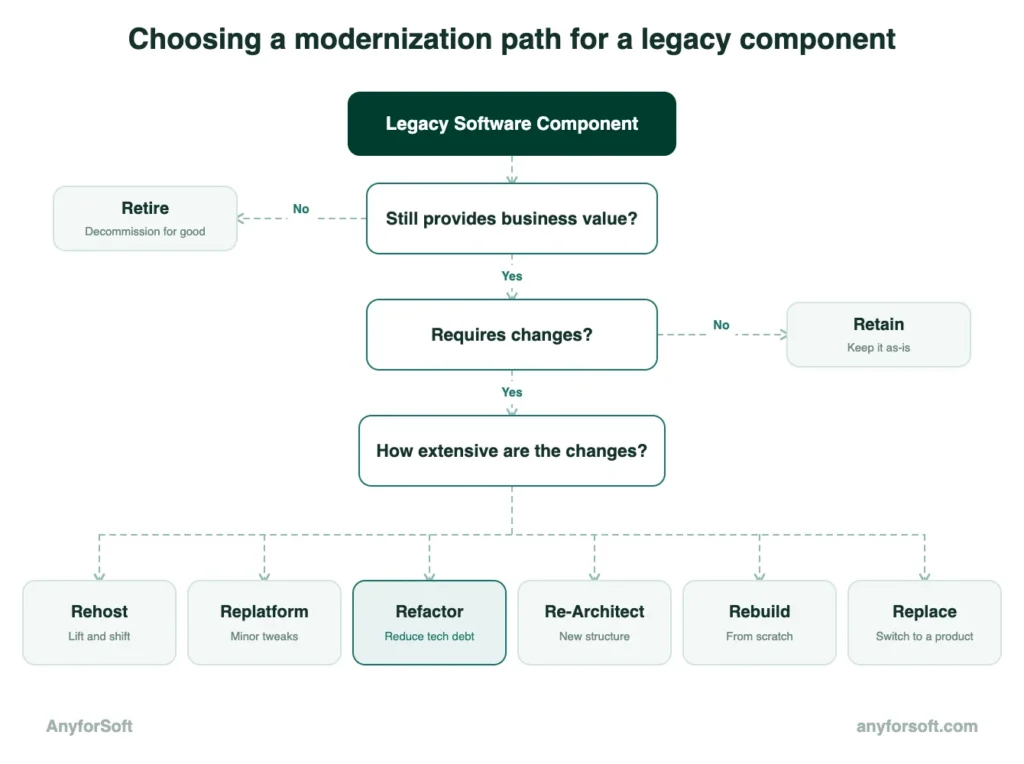
Every software component carries a different combination of age and dependency on other systems. The 7 Rs framework gives engineers a shared vocabulary for matching each piece to the right approach. Sequenced this way, the choices form a phased modernization roadmap.
Rehost (Lift and Shift)
Without altering its underlying logic or feature set, rehost simply moves the software onto new infrastructure. AWS Migration Hub tracks each workload’s progress.
When a data center contract is set to expire within months, this becomes the fastest realistic option.
Replatform
Beyond a simple rehost, this approach introduces targeted changes designed to take advantage of the new environment. Throughout this process, core logic stays intact.
For database engines, swapping in a managed cloud version is a common example.
Azure Migrate typically tracks this kind of cloud-native migration, assessing dependencies before the move begins.
Refactor and Re-Architect
This approach restructures existing code without changing what the solution does. As a result, readability improves and duplication drops. Through microservices decomposition, re-architecting goes further, replacing the underlying structure and splitting a monolith into independently deployable services.
Since the changes happen inside the logic, both demand more engineering time than rehost or replatform.
Rebuild and Replace
With a rebuild, the team creates a new version of the product. It does the same job as before, but runs on current technology.
Replace takes a different route. The company stops using its own application and switches to a ready-made product that already does the job.
Once a piece of software has built up enough patches and workarounds, starting fresh often costs less than continuing to fix it.
Retire and Retain
Without anything depending on them, some parts of the architecture can simply be shut down. This removes their cost and risk, and nothing else breaks as a result.
Other components are better left untouched, especially when they still work well and rarely change. Updating one of these would often cost more than it returns, so leaving it alone frees up the budget for higher-priority work.
Legacy Modernization Best Practices: Step-by-Step
That higher-priority work is where a structured plan pays off. Built around DevOps practices that keep every change reversible, the following seven steps turn the 7 Rs into a practical sequence. Each step also produces a deliverable developers can review before moving forward.
Step 1. Audit Your Legacy Environment First
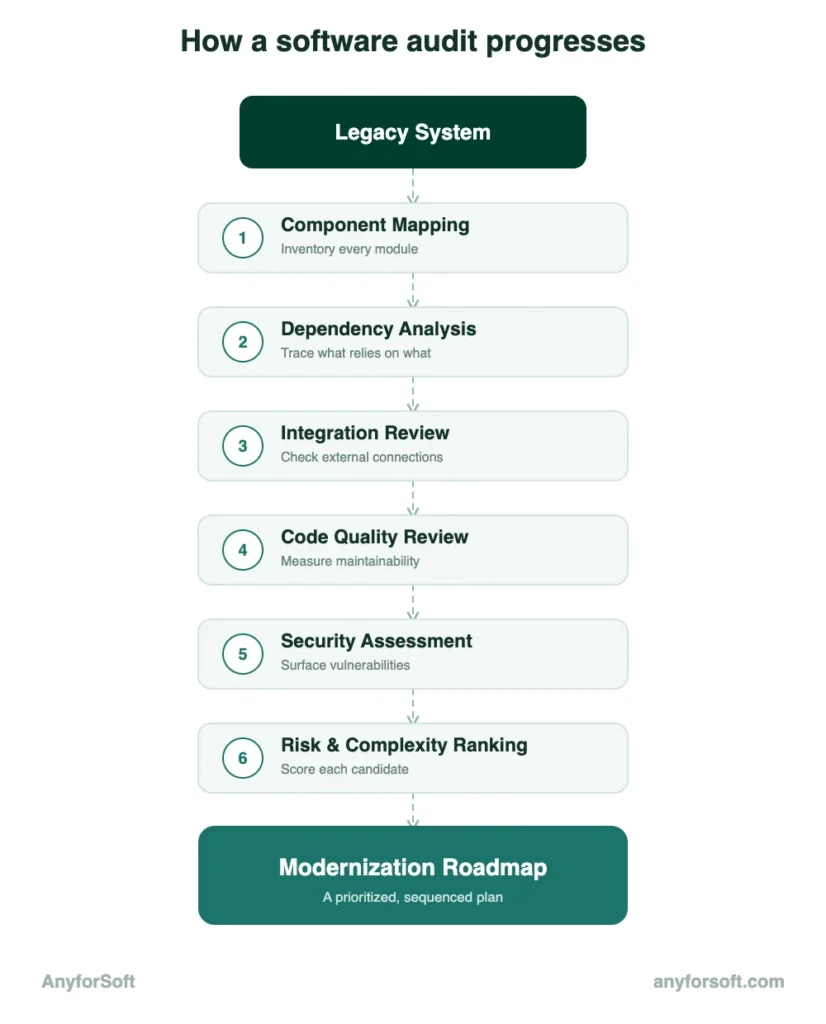
Before any changes happen, the team maps every part of the app, its dependencies, and integration points. SonarQube, a static analysis tool, then surfaces quality issues, security gaps, and outdated dependencies that aren’t visible from the outside.
That work produces one deliverable: a report ranking every element by risk and complexity. Among the best practices for legacy system modernization, this sequencing matters most: understanding the application comes before choosing a strategy.
Step 2. Define Success Metrics Before You Begin
With the audit complete, the team defines what success actually looks like before writing a line of new code. Vague goals like “improve performance” don’t hold up once a project review starts asking for evidence.
Useful metrics tend to fall into a few categories:
- Response time under typical load
- Error rate after each deployment
- User adoption during the first month
Before applying these metrics across the whole platform, developers validate them through a small proof of concept. If those numbers hold up, the same metrics guide every later step.
Step 3. Choose the Right Strategy for Each Component
With an audit and clear metrics ready, each part of the platform maps to one of the seven approaches. A simple API might fit a rehost.
A core order-processing module may call for full re-architecture, since other systems depend heavily on it. For elements in between, containerization offers a practical middle ground. It packages a solution together with its dependencies, making it portable across different environments.
Step 4. Modernize Incrementally, Not All at Once
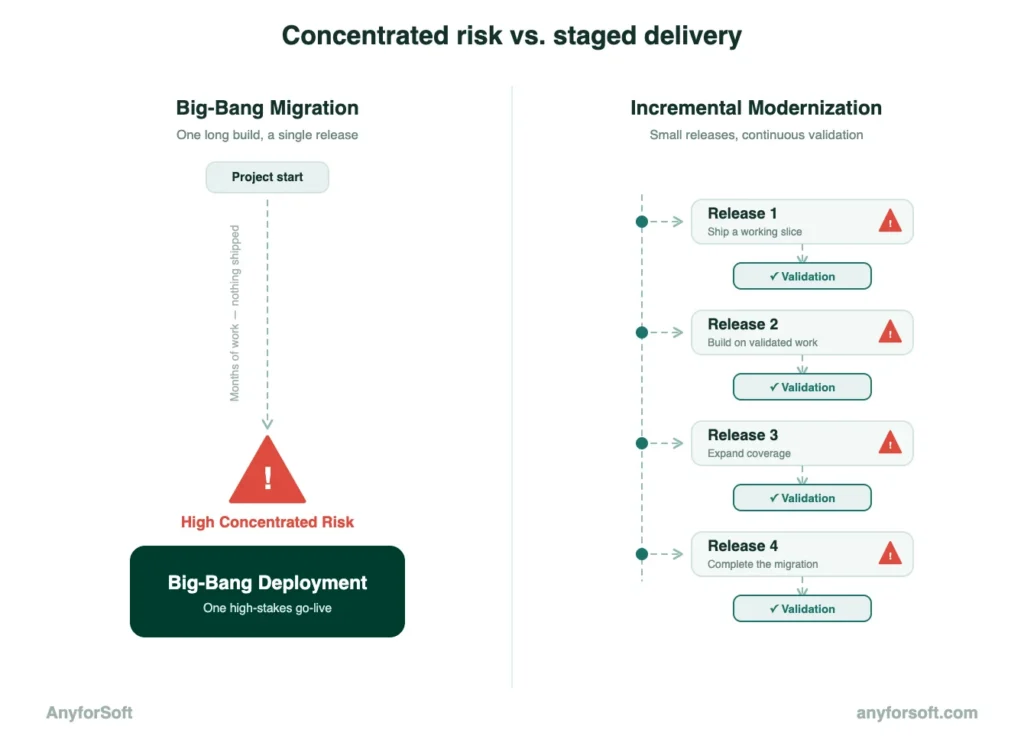
With strategies chosen, the team faces one more question: how much to change at once. Migrating everything at once concentrates risk into a single release, where one failure can affect the whole platform.
Spreading that risk across smaller releases, each validated before the next begins, is what incremental migration delivers. Smaller releases also surface problems early, while there’s still time to adjust course.
Under tight deadlines, this sequencing reflects one of the best practices for legacy system modernization. A problem in one release doesn’t stall the rest.
Step 5. Decouple Data from the Application Layer
Many older apps mix business logic and data access code inside the same files. Without a clear separation, updating the tool risks disturbing how data is stored.
Migrate4j, a data migration tool that moves data in planned stages over time, helps manage this separation. Each stage runs alongside the existing system before fully replacing it.
At this stage, a parallel run strategy becomes useful. The new data layer runs alongside the old one, processing the same inputs at the same time.
If both versions produce matching results across enough cycles, the team can switch over with confidence. Any mismatch surfaces before customers ever see it.
Step 6. Automate Testing at Every Stage
Every change made so far, from rehosting to data separation, needs validation before it reaches production.The CI/CD pipeline automates code testing and deployment at every stage. Built into this system, automated testing catches regressions as soon as a change is committed.
This kind of continuous validation is one of the best practices for legacy code modernization. It pays off at every stage of the rollout.
Step 7. Design for Scalability from Day One
Every step up to this point focuses on the tool as it exists today. Designing for system scalability from the start prevents the next round of constraints from forming before the project even finishes.
An API-first architecture supports this kind of growth in a few concrete ways:
- Versioned endpoints. New features ship without breaking integrations that depend on the current version.
- Independent service boundaries. One component can be updated or replaced without redeploying the rest of the system.
- Predictable contracts. Internal and external teams build against the API without waiting on backend changes.
None of these choices add much overhead during initial development. They prevent costly rework once the solution needs to scale.
AI-Powered Legacy Modernization
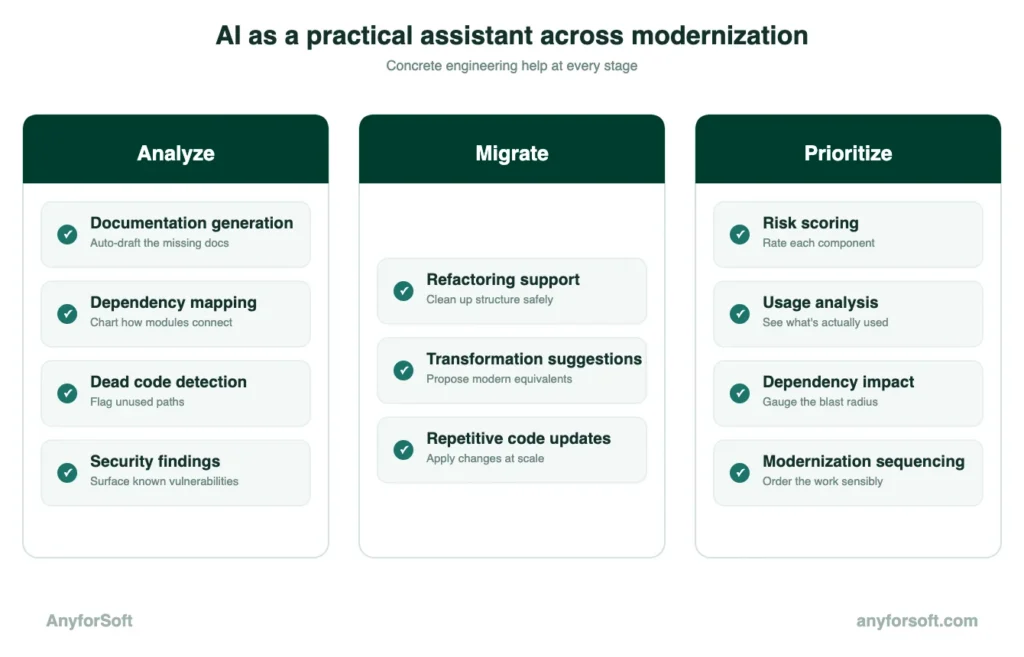
Across applications, artificial intelligence supports that review in three connected ways. It scans and documents existing source files, applies consistent changes during migration, and flags high-risk parts. These three capabilities make AI legacy code migration easier to plan and validate.
AI for Legacy Code Analysis and Documentation
For products with years of undocumented changes, closing documentation gaps is often where AI tools start. GitHub Copilot, an AI coding assistant, reads through a project’s source files and generates plain-language summaries of what each function does.
At the architecture level, an intelligent code scanner maps relationships across the entire system. Flagged in the same report are unused sections that consume resources without contributing anything. Circular dependencies show up too, where two components rely on each other in ways that make either one hard to change. Security issues nobody has tracked in years appear in the same report.
When the engineer who built it leaves, that scan becomes the closest replacement for what they knew.
Automated Code Migration with AI
Once a scan identifies what needs to change, applying those changes consistently across hundreds of files becomes the next challenge. In a single pass, the same transformation pattern applies everywhere it occurs. Known as LLM-based refactoring, this approach uses a large language model to propose changes at scale.
IBM Watson Code Assistant, an AI-powered transformation tool, proposes these transformations. Before any change gets applied, a developer reviews each one. The repetitive part of the work disappears, but human review stays in the loop.
AI-Driven Risk Assessment and Prioritization
With analysis and migration support in place, the remaining decision is which parts of the platform to address first. Based on known vulnerabilities and exposure to external traffic, Veracode, a software security tool, assigns each one a risk score.
Combining this score with usage data and dependency maps, GenAI for legacy modernization turns a flat inventory into a ranked list. To the top go the highest-risk items. Stable, rarely used ones can wait.
Where the budget covers only part of the work, this ranking provides a defensible starting point.
Team and Process Best Practices
Technical decisions do not fail on their own. The people and processes surrounding them determine whether legacy system modernization best practices translate into results on the ground. The organizational side of legacy application modernization determines how well those technical choices hold under real-world pressure. Before the first commit and throughout delivery, three practices shape that outcome.
Align Stakeholders Before the First Commit
Software overhaul touches every part of the organization. Finance approves the budget. Operations depend on the infrastructure being changed. Business leadership carries the timeline pressure.
When any of these groups learns about the change after decisions are already made, they push back at the worst possible moment. Getting buy-in early means different things for different stakeholders.
For finance, it means showing the cost of inaction alongside the investment figure. For operations, it means a clear picture of what changes and when. For business leadership, it means connecting the technical work to revenue, risk, or competitive position.
The earlier these conversations happen, the fewer surprises derail the project mid-delivery. Understanding the plan makes a stakeholder less likely to block a release at the last minute. Encountering it unprepared makes them far more likely to do exactly that.
Establish Governance and Architecture Decision Records
Without a governance structure, undocumented decisions accumulate fast.
A choice made in week two gets forgotten by week eight. A new hire reverses it without knowing why it was made.
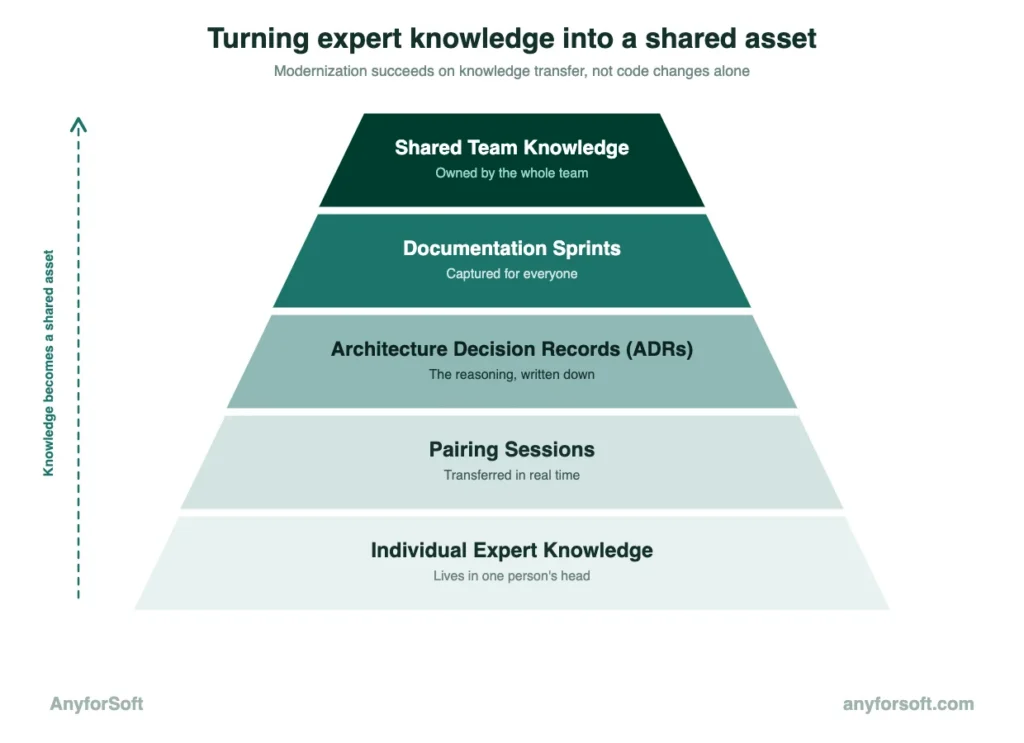
Architecture Decision Records, or ADRs, solve this directly. Each ADR captures one decision: what was chosen and what alternatives were considered. A separate line explains why the chosen path made more sense given the constraints at the time.
Over a long project, that record becomes the primary source of decision context. When a new engineer joins, the ADRs explain the reasoning behind the platform’s current shape. When a decision needs revisiting, the original context remains available without needing to reconstruct it from memory.
Without it, technical choices escalate to leadership unnecessarily. Delivery slows, and senior engineers get pulled away from the work itself.
Plan for Knowledge Transfer Early
In many solutions, key knowledge lives in one or two people. They know which parts of the tool are fragile, which integrations break under edge cases, and which configuration choices were made to work around long-forgotten constraints.
When those people leave, that knowledge disappears with them. Waiting until the end of the project is where most organizations lose it permanently.
Starting knowledge transfer early changes the dynamic. Pairing sessions bring a senior engineer and a newer hire through the codebase together. That process captures institutional knowledge, the kind that exists in practice but has never been written down, before it becomes urgent.
Documentation sprints help too. Short, focused periods dedicated to writing up knowledge, scheduled at regular intervals, produce reference material everyone on the team can use.
The goal is a solution the organization understands collectively, independent of any single person’s memory.
Legacy Modernization in Practice: Anyforsoft Case Studies
A structured plan produces outcomes that unplanned work typically misses.
A structured plan produces outcomes that unplanned work usually can’t match. The two projects below show what that looks like under real commercial pressure. One carried years of inherited code, the other rebuilt from near-zero.
CYBEX: E-Commerce Platform Rebuilt from the Ground Up
CYBEX Ukraine, the regional representative of a global child safety and mobility brand, ran its e-commerce storefront on a solution that had accumulated years of inherited JavaScript. This accumulation slowed the site and blocked new feature development. Routine maintenance became unpredictable. Security exposure made the status quo unsustainable. Remaining on the aging infrastructure was not a viable option.
AnyforSoft rebuilt the platform from scratch, eliminating the inherited JavaScript entirely. This legacy system modernization case study shows what a clean rebuild produces. The starting point was a full audit rather than a set of assumptions.
The measured outcomes included:
- Green scores across all PageSpeed Insights metrics. Page speed improved to the highest performance band after the inherited JavaScript was removed.
- Real-time inventory accuracy. ERP integration automated product pricing and stock updates across all sales channels.
- Streamlined checkout. Nova Post API integration lets customers select their nearest post office directly at checkout, reducing friction at the point of conversion.
AnyforSoft continues to provide maintenance and support for the company.
Game Informer: Platform Revival from an Inherited Codebase
Game Informer, once the fifth most popular video game publication in the United States, shut down in 2024 after building a 28-year reputation. By 2025, a new owner had acquired the brand and needed to rebuild both the solution and the subscriber base from zero. AnyforSoft inherited a partial infrastructure with no user data and built a complete commercial product from it.
The pressure was immediate. Revenue had to start flowing before the subscriber base was rebuilt. Every technical decision was driven by that constraint.
The results at relaunch were measurable across four dimensions:
- 26,000 subscribers acquired from zero. The platform reached this milestone within months of relaunch, with a target of 30,000 set for year end.
- 5 million visitors handled at restart. When traffic spiked at relaunch, the infrastructure held without incident.
- Revenue streams activated from day one. Stripe integration enabled digital subscriptions and print sales immediately. MailerLite handled subscriber communications from the start.
- 24-hour feature delivery. When a promotional discount feature was needed for an end-of-summer campaign, AnyforSoft delivered a complete promo code system within one day.
The collaboration continues, with AnyforSoft actively developing new features focused on user experience and revenue growth.
Why Engineering Teams Choose AnyforSoft for Legacy Modernization
Engineering decisions made throughout a solution restructure determine whether it stays on budget, avoids downtime, and produces the outcomes defined at the start. AnyforSoft’s process is built around these three factors.
Full-Cycle Legacy System Audit
Every engagement starts with a full audit, mapping how the app is structured and where its dependencies lie, before any changes happen. AnyforSoft’s engineers run this audit on the existing codebase, not a simplified version of it.
That distinction matters. A vendor unfamiliar with how aging systems behave under load tends to underestimate what an audit will surface. Years of undocumented changes and workarounds only become visible once someone maps software directly.
The output is a risk-ranked report covering every component. It becomes the foundation for every decision that follows, from choosing a strategy to sequencing the rollout.
AI-First Engineering Approach
AnyforSoft embeds AI into the workflow at three points:
- Analysis
- Migration
- Risk prioritization
Each stage uses AI to handle volume, while engineers focus on the decisions that need judgment.
During analysis, AI-powered scanners read through a codebase and generate documentation for components that were never documented in the first place. The same scanners map dependencies and flag dead piecec, surfacing in hours what would take a person weeks to find manually.
During migration, AI proposes the same transformation across hundreds of files in a single pass. A developer reviews each proposed change before it’s applied, so the repetitive part of the work disappears without removing human oversight.
For prioritization, AI combines risk scores, usage data, and dependency maps into a ranked list. This turns a flat inventory of components into a sequence the team can act on immediately.
Proven Modernization Track Record
CYBEX’s rebuild eliminated years of inherited JavaScript and produced green scores across every PageSpeed Insights metric. Game Informer’s relaunch reached 26,000 subscribers from zero and handled 5 million visitors without incident.
Other projects produced comparable gains.
KharkivToday’s migration from WordPress to Drupal with Thunder CMS produced an 11% increase in site traffic and a 14% rise in average session duration.
Pine Dev Studio’s AWS infrastructure restructuring delivered a 24% increase in server speed and eliminated 123 performance errors.
Across these cases, the pattern holds: structured work produces measurable changes in speed, traffic, stability, or revenue.
Risk-Controlled, Incremental Delivery
AnyforSoft delivers solutions in smaller, validated releases. Each one is tested and confirmed before the next begins, with validation checkpoints built into the delivery schedule itself.
Smaller, validated releases give clients visibility into progress and the chance to adjust direction before problems compound. This visibility is itself part of the deliverable.
Flexible Engagement Models
Not every engagement needs full staffing from day one. Some clients need specific expertise added to what they already have, on a schedule that flexes with project phases.
AnyforSoft has provided team extension services for agencies like Dropsolid and Achieve Internet, embedding developers directly into client workflows and tools. For Dropsolid, this meant working within their proprietary distribution system from day one.
The engagement model adapts to what the task actually needs:
- Full delivery. AnyforSoft owns the audit, planning, and execution from end to end.
- Team extension. Dedicated developers integrate into an existing client workflow and toolset.
- Ongoing support. Maintenance and feature development continue after the initial stage is complete.
Each model fits a different step of a platform’s lifecycle, from initial rebuild through long-term operation.
FAQs
What are legacy modernization best practices?
Seven areas define legacy modernization best practices. They cover auditing the codebase, setting measurable success criteria, and choosing the right strategy for each component. Rollout sequencing, data separation, automated testing, and scalability design fill out the remaining four. Skipping ahead usually means revisiting decisions later.
How do you assess a legacy system before modernization?
Mapping comes first: every component, dependency, and integration point gets recorded across the product. Static analysis tools, which examine code without running it, then surface quality issues, security gaps, and outdated dependencies. What results is a risk-ranked report. That report becomes the basis for choosing a strategy.
What is the 7 Rs framework?
Seven approaches make up the framework: rehost, replatform, refactor, re-architect, rebuild, replace, retire, and retain. Urgency, budget, and how much code needs to change determine which approach fits which component. Most teams use more than one, applying different Rs to different parts of the same system.
How long does a project typically take?
A few months, for a focused replatform. A year or more, for a full re-architecture across a large platform. Timelines depend on solution size and how much can run incrementally versus all at once. Incremental rollouts extend the calendar, but they reduce the risk of any single release causing major disruption.
What are the biggest risks in legacy modernization?
Data loss during migration tops the list, since it can affect customers and is often irreversible. Integration failures come next, disrupting connections to other systems the tool depends on. Security gaps introduced during the rebuild create new vulnerabilities even as old ones get fixed. Performance regressions sit at the bottom. They slow software temporarily, but they’re usually the easiest to detect and resolve.
How do you maintain business continuity during modernization?
Switching everything over at once, with no way to confirm the new system works before the old one goes offline, is where most disruption comes from. A parallel run avoids that. The new system runs alongside the old one, processing the same inputs and producing results that get compared. Once the outputs match consistently, the switch happens, with the old system still available as a fallback.
What is the strangler fig pattern?
Gradual replacement, one piece at a time, is the core idea behind the strangler fig pattern. New functionality gets built around the old system, intercepting and replacing specific functions while the rest continues running unchanged. Fewer requests reach the original system over time. Eventually, nothing depends on it, and it can be retired.
Refactoring vs. rebuilding: how do you choose?
When the core logic still meets business needs but the implementation has become hard to maintain, refactoring fits.
When the software core logic still meets business needs but the implementation has become hard to maintain, refactoring fits. Rebuilding suits the opposite case. The solution no longer matches how the business operates, or maintaining the current version costs more than starting over.
Risk favors refactoring too, since the application keeps running throughout, while rebuilding requires a cutover at some point.
How can AI accelerate legacy modernization?
Scanning code for documentation, applying repetitive changes across many files, and ranking components by risk: these are the time-consuming parts of legacy modernization that AI shortens. What used to consume engineers’ time now happens automatically. Engineers focus instead on the decisions that need judgment. Months of manual analysis can shrink to days.
What AI tools are used in legacy modernization?
GitHub Copilot generates documentation for undocumented code. Mapping dependencies and flagging dead pieces or security issues falls to intelligent canners. Proposing consistent transformations across many files, for a developer to review, is what IBM Watson Code Assistant does. Veracode assigns risk scores based on vulnerabilities and exposure, feeding directly into prioritization.