



Corporate L&D, Associations and CE
Strategy & Discovery
Innovative education platforms
Build & Launch
Online training solutions
Grow & Support
Creative content & apps
Platform & Technology Expertise

Canvas Development Company for Customization & Integration

What if your program needs auto-enrollment when the students register in the SIS, or your simulation-based training assigns scenarios based on each participant’s role? Default Canvas configurations fail here. Benefit from custom Canvas LMS development that adjusts the platform to your learners’ needs.

Talk through your project
Partners, not just projects

Behind each logo is a long-standing relationship, built on trust as much as delivery.

Why Organizations Choose Canvas LMS

Canvas holds 50% of North American higher education enrollment. It’s more than any other LMS. Here is why.

Open Architecture and Flexibility

The LMS is built on open standards, giving development teams direct access to the platform’s core. Custom workflows and institution-specific logic can be built directly on the platform.

Scalable Learning Infrastructure

As enrollment grows or training programs expand, Canvas handles the increased load without requiring a platform migration. Organizations add users, courses, and content without rebuilding what already works.

Strong API Ecosystem

The platform exposes a comprehensive REST API, connecting it to SIS, CRM, HR systems, and third-party EdTech tools without custom middleware. Data moves between systems without manual exports or duplicate entry.

Enterprise-Grade Security

Canvas meets FERPA, GDPR, and SOC 2 compliance requirements out of the box.Role-based access controls, encrypted data transfer, audit logs, and data minimization protocols protect learner information across the full platform.

Canvas LMS Development Services

Custom Development

Standard configuration doesn’t accommodate every learning model. Custom development extends the platform with features and workflows built specifically for your enrollment structure and reporting requirements. Typical builds inside Canvas include enrollment rules, approval workflows, and role-specific dashboards. Early Canvas LMS consulting shows which needs the platform covers natively. Where your model outgrows Canvas entirely, custom LMS development builds a platform from scratch.

Integration Services

Disconnected systems force manual data handling between the platform and your SIS or HR systems. API-based integration connects these systems directly, so learner data and enrollment records move automatically without duplicate entry. The same LMS integration services link Canvas to your CRM and video platform.

Plugin Development

When native Canvas tools don’t cover a specific instructional need, custom plugins add that functionality without modifying the core platform. New features deploy cleanly and remain stable across the LMS version updates. A Canvas LMS LTI integration opens a tool inside the course, with the learner already signed in. Tools needing deeper course data run on the Canvas LMS API.

Theme and UI Customization

The default platform’s interface follows Instructure’s visual standards. Theme and UI customization realigns the LMS’s navigation structure and visual identity with your brand and accessibility requirements. Learners interact with an environment that reflects your institution.

LMS Migration

Moving from another LMS to Canvas requires more than transferring files. Course content, learner records, assessment data, and integrations are mapped and migrated without disrupting active programs or losing historical data. Courses moving from Blackboard or Moodle to Canvas keep their SCORM packages and gradebook history. Our LMS migration services run a test migration before cutover.

Support and Maintenance

As your learning model evolves, Canvas configuration needs to keep pace. Ongoing support covers performance monitoring, feature updates, bug resolution, and platform upgrades so your team focuses on instruction.Teams that want to hire a Canvas developer long term get a dedicated team that already knows their setup. Upgrades and fixes then run under one support and maintenance package.

Bring us the workflow Canvas can’t handle
On a short call, we’ll scope what it needs and how to build it without modifying the Canvas core.

Why AnyforSoft for Building a Canvas LMS infrastructure

EdTech Development Expertise

The team’s EdTech work spans custom LMS development and enterprise platform builds for universities. For a US-based tutoring company, the team built adaptive assessment logic and a custom grading engine on Open edX — the scope that Canvas projects require.

Proven Work with Institutional Clients

Delaware County Community College and Imperial College Business School have each worked with AnyforSoft on platforms with distinct security and compliance requirements. They involve restricted-access portals and multi-site architecture serving thousands of users.

Long-Term Partnerships

AnyforSoft engagements with educational institutions extend beyond initial delivery. The collaboration with Wittenborg University began with a full website rebuild and expanded into a second project: a native AI assistant supporting applicants and students across the university’s digital platform.

Complex Requirements Are the Starting Point

When Open edX proved insufficient for the tutoring company’s assessment requirements, the team built custom layers in Python and React. Scoping the right solution is the first conversation on every project.

Canvas LMS Integrations

CRMs

Learner inquiries, enrollment status, and engagement data stay disconnected when Canvas and your CRM operate separately. A direct integration gives admissions and student success teams a complete view of each learner without switching between platforms.

HRMs and HRISs

Manual enrollment updates create lag between HR records and active training assignments. Linking Canvas to your HRM or HRIS automates course assignments based on role and onboarding status.

Video Conferencing Tools

Live session access requires learners to leave Canvas and manage separate logins. Direct integration embeds session access inside Canvas so attendance and recording data feed back into learner records automatically.

Content Authoring Tools

Content built in external authoring tools loses context when imported manually into Canvas. A live connection between authoring environments and Canvas ensures updates reflect immediately without re-uploading files.

Learning Analytics Platforms

Canvas native reporting covers completions and scores. A dedicated analytics platform adds behavioral data and predictive indicators that support earlier intervention and more accurate program evaluation.

Third-Party EdTech Tools

Specialized tools for assessment and credentialing often sit outside Canvas by default. LTI-based integration embeds these tools directly into the learner experience without requiring separate accounts or manual data transfer.

Student Information Systems (SIS)

Registrar staff fix records by hand when rosters and grades update in two places. With SIS and LMS integration, enrollment changes reach Canvas and final grades flow back each term.

Single Sign-On (SSO)

Separate logins for Canvas and each connected tool mean password resets and abandoned first sessions. Single sign-on for LMS access through SAML, OAuth, or OpenID Connect gives learners one campus or company login.

Our technology stack

Back-end Front-end UI/UX tools
Node.JS Node.JS Python Python
React React TypeScript TypeScript
Figma Figma Sketch Sketch

Canvas LMS AI Integrations

The platform supports both native Canvas LMS AI features and custom AI layers. Which capabilities make sense depends on how your institution runs its learning operations. Each Canvas LMS AI integration builds on our AI solutions for education, scoped to your data and access rules.

IgniteAI Agent

Instructure’s IgniteAI Agent is a native AI tool capable of automating complex educator and administrator workflows, from generating rubrics to managing course consistency. Configuration determines which workflows are active and how the agent operates within your institutional policies.

LLM-Enabled Assignments

LLM-enabled assignments allow educators to design learning activities that embed conversational AI directly into the course, with learning evidence captured automatically in the Gradebook. Custom development extends this further – scoping AI interactions to specific instructional goals and assessment criteria.

Smart Search

Smart Search uses AI to understand query context, helping students and instructors find course content without relying on exact keywords. Custom implementation connects the Smart Search API to institution-specific content repositories beyond the default environment.

Custom AI Assistants

Institutions with specific advising, onboarding, or support needs benefit from AI assistants built directly into the platform. These tools handle recurring learner queries, surface relevant resources, and route complex cases to staff — reducing response time without adding headcount.

Predictive Analytics Integration

Native reporting tracks completions and scores. A custom AI layer adds behavioral pattern analysis, identifying learners at risk of disengagement before dropout occurs and giving student success teams earlier, actionable signals.

Institution-Hosted LLM Integration

The platform supports institution-driven deployments where organizations integrate their own LLMs directly into their environment. Custom development scopes the integration to your data environment, access controls, and compliance requirements.

Use Cases

University SIS Integration

Student enrollment data and course access sit in separate systems. Connecting the SIS to Canvas syncs registration changes and course assignments automatically, keeping records accurate without manual updates.

Multi-Campus Learning Infrastructure

Separate LMS’s instances across campuses create inconsistent data and duplicated administration. A unified environment with role-based access gives each campus operational independence while central teams retain full visibility.

Enterprise Employee Onboarding

When HR systems and the LMS don’t communicate, L&D teams assign courses manually for each new hire. Connecting the platform to your HRIS automates course assignment by role and department from day one.

Compliance Training and Reporting

Mandatory programs require evidence that employees completed training within defined timeframes. Custom reporting surfaces completion records and expiry tracking in formats that satisfy internal and regulatory requirements.

Certification Program Assessment Logic

Linear learning system’s assessment tools don’t support competency-based advancement. Custom logic enforces prerequisites, tracks attempt history, and issues credentials when defined thresholds are met.

Professional Recertification Tracking

Continuing education credits accumulate across cycles, but the platform doesn’t track them natively. Custom configuration automates enrollment into recertification courses and sends reminders when renewal deadlines approach.

See how this would work for your program
Describe how your institution or training program runs today, and we’ll outline the Canvas setup it needs.

How we helped our partners

These projects faced what a serious Canvas build faces: custom assessment logic, system integrations, and AI inside a live platform.

A US tutoring company moved SAT prep from paper to a digital testing platform

Since the 1980s, the company had prepared students for the SAT on paper, grading every test by hand. The digital SAT called for practice in a matching environment linked to its Salesforce CRM. AnyforSoft built it on an Open edX core, adding Python and React layers where Open edX fell short.

  • Three test modes, from real exam timing to fully self-paced practice
  • Adaptive difficulty that adjusts each module to the learner’s answers
  • Custom grading scheme modeled on the SAT, with PDF score reports
  • Proctor cabinet for supervising in-person testing sessions
  • Two-way data sync with Salesforce
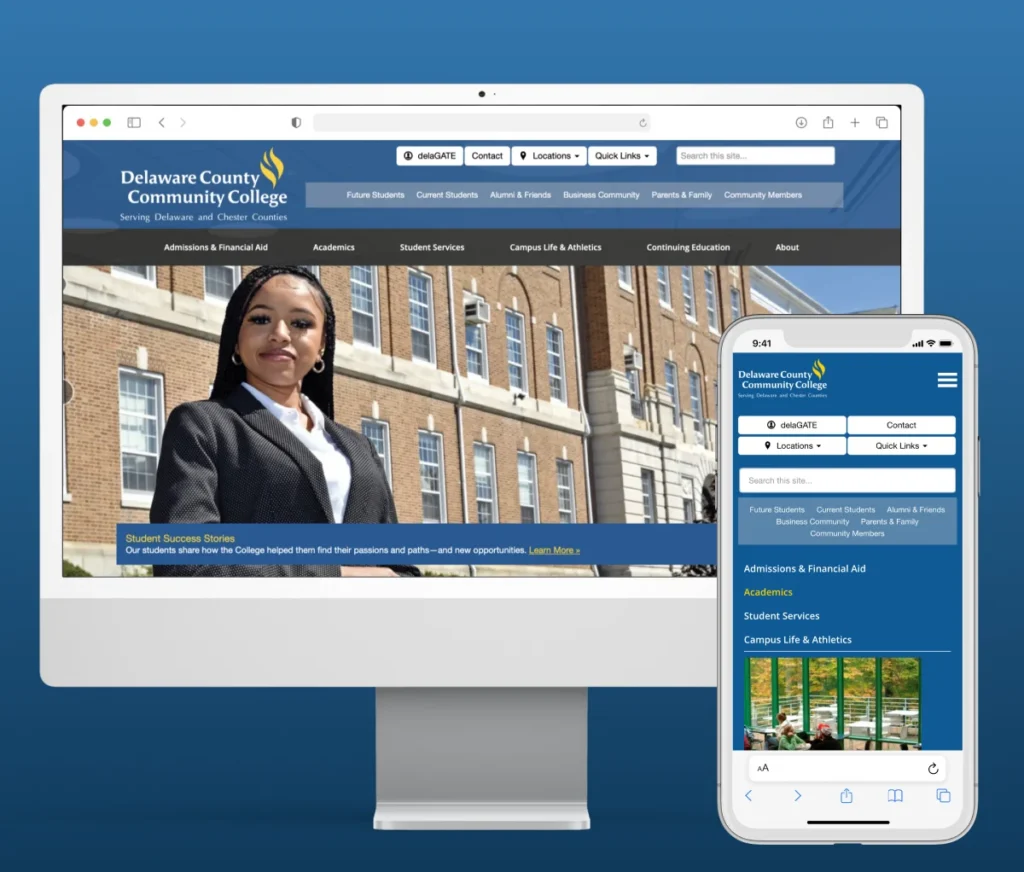
Delaware County Community College website by AnyforSoft

Delaware County Community College secured three websites and gained a dedicated support team

The Pennsylvania college ran three sites, including two restricted to students, and needed user information kept safe. Its own requests had to fit around protection and maintenance. AnyforSoft audited the sites, closed the vulnerabilities it found, and assigned engineers for ongoing upkeep.

  • Authentication mechanisms protecting users’ personal data
  • Encryption protocols guarding records and access to internal services
  • Regular security audits on all three sites
  • Sites prepared for migration to Drupal 10
  • Updates, patches, and version control handled by a dedicated team

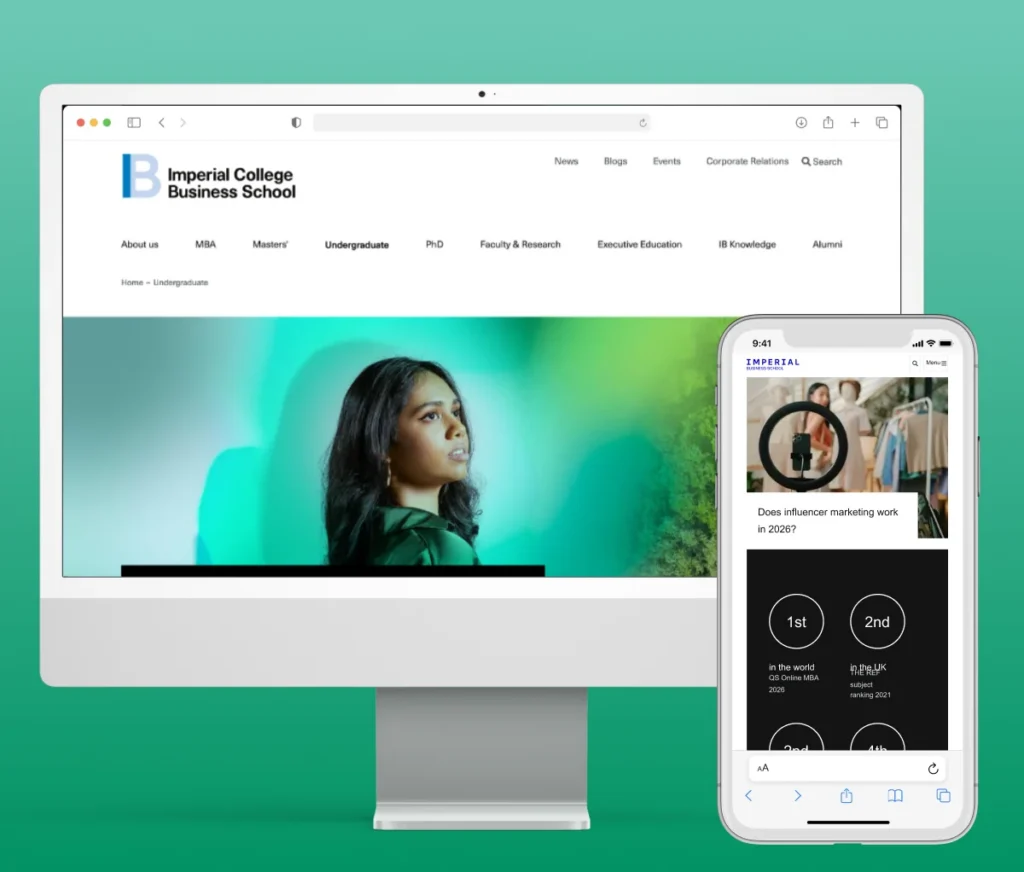
Imperial College Business School stabilized its website and cleared a path to Drupal 10

Layout glitches and back-end bugs had piled up on the school’s website, the main hub for its students and partners. Fixes could not disrupt workflows or change what returning users knew. AnyforSoft stabilized the platform, made design-aligned improvements, and prepared the upgrade.

  • Layout inconsistencies and back-end bugs resolved
  • Drop-down navigation restructured with well-supported Drupal modules
  • Custom components for faster content creation
  • Regular Drupal 9 updates and security patches
  • Drupal 10 migration scoped and the architecture prepared for it
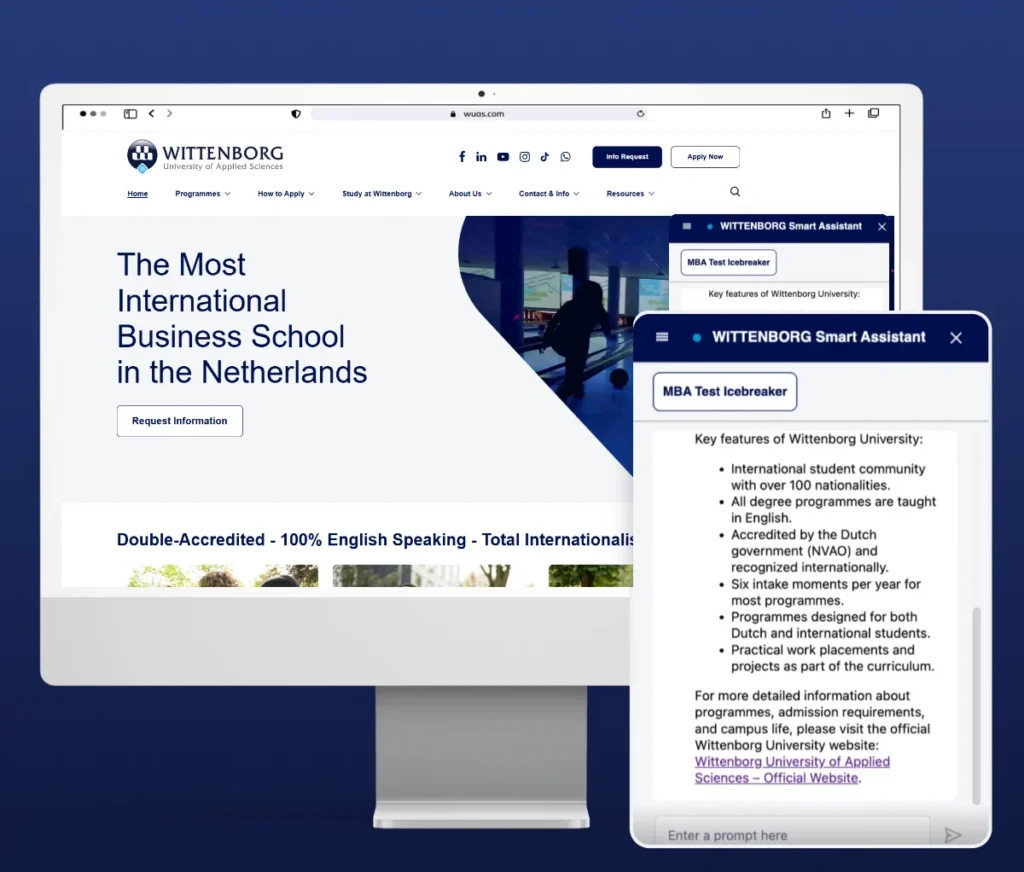
AI chatbot for Wittenborg University website

Wittenborg University added an AI assistant that answers from official university content

A single unanswered question can delay an application or stop it entirely. After rebuilding the university’s website, AnyforSoft added an AI assistant for applicants and current students. It runs as a native module of the same Drupal 10 platform, so it fits into existing editorial workflows.

  • Answers grounded in a knowledge base built from university pages and documents
  • Automatic updates when website content changes
  • Responses kept to university topics, with links to pages, forms, or contacts
  • Administrator control over tone of voice and accessible content
  • Built with the OpenAI API, a Milvus vector database, and RAG

Our Canvas LMS Development Process

1

Discovery and Requirements Analysis

Your learning model, existing systems, and technical constraints are mapped before any development begins.
2

LMS Architecture Design

The platform architecture is shaped around your enrollment structure, integration requirements, and long-term scalability needs.
3

Customization and Development

Features, workflows, and plugins are built to your specifications without modifying the core platform.
4

Integration and Testing

Each integration is validated against real data flows to confirm accuracy, stability, and performance under load.
5

Deployment and Optimization

The solution goes live aligned with your release cycles, with post-launch monitoring to catch and resolve issues early.

FAQs

Can Canvas LMS be customized for corporate training?

Yes. Canvas LMS customization adapts the platform to role-based enrollment and compliance reporting formats that standard configuration doesn’t support. Department-specific learning tracks and manager dashboards can be added without rebuilding the existing setup.

How much does Canvas LMS development cost?

Canvas LMS cost is not publicly listed and is negotiated per institution based on enrollment and contract length. Estimates suggest licensing typically falls between $5 and $15 per student annually. Custom development is a separate investment on top of that:

  • Platform-based MVP (a working Canvas environment with core customizations validated before full build): 25,000–80,000
  • Moderate customization (plugin builds, single-system integrations, theme development): 80,000–150,000
  • Advanced customization (multi-tenant architecture, AI features, proprietary integrations, complex certification logic): 150,000–300,000

Building a platform from scratch is a separate route, scoped and priced as custom LMS development.

Get in touch to receive a scoped estimate based on your requirements and user scale.

Can Canvas LMS integrate with CRM or HR systems?

Yes. API integration connects the platform to Salesforce, HubSpot, Workday, and SAP. Learner data and completion status sync automatically, removing manual exports from L&D workflows. Student information systems and SSO connect the same way through LMS integration.

Is Canvas LMS suitable for enterprise learning platforms?

Yes. Large-scale deployments across multiple departments or campuses are supported through open architecture and a comprehensive REST API. Where standard configuration falls short, custom development adds enterprise-specific workflows and reporting structures.

How secure is Canvas LMS for business use?

Out of the box, the platform meets FERPA, GDPR, SOC 2, and WCAG 2.1 requirements. Implementation layers on role-based access controls and audit logs aligned with your organization’s internal security policies.

How is Canvas LMS used in healthcare education?

Compliance training and continuing education credit tracking sit at the core of most healthcare learning programs. Once defined competency thresholds are met, assessment logic issues credentials automatically. For program coordinators, automated reminders replace manual renewal follow-up.

How long does Canvas LMS development take?

Weeks to months, depending on scope. Typical ranges:

  • Configuration and integrations: 4–8 weeks
  • Moderate customization (plugins, single-system integrations, themes): 2–4 months
  • Advanced customization (multi-tenant architecture, AI features, certification logic): 4–6 months

The number of connected systems moves the estimate most. Discovery comes first, so the timeline rests on your actual requirements.

Can you migrate our courses from Blackboard or Moodle to Canvas?

We can move courses from both platforms. Course content, SCORM packages, grades, and user data are mapped to the Canvas structure and moved together. Every LMS migration starts with a test on sample courses, so your team checks the result before cutover. Active terms keep running on the old LMS until the switch.

How can AI improve learning experiences in Canvas LMS?

Native features cover smart content search and LLM-enabled assignments. A custom AI layer adds predictive analytics and institution-hosted LLM integration scoped to your data environment and compliance requirements.

How do you protect student data when connecting AI tools to Canvas?

By sending each AI tool only the data its task needs. Integrations are designed around FERPA and GDPR requirements, and role-based access decides who sees AI outputs. In a ChatGPT integration with Canvas LMS, names and student IDs can be stripped before prompts leave your environment. Institutions with stricter rules can run an institution-hosted LLM, so student data stays on their own infrastructure.


Tell us what Canvas can't do for you out of the box.

We'll scope the solution together.

Let’s talk
Vlad
Vlad

Business Development Manager

Anatolii
Anatolii

CEO

AnyforSoft

Privacy Overview

This website uses cookies so that we can provide you with the best user experience possible. Cookie information is stored in your browser and performs functions such as recognising you when you return to our website and helping our team to understand which sections of the website you find most interesting and useful.