






Four people. Six hundred new hires a quarter, plus every overdue safety course to chase by Friday. Plenty of L&D teams run on numbers like those in 2026, with more programs on the calendar and the same headcount they had two years ago, and the deadlines are usually what slips first.
Most of that load is repeat work, the kind LMS automation was made for. Whatever your team does on a schedule goes into a rule.
The new hire’s courses are already waiting on her first morning, and Friday’s reminders go out whether anyone remembers them or not.
Below are the seven workflows worth automating first, how a rule actually fires, where AI helps (and where it adds more checking than it saves) and a six-step rollout.
Set up carefully, it’ll reduce admin workload enough to keep scalable training realistic for a small team.
What Is LMS Automation?
Learning platform automation is a set of rules inside your LMS that does the routine clicking for you. Each rule waits for an event, like a new hire appearing or a certificate nearing its expiry date. Then it enrolls, notifies, issues credentials or reports on its own. You set it up once. It keeps running until somebody changes it.
Say HR adds Priya on Monday afternoon. By the time she opens her laptop on Tuesday, an automated learning management system has put her onboarding, set her due dates and emailed her manager, and nobody in L&D had to lift a finger. Those are triggers and actions at work.
AI-driven setups are a different animal. They judge from data (which employees look likely to stall, which course fits whom), and sometimes they’re wrong even when your settings are right. Decide which kind each workflow needs before you build, since that choice sets how much checking you’ll be doing later.
What Does Manual LMS Admin Work Cost Your Team in 2026?
Manual admin costs you in four places:
- hours on enrollments, exports and spreadsheet checks
- compliance deadlines missed because nobody saw the expiry date
- reminders that go out a week late, or not at all
- an onboarding experience that depends on who’s on shift that week
Budgets are shrinking while the work isn’t, and the per-employee numbers show by how much. Across 340 organizations, ATD’s 2026 State of the Industry report found direct learning spending fell to $846 per employee in 2025, down from $1,254 a year earlier. ATD credits part of that drop to efficiency gains, with automated administrative processes among them.
For L&D leads and EdTech product owners, training automation shows up in numbers they already track. Fewer missed deadlines show up in completion rates, courses released on day one shorten time-to-competency, and timestamped records help audit readiness.
LMS Workflow Automation: Which Processes Should You Automate?
Good candidates have a clear starting event and a response that doesn’t change from case to case.
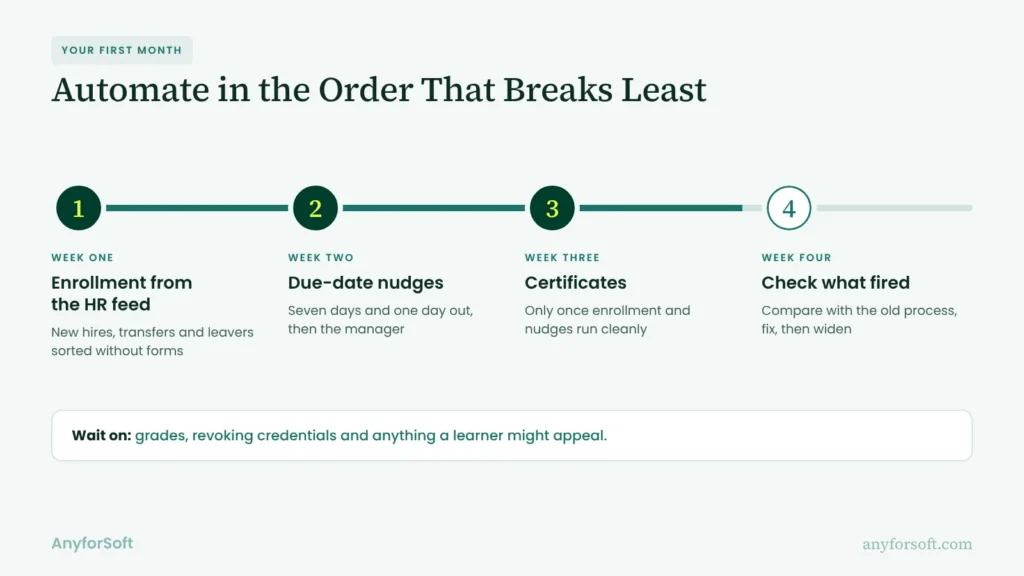
If you can write the task as “when X happens, do Y”, a rule can run it. Seven workflows pass that test on most LMSs. If you’re starting from zero, a sensible first month is enrollment from the HR feed in week one, due-date nudges in week two, and certificates once both run cleanly.
Enrollment and User Provisioning
The week a regional office hires 30 people at once is the week hand-entered accounts fall apart. With the HR system connected, each new account shows up as an LMS profile within hours, with department and job title picking the courses.
Once you’ve written course assignment rules, automated enrollment handles starters, transfers and leavers. The form-filling stops.
When somebody moves from Support to Sales, their automated training assignments follow them there.
Onboarding and Role-Based Learning Paths
Week one, policies. Week two, product courses. Around day 30, a check-in with the manager. Because employee training automation releases each stage only when the last one’s done, learning paths move at each person’s pace, and managers stop chasing. A new engineer and a new account manager can share the first week and split after it, since the role decides which branch opens next. Someone who finishes early gets the next stage the same day without waiting for the next batch.
Compliance Training and Certification Renewals
Take the forklift certificate that expired in March while its owner was on leave. Nobody noticed until the safety audit in May, and by then it wasn’t a training problem anymore.
A rule watching expiry dates catches that months earlier. Sixty days out, the refresher lands in the employee’s queue. If the date passes anyway, the record shows as lapsed and the manager gets an alert.
Annual security awareness training and continuing education credits can run on the same expiry dates, and the audit record fills in as people finish.
Notifications, Reminders, and Escalations
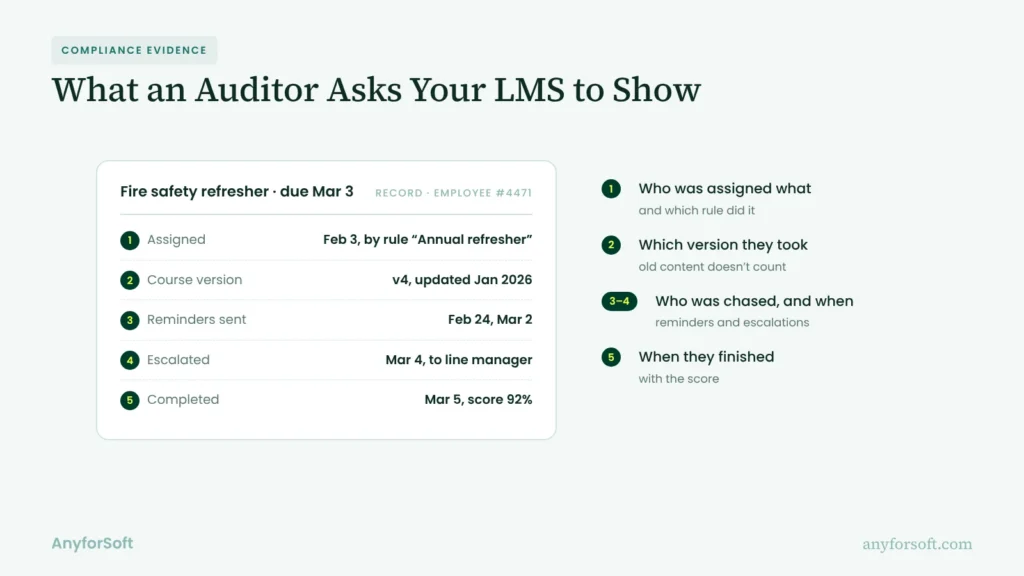
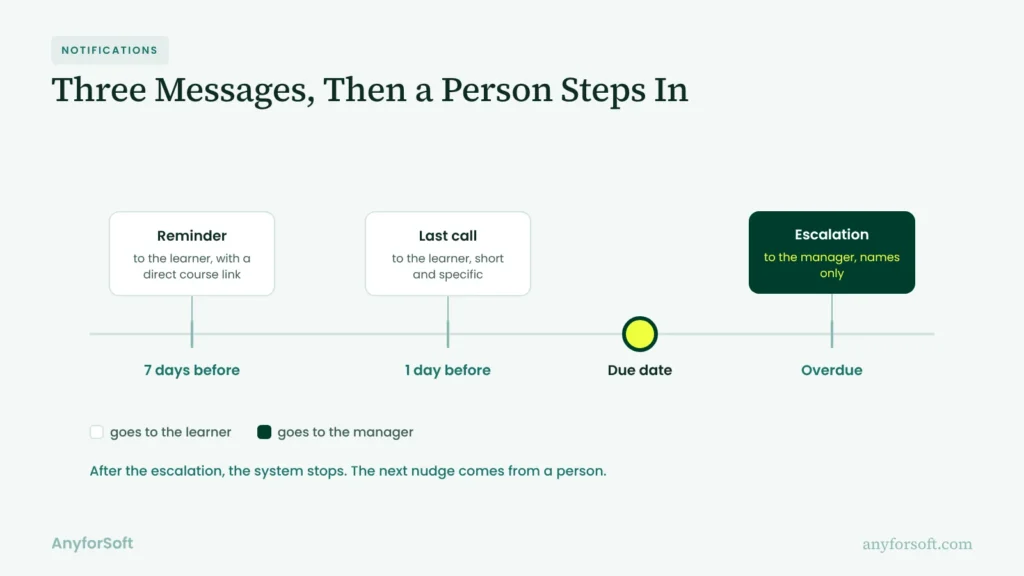
For most courses, a simple schedule is enough: due-date reminders seven days and one day out, then escalation to managers once a course goes overdue.
More messages rarely help, because people start filtering them. Wording matters as much as timing. A reminder that names the course, says how long it takes and links straight to it is far easier to act on than a generic “you have pending training”.
Assessments, Grading, and Certificates
The quiz closes, the score lands in the gradebook, and the credential goes out before the learners close the tab. For single-answer and matching questions, automated grading is purely rule-based.
A pass mark releases the certificate with the person’s name and date already on it.
In exam prep courses, a target score can open the next practice test the moment someone hits it.
Reporting and Analytics
Filtering completions for six regional managers can take someone an hour every week. With automated reporting, the system builds the file and sends it on schedule.
Each manager sees only their own people. Two settings decide whether a report gets read or deleted: who receives it, and what counts as a problem.
A manager with 40 people doesn’t need 40 rows, because the five who are overdue are the ones to act on. What else goes into it depends on your LMS reporting features.
Course Sales and Extended Enterprise Training
When you sell courses to partners or customers, one purchase can set up the account, enroll the buyer and send the receipt.
Linked to your sales tools, an LMS with marketing automation follows up when a buyer stalls, and customer onboarding courses open the day a contract’s signed.
| Workflow | Trigger | Automated action | Result |
| Enrollment | new HR record | create account, assign courses | no manual sign-ups |
| Onboarding | start date | release stages by role | faster ramp-up |
| Compliance | expiry date nears | assign the refresher | fewer lapsed records |
| Reminders | due date approaches | nudge learner, alert manager | fewer overdue courses |
| Assessments | quiz submitted | grade, issue credential | instant results |
| Reporting | weekly schedule | build and email the report | no Friday exports |
| Course sales | purchase | create account, enroll | access within minutes |
The rows your team touches every week are the ones that return hours fastest.
How Does an Automated LMS Work? Triggers, Rules, and Integrations
Every rule starts with an event, like a status change. A condition narrows it to the right people, and the action is whatever the system does next. The data for all three comes from the systems around your LMS.
Triggers, Conditions, and Actions
Back to Priya. Her record arriving from HR is the trigger. Two conditions apply: she’s in Sales, and she starts within 14 days (later starters wait until the window opens). The actions put her on the sales onboarding track, set a 30-day due date and email her manager.
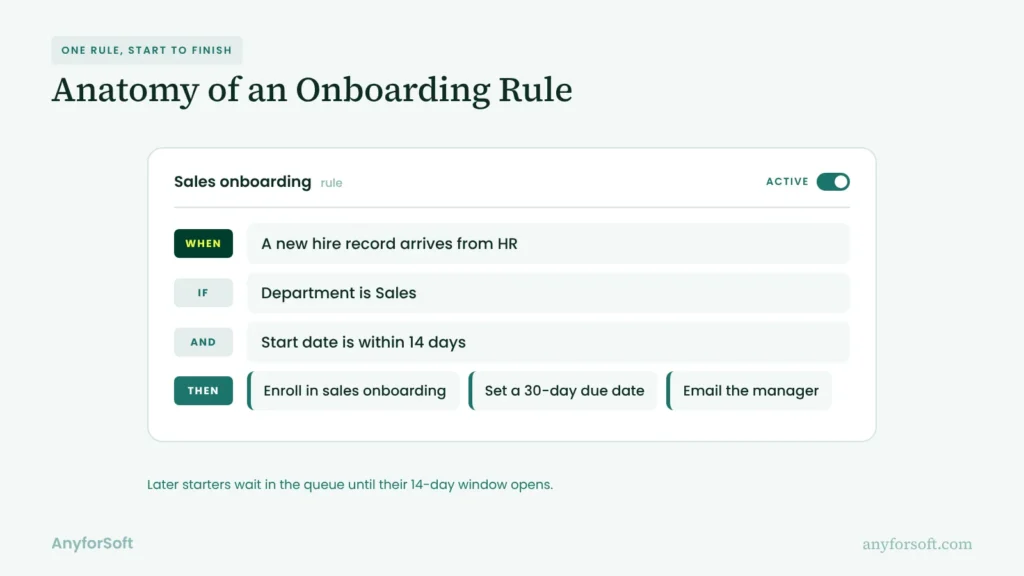
Some checks run on a schedule, hourly or overnight. Others fire the second something changes, through webhooks (a message one system sends another when an event happens).
Overnight is fine for nudges. A start date tomorrow can’t wait that long.
Integrations That Feed the Rules (HRIS, CRM, SIS, SSO, Video)
Rules can’t be more current than the data behind them. A department renamed in one system but not the other is enough to break assignments, and no error message tells you. So each connection needs one owner.
The usual feeds:
- hires, transfers and managers from an HRIS (Workday, BambooHR)
- customers, partners and purchases from a CRM (Salesforce, HubSpot)
- enrollments and class rosters from a student information system
- one login per person through SSO / SAML, closed when HR closes the account
- live session links and attendance from Zoom and Microsoft Teams
With LTI, an external tool opens inside a course. Completions and scores travel back through SCORM / xAPI (how courses report progress). With a handful of systems connected, teams bring in LMS integration services to map who owns each data flow before a single rule goes live.
Native Features vs Middleware vs Custom Development
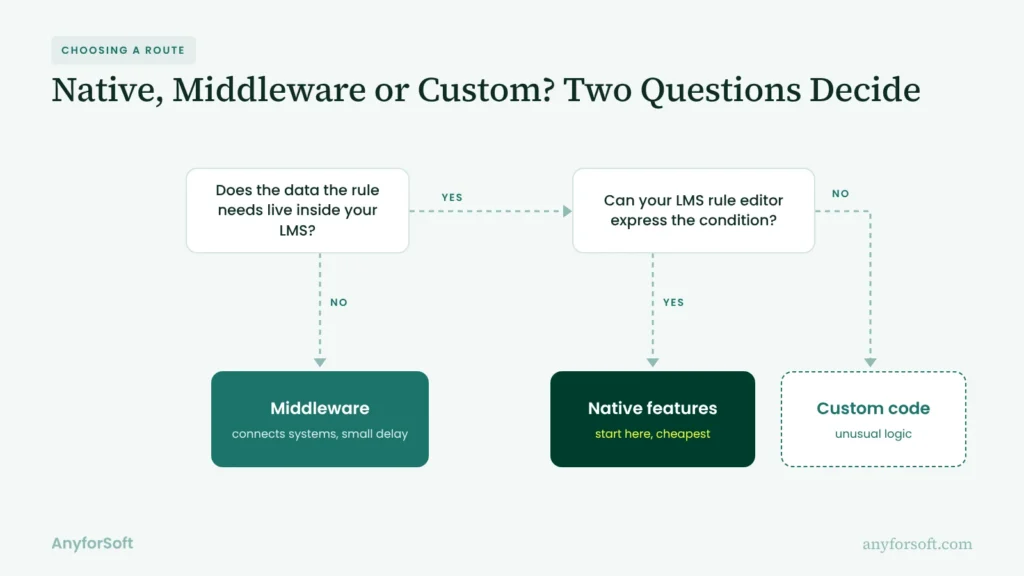
Before picking a route, check four things about your own LMS:
- whether its rule editor can express the condition you need
- whether the data the rule needs already lives in the LMS
- how fast the event has to fire: within seconds, or by tomorrow
- what happens to your logic if the vendor changes or retires the feature
| If… | Route |
| the editor can express it and the data’s already inside | native features |
| the data lives in another system (most middleware can react to events instantly, too) | middleware |
| the logic is unusual, or no tool supports the event you need | custom development |
Commercial LMSs usually cover the common cases. Pro and Enterprise plans of TalentLMS include Automations that assign courses after a set time or reset them when a credential expires. Absorb auto-enrolls people by department, job title or hire date. Rules in Docebo live in a separate Automation app you have to activate. Before you pay for middleware, ask your vendor which events can start a rule and which plan includes them.
Among open-source and education platforms, the paid Moodle Workplace edition has dynamic rules that enroll, notify or suspend users after events like a completed course or an expired certification; the standard edition doesn’t. For bulk changes, Canvas LMS takes CSV imports and admin uploads to create users, courses and enrollments.
Middleware tools like Zapier and Make connect the LMS to forms, spreadsheets and sales systems without code.
There’s some lag, since these connectors check for new data on a timer, every 15 minutes on some free plans.
Custom code covers whatever’s left. Open-source platforms like Open edX offer a REST API (a documented way for code to read and change course and user data). High Pass Education went this way: AnyforSoft added a custom assessment and reporting layer on top of its off-the-shelf LMS, and instructors now spend less time combing through reports before consultations. Read the High Pass case.
How Is AI Changing LMS Automation in 2026?
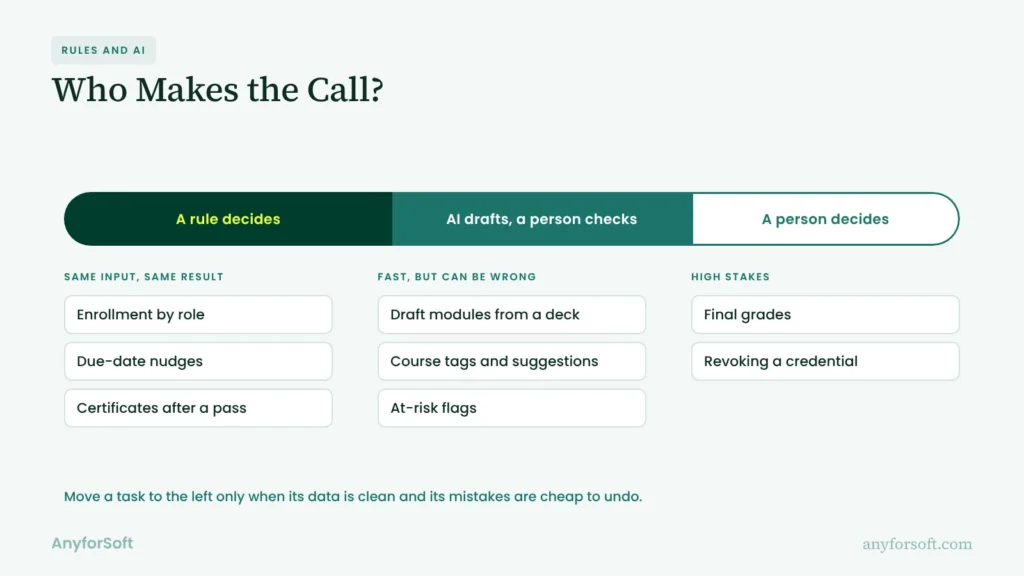
AI adds judgment where fixed rules can’t decide. Fixed logic can assign a course to the whole Sales team, yet it can’t tell which person is about to stall. Inside an AI-powered LMS, that judgment shows up in four places. Each still needs a person checking it.
AI Content Generation and Course Tagging
A subject-matter expert’s 40-slide deck, handed to a generative tool at lunch, can become a draft module with quiz questions within hours. It’ll have mistakes, so an instructional designer reviews every module first.
Tagging existing courses by skill and level is the quieter win, since it helps assignment logic find the right one in a catalog nobody’s scrolled to the bottom of in years.
Adaptive Learning Paths and Recommendations
Here the system reorders content as each student goes. A learner who aces the data privacy pre-test skips to the scenarios, while one who misses half the questions gets the basics first.
When no instructor is online, an AI tutor can answer questions inside the course. New programs start on fixed paths, since recommendations need months of data.
At-Risk Learner Prediction
Missed logins. Slow progress, falling quiz scores, courses left half-open. Prediction models weigh signals like these and flag learners who may not finish. A manager or tutor gets the flag and decides what happens next.
Two caveats: accuracy depends on clean data and history, and drops in learner engagement can have causes a model can’t see, like a reorganization.
AI-Assisted Grading and Feedback
AI scores practice essays against a rubric and drafts comments in seconds. When a trainee just wants a quick read on a draft, AI feedback in seconds beats a human reply days later.
When a score affects a credential or a final grade, human-in-the-loop review protects both sides: an instructor checks the score and the comments before release, so a learner never has to appeal an AI’s mistake.
| Rule-based automation | AI-driven automation | |
| Setup effort | low: configure events and conditions | higher: data prep, model choice, testing |
| Predictability | same input, same result | output varies and needs review |
| Data needs | clean records for the fields a rule checks | months of learner history |
| Best use cases | enrollment, nudges, credentials, reports | content drafts, recommendations, risk flags |
Most teams get their quickest return from rule-based setups, then add AI once the data can be trusted.
How to Implement Automation in Your LMS: A 6-Step Plan
Whether you’re configuring your current LMS or shopping for a learning management system with automation built in, the order of work doesn’t change. Each step ends with something your team can hand over.
Step 1: Audit Manual Workflows
For two weeks, every administrator logs their recurring tasks: what they do, how often, how long. You end up with a workflow inventory that shows hours per task. “We’re swamped” turns into a number you can act on.
Step 2: Prioritise by Time Saved and Risk
Score each task twice: hours saved, and the damage a mistake would do. Enrollment and deadline alerts come out high on hours and low on risk. Revoking credentials is the opposite. It’s hard to undo, so it waits.
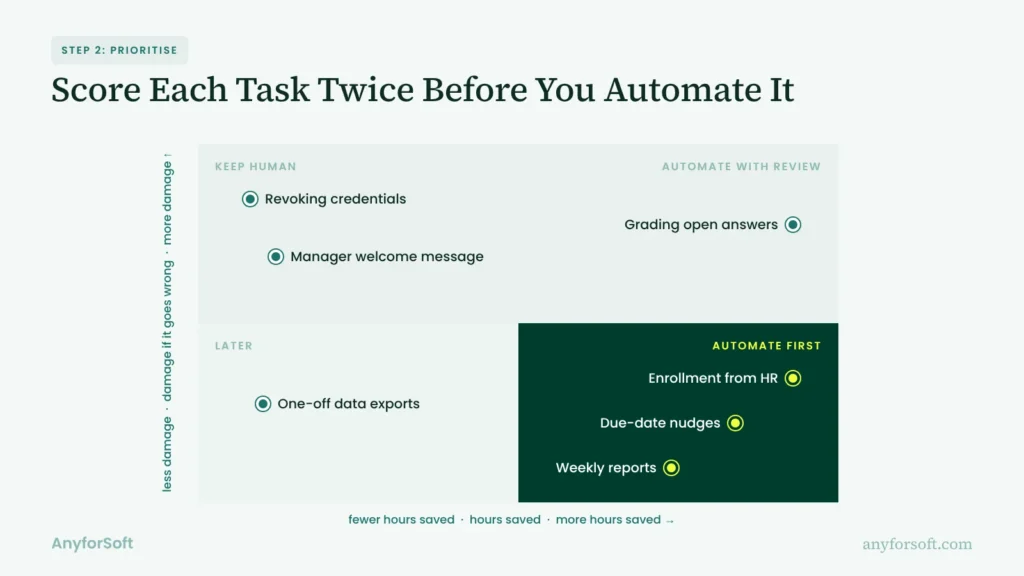
What you get is an automation backlog in build order, with expected hours back next to each item. Finance will want to see it, since it ties the project to lower training costs.
Step 3: Map Data and Integrations
For every backlog item, write down which system holds the data, who owns it and which way it syncs. The result is an integration map your engineers can build from. Most maps turn up at least one surprise, such as manager names that live only in someone’s personal spreadsheet.
Step 4: Build and Test the Rules
Build in a test copy of your LMS, and write scenarios for each rule, odd cases included. The new hire whose start date moves back a week. A manager who leaves on the day an approval is due. If your platform can’t express the logic you need, weigh whether to build a learning management system.
That’s when budgets come in. A single sign-on connection can take hours, while a two-way sync with an older HR system that has a limited API can take weeks. In AnyforSoft’s estimates, a scoped proof of concept on your existing platform runs $8,000–$25,000, and moderate customization of an existing LMS $80,000–$150,000.
Step 5: Pilot With One Program, Then Switch On
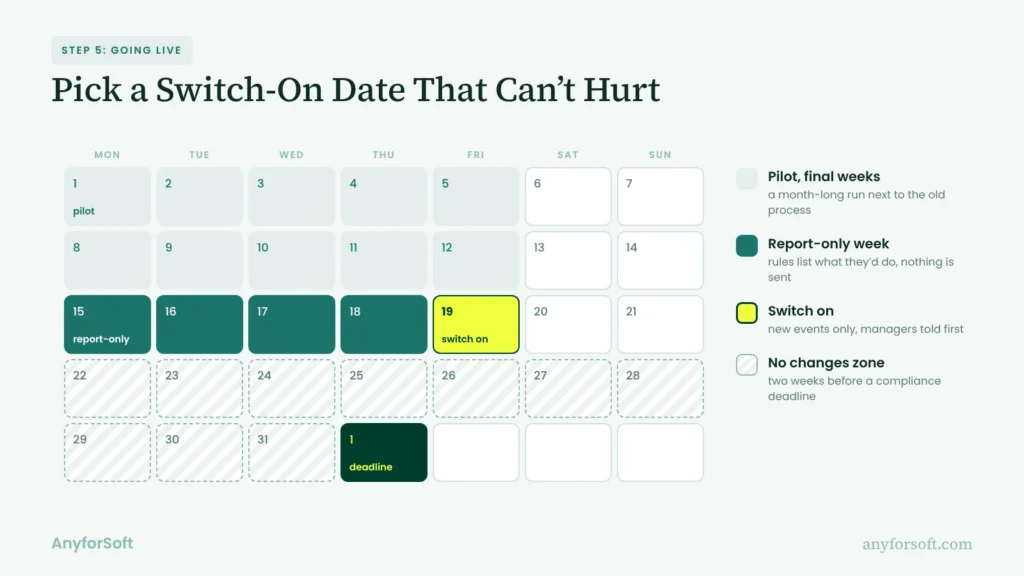
Pick one program, say onboarding in a single region, and run the new setup for a month next to the old process. A useful pilot report compares hours spent and errors on both sides, and adds what participants said.
Going live is where running courses get hurt, so plan the switch:
- list who’s already mid-course, and apply the new setup only to new events
- run each rule in report-only mode first, if your LMS has one, and compare its list with what you’d have done by hand
- don’t switch on in the two weeks before a compliance deadline
- tell managers what’ll change in their inbox before it does
Nobody gets re-enrolled or emailed twice.
Step 6: Monitor and Improve
An automation dashboard tracks how often each rule fired and how often it failed. Each rule needs one named owner, so a misfire has someone to call.
When a rule hits live learners by mistake, pause it first, fix it, then tell the people it touched. Job titles change and courses retire, and a quiet failure can run for weeks before anyone spots it.
What Are the Biggest Risks, and How Do You Avoid Them?
Most failures trace back to four causes. The rules themselves are rarely one of them.
Messy Data and Duplicate User Records
An employee with two accounts gets two sets of emails, with half her completions on each. Duplicates usually come from hand-made accounts or changed email addresses. Merge them, then pick one ID per person (the employee number is the usual choice), and block manual account creation for anyone the HR feed already covers.
Over-Automation and Lost Human Touch
With training automation, messages multiply fast. Nine system emails in week one and not a word from their manager, and a new starter decides courses are paperwork.
Cap automated messages per person per week. Some moments land better coming from a person, like the welcome or the feedback on a failed assessment.
The system can remind the manager to send them. Sending them is still the manager’s job.
Platform Limits and Vendor Lock-In
Logic built in a vendor’s own editor often can’t be exported at all. If you switch platforms in three years, someone will rebuild that logic by hand.
The cheap insurance: write each rule down in plain language, outside the LMS, while you build it. Keep content in open standards and integration logic in code or middleware you control.
Security, Privacy, and Compliance (GDPR, FERPA)
Each integration moves personal data. An automated report can’t be unsent once it lands in the wrong inbox. GDPR, the EU’s data protection law, asks for a lawful basis behind every data flow. FERPA, the US law protecting student records, limits who can see grades and enrollment details. Three habits cover most of it:
- the narrowest access each integration needs, and no more
- reports addressed to roles like “regional manager”, so access follows the job
- a log of what each rule changed, kept for the auditor
All three are easier to set up before the first rule goes live.
Real Projects: How AnyforSoft Cut Manual Work in Learning Platforms
Most projects below began with routine work done by hand. The fixes differ: a customized open-source LMS, a custom testing platform and two more LMS projects.
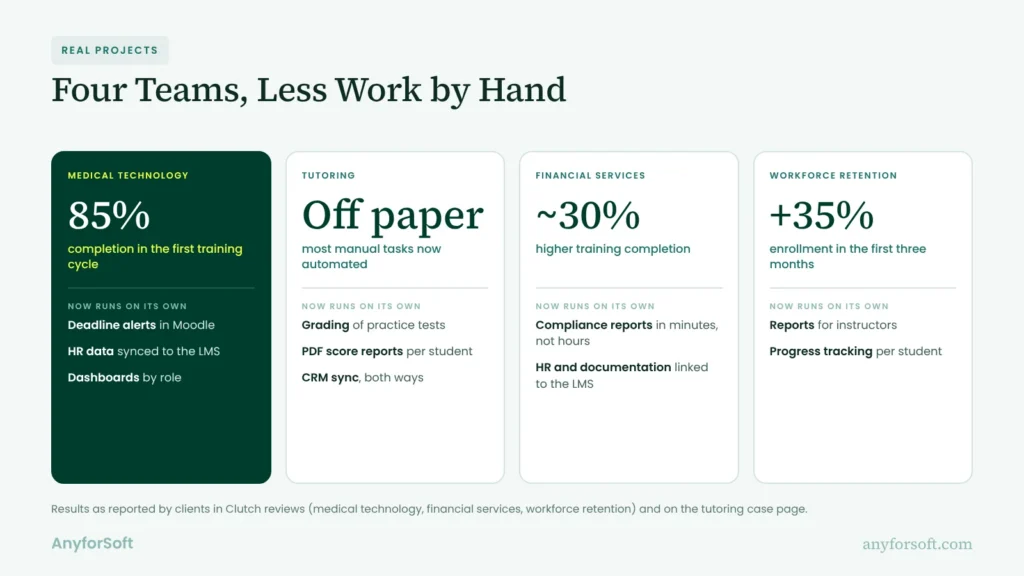
Deadline Tracking for a Medical Technology Company
A medical technology company in Germany wanted its Moodle LMS to take routine training admin off HR and compliance staff. We customized it so it’d handle that, adding:
- automated deadline alerts
- a connection to the company’s HR software
- role-based dashboards
The client’s Clutch review gives no before figure. What it does report: 85% completion in the first training cycle, and a major drop in manual work for HR and compliance teams.
Digital Testing Platform for a Tutoring Company
Since the 1980s, a US tutoring company has prepared students for standardized tests. Until recently, its SAT practice hadn’t left paper. Every printed test got graded by hand. Every score report got written up by hand, one student at a time.
We built them a digital testing system on an Open edX core, with a lot of custom code on top. It now handles:
- grading with an SAT-style scoring scheme
- a PDF score report for each student
- tests, groups and users from one admin panel
- two-way data sync with the client’s Salesforce
Most of what staff once did by hand runs on its own now. Read the case.
Two LMS Projects, Results in the Clients’ Words
A financial solutions company in the Netherlands wanted its LMS connected to the rest of the business. AnyforSoft linked it to the HR system and internal documentation, and set up a hierarchy of permissions. Completion rose about 30%, the client says. HR doesn’t spend hours on compliance reports anymore; it pulls them in a few minutes.
A workforce retention company wanted to modernize course management. Its new LMS has:
- video lessons and quizzes
- progress tracking per student
- automated reports that, in the client’s words, saved “a lot of time on admin work”
Enrollment rose 35% in the first three months.
Why Education Teams Work With AnyforSoft
AnyforSoft is an EdTech partner for higher education, e-learning businesses, corporate L&D and associations. It’s rated 4.9 out of 5 on Clutch across 88 reviews, and more than 140 clients have worked with the team.
15+ Years in EdTech
Since 2011, the team has delivered 150+ education-focused projects. As an LMS development company, AnyforSoft brings engineers who’ve built enrollment, assessment and reporting logic before.
That work spans universities, EdTech companies, corporate L&D teams and associations, so the team has met the same automation problem from the registrar’s side and from HR’s. Several clients have stayed for more than five years.
Integration-First Engineering
Automation only works as well as the data reaching it, so AnyforSoft maps the connections before anyone writes a rule: HR and sales systems, single sign-on, student records.
The team connects learning platforms with SIS, CRM and HRIS data, and plans the work around your calendar, such as enrollment cycles and launch dates, so a sync never goes live in the middle of one.
AI With Human-in-the-Loop Control
Ten-plus AI products for education so far. AI goes where it removes a real chore, such as grading, content tagging or search, and it isn’t built to replace teachers or staff. Wherever a feature scores or flags learners, the team designs a review step in, so a person checks the output before it counts.
The assistant built for Wittenborg University of Applied Sciences, for example, answers only from the university’s own pages, and its administrators decide the tone and which content it may use.
Moodle, Canvas, Open edX, or Fully Custom
Some teams extend the platform they already run. Others need a custom LMS, or a headless LMS (the engine behind your own site or app), because the learner experience has to match their product.
Flexible Engagement Models
Some teams start with LMS consulting services to scope the work and get an estimate before committing to a build. Others need engineers for months: a dedicated development team, drawn from 80+ engineers, joins your roadmap and stays with the platform after launch, with support packages for the years that follow.
Frequently Asked Questions
Which LMS tasks should you automate first?
The ones that run most often and break least: enrollment, deadline nudges, certificates and weekly reports. Those tasks repay LMS automation fastest. Anything touching grades or job status can wait, because a wrong rule there is hard to undo.
Can an LMS automate new hire onboarding?
Yes, as long as HR sends the four fields the setup depends on:
- start date
- job title or role
- department
- manager
If one is missing, the wrong courses go out, so it’s worth checking the HR feed before you build anything on top of it.
How does an LMS automate compliance training?
By watching expiry dates and keeping the evidence an auditor asks for: who was assigned what, when they finished, which version of the course they took and what they scored. Overdue employees get escalated on their own, so the record also shows who was chased and when.
What integrations does LMS workflow automation need?
Start with the HR system, since it decides who exists and in which role. Single sign-on comes next, so access closes the day someone leaves. Student records or sales data follow, depending on who you train, and video tools last. One connection done well beats four half-finished.
Can Moodle, Canvas, or Open edX handle these workflows without custom development?
Partly. Basic enrollment and notifications run natively on all three. Advanced rules can cost extra, and some won’t work without a paid edition. Choosing between native automation vs middleware vs custom development depends on how far your workflows go beyond the defaults.
What does it cost to add workflow rules to an existing LMS?
Depends where the logic lives. Native options mostly cost admin time; middleware adds a monthly subscription. Custom work is priced by scope, and the custom LMS development cost breakdown shows what moves the number up or down.
How do you measure the ROI of fewer manual admin hours?
Count hours per process before and after, with the Step 1 inventory as your baseline. Then decide where the freed hours go. Few organizations plan that part: Gartner found only 7% give guidelines on how to use time saved by AI, in a July 2025 survey of 114 HR leaders. A named target, such as more coaching sessions, gives you something to track next to the hours.
How do you keep learner data compliant with GDPR or FERPA?
Mostly through paperwork that’s easy to skip. Sign a data processing agreement with every tool in the chain, and find out where each one stores learner data. Inactive accounts need a retention period too. For FERPA in particular, check that no automated report sends grades beyond the school’s approved recipients.
What tasks can AI take over in a learning management system?
Drafting, tagging, recommending and flagging. Final grades, and anything a student might appeal, are safer with people, since a person can explain the decision.
Can AI grade assignments and give feedback without hurting quality?
For practice work, yes. For graded work, test it before you trust it: run 50 past assignments through the AI, compare its scores with your instructors’ and look hard at the ones that differ.
Even then, most teams keep an instructor reviewing each score before release.