







Most enterprise learning software works the same way for every employee. One course, one pace, no adjustments.
An AI-powered LMS for corporate training changes this one-size-fits-all pattern. It watches how each employee learns, then reshapes the course order and skill tracking on its own.
New hires show the problem best. Building employee onboarding paths by hand for every role does not scale past a few positions. Compliance training content also goes out of date fast, since rules change often.
Both problems get worse as teams spread across more locations.
McKinsey places onboarding inside the largest category of value it found for AI use in HR. No other use case scored higher in the study. It’s one clear signal among several pointing toward adaptive learning systems becoming standard practice.
What Is an AI-Powered LMS for Corporate Training?
Picture the baseline most professionals have in mind: one dashboard and one fixed course catalog. Every employee moves through it at the same pace. This setup is what most people picture when they think of standard corporate learning software.
For more than fifteen years, Anyforsoft has built custom software and e-learning solutions for enterprise and education clients.
Three capabilities separate an adaptive system from the standard baseline:
- Course content adjusts automatically to each learner’s role and pace.
- Recommendations come from behavior data such as quiz results and time spent per lesson.
- Progress tracking updates on its own, without an administrator entering data by hand.
Three underlying mechanisms drive these capabilities.
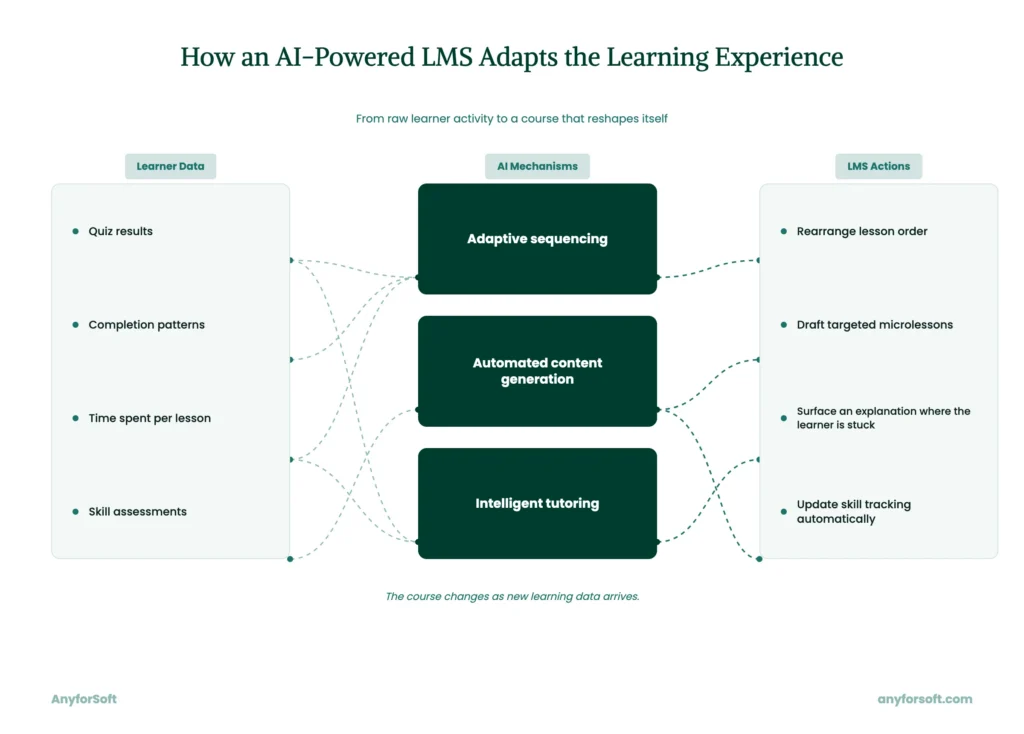
Based on quiz results and completion patterns, adaptive engines rearrange lesson sequencing. Drawing on source material, automated content generation drafts microlessons without a course designer starting from scratch.
One layer, intelligent tutoring, flags exactly where a learner is stuck and surfaces a targeted explanation.
Why Do Organizations Need an AI-Powered LMS for Corporate Training in 2026?
Static course catalogs leave skill gaps unaddressed. For learners at different skill levels, a generic corporate LMS offers only one fixed sequence. Ignoring individual pace, the structure produces early drop-off before employees reach required modules.
Content that never adjusts to what a learner already knows also feels redundant, and disengagement follows fast.
Without automated analytics, program managers compile completion data by hand. A training system with built-in reporting removes the overhead entirely.
Spread across time zones, distributed employees also lose the informal cues that once signaled falling engagement early. Once those cues disappear, remote workforce training needs different signals to catch disengagement before it affects output.
Fewer hours spent on manual reporting also produce reduced training costs across large, distributed teams.
What Key Features Should an AI-Powered LMS Have for Corporate Training?
Five capabilities turn a corporate LMS into a tool that adjusts to every learner automatically.
Four recurring weak points anchor these features:
- static sequencing
- manual reporting
- generic material
- disengaged remote teams
Most of these features center on AI-powered content recommendations, surfacing the right lesson or explanation at the right moment.
Without an administrator building the logic by hand, they run on their own.
Adaptive Learning Paths
An adaptive engine reads quiz results, completion pace, and skill assessments as they come in.
Based on that data, it resequences the course order for each learner automatically. An employee who tests strong in one module skips ahead, while one who struggles gets extra practice inserted before the next topic unlocks. No administrator adjusts these paths by hand once the engine is running.
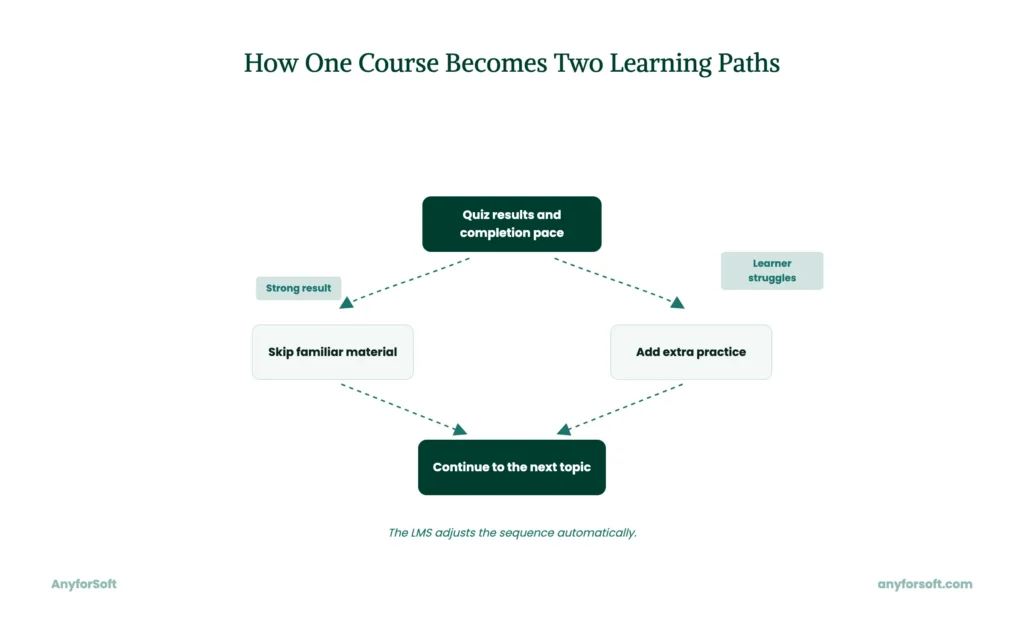
This kind of continuous resequencing is the infrastructure behind upskilling and reskilling, which Deloitte’s Q2 2024 State of Generative AI in the Enterprise report ranks as a top talent response to GenAI. Redesigning work processes is the only response cited more often.
AI-Generated Microlearning and Content Recommendations
Built around one specific skill, microlearning breaks a topic into single lessons typically five to ten minutes long. Generation tools draft an initial lesson from existing source material, and a human editor reviews it before publishing.
Distinct from microlearning generation, natural language course search lets employees type a plain question and reach the matching lesson directly.
Automated Skill-Gap Analysis
A skill-gap engine compares each learner’s attempts to separate genuine knowledge gaps from time-management issues. Across a learner’s history, it also flags recurring mistake patterns tied to specific questions.
Beyond individual attempts, administrators see aggregated statistics too, including the most common wrong answer and the average time per question.
Such reporting stays fully comparative, drawing only on data already on record. Built this way, skill-gap pipelines also support leadership development. Identifying a gap early shapes who gets nominated for advanced tracks.
AI Chatbot and Learning Assistant
Inside a learning system, an AI chatbot support feature answers employee questions using the organization’s own course material as its source.
Grounding every answer in that material, retrieval-augmented generation avoids relying on general knowledge the model already holds. Administrators set the tone of responses and limit which topics the assistant can address.
The same controls apply to any AI layer added on top of existing course material.
From AnyforSoft’s portfolio, Wittenborg University of Applied Sciences shows this same principle applied outside a learning system entirely. The university’s AI-powered assistant runs on the university’s public website.
The underlying approach holds in both cases: existing content and data form the base, and an AI layer gets added on top of it.
Predictive Analytics for Learner Engagement
This category of tooling scores engagement signals such as login frequency, quiz timing, video-completion rate, and time since last login.
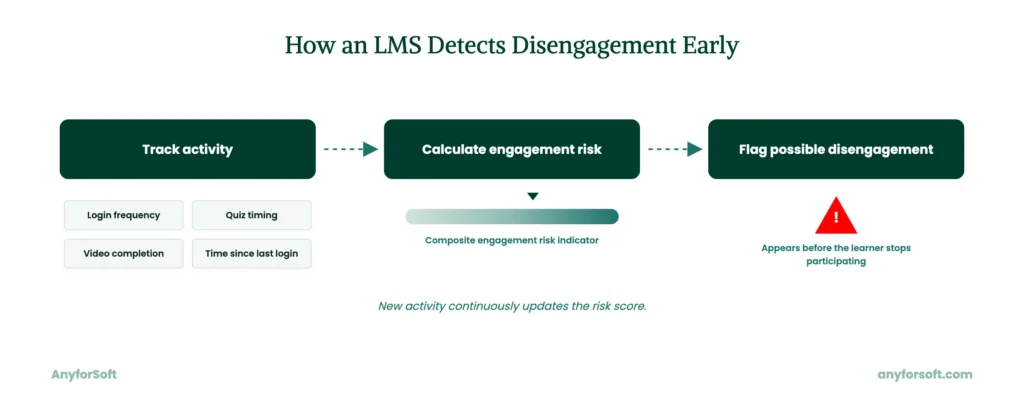
Before a course ends, those signals flag learners likely to disengage. A risk score updates automatically as new activity arrives, without a manual review cycle in between.
Tracking these signals ties learning activity to measurable L&D ROI. Outcomes can be measured against retention and productivity data already collected.
AI-Powered LMS vs. Traditional LMS: What’s the Difference in 2026?
Across these two categories, personalization diverges most clearly. Traditionally, every employee receives the same course sequence, regardless of role or prior knowledge. Adaptive sequencing adjusts automatically, per learner.
Reporting works differently too. Working with older tools, teams compile reports by hand from exported completion data. In newer setups, that same reporting generates itself automatically.
Proactive tracking replaces reactive tracking at the engagement layer. A traditional setup flags a drop only after the learner has already stopped attending. An adaptive engine catches that same risk earlier, using signals like login frequency and quiz timing.
| Capability | Traditional LMS | AI-powered LMS |
| Course sequencing | Fixed for every learner | Adjusts automatically per learner |
| Reporting | Manual exports | Generated automatically |
| Engagement tracking | Flags drop-off after it happens | Flags risk before it happens |
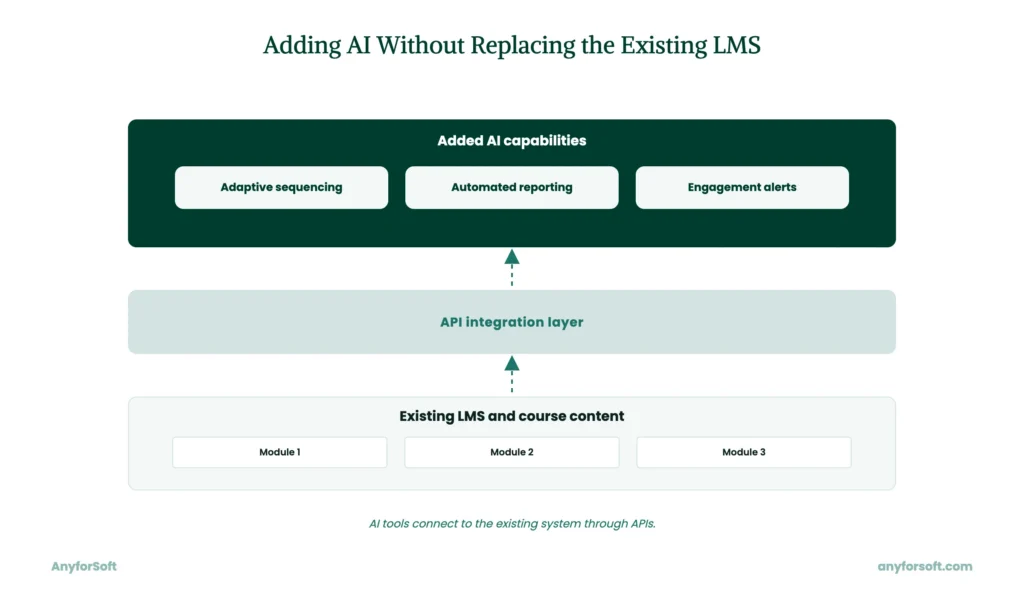
Two well-known enterprise systems, Cornerstone OnDemand and SAP SuccessFactors, built their reputation years before adaptive tooling existed. Extending either one with AI capability usually depends on API-first architecture.
This architecture connects new tools to the existing software without a full rebuild.
How to Implement an AI-Powered LMS for Corporate Training
Turning this decision into a working system follows a fixed order, from a stack audit to rollout monitoring. Seven steps cover the full path. Each one produces a concrete deliverable before the next begins.
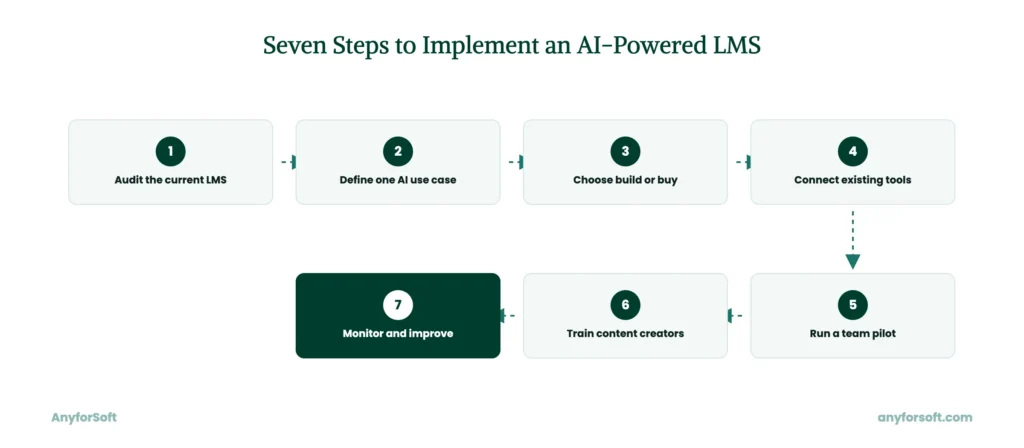
Step 1: Audit Your Current Training Stack and Content
Every implementation starts with a full audit of the existing corporate LMS software and its existing course catalog.
Within the same pass, it also maps existing integrations to define what needs to carry over. For every course file already in use, it should confirm SCORM and xAPI compliance. Gaps found here define the scope for every step that follows.
Step 2: Define AI Use Cases and Success Metrics
At this stage, one clearly scoped use case works better than a long wish list. Teams typically start with a single measurable goal, such as faster onboarding time for new hires in one department.
Before any wider rollout begins, that metric becomes the benchmark for judging the pilot.
Step 3: Choose Build vs. Buy for Your AI-Powered LMS
For teams that need to launch quickly without deep customization, vendor solutions with built-in AI features fit best. When workflows or compliance requirements don’t match a vendor’s fixed feature set, custom LMS development fits better.
Matched against those needs, the right choice depends on how closely an off-the-shelf software already meets them. Teams that build a learning management system from scratch usually start with an internal resource audit.
Step 4: Integrate with HRIS, SSO, and Existing Tools
Most organizations already manage employee records in a separate human resources system. Once the new tool connects to it, HRIS integration syncs those records automatically, without manual duplication.
For every employee, single sign-on (SSO) support removes a separate login step. Through the same API layer, existing tools such as video conferencing or content libraries typically connect for that integration.
Step 5: Pilot with One Team Before a Full Rollout
Before a full rollout begins, a single team should test the system. As a pilot scope, sales enablement training for one regional group works well.
Results stay easy to measure within a few weeks. Feedback from that pilot then shapes the plan for every other department.
Step 6: Train Content Creators on AI Authoring Tools
Before building lessons independently, instructional designers need hands-on practice with the new authoring tools. A short workshop covering prompt design and review steps typically covers the basics within a day.
During the first few projects, ongoing support catches most early mistakes before they reach learners.
Step 7: Monitor Engagement Data and Iterate
Once the solution is live, engagement data becomes the main signal for what to adjust next.
On a regular schedule, teams should review login frequency, completion rates, quiz performance, and video-completion rate. It catches most issues before they grow into a larger problem.
Over time, programs that adapt based on this data tend to support increased employee retention.
In PwC’s 2024 Global Workforce Hopes and Fears Survey, employees planning to leave cited limited learning opportunities as a reason far more often than employees planning to stay. The gap is significant, at 67% versus 36%.
How to Prepare Your Team for AI-Powered LMS Adoption
Beyond the technical build, three areas of internal readiness determine whether adoption actually holds. Two center on decision-making: stakeholder alignment and the build-versus-buy choice from a staffing angle. Handled separately, the third covers the change process itself.
Align L&D and IT Stakeholders Early
When L&D and IT teams start scoping requirements separately, integration issues tend to surface late, after most decisions are already locked in. Early alignment prevents that gap from forming in the first place. One recurring technical question IT raises at this stage is whether the system needs multi-tenant architecture. For organizations managing more than one business unit or subsidiary, this matters most. Settling that question early avoids a costly redesign once development is already underway.
Choose Build vs. Buy Based on Team Capacity
More often than budget, the existing engineering headcount determines this decision. Teams with available internal capacity can absorb a custom build without disrupting other projects. Without that resource, bringing in a dedicated development team avoids stretching existing staff across an unfamiliar project. Matched against internal bandwidth, this choice differs from the build-versus-buy question covered in Implementation. That earlier question centered on workflow fit, distinct from staffing levels considered here.
Plan for Change Management and Employee Adoption
Rolling out new software without a change plan often produces low usage, regardless of how well it performs technically.
A short training period paired with clear internal communication reduces that risk substantially. Handled this way, the adoption process supports scalable training delivery across departments as the organization grows. That payoff compounds each time a new team or region gets added to the system.
AI-Powered LMS in Practice: AnyforSoft Case Studies
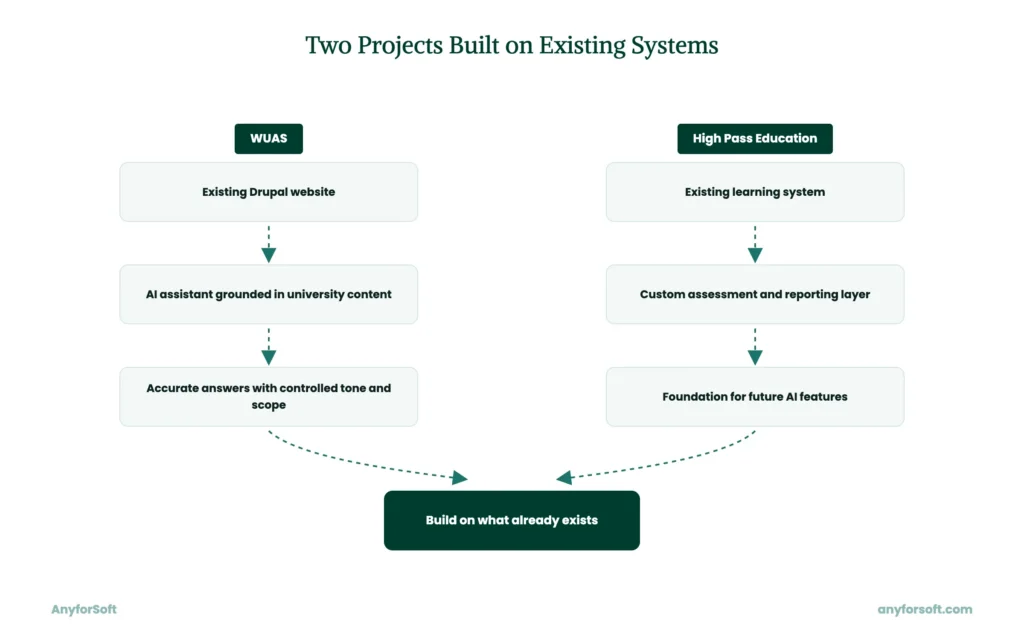
Two recent projects show how this groundwork plays out for different organizations. Each one solved a distinct problem, but both reflect the same underlying approach to building on what already exists.
WUAS (Wittenborg University of Applied Sciences)
Grounding an AI layer in an organization’s own published material, without inventing answers, is the same challenge every AI-powered learning tool must solve.
Wittenborg University needed a way to answer student questions accurately without licensing a separate AI solution to sit alongside its website. Directly into the university’s existing Drupal 10 site, AnyforSoft built an AI website assistant.
Grounded in official university content, it uses the OpenAI API and a Milvus vector database to answer every question.
Integrating directly into the existing site kept the build simple. Within a limited budget, development stayed on track, a constraint stated directly in the project scope. Administrators also gained direct control over tone and topic scope, a safeguard that matters wherever an AI assistant represents an organization publicly. When evaluating a partner to build an AI-powered solution, pay attention to whether they can ground responses in your own content. That capability often costs far less than adding a standalone system.
High Pass Education
Preparing existing infrastructure for future AI capability is a common first step for organizations building AI-powered learning programs.
High Pass Education needed granular, per-learner assessment control and detailed analytics that its existing off-the-shelf learning system did not support. On top of it, AnyforSoft added a custom assessment and reporting layer. Built for ongoing evolution, it can absorb new AI capability over time.
In 2025, the client reported their strongest first-quarter performance to date. That extensible layer now stands as a foundation the client can build further AI capability on. Because the layer can absorb new capability directly, no future rebuild is needed.
When evaluating a partner for this kind of work, look for one who designs today’s build as a foundation. It should support AI capability added well after launch.
Why Engineering Teams Choose AnyforSoft for AI-Powered LMS Development
For more than fifteen years, AnyforSoft has built custom software with a focus on education and e-learning platforms. Recent projects reflect that same specialization in practice, from AI-grounded assistants to custom assessment layers built on existing infrastructure. Those same engineering habits carry into how AI-powered learning tools get built today.
Full-Cycle LMS Audit and AI Readiness Assessment
A readiness assessment starts with a full audit of the client’s existing learning system and content library. Existing integrations are mapped in the same pass. Gaps are measured against what AI capability actually requires, not against a generic checklist. This sequence keeps existing enterprise software development investments intact, without requiring a full rebuild.
AI-First Engineering Approach
Scoping AI implementation around one well-defined use case keeps early costs predictable. Expanding capability step by step avoids the large, expensive proof-of-concept many vendor-led AI projects require upfront. This approach applies just as well outside education and corporate learning. Compliance platforms and internal tools draw on the same underlying AI integration services discipline, and so do customer-facing systems built for an entirely different industry.
Proven LMS and E-Learning Platform Track Record
As an LMS development company, AnyforSoft has delivered platform architecture and content migration for corporate training and higher education clients. Certification-exam systems extend that track record further. Organizations comparing vendors for the best LMS for corporate training solution often weigh this same range.
System architecture and content migration count as evidence, as does integration work across more than one industry.
Seamless HRIS and Enterprise System Integration
Integration work connects the learning platform directly to HR tools and single sign-on providers. Reporting tools already in place stay connected too. A headless LMS architecture separates content delivery from the underlying data layer, so each connection can be built independently. That separation keeps existing HR workflows untouched during rollout.
Flexible Engagement Models
Engagement models range from full project ownership to LMS consulting on a specific integration or feature. Teams can bring in support for a single sprint or a multi-year build, based on internal capacity and timeline.
FAQs
What is an AI-powered LMS for corporate training?
Adapting course content and sequencing to each employee automatically is the core function of this kind of solution. Skill tracking updates the same way, without an administrator entering data by hand. Unlike that adaptive path, traditional systems apply one fixed course sequence to every learner. Quiz results and completion patterns, among other signals, drive that adjustment continuously.
How does an AI-powered LMS differ from a traditional corporate LMS?
At the core, personalization separates the two categories. A traditional setup delivers one fixed course sequence to every employee. Studying each learner’s pace and behavior, an adaptive engine adjusts sequencing and reporting automatically. This distinction shapes engagement and completion rates. How quickly skill gaps get identified also depends on it.
What are the benefits of using AI in corporate training platforms?
Adaptive capability inside a corporate training LMS produces several measurable benefits. When content matches each learner’s own pace, completion rates rise. Because progress tracking updates automatically, reporting overhead drops. Skill gaps also surface earlier, since analytics flag them before a course ends.
How much does it cost to build a custom AI-powered LMS?
Cost depends heavily on scope, since a custom build differs sharply from a vendor subscription. With built-in AI features, vendor systems typically involve licensing fees and configuration costs. Custom development involves a larger upfront investment but avoids ongoing per-seat licensing costs. Matched against existing requirements, the right choice depends on how closely a solution already meets them.
Which AI features matter most for corporate training in 2026?
Among the most valuable capabilities for corporate training in 2026 are adaptive learning paths and automated skill-gap analysis. Within a modern AI learning platform, these features directly affect completion rates and reporting accuracy. Predictive analytics for engagement matters too, since it flags disengagement before it affects output. AI chatbots and content recommendations round out the list, extending the other three capabilities without replacing them.
Can AI personalize training paths for individual employees?
Yes. Based on quiz results and completion pace, AI can personalize adaptive learning paths for each employee. Skill assessments feed into that same process. Analyzing this behavior data continuously, an engine resequences course content without manual input. An employee who tests strong in one area skips ahead, while one who struggles receives extra practice before moving on.
How do you integrate an AI-powered LMS with existing HR systems?
Most AI-powered tools connect to existing HR infrastructure through an API layer built for that purpose. Through that same connection, HRIS integration syncs employee records automatically, removing the need for manual data entry. Bundled with the same integration, single sign-on (SSO) support typically removes a separate login step for every employee. Configuration usually takes a few days once API access is confirmed.
What data does an AI-powered LMS need to personalize learning?
Personalization relies on several data points collected as employees interact with the application. Through quiz results and completion pace, the system sees how quickly a learner absorbs new material. Login frequency and video-completion rate reveal engagement levels over time. Rounding out the picture, skill assessments flag gaps before they affect performance
How does AI improve completion rates in corporate training?
AI improves completion rates by matching lessons to each learner’s own pace. Automatically resequenced lessons reduce the drop-off that happens when pacing feels too advanced or too basic. Before a learner stops attending entirely, predictive analytics also flag disengagement early. Together, these mechanisms produce improved completion rates compared with static course catalogs.
What AI tools and models power modern corporate LMS platforms?
Several established tools currently power AI capability inside corporate training software. Docebo, 360Learning, Absorb LMS, TalentLMS, and CYPHER Learning each offer some form of adaptive recommendation or automated content tooling. Also covered earlier in this article, Cornerstone OnDemand and SAP SuccessFactors have added AI features to their existing enterprise solutions. Trained on completion and engagement data specific to each client’s material, machine learning models power most of these tools.