








Building a learning management system means navigating dozens of tools and vendors before a single line of code is written. For decision-makers without a technical background, the choice carries financial risk.
Budget estimates shift by hundreds of thousands of dollars depending on feature scope, and a misaligned platform generates retraining and migration costs that are difficult to reverse.
This guide gives you the ground to make that decision confidently.
By the end, you will know:
- What separates a custom LMS from an off-the-shelf one, and how to choose between them
- Which core and advanced features produce measurable business outcomes
- How a learning system development actually unfolds, from architecture to launch
- What drives cost and timeline, and where organizations typically overspend
- How to evaluate a development partner before signing a contract
We’re sharing what we know from practice. AnyforSoft has designed and built products for education across the US and Europe, including Delaware County Community College and Wittenborg University of Applied Sciences.
Read ahead to get a decision-ready framework for building an LMS that fits your organization’s goals and budget.
What Is a Learning Management System?
LMS is software that manages how learning content reaches people and records what they do with it. Administrators track completion rates and assessment scores from a single interface, without chasing down progress manually.
The basic function applies in two settings.
- Universities and schools use it to manage curricula and keep remote students connected to coursework.
- Businesses use it for employee onboarding and compliance certification.
Partner training programs are a common extension of both.
The regulatory environment and integration requirements are where the two settings diverge.
- Academic deployments focus on student data privacy and academic integrity tooling.
- Corporate ones connect tightly to HR environments and produce audit trails for compliance reporting.
Off-the-shelf solutions like Moodle, Canvas, TalentLMS, and Docebo cover most of the needs out of the box.
Custom development brings value when the required integrations or compliance scope fall outside what a standard tools handle.
How to design an LMS: Custom vs. Off-the-Shelf
Choosing between a ready-made product and a custom-built one is where most projects stall.
The right answer to the question “How to choose an LMS?” depends on how closely your training workflows match what standard software is designed to handle.
Getting that fit wrong is expensive in both directions: over-building adds unnecessary development cost, and under-building forces a migration before the application reaches full adoption.
When a ready-made LMS is enough
Off-the-shelf products are sufficient when training needs are well-defined and workflows are standard. With platforms like Moodle, TalentLMS, Canvas, and Docebo, course delivery and progress tracking require no custom code.
Certification features and basic reporting come standard in every pricing tier; configuration handles the gap between defaults and most organizational requirements.
Four signals that a ready-made tool will meet your needs:
- Your learner structure maps to standard administrator and learner role categories
- Content delivery stays within SCORM packages and video-based modules
- Reporting pulls from the internal data only, with no external system dependencies
- Native integrations cover your CRM or HRIS without custom API development
The Bridge, a digital talent accelerator in Spain, illustrates the value of intelligent LMS development.
After cycling through two previous platforms, the team moved to Moodle and cut administrative workload by 20%. Over 1,000 students now train annually on the platform, with no custom development involved.
Implementation timelines for off-the-shelf platforms run in weeks, and long-term maintenance stays within the vendor’s support structure.
When custom LMS development makes more sense
Customization is the right choice when the business logic driving the training program falls outside what a standard solution can configure. In this case, assessment design is often the first pressure point. Continuous integration with proprietary internal systems is another.
If you’re considering different options while answering the question “How to create a learning management system?”, four signals that custom development is the stronger option:
- Assessment or grading logic falls outside what any standard module covers
- Continuous data exchange with an internal CRM or ERP system is required
- Learner permissions and role structures don’t map to standard role models
- Compliance requirements include audit trails or data residency controls not supported natively
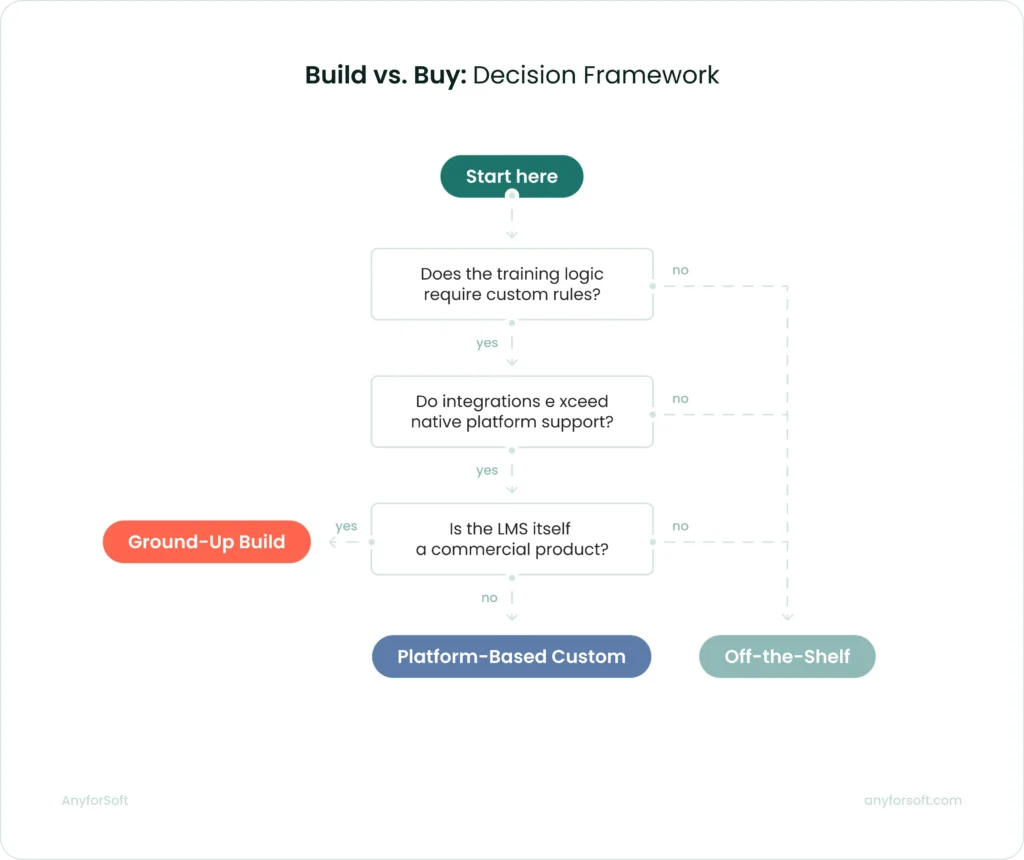
Build vs. buy: decision framework
This decision follows from operational conditions.
Before committing to either path, four questions will give a directional answer:
- Does the training logic require custom rules? Standard software handles branching content and quiz-based certification. When grading formulas or adaptive delivery logic are involved, configuration alone rarely covers them.
- How many external systems does the LMS need to connect with? Native integrations cover common platforms: Salesforce, Workday, Zoom, and most major HRIS tools. Beyond the supported list, each additional connection adds custom API development to the project scope.
- What is the projected learner volume in year two? SaaS platforms scale within their pricing tiers. Before committing to a vendor, organizations projecting significant user growth should verify that per-seat costs remain acceptable at the target scale.
- Who maintains the platform after launch? Off-the-shelf platforms carry maintenance within the vendor relationship. For custom systems, the choice is between an internal technical owner and a long-term development partner.
The balance every LMS has to get right
One founder, writing on Reddit after two years of building the product, put the core challenge plainly:
Simple tools lack power, and powerful tools are complicated.
After watching hundreds of user sessions, the team’s solution was two modes — a linear one for straightforward courses, a visual canvas for complex scenarios. Users chose based on what they were building, not what the team assumed they needed.
That tension is real at every level of decision-making:
- A solution that prioritizes simplicity gets adopted quickly; administrators can configure it without technical help, and learners complete their first course in minutes.
- The one built for power handles complex integrations, custom grading logic, and role structures that don’t fit standard templates.
Rarely does one system do both without deliberate architectural choices.
This is the balance AnyforSoft designs toward.
One project from AnyforSoft’s portfolio illustrates this balance directly.
The digital testing platform built for a US-based tutoring company was designed so that students could navigate it without guidance. Onboarding was guided, and three test modes accommodated different preparation needs.
The architecture running beneath that surface handled adaptive difficulty and a custom grading scheme modeled on SAT scoring formulas. Continuous bidirectional data exchange with Salesforce ran alongside both.
Neither layer compromised the other.
How to Launch an LMS: Core Features to Prioritize
Not every feature deserves equal attention during procurement. Some capabilities determine whether the solution can run your training program at all; others affect how efficiently administrators manage it day to day.
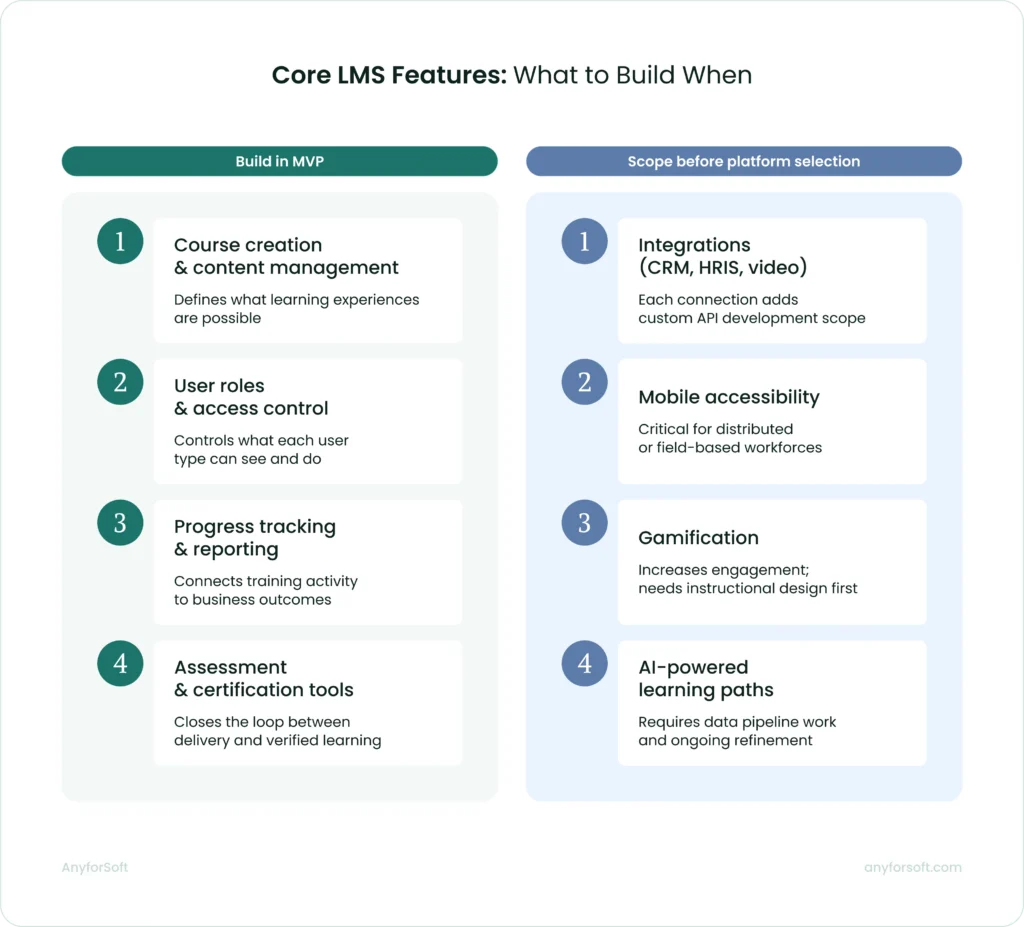
Course creation and content management
Course authoring is where administrators spend the most time before any learner touches the platform. The format options available at this stage determine what kinds of learning experiences are actually possible.
Most off-the-shelf solutions support SCORM packages and video uploads as a baseline.
The practical consideration is who builds the content.
When instructional designers own the process, dedicated authoring tools matter less. When subject matter experts build courses without design support, low-friction creation functionality significantly reduces production time.
User roles and access control
Role-based access defines what each user type can do and what data they can reach.
Moodle Workplace supports Dynamic Rules: automated workflows that assign users to courses and issue certifications based on profile fields like department or region.
TalentLMS allows administrators to build custom user types with granular permissions, including report visibility controls at the role level.
For organizations with multiple departments or external partner networks, the ability to create separate training environments under one administrative account is worth verifying before committing to a system.
Progress tracking and reporting
Reporting is where training activity connects to business outcomes. Without structured tracking data, L&D teams cannot demonstrate the value of their programs to leadership. Completion rates and assessment scores are the minimum evidence that conversation requires.
TalentLMS supports scheduled reports delivered automatically to designated recipients, custom filtering by user, course, or date range, and a timeline view that logs every individual user action. Here is a real-world example of how this set of features works.
Lynk & Co operates Clubs across six European countries and uses TalentLMS to track sustainability training completion rates monthly across all locations. Their L&D Partner receives automated reports on mandatory courses and no longer tracks that data manually. As Mohammed Chaikh, L&D Partner, put it:
“Custom reports in TalentLMS have really helped us keep track of how well the training sticks with our learners”.
At the earliest stage, two reporting capabilities matter most: completion tracking by user and automated alerts for overdue or expiring certifications. For the full picture, our reporting features guide covers what to prioritize at each stage of solution development.
Assessment and certification functionality
Assessments close the loop between content delivery and verified learning. A learner who completes a course has not necessarily retained it; an assessment score provides evidence either way.
Certification management adds a compliance dimension.
Moodle supports automated recertification workflows: the system tracks certificate expiry dates and sends reminders before they lapse. It reduces the administrative overhead of managing compliance cycles manually.
For regulated industries, that automation is not optional since manual tracking at scale is error-prone and audit-vulnerable.
Integrations with third-party tools (CRM, HRIS, video conferencing)
A system that cannot exchange data with the rest of your business stack creates manual work at every boundary. HR onboards a new employee in the HRIS; without integration, an administrator must also create that user account separately.
The cost of poor integration shows up fast.
PowerDMS, a US software company, discovered its previous solution had a Salesforce sync backed up by 27 days, with a projected timeline of nearly a year to provision 200,000 users.
After switching to Docebo, course deployment time dropped from over an hour to 10 minutes per course. Over two years, their customer base grew 28.1% while support desk cases fell 27.5%.
TalentLMS supports integrations with Salesforce, BambooHR, Zoom, and a range of HRIS platforms without custom API development. Beyond the native list, each additional connection requires custom development and should be scoped before platform selection.
Mobile accessibility
Mobile access matters most for distributed workforces. Field technicians, remote employees, and sales reps on the road complete training between tasks, not at a desk.
TalentLMS offers iOS and Android apps with offline mode. Learners download course content in advance and complete it without a connection; progress syncs automatically when they reconnect.
SCORM packages, video, assessments, and HTML content are all mobile-compatible.
The offline capability is the detail worth verifying. A mobile app that requires a live connection is not useful for a technician completing certification training in a low-signal environment.
Advanced Features Worth Considering
Core features keep a learning system functional. Advanced features determine whether learners stay engaged and whether the tool can serve distinct audiences without multiplying administrative overhead.
The four capabilities below are where off-the-shelf products diverge. Implementing them often requires dedicated LMS integration services.
Gamification and learner engagement
LMS gamification applies game mechanics to training content to sustain motivation beyond mandatory completion. Points accumulate as learners complete activities; badges mark milestones, and a visible leaderboard shows how each learner ranks against peers.
Roland, the Japanese instrument and electronics manufacturer, built the Roland Academy on TalentLMS and ran weekly leaderboard competitions throughout the first year. As a result, salespeople started seeking out training on their own initiative.
Corin Birchall, VP of Global Retail Operations at Roland, was direct about the reasoning:
Roland sells exciting products and wants to be a fun company to work with. High expectations for staff and engaging training are not treated as opposites.
Gamification increases completion rates and return visits. It cannot replace well-structured content.
AI-powered personalized learning paths
AI-powered personalization adjusts what a learner sees based on their role, prior completions, skill gaps, and behavior. The system surfaces recommended courses automatically and assigns content by department or job title. As roles change, those assignments update without manual intervention.
MidFirst Bank, a privately held US financial institution with approximately 3,500 employees, moved from a rigid legacy system to Docebo’s AI-powered platform.
Before the switch, compliance reporting required analysts up to three days to compile. With automated reporting in place, that workload dropped to near-zero.
The bank doubled its available training content; compliance completion rates climbed 10% and automated workflows across all business units are saving the organization $11,000 annually.
One framing note for decision-makers: AI assists administrators and supports learners. It removes the manual work of routing content and tracking compliance.
It does not replace instructors or the judgment that L&D professionals bring to program design.
Social learning and collaboration tools
Social learning features connect learners directly with subject matter experts and peers inside the application. Questions get answered in context. Instructors, in turn, address recurring issues in one place, visible to everyone who follows up with the same query.
Mitsubishi Electric deployed 360Learning to train over 2,000 customer engineers across its service network, replacing a classroom-based model that created significant backlogs. Social features allowed engineers to post questions and receive responses within a 24-hour service level agreement while the L&D team got visibility into every interaction.
The team became 900% more efficient; monthly training participants increased from 200 to 300 and training costs fell by 65%, with customer satisfaction reaching 99%.
Speed of feedback drove those results. Content volume was a secondary factor. What mattered was that learners got answers quickly and instructors stopped repeating the same responses one by one.
White-labeling and multi-tenancy
White-labeling removes vendor branding and replaces it with the organization’s own visual identity and custom domain.
Multi-tenancy extends this: a single instance runs multiple separate portals, each with its own branding and user base, managed from one administrative account.
ChargePoint, a US-based electric vehicle charging network, used LearnUpon’s multi-portal architecture to train and certify its installer partners in the field. Before launch, training was fragmented and installer support calls were a recurring cost. After deployment, support calls dropped by 89% and projected cost savings reached $200,000.
How to Develop an LMS: Step-by-Step
Development follows a sequence that looks linear on paper but requires iteration at nearly every stage. Early decisions about deployment model and audience constrain what is possible later. Getting them right before development starts costs less than correcting them afterward.
Step 1: Define your goals and target audience
Before selecting a platform or writing a line of code, the team needs to know who the product is for and what it is supposed to produce.
A compliance training software for 500 internal employees is a different build from a customer education portal serving 50,000 external users across multiple time zones. Not just in scale. In architecture, role structure, and what integrations actually matter.
A workforce training tool will likely need HRIS integration and manager-level reporting. A partner certification one will need white-labeling and external user registration flows.
Step 2: Choose your deployment model (cloud, on-premise, SaaS)
With SaaS platforms, the vendor owns the infrastructure. Security patches and uptime are their problem, not the client’s one. Teams that want fast deployment and predictable costs without internal technical ownership tend to start here, and for many use cases, it holds up well.
Cloud-hosted custom builds work differently. The organization owns the codebase and the data; the development partner handles deployment and ongoing maintenance.
On-premise goes further. The entire infrastructure runs inside the organization’s own data centers.
It is a heavier lift, but healthcare and financial services organizations frequently have no other option: data residency and compliance requirements leave little room for negotiation.
Step 3: Select the tech stack
There is no universally correct stack. The right choice depends on integration requirements and how the solution needs to scale.
For custom builds, common backend choices include Python with Django or Node.js. React and Vue.js are the dominant frontend frameworks.
Relational databases like PostgreSQL handle structured learner data and reporting queries well. At scale, caching layers and read replicas become necessary to maintain performance during peak assessment periods.
Step 4: Design the UX/UI
Learner experience design starts with two user types: the learner completing courses and the administrator managing content and reporting. Getting the experience right for both simultaneously: this is what separates adopted platforms from abandoned ones.
Feature scope tends to crowd out navigational clarity. You’ll see the consequences fast.
A learner who struggles to locate their assigned course in the first session rarely comes back for the second. If a dashboard is scoped to what each user role actually needs, it reduces the friction before it becomes a retention problem.
WCAG 2.1 AA compliance covers keyboard navigation and color contrast requirements. For platforms serving regulated industries or public institutions, these are legal requirements.
The practical insight is as follows: the earlier accessibility requirements enter the design process, the less they cost to implement.
Step 5: Develop and integrate core modules
Proceed module by module. User authentication and course delivery come first, as every other feature depends on them. Assessment tools and certification workflows build on top of that foundation. Reporting layers come last.
Integrations are where timelines most often extend beyond initial estimates. Native integrations with widely used products follow documented APIs and are relatively predictable to scope.
Custom integrations with proprietary internal systems require discovery work that cannot always be estimated accurately upfront.
Identifying every required integration before building begins, and assigning realistic timelines to each, prevents the most common form of scope expansion during this phase.
Step 6: Test and QA
Testing covers four distinct areas.
- Functional: Every feature is verified against its original specification.
- Performance: Realistic concurrent load scenarios, exam periods and company-wide launches in particular, expose architectural weaknesses before they affect users.
- Security: Reviewing access controls and vulnerability scanning before the solution goes near production catches issues that are far cheaper to fix at this stage.
- UAT: Representative learners and administrators use the platform under realistic conditions, surfacing usability issues that automated tools tend to miss.
Plan for at least one revision cycle after UAT before launch.
Step 7: Launch your MVP
An MVP launch releases the minimum feature set needed to deliver value to the first group of real users. Real usage data is what drives the next decision. Assumptions made before launch rarely survive first contact with actual users.
The MVP scope should be tight. Features left out of the first release are not abandoned. They wait for the next iteration. What gets prioritized depends on what real users show they need once the application is live.
Treating the MVP as a starting point keeps post-launch improvements grounded in actual behavior.
Step 8: Iterate based on user feedback
Post-launch iteration is where the gap between a workable application and an effective one closes.
Usage data shows which courses learners finish and where they drop off. Friction points that testing missed tend to appear in support tickets first. Whether the learning system is actually producing the learning outcomes it was built for becomes visible in completion rate trends by cohort.
Short and focused iteration cycles produce more cumulative improvement than infrequent large releases.
The piece of advice is as follows: prioritize changes that affect the largest number of users first.
LMS Architecture Overview
Architecture decisions determine how the solution performs at scale and what it will cost to extend it later.
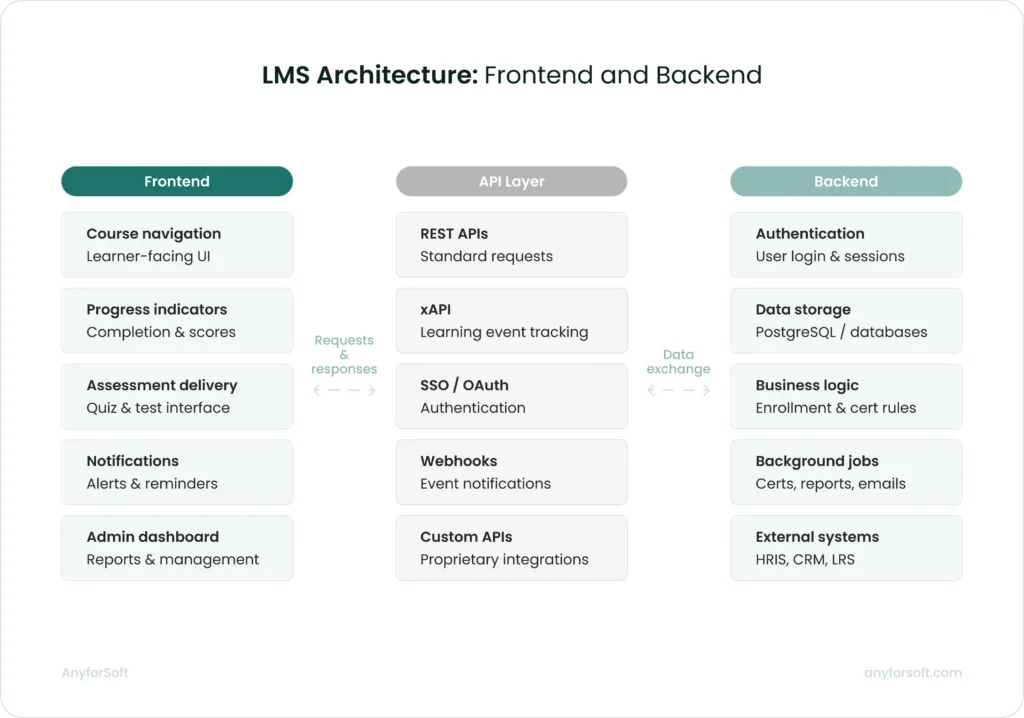
The frontend is what learners and administrators interact with directly. It handles course navigation, progress indicators, assessment delivery, and notification display.
The backend manages everything learners never see: authentication, data storage, business logic, and integrations with external systems.
These two layers communicate through APIs. A decoupled architecture, where the frontend and backend operate independently, makes it easier to update one without affecting the other. Most modern builds use this approach for that reason.
The boundary between the foundation and custom layers matters in practice.
When AnyforSoft built a digital testing solution for a US-based tutoring company,Open edX provided the core, but the required assessment logic fell outside its native capabilities.
To handle adaptive difficulty and grading, the team added custom Python layers on the backend. React covered the frontend. Salesforce integration required a separate data exchange layer built entirely outside the Open edX module structure.
Key frontend considerations include:
- Framework choice: React and Vue.js dominate; the decision affects developer availability and long-term maintainability
- Mobile responsiveness: layouts must adapt to screen size without a separate mobile codebase
- Performance budget: page load targets should be defined before design begins, not after
- Accessibility: WCAG 2.1 AA compliance should be scoped into the frontend build from the start
Key backend considerations are:
- Authentication: SSO support is frequently a non-negotiable requirement for enterprise deployments
- API design: RESTful APIs; xAPI support is required for detailed learning event tracking
- Background jobs: certificate generation and notification dispatch should run asynchronously to avoid blocking user-facing requests
- Caching: session data and frequently accessed content should be cached at the application layer
Database design
Applications for learning generate two distinct categories of data.
Structured data such as enrollment records and certification expiry dates maps naturally to relational databases.
PostgreSQL is the most common choice for this layer. It handles complex reporting queries and maintains referential integrity across linked records.
Event data is a separate task. Every learner action generates a record: a video paused mid-lesson, or a question answered and then revisited.
At scale, storing and querying this data in a relational database creates performance bottlenecks.
Purpose-built solutions for this layer include:
- xAPI-compatible learning record stores for standardized event capture
- Time-series databases for high-frequency interaction data
- Data warehouses for historical reporting and cohort analysis
- Read replicas for reporting queries, keeping them off the primary database
Schema design decisions made early are expensive to reverse. How courses relate to users and how completion states are stored both affect query performance and reporting accuracy as the architecture grows.
Scalability and performance planning
A learning system that performs well at 500 users may degrade noticeably at 5,000. Scalability planning addresses this before it becomes a production problem.
Horizontal scaling adds server instances to distribute load. Vertical scaling increases the capacity of existing servers. Most cloud-hosted deployments use horizontal scaling for application servers and vertical scaling for the database, at least initially.
Four performance considerations worth addressing during architecture planning:
- Load balancing: Distributing traffic across application servers prevents any single instance from becoming a bottleneck
- CDN delivery: Latency drops for geographically distributed learners when video and SCORM content is served through a CDN
- Database read replicas: Reporting queries should run against a replica to keep load off the primary database
- Caching strategy: At the application or CDN layer, user dashboards and course materials benefit from being cached
Peak load scenarios deserve specific attention. An exam period with 10,000 concurrent users submitting responses simultaneously places a different demand on the infrastructure than 10,000 users browsing course catalogs.
Load testing against realistic peak scenarios before launch is the only reliable way to verify the architecture holds.
AI integration layer
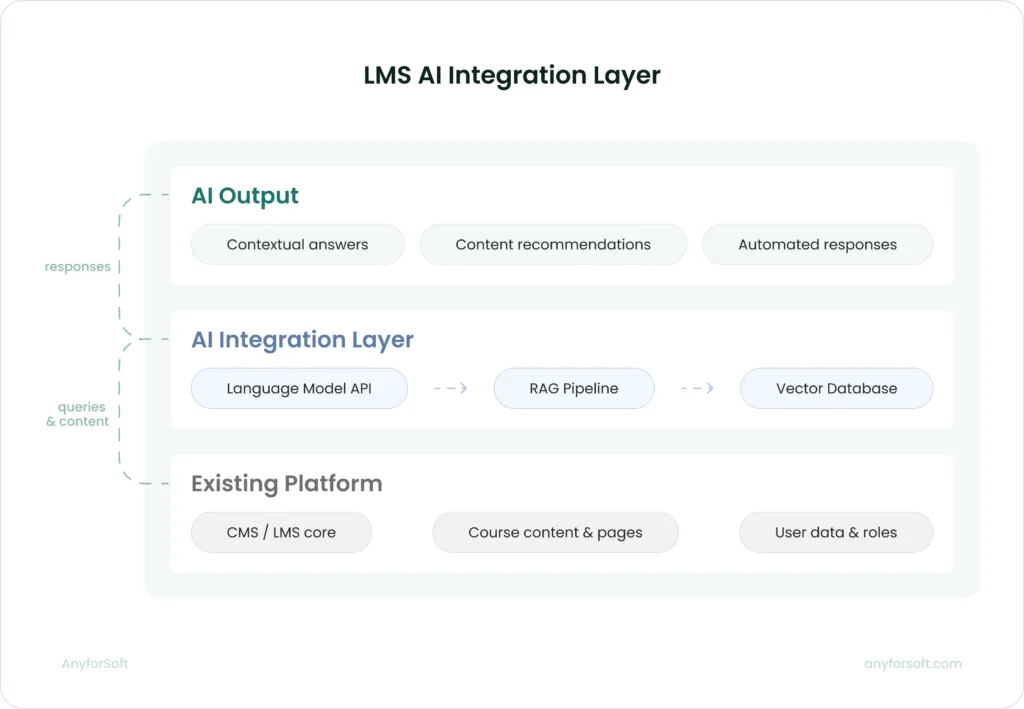
Adding AI capabilities to a learning solution does not require rebuilding it. The more practical approach is a dedicated integration layer that connects the existing infrastructure to AI services. The core architecture remains intact.
At its core, this layer connects a language model API to a vector database through a retrieval-augmented generation pipeline.
RAG grounds model responses in the organization’s own content. Without it, an AI assistant produces plausible output with no guaranteed connection to verified source material.
When AnyforSoft built an AI assistant for Wittenborg University of Applied Sciences, the existing Drupal 10 platform stayed untouched. A custom Drupal module connected the core system throught the OpenAI API. Milvus served as the vector database storing embeddings of official university content.
Every response the assistant generated was grounded in that content. When university pages updated, the knowledge base updated automatically.
Administrators controlled which content the assistant could access and configured its tone of voice through the same CMS they already used for the rest of the site.
Four architectural decisions in that build are worth noting for any team considering a similar addition:
- RAG over fine-tuning: Grounding responses in retrieved content keeps answers current without retraining the model each time content changes
- Native integration: A separate service was avoided entirely by building the AI module within the existing CMS
- Configurable access controls: Content scope and assistant behavior stayed within institutional boundaries because administrators controlled both
- Automatic knowledge base updates: Tying the vector database to the CMS content pipeline removed the need for manual reindexing
Compliance and Security Standards
Security and compliance requirements shape architecture early in the design process. Ignoring them means retrofitting them later, at higher cost and greater risk.
SCORM, xAPI (Tin Can), AICC compliance
SCORM packages course content into a portable format any compliant application can import and run. Two versions are active: SCORM 1.2 and SCORM 2004. Most platforms support both, though SCORM 1.2 remains more common due to its simpler implementation.
xAPI extends the tracking scope considerably. Rather than recording only completion and score, it captures granular learning events across any context — a simulation run outside the environment, a document opened on a mobile device. That data flows to a learning record store.
AICC appears mostly in enterprise environments with legacy content libraries. New builds rarely implement it from scratch; the typical scenario is supporting it during migration from an older system.
GDPR and data privacy
For solutions serving EU users, GDPR compliance is a legal requirement governing how personal data is collected and deleted. It covers learner profiles, assessment records, and behavioral tracking data generated through xAPI.
Four requirements with direct architectural implications:
- Data minimization: collect only what delivering and tracking learning requires; behavioral analytics beyond that need explicit justification
- Right to erasure: learner records must be deletable on request without breaking database referential integrity
- Consent management: data processing agreements should surface at the point of collection
- Data residency: personal data from EU-based organizations must remain within EU borders unless specific transfer mechanisms are in place
Outside the EU, other frameworks apply.
US student data falls under FERPA; healthcare training platforms must account for HIPAA. Identifying applicable regulations before architecture decisions are finalized prevents redesign later.
Role-based access and authentication
Role-based access control defines what each user type can see and do. Learners reach their assigned courses and progress data; administrators carry broader rights over users and content. Defining these boundaries prevents accidental data exposure at scale.
Authentication is where security failures most commonly start. Poorly implemented session management and missing multi-factor authentication both create entry points that are cheap to close while developing and expensive to close after a breach. SSO support through SAML 2.0 or OAuth 2.0 allows organizations to manage access through an existing identity provider rather than a separate credential store.
Tenant-level access isolation is an additional requirement for platforms serving multiple organizations. Each tenant’s data must be structurally separated. A configuration error in one portal should never reach records in another.
LMS Development Cost Breakdown
Costs vary more than most organizations expect before they start scoping. The range runs from $8,000 for a proof of concept to over $500,000 for a ground-up build.
Factors that affect the budget
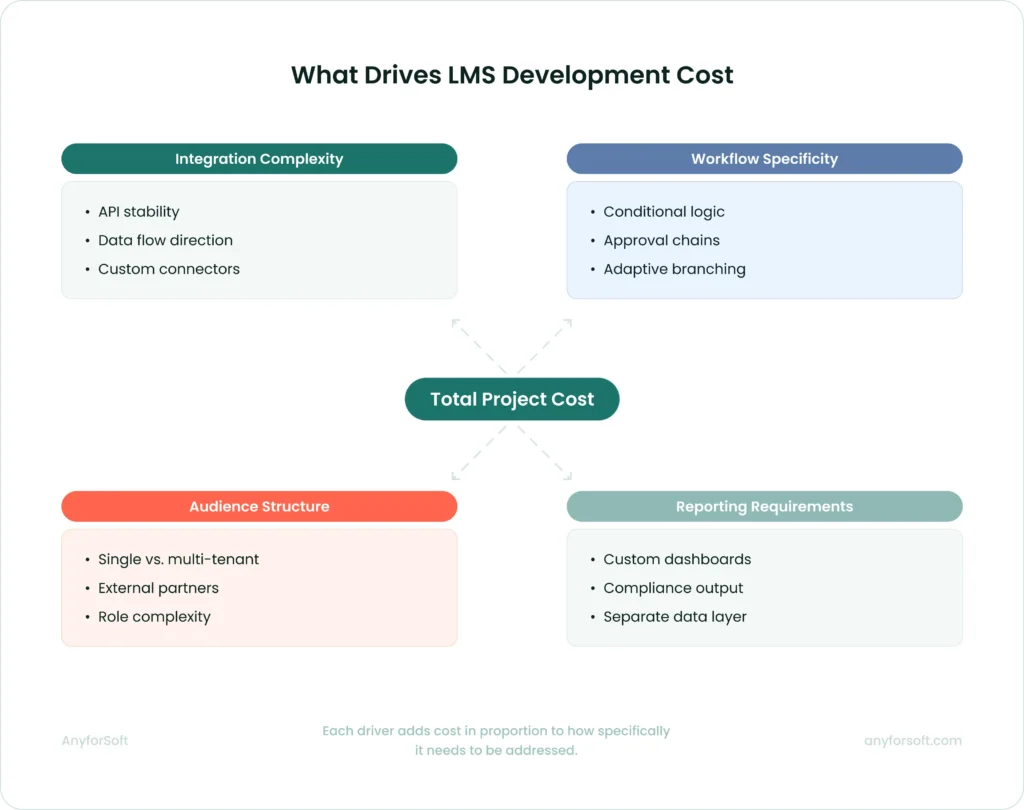
The primary cost driver is intervention depth: how far the project moves away from what a tool already does.
A feature that exists natively costs little to configure. The same feature rebuilt with custom logic and cross-system dependencies becomes a multi-week engineering task. The feature label stays the same; the actual scope does not.
Four factors consistently shape where a project lands within its budget range:
- Integration complexity: whether external systems have stable APIs, whether data moves in one direction or both, and how much transformation logic each connection requires
- Workflow specificity: conditional logic, multi-stage approvals, and adaptive branching all require custom development that standard configurations cannot cover
- Audience structure: serving internal employees and external partners requires multi-tenant architecture, separate content spaces, and a permissions layer that a single-audience deployment does not
- Reporting requirements: executive dashboards and compliance-specific output formats require a separate data infrastructure built outside the native reporting tools
Integrations deserve particular attention. Listed as line items in early budgets, they are consistently underestimated.
A straightforward SSO connection with a well-documented provider takes hours. A bidirectional sync with a legacy HRIS can take weeks.
That gap catches organizations off guard when early estimates treat every integration as equivalent.
Estimated costs by project scope
LMS development costs follow a logic tied to how much the system needs to move away from what the platform already does. Five scope levels cover the realistic range:
| Scope | Typical cost | Choose when |
| Proof of concept | $8,000 – $25,000 | Feasibility is unclear on a specific requirement |
| Platform-based MVP | $25,000 – $80,000 | Requirements are defined; first production version needed |
| Moderate customization | $80,000 – $150,000 | A solution needs adapting to business workflows |
| Advanced customization | $150,000 – $300,000 | Multi-tenant, AI features, or complex logic required |
| Full custom build | $300,000 – $500,000+ | LMS is the product, or no existing tool fits |
Most organizations describing their need as “a custom LMS” land in the moderate customization range.
Ground-up development makes sense in three specific circumstances: when the learning system is itself a commercial product, when regulatory requirements rule out all existing tools, or when proprietary training logic would cost more to map onto a platform than to build from scratch.
Outside those cases, customization covers the full range of what most organizations need.
The jump from moderate to advanced customization reflects a genuine expansion of engineering scope.
More custom code means more testing, greater architecture demands, and a higher ongoing maintenance burden after launch.
Two projects with identical feature lists can carry budgets that differ by a factor of two to four, depending on how those features need to be built and maintained.
How to optimize development spend
Scope discipline at the planning stage has more leverage on the final budget than any decision made during development. Several patterns consistently push costs beyond initial estimates.
Starting with a proof of concept is the lowest-risk path when feasibility is genuinely uncertain. A POC answers one specific technical question before the full build is planned around an assumption that may not hold. It is not a compressed version of the final system; organizations that treat it as one produce neither a valid test nor a useful build.
For MVP builds specifically, the difference between a $30,000 project and a $75,000 one is rarely technical complexity. It is almost always scope discipline. Five questions worth answering before development begins:
- Which workflows are genuinely unique to the organization, and which does a standard platform already cover?
- Which integrations must be live at launch, and which can follow in a later phase?
- Which requirements are business-critical and which are nice to have?
- Is the project solving today’s operational problem, or designing for a future state that does not yet exist?
- Does the organization need a product-level learning management system or a well-fitted internal system?
Discovery is the most effective cost control available at the planning stage. A week of structured requirement clarification before development begins prevents significantly more than a week of rework later.
Poorly scoped projects produce systems that do not fit the business, requiring further investment to correct after launch.
How Long Does It Take to Create an LMS?
Timelines follow the same logic as costs: complexity and distance from standard solution behavior are what drive them.
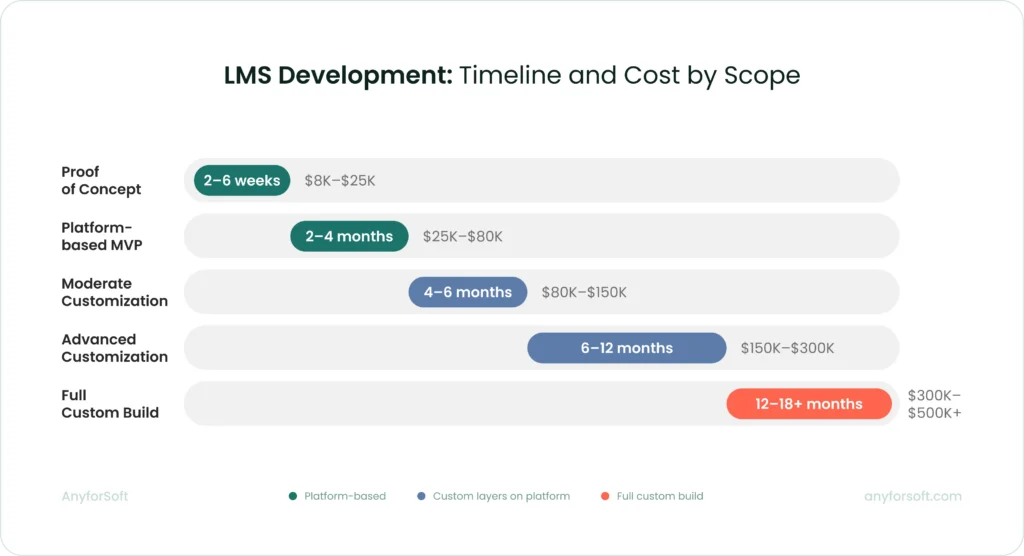
Typical timelines by platform complexity
Scope determines timeline more reliably than any other variable. A proof of concept validating one specific requirement typically takes two to six weeks. MVPs run two to four months, assuming requirements are defined before development begins.
Moderate customization projects, such as branded portals, adjusted workflows, two or three integrations, typically take four to six months from discovery to launch. Advanced customization, covering multi-tenant architecture, AI features, or complex certification logic, runs six to twelve months. Full custom builds from scratch rarely finish in under a year.
Two factors extend timelines beyond initial estimates more than any others.
The first is integration work with systems that have limited API documentation; the discovery phase alone can add weeks.
The second is requirement changes mid-development. Decisions deferred to the build phase cost three to four times more in time than decisions made during scoping.
| Scope | Typical timeline |
| Proof of concept | 2 – 6 weeks |
| Platform-based MVP | 2 – 4 months |
| Moderate customization | 4 – 6 months |
| Advanced customization | 6 – 12 months |
| Full custom build | 12 months+ |
MVP-first approach to accelerate time-to-market
The MVP-first approach releases the minimum feature set needed to deliver real operational value, then builds on it using data from actual usage. It compresses time-to-market by deferring everything the organization does not need on day one.
The practical effect is significant. A full-scope build planned upfront takes six to twelve months before any user touches the system. An MVP covering core course delivery, basic reporting, and one or two critical integrations can go live in two to four months. Real usage data then drives what gets built next, rather than pre-launch assumptions about what users will need.
Scope discipline is what makes this approach work. An MVP that accumulates deferred features from internal stakeholder pressure stops being an MVP. Each addition extends the timeline and reduces the value of launching early. The question to ask for every proposed feature: does the system fail to deliver its core purpose without it on day one?
The MVP-first path suits most organizations building a platform-based learning management system for the first time. It lowers initial investment, accelerates time to value, and produces a more informed scope for the phases that follow.
Choosing the Right Development Partner
The development partner shapes the outcome as much as the platform choice does. A team with strong technical skills but limited understanding of the business requirements produces a system that performs well in testing and poorly in production. The criteria below help separate partners who can deliver from those who say they can.
Key criteria for vendor selection
Education technology experience matters more than general web development capability. LMS projects involve SCORM compliance, xAPI implementation, certification logic, and learner data privacy requirements that developers without domain experience routinely underestimate. Ask for specific examples of learning platforms the team has built, not just web applications with a training component.
Integration depth is worth examining closely. Most LMS projects require connections to HRIS platforms, CRM systems, or SSO providers. A partner who has built these integrations before knows where the edge cases appear and how to scope them accurately. Discovering those edge cases during development adds cost the original estimate never anticipated.
Long-term support capacity is a criterion many organizations evaluate too lightly during vendor selection. The partner who builds the system understands its architecture; handing it to a different team post-launch introduces risk and cost. Verify that the partner offers structured maintenance and is willing to commit to it contractually.
Questions to ask a software development company
Before signing a contract, direct questions produce more useful answers than reviewing portfolios alone:
- Which LMS platforms do you work with, and what is the most complex customization you have built on each? The answer reveals actual depth, not claimed familiarity.
- How do you scope integrations before development begins? Partners with integration experience conduct discovery before estimating. Those without it estimate by assumption.
- What does your discovery process look like, and how long does it take? A partner who compresses or skips discovery will miss requirements.
- How do you handle scope changes mid-development? Every project encounters them. The process for managing changes matters as much as the initial plan.
- Who owns the codebase after launch, and what does ongoing support cover? Ambiguity here creates disputes later.
A useful final check: ask whether you can speak with a current or recent client whose project resembles yours. A partner confident in their work answers yes without hesitation.
Red flags to watch out for
Some warning signs appear early in the vendor selection process. Others surface only after the contract is signed.
A partner who provides a fixed-price quote before conducting any discovery work is estimating without information. Fixed prices require a defined scope; scope cannot be defined without understanding requirements. When a quoted timeline seems faster than the complexity of the project warrants, the estimate is likely missing something.
Claiming equal familiarity with every platform and treating every integration as straightforward signals capability that may not have been tested under real project conditions. Experienced partners give ranges tied to specific conditions, not optimistic single figures.
Poor communication during the sales process predicts poor communication during development. Slow responses and vague answers to technical questions both signal how the relationship will function once the contract is signed and the leverage shifts.
Why Partner with AnyforSoft to Build Your LMS
AnyforSoft has built learning platforms for clients in education and professional services across the US and Europe. The work spans customization on Open edX and AI-powered features layered onto existing solutions.
Where AI features are needed, the team builds them on top of existing tools and workflows. Current systems stay intact; development costs stay contained.
Discovery happens before development begins. That single practice prevents the requirement gaps and mid-project pivots that push timelines and budgets beyond initial estimates. After launch, the same team that built the platform handles maintenance, keeping the system current as the organization’s training needs grow.
The process starts with understanding what the system needs to do on day one.
FAQs
What is the best tech stack for LMS development?
There is no single correct answer. Stack selection depends on team expertise and the integration requirements the product needs to meet.
For custom builds, Python with Django and Node.js are common backend choices. React and Vue.js dominate on the frontend. For organizations that need a starting point they can extend without building every module from scratch, Open edX provides a mature foundation. At most scales, PostgreSQL handles structured learner data and reporting queries well.
One principle holds across every project: the right stack is the one the development team knows deeply and can maintain after launch. Technical superiority on paper means little if the team building the system is unfamiliar with it.
How much does it cost to develop a custom LMS?
It depends on scope. Platform-based development with moderate customization typically runs $80,000 to $150,000. Advanced customization ranges from $150,000 to $300,000.
Earlier stages cost less. A proof of concept starts at $8,000; platform-based MVPs range from $25,000 to $80,000. At the other end of the range, full custom builds from scratch start at $300,000 and frequently exceed $500,000.
The primary cost driver is intervention depth: how far the project moves away from standard software behavior.
For a side-by-side view of what leading solutions charge, see the LMS pricing comparison.
Can I build an LMS on top of an existing platform like WordPress or Moodle?
Yes. For most organizations, it is also the more practical path. Development starts with a working foundation: course delivery and user authentication already exist. The development team builds only the adaptation layer the business requires. The development team builds only the adaptation layer the business requires.
Moodle and Open edX are the strongest foundations for serious LMS builds. Through its plugin architecture and active developer community, Moodle covers most corporate and academic training needs. For organizations needing strong assessment and certification capabilities at scale, Open edX is the stronger fit. Basic course delivery is possible on WordPress through plugins like LearnDash. Under enterprise-level requirements, though, it reaches its limits quickly.
How do I migrate content from an old LMS to a new one?
Content migration is consistently underestimated. Course files built for a previous platform may be in formats the new one does not support. Rarely do metadata structures built around the old tool logic transfer cleanly. Video content sometimes requires re-editing too.
The practical steps follow a consistent sequence. Start with a content audit: catalog every course, identify its format, and flag anything requiring conversion or rebuilding. SCORM and xAPI packages transfer most reliably between compliant platforms. Custom HTML content and proprietary formats require the most manual work. Plan for the migration to take longer than the initial estimate suggests.
What integrations should an LMS support out of the box?
The answer depends on the organization’s existing solutions. Four integration categories cover the requirements most organizations encounter:
- HRIS and HCM platforms: for automated user provisioning, role assignment, and offboarding when employees change positions or leave
- SSO providers: SAML 2.0 and OAuth 2.0 support allows learners to access the LMS through existing credentials without a separate login
- CRM systems: relevant for organizations running customer or partner training programs where learner data needs to flow between system components
- Video conferencing functionality: Zoom and Microsoft Teams integrations support instructor-led sessions scheduled and tracked within the LMS
Depending on the use case, content libraries and SIS platforms for academic deployments are common additions. Payment gateways apply specifically to commercial training programs.
Can AI replace human instructors in an LMS?
The short answer is no. What AI does well in a learning context is specific: surfacing relevant content based on learner behavior, generating quiz questions from existing material, answering common procedural questions, and flagging learners who are falling behind.
Instructors bring judgment. They respond to what a learner actually needs in a given moment, not what a pattern in historical data predicts. AI handles the repetitive and the routine. The more productive framing is division of labor: AI reduces the administrative load so instructors can focus on work that requires human involvement.
How long does it take to launch a fully functional LMS?
Timeline follows scope. Two to six weeks covers a proof of concept. For platform-based MVPs, the range is two to four months when requirements are defined upfront. Moderate customization projects typically take four to six months from discovery to launch. Six to twelve months is the realistic range for advanced customization. Full custom builds rarely finish in under a year.
Two factors extend timelines more than any others. Integration work with systems that have limited API documentation adds weeks even at early project stages. Requirement changes mid-development cost significantly more time than decisions made during scoping.
Define requirements before development begins. That single discipline protects the timeline more reliably than any other measure.