








If your company already runs a learning platform, the finish rate on it is probably high. In practice, working out how to improve employee training with an LMS means asking the system for one more thing. Alongside the list of who signed off, it should show who can now do the job.
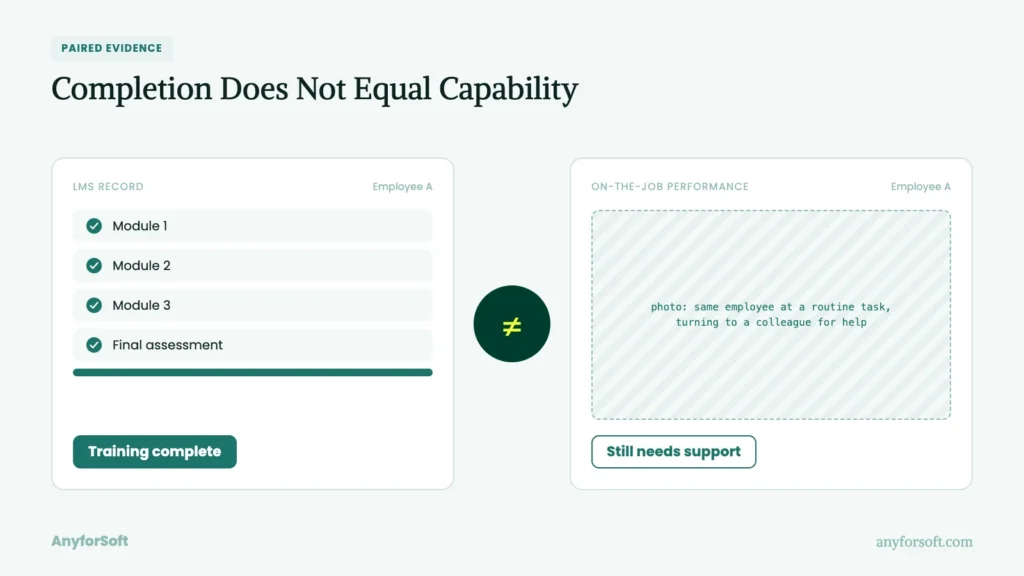
The two lists can differ widely. Picture a new hire who clicks through every module of employee onboarding in week one. Three weeks later, the same person still needs a colleague’s help with a routine task. On the dashboard, that hire counts as a success.
Regulated work raises the stakes. A company can see 94% of staff finish their compliance training and still fail an inspection. Auditors test what people do on the job. Sign-offs prove the material was opened. They are the first measurement worth having, and the easiest one to stop at.
Why Employee Training Needs a Learning Management System
A spreadsheet makes even that first measurement hard to trust. The practical side of how to improve employee training with an LMS begins with where the records live. In a shared file, attendance gets typed in by hand, sometimes days after the session. One structured system captures the same event at the moment it happens, under the person’s own login.
After the move, more gets written down in the first place. Shadowing shifts and other on-the-job training tend to skip the spreadsheet altogether, because logging them falls outside anyone’s job description. With a checklist inside the platform, the supervisor ticks off each observed task on a phone. The skill now has a date and a witness attached.
One-off sessions have a second weakness: they end. A workshop held in March says little about what its attendees know in September.
Once the schedule lives in one place, a refresher gets booked the day the first session closes. A single event becomes continuous learning, and each repeat adds a result for the same person. Over a year, those results show whether a skill is holding or fading.
Why Traditional Employee Training Falls Short Without an LMS
Without those results, problems surface late and in expensive places. Two new hires in the same role get different first weeks, depending on who had time to show them around. A certification lapses because the renewal date lived in one person’s calendar. Once a company has employee training software in place, the dates get easier to manage. A standard report still stops at the sign-off. What that summary leaves out is the input a skills gap analysis needs: which tasks staff keep getting wrong.
Administrators pay a second cost that no budget line shows. Behind the scenes, someone has to chase signatures and mark answer sheets. One AnyforSoft project for a US tutoring company began with tests graded and proctored by hand. That work took roughly 80% of a staffer’s time. Each of those hours draws on L&D funds without teaching anybody a skill. For a finance lead, reduced training costs start with the manual workload. A further saving comes from programs no longer repeated because the first round taught too little. Both savings depend on LMS analytics that look beneath the sign-off.
Ways an LMS Improves Employee Training
Looking beneath the sign-off is one of five jobs a learning tool can take on. Together they decide whether an LMS for corporate training earns its license fee. The common yardstick is workforce performance, since each job is judged by the capability it leaves behind.
Centralizing and Standardizing Training Content
Judging staff by one standard requires teaching them from one source. The central library does that job: a lesson exists once, and assignments point to the single copy. When a safety procedure changes, the owner edits one file, and the new version reaches all enrolled staff at once. Without the single copy, old slide decks keep circulating by email, and two branches end up following different rules.
Formats hang off the same record too. When a company sets up an LMS for employee training, a live workshop and a video lesson can share one program page. That arrangement is what makes blended learning workable: the instructor sees classroom attendance and online results in one place. Tags for role and topic let a supervisor in any branch find the current version without asking L&D. The same tags also tell the platform who should receive which material.
Personalizing Learning Paths by Role and Skill Gap
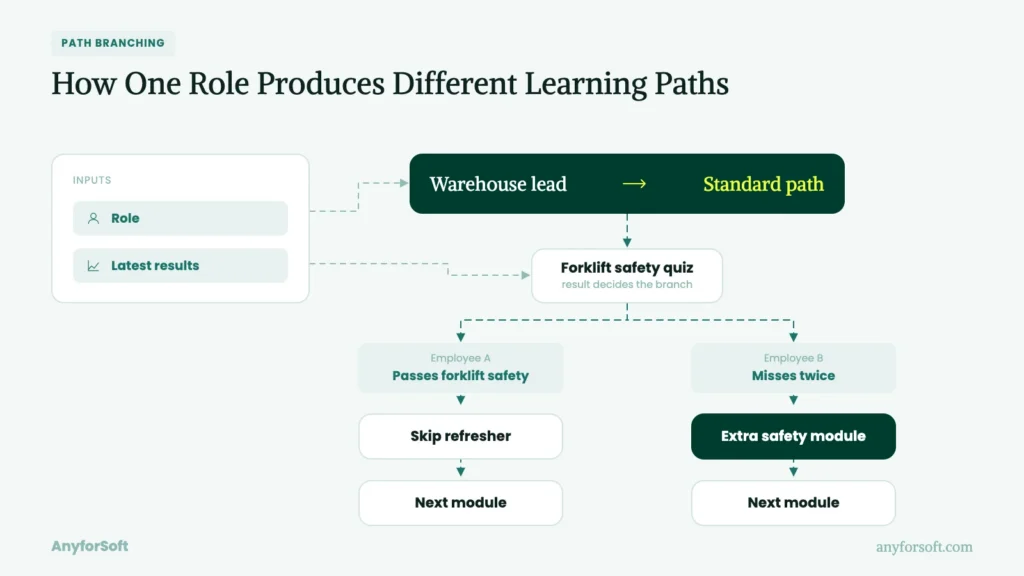
From the participant’s side, the result is a short list. A new warehouse lead opens the dashboard and sees six modules, all tied to the role. Behind that list, two inputs do the sorting: the job title held in the HR record, and the person’s latest results.
Role sets the baseline. The solution assigns the standard path for the position, so two professionals hired into one job start from the same place. After the first check, results trim or extend the path. Someone who passes the forklift safety quiz on the first attempt skips the refresher. A colleague who misses the same questions twice gets an extra module on those points.
Inside the company, the same logic serves specialists changing jobs. When the goal is upskilling and reskilling, the system compares the target role’s path with what the person has already passed. Only the difference gets assigned. A move from sales to account management then means studying the missing pieces only. Each assignment carries a due date, and some of those dates are set by a regulator.
Automating Compliance and Certification Tracking
Regulatory dates fail in a predictable way: they live in one person’s head. A renewal that depends on one coordinator’s calendar is safe only while that coordinator is at work. Once the expiry date lives in the platform as a rule, reminders go out on schedule without anyone sending them. For example, a rule can enroll the holder 90 days before a certificate lapses and alert the supervisor at 30.
On inspection day, a second benefit appears. Each enrollment and sign-off is logged with a timestamp, so the proof of who was certified on which date already exists. With that log, an auditor’s request becomes an export, where it used to be a round of collecting signatures. The log proves the certificate is current. Whether its holder works safely is a separate measurement.
Making Training Measurable With Analytics and Reporting
A sign-off record and a capability record answer different questions. On screen, both arrive as percentages from the same software, which is why they get confused. What course completion tracking shows is attendance: who reached the last screen, and when. About the wrong answers given along the way, it stays silent.
A department that reads the first as the second looks ready on paper while errors continue on the job. Much of how to improve employee training with an LMS rests on keeping the two apart. The finish figure is the floor of measurement, and the useful part is built on top of it.
On top of that floor, the useful part comes from details the platform already stores. Each quiz attempt in an employee training LMS leaves a trail: the questions missed and the time spent on each. Grouped by module, those trails show where a whole team stumbles on the same step.
Different readers need different slices of those results. A tool with role-based dashboards handles the slicing. For one crew, the supervisor sees the weak spots. The L&D lead sees which module produces repeat failures across the company. Neither view needs an analyst, and both answer what the finish figure could not.
Increasing Engagement With Gamification and Microlearning
The answers in a dashboard depend on staff showing up.
For shift workers, length is the first barrier. A 40-minute module competes with a shift, and the shift wins. Cut into five-minute lessons, the same material fits a break or a bus ride. Units delivered as mobile-first training also reach floor staff who have no desk.
Beyond length, visible progress does the second part of the work. Points for a streak of daily lessons, or a badge for clearing a path, give a small reason to come back.
Here, usage is a means to an end. More sessions produce more attempts, and more attempts sharpen the picture of who can do the job. A leaderboard that raises logins and leaves error rates unchanged has measured enthusiasm and little else.
How to Improve Employee Training With LMS: Step-by-Step
Measuring the right thing takes a fixed order of work. The task breaks into seven steps, each leaving a document or a working setting inside the employee training software. Across the seven, later stages reuse what earlier ones produce.
Step 1: Audit Current Training Content and Gaps
The sequence starts with an inventory of what already exists. Before anything is rebuilt, the L&D lead lists each module with its owner and its last update. Alongside the inventory, a second list records where the material falls short:
- roles with no assigned path
- lessons whose last edit predates the procedure they teach
- tasks where supervisors keep correcting the same mistake
- mandatory topics covered by a slide deck with no check at the end
Consider reading both lists before any plan to improve your learning management system, since they show what to fix first. If a replacement is on the table, the same documents become the LMS vendor selection criteria, written before the first demo. Either way, Step 1 ends with two documents: an inventory of what exists and a dated list of what is missing.
Step 2: Define Measurable Training Outcomes
With the missing pieces on paper, the second step decides what a fixed problem will look like. An outcome here means a figure with two values attached: today’s baseline and a dated target.
First on the list comes the training completion rate, since later checks only make sense once a module is finished. The rest of the set measures what changes on the job afterward:
- errors per task in the month after a program ends
- weeks until a new hire performs without supervision
- repeat failures on the same module
- supervisor sign-off on tasks observed on the floor
Baselines are recorded now, because a target without a starting value cannot show movement. The step ends with a one-page outcome set, each line carrying today’s value and a dated target.
Step 3: Map Learning Paths to Roles and Skill Gaps
Once the outcomes exist, each one needs a route that leads to it. Mapping puts two columns side by side: the positions in the company, and the modules that serve each one’s targets. Existing material from the inventory fills some cells, and the shortfall list shows which cells stay empty. Consider marking each empty cell as build or buy before going further. Supervisors then review the draft, since they know which tasks a job involves weekly and which once a year. The finished map shows, role by role, which path leads to which outcome and what is still unmade.
Step 4: Migrate and Structure Content Inside the LMS
With the map agreed, the material moves into place. For a company that already licenses a platform, “migrate” means moving files from shared folders into it. A replacement is worth discussing only if the current one cannot hold the structure the map calls for.
Before upload, each file is checked for SCORM/xAPI compliance, the packaging standards that let a module send back results. Files that fail the check play as plain video and record only that they were opened. Tagging then turns a folder of uploads into an LMS for employee training: each item gets a position tag and a review date. To keep uploads and tests in order, follow an LMS implementation checklist.
The step ends with a tagged library in which each unit on the map can be found and assigned.
Step 5: Automate Enrollment, Reminders, and Compliance Tracking
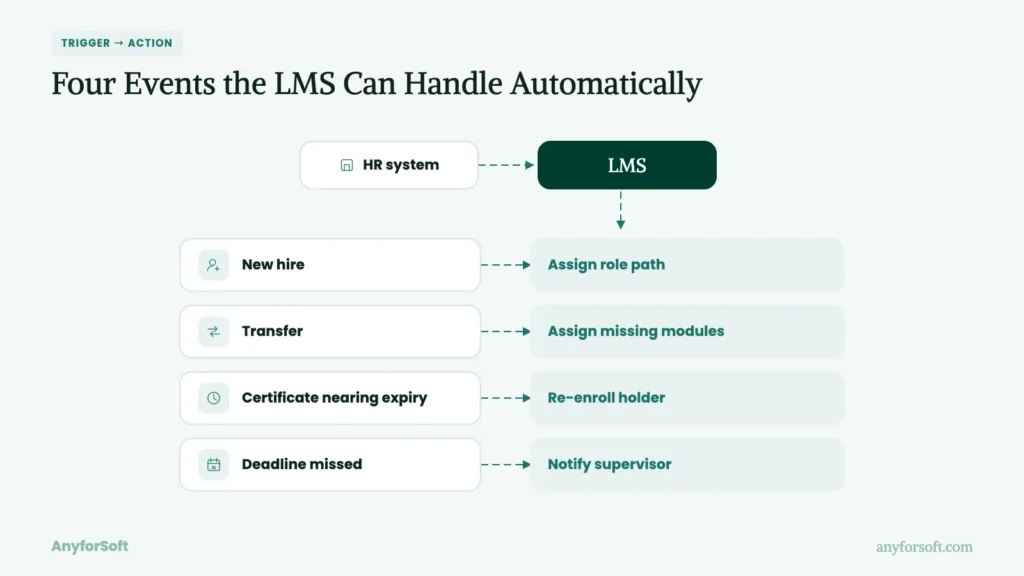
As headcount grows, assigning by hand stops working. The fifth step hands that job to rules, and rules need one input: who holds which position. That input comes from an LMS integration with HR systems, so a new hire or a transfer appears without retyping.
An actionable rule set covers four events:
- a new hire joins and receives the path for the position
- a transfer triggers only the modules the new position adds
- a certificate nears expiry and its holder is re-enrolled
- a deadline passes and the supervisor is notified
The step ends with a documented rule set and a reminder schedule that run without a person behind them.
Step 6: Add Gamification and Microlearning for Engagement
Rules can enroll people, but they cannot make anyone come back. Consider starting with a single mechanic, such as a weekly streak or a five-question recap sent three days after a module. Spaced recaps serve knowledge retention. A 2021 review in Psychological Bulletin of classroom research found that quizzing raised achievement.
Before launch, the L&D lead writes down which outcome the mechanic should move, and when it will be checked. If logins rise and that outcome stays flat, the feature gets replaced. The step ends with one live mechanic and a dated plan for judging it.
Step 7: Review Analytics and Iterate Quarterly
Judging happens on a calendar. Once a quarter, the L&D lead sets the outcomes beside current figures and marks each line moved or flat.
In that meeting, the most useful part covers what the finish rates failed to explain. One example is a module with full sign-off and unchanged errors. Each unexplained line becomes an item in a revision backlog, with an owner and a date.
Repeating that loop is the working answer to how to improve employee training with an LMS. Evidence aims at each quarter’s revisions. With cost set against outcomes that moved, the same review supports a defensible training ROI. Step 7 ends with a dated review and a backlog, and the next quarter starts from both.
AI-Powered Employee Training in Your LMS
A quarterly review looks backward.AI features inside a learning platform read the same records between reviews, while results can still be changed.
In this setting, AI means models that read attempt histories and suggest a next action for a person to approve.
AI-Personalized Learning Paths for Employees
The first kind of suggestion concerns what a person studies next. Under a fixed rule, all holders of a position get the same path. A model running adaptive learning adjusts that path per person, using signals a rule ignores. Response time is one such signal: slow, correct answers point to shaky recall, so the model schedules a repeat. After a run of fast, correct answers, the next unit is skipped.
Control stays with the administrator through limits. Mandatory modules stay fixed, and the model reorders only the optional ones. Because each adjustment is logged, a supervisor can see why two colleagues received different paths.
AI-Assisted Course Creation and Content Updates
Paths need material, and producing it is where L&D hours go.
AI assistance covers four tasks:
- drafting quiz questions from an approved policy document
- turning a recorded session into a summary and a transcript
- flagging lessons that cite a procedure changed since their last edit
- translating a finished module for another site
On the reader’s side, the same models supply intelligent content recommendations, suggesting a related unit after a missed question.
A subject expert reviews each draft before release, since a fluent paragraph can still state the wrong torque value. Together, these uses shorten the route from a changed procedure to a corrected lesson, with the expert’s review as the fixed step.
Predicting At-Risk Learners Before Training Fails
A corrected lesson helps only the cohort still working through the program.
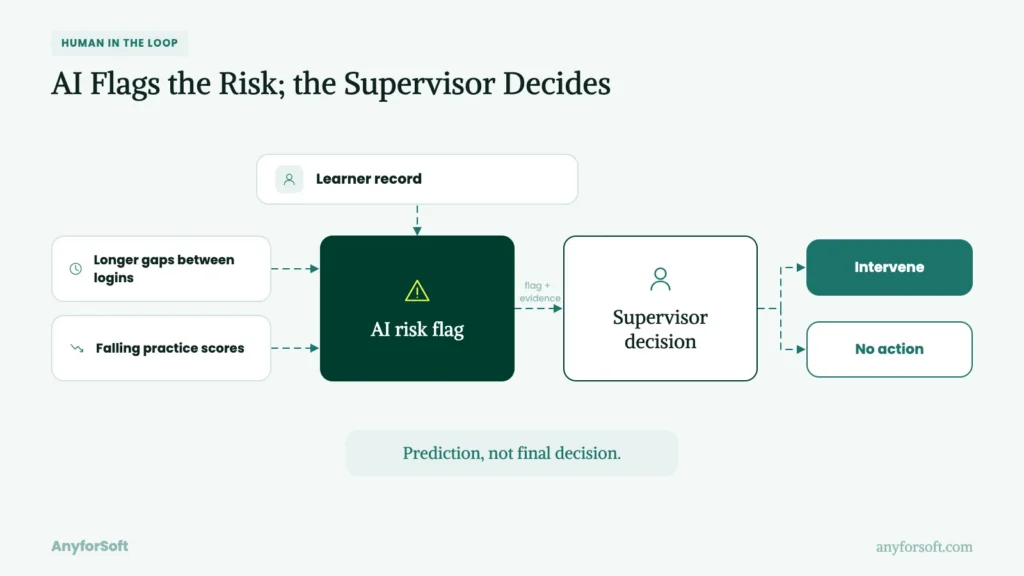
A risk model watches for the pattern that precedes a failed exam or a dropout. Typical inputs are lengthening gaps between logins and falling scores on practice checks. When the pattern appears, the model flags the participant to the supervisor, with the evidence attached.
Timing decides what a flag is worth. Three weeks before a deadline, it leaves room for a conversation or a different format. The day before, it leaves room for a retake only. Flags are predictions, and some will be wrong, so the decision stays with the team lead.
Team and Process Best Practices
Habits decide more of a rollout’s result than features do.
Setting up an employee training management system is the part with a manual. The rest of how to improve employee training with an LMS comes down to habits that arrive with none.
Get Manager Buy-In Before Rollout
The first habit belongs to supervisors: allowing study time during paid hours. Without that time, assignments get done late at night or skipped, and the platform looks unused.
Team leads agree faster when the case is made in their terms. Shown the shortfall list for their own unit, a department head can see the hours lost to repeated mistakes. From there, productivity gains become an argument about their numbers, and study time stops looking like a cost.
A second argument concerns who stays. A visible path to the next position gives a reason to remain, which makes employee retention part of the pitch.
In a corporate LMS, that path can be shown to the person and the lead on one screen. Both arguments land best before launch, while the schedule can still bend around them.
Set a Governance Model for Content Ownership
A schedule also needs names next to the material. A governance model, in this context, is a written answer to who may change what, and who checks it afterward. For each module, the model names four things:
- an owner who answers for accuracy
- a reviewer who approves edits
- a review date
- a retirement rule for outdated lessons
The platform enforces those names through role-based access: owners can edit their own modules, and only reviewers can publish. Without the permissions, the model is a document anyone can ignore.
With them, each lesson has a name attached, and stale files have a date on which someone must act.
Build a Feedback Loop With Employees
Owners learn what is stale from the lessons’ audience.
The loop begins with a two-question survey at the end of each module. Once a month, the owner reads the answers and picks one change to make. After the edit, a short note tells respondents what changed and why.
That last part carries the most weight with whoever answered. Comments continue where they visibly change the lesson, which is a plain form of employee engagement.
Silence after a survey teaches the opposite lesson quickly. Comments also reach places the figures cannot, such as a quiz question that punishes the correct floor practice.
Improving Learning Outcomes in Practice: AnyforSoft Case Studies
Measuring why a candidate fails is engineering work, and neither project here comes from an employer instructing its own workforce.
High Pass Education prepares outside professionals for certification exams, and a US tutoring company prepares students for standardized tests. Exam preparation and workforce certification rest on the same build: a record of why a person failed.
High Pass Education: A Custom Assessment Layer on Top of an Existing LMS
High Pass Education prepares mental health professionals for the certification exams required for private practice and supervisory roles. Its off-the-shelf learning management system had fixed test structures and returned one final score per attempt. That score said little about why a learner failed: a knowledge gap and poor time management looked identical. Between attempts, the system could offer no guidance, because it kept no comparison across them. An employer whose tool shows pass or fail has the same blind spot.
In 2024, an eight-person AnyforSoft team built a custom assessment layer on top of it. The layer has four parts:
- configurable tests, with time limits and passing thresholds set per learner
- speedrun formats that train accuracy under time pressure
- attempt comparison over time, separating knowledge gaps from time-management problems
- aggregated statistics for instructors, such as the most common response per question
The client reported its strongest first-quarter performance to date in 2025. Learner adoption rose, and programs can now grow without added instructional staff. For instructors, consolidated results replaced the manual review they used to do before consultations. Users sync between the tool and its connected LTI applications within 5–20 seconds, and accessibility follows the WCAG 2.1 standard. According to CEO and President Benjamin Caldwell, graduates credit the platform’s guidance as an advantage on exam day. Because the build is a layer, new test formats can be added without reworking what exists.
High Pass Education kept its solution throughout, and each new capability was added on top.
Digital Testing Platform: From Paper Grading to Automated Assessment Workflows
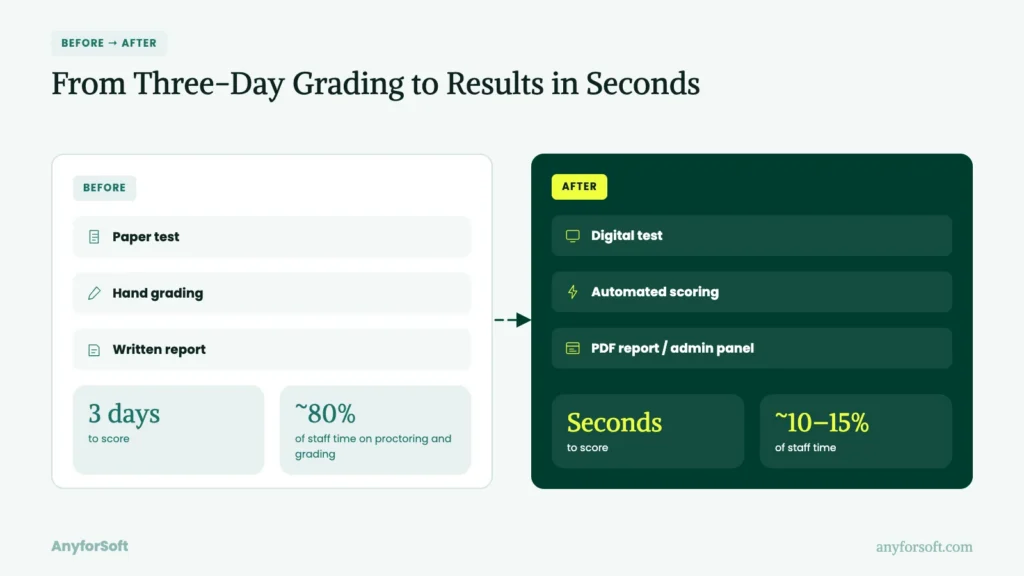
A US tutoring company, active since the 1980s, prepared students for the SAT on paper. For years, practice tests went out by mail and came back for hand grading, followed by a written report. The routine consumed staff time and left students unready for a digital exam. During discovery, Open edX alone proved insufficient for the job. A six-person AnyforSoft team kept it as the core and launched a digital testing platform around it in 2024. The custom build has six parts:
- three test modes, from a timed simulation of the real exam to self-paced practice
- difficulty that adapts by rule, easing after wrong answers and rising after correct ones
- a custom grading scheme whose formulas return a score range
- automatic PDF score reports showing time spent per question
- a proctor cabinet for supervising sessions and pausing one student or a group
- two-way Salesforce data exchange under predefined rules
Scoring that took three days now takes seconds. Proctoring and grading fell from roughly 80% of a staffer’s time to roughly 10–15%. Built to order, the exam simulation mirrors the real test more closely than an off-the-shelf tool allows. Most formerly manual tasks now run from one admin panel, which cut overhead. When certification tests and new-hire checks leave manual administration, the L&D staff who graded them get most of their week back.
Why Companies Trust AnyforSoft to Improve Employee Training With LMS
Both projects came from an EdTech partner with more than 15 years of engineering behind it. Companies bring AnyforSoft an LMS for corporate training when the solution they own has stopped answering their questions.
Full-Cycle LMS Development and Customization
A platform that falls short leaves two routes open. Where people know the current system and the records live there, extending it fits. As in the High Pass Education project, a layer covers the missing capability and the core stays untouched.
Building new through custom LMS development fits the opposite case: a core that blocks the tests or data exchange a company needs. Both routes cover the full cycle, from discovery through support after launch.
When comparing partners, ask any LMS development company which route it would recommend for your records, and why. Extension starts faster and inherits the core’s limits. That trade-off weighs most where the core itself is the obstacle.
AI-First Approach to Personalized Training
AI-first, at AnyforSoft, means each AI feature is tied to a task that staff or participants handle daily. The approach covers grading, tagging of material, search and individual guidance.
Replacing instructors is outside it: a human reviews the output and stays accountable for it.
For Wittenborg University of Applied Sciences, the team built a website assistant that answers only from official university pages. When those pages change, the answers change with them, and administrators set the tone and the permitted sources.
A second project, FilterSync, comes from property management and shows the same habit outside education. Its model checks tenant photos of air filters, and low-confidence results go to a human reviewer with a decision record. In both builds, the AI’s claims can be checked, which is the same test a finish rate should face.
Proven Track Record in Education and Corporate Learning Platforms
Since 2011, AnyforSoft has made education its core, after years of building products in other industries. The record since then includes:
- 150+ projects with a focus on education
- 140+ clients, among them Imperial College Business School and Delaware County Community College
- 10+ AI products built for education
- a 4.9 out of 5 rating on Clutch across 88 reviews
In scope, the projects range from university websites and student portals to a corporate e-learning platform for an L&D department.
A system serving separate business units or client organizations needs multi-tenant architecture, so each tenant sees only its own users and results.
Connections are routine in those projects, where LMS integration services have covered Moodle, Open edX, Canvas and Salesforce. The bench runs to more than 80 engineers, which keeps one coordinated group on a client’s whole roadmap.
Flexible Engagement Models for L&D Teams
L&D functions arrive at different stages, and the working arrangement follows the stage. For an organization unsure where to start, LMS consulting services come first, covering discovery and a scoped plan. A department with a roadmap and no engineers fits a dedicated development team. The same people stay on the project long enough to learn its context.
Once software is live, a support package or a few added engineers covers maintenance between releases.
One arrangement can lead into the next. Since 2023, Wittenborg University of Applied Sciences has worked with AnyforSoft, moving from a website rebuild to the AI assistant.
FAQs
1. What are the best ways to improve employee training with an LMS?
Start by defining outcomes that go past the finish rate. Map paths to positions, and let rules handle enrollment and reminders. Each quarter, review the figures and revise what they fail to explain. Those habits outweigh any single feature for a company working out how to improve employee training with an LMS.
2. How does an LMS improve employee training compared to traditional methods?
Classroom sessions and shared files leave little evidence behind. A platform logs each attempt under the person’s own login, at the moment it happens. Those records feed learning analytics and reporting, which show where a group stumbles and whether a skill holds over time. Traditional methods can teach well, yet they cannot show what stayed.
3. What LMS features actually improve employee training outcomes?
Attempt records carry the most weight, because they show why a person failed a test. Next in an LMS for employee training come position-specific paths and rule-driven reminders, which get the right material to people on time. Badges and streaks support usage, and they matter once the first two are in place.
4. How do you measure whether an LMS is improving employee training?
Record a baseline before launch, then take the same measure a quarter later. Useful candidates include errors per task and time-to-competency, the weeks until a new hire acts without supervision. A finish rate belongs in the set as the starting point. If sign-offs rise and errors stay flat, the material needs revising.
5. How long does it take to see results after implementing an LMS for training?
Administrative results come first: reminders and enrollment rules save hours in the first weeks. Skill gains take longer, since a baseline and a follow-up check need at least one quarter between them. A careful LMS implementation shortens both waits by loading clean records and tested modules from day one. Expect the first evidence-led revision after the second quarterly review.
6. Can a small business use an LMS to improve employee training?
Yes. A company with 30 staff needs one library with attempt records, and reminders for certificates. Hosted products cover those needs at a per-user price, with no engineering involved. For a firm that size, the best LMS for employee training is the one its supervisors will open weekly. Custom development makes sense later, if tests or data exchange outgrow the product.
7. How do you get employees to actually use the LMS for training?
Low usage usually traces back to time and relevance. Modules that ignore the position, or arrive with no paid hours attached, get skipped.
Fix those two causes first, then add short lessons that open on a phone. Staff return to an employee training LMS when a supervisor asks about results and when their comments lead to visible edits.
8. What's the difference between an LMS and a standalone employee training program?
A standalone program is a single track on one subject, with a start and an end. The platform is where programs of that kind are stored and measured. One track can run without it, but the results then live in a spreadsheet and fade afterward. A company gains from employee training software once it runs more than a handful of programs or needs proof for an auditor.
9. How can AI improve employee training within an LMS?
AI reads the records a platform already holds and proposes a next action. It can reorder optional modules and draft quiz questions for an expert to review. Another model watches for the pattern that predicts a failed exam and names who is showing it.
A further use is an AI tutoring assistant, which answers a participant’s question from approved material at the moment of confusion. In each case, a person approves the result.
10. What AI-powered LMS features help personalize employee training?
Two features do most of the job. The first adjusts order and pace from each person’s answers and response times. The second recommends a related unit after a missed question. Combined, they produce AI-powered personalized learning paths, where two colleagues in one position follow different routes to the same target. Mandatory modules stay fixed, so the differences apply to optional material only.