









Choosing an LMS pricing model is a strategic decision that shapes how training costs behave as an organization grows, restructures, or expands its learning programs.
While vendors set prices, the pricing model determines what triggers cost increases, how flexible adjustments are, and where financial risk accumulates over time.
In practice, LMS pricing rarely stays static. User participation changes, new features become necessary, and integrations expand as systems move deeper into daily operations. Pricing models translate these shifts into recurring costs, often in ways that are not obvious during initial evaluation.
This guide focuses on how LMS pricing models work and how they respond to real‑world usage. Rather than comparing vendors or listing plan prices, it examines the structures behind LMS pricing and the trade‑offs they create. Specifically, it addresses:
- How different LMS pricing models translate usage and features into cost
- How are enterprise lms pricing models structured?
- What pricing structures reveal about scalability and long‑term flexibility
- Where hidden costs typically emerge after implementation
- How organizations evaluate pricing models as training needs evolve
The goal is to help organizations select a pricing model that remains aligned as training scope, operational complexity, and budget constraints change over time.
Factors That Influence LMS Pricing
LMS pricing varies because platforms are built for different usage patterns and technical requirements.
In this guide, off‑the‑shelf LMS refers to prebuilt platforms like Moodle or TalentLMS that organizations configure and extend. Custom LMS refers to systems developed specifically for one organization. Both approaches rely on the same pricing factors, but those factors affect costs in different ways.
- Number of users. Off‑the‑shelf LMS platforms usually price access based on active users or usage limits. In custom LMS projects, user volume affects infrastructure capacity and performance planning rather than licensing fees.
- Deployment type. Standard LMS platforms often include cloud hosting in the subscription price. Custom LMS solutions require separate decisions about hosting, updates, and long‑term infrastructure management.
- Integrations. Off‑the‑shelf LMS platforms may charge extra for integrations beyond built‑in connectors. In custom LMS development, integrations are defined during scoping and directly affect development effort.
- Compliance and security requirements. Many standard LMS platforms offer compliance features as paid add‑ons. Custom LMS solutions must account for regulatory requirements during design, which increases development scope.
- Advanced features. Analytics, automation, and AI‑driven tools are often tiered in off‑the‑shelf LMS pricing. In custom LMS projects, these features are built explicitly and priced as part of development.
- Support and maintenance. Off‑the‑shelf LMS pricing typically includes basic support, with higher tiers offering expanded service levels. Custom LMS solutions require ongoing maintenance planning that affects long‑term costs.
LMS Pricing Factors: Off‑the‑Shelf vs. Custom
| Pricing factor | Off‑the‑shelf LMS | Custom LMS |
| Number of users | Pricing scales by active users or usage limits | No license fees; infrastructure scales with load |
| Deployment type | Cloud hosting included in subscription | Hosting and maintenance handled separately |
| Integrations | Limited to built‑in or paid connectors | Fully custom integrations built from scratch |
| Compliance and security | Available as add‑ons or higher tiers | Designed into the system from the start |
| Advanced features | Tiered or optional features | Built as part of development scope |
| Support and maintenance | Included support with paid upgrades | Ongoing maintenance planned separately |
Key Enterprise LMS pricing models
Off‑the‑shelf LMS platforms rely on predefined pricing structures that connect cost to usage or feature access. As learner numbers grow or functional needs change, these structures determine how expenses increase and where limits appear.
To understand how LMS costs are typically calculated, it helps to look at the pricing approaches most commonly used by standard platforms.
Per‑user pricing
When pricing is tied to user volume, subscription costs increase as more learners access the platform. This structure makes budgeting straightforward at smaller scales, but it becomes sensitive once usage grows.
Example: TalentLMS applies per‑user pricing across its standard plans. Its Starter plan costs about $119 per month for up to 40 users, while higher tiers reach several hundred dollars per month as user limits expand. Charges depend on how many learners are active during each billing period.
Because costs rise in direct proportion to usage, this model suits organizations with stable enrollment. Rapid growth or seasonal spikes often push teams into higher tiers sooner than expected.
Tiered feature plans
Under tiered pricing, platforms group functionality into predefined plans with fixed monthly or annual fees. Each tier unlocks a broader set of tools, regardless of how frequently they are used.
Example: LearnWorlds follows this structure. Entry‑level plans start at around $29 per month, while advanced tiers reach approximately $299 per month and include analytics, automation, and enterprise‑level controls. Access to features, not user count alone, determines the price.
Although upgrade paths are clear, this model can introduce abrupt cost increases. A single required feature may sit behind a higher tier, even when other bundled capabilities remain unused.
Hosted open‑source pricing
Although open‑source LMS software is free, hosted versions introduce subscription costs tied to infrastructure limits. Pricing reflects hosting capacity, maintenance, and support rather than licensing.
Example: MoodleCloud offers hosted Moodle plans starting at roughly $230 per year for up to 50 users. Larger plans exceed $2,000 per year as user and storage limits increase. Core functionality remains the same across plans, with differences driven by capacity.
This approach lowers entry barriers and simplifies setup. As requirements become more complex, however, organizations often outgrow hosted limits and move toward managed or self‑hosted deployments.
LMS Pricing models for Enterprises Comparison Table
| Pricing model | Typical cost range | Best suited for | Advantages | Limitations |
| Per‑user pricing | ~$10–$500+ per month, depending on user limits | Teams with stable or predictable learner numbers | Clear cost structure; easy to forecast at small scale; aligns cost with usage | Costs rise quickly as user counts grow; higher tiers often required for features |
| Tiered feature plans | ~$30–$300 per month | Organizations prioritizing specific features over user volume | Fixed monthly pricing; clear upgrade paths; feature access is predictable | Single required feature may force higher tier; unused features bundled |
| Hosted open‑source pricing | ~$230–$3,000+ per year | Small teams starting with open‑source LMS | Low entry cost; hosting and maintenance included; no licensing fees | Limited customization; capacity caps; scaling often requires migration |
| Balanced approach (hybrid) | Varies by customization scope | Organizations with mixed standard and custom needs | Controls licensing costs; targeted customization; avoids full rebuild | Requires technical planning; customization still adds cost |
LMS pricing models comparison for enterprises 2026: Key Market Trends
LMS pricing in 2026 no longer follows the clean subscription patterns many teams once expected. As platforms take on broader roles inside organizations, pricing reflects how systems are configured, expanded, and maintained over time, often in ways that only become visible after implementation begins.
The shift is subtle at first. Then it compounds.
Several trends now shape how LMS costs are set, and they explain why pricing comparisons often break down once real requirements enter the discussion.
Hybrid pricing models are becoming standard
Many LMS vendors now rely on more than one pricing mechanism at the same time. A base subscription usually covers core functionality, while additional charges appear as usage grows or scope widens. This layered approach has become common across both mid‑market and enterprise platforms.
In real deployments, the structure often looks simple at first. A fixed monthly or annual license sets the baseline. Once active users pass a certain threshold, costs increase. Quietly.
Advanced capabilities rarely sit inside the base license.
Analytics, integrations, automation tools, and extended reporting are commonly priced separately, even though they run on the same platform and share the same underlying infrastructure. Over time, these add‑ons can account for a significant share of total spend, especially when they are adopted incrementally rather than planned upfront.
This structure keeps entry pricing manageable but shifts cost control into daily operations. Organizations need to watch not just license fees, but how usage patterns quietly change overall cost.
AI‑driven features are reshaping LMS cost structures
Artificial intelligence has moved into the core expectations for many LMS platforms. Adaptive learning paths, predictive insights, and automated content recommendations now appear as premium features rather than optional extras.
These capabilities are rarely part of entry‑level plans. When added, AI modules typically raise total LMS costs by 15–25%, depending on how deeply they are woven into learning workflows and how broadly they are applied across user groups.
Predictability becomes harder.
As AI features spread across platform roadmaps, organizations face a practical trade‑off. Advanced functionality brings value, but it also makes long‑term licensing costs less stable, particularly when an AI-based LMS pricing model depends on usage intensity rather than fixed access.
LMS pricing models for enterprises reflects operational complexity
For large organizations, LMS pricing in 2026 depends less on user volume and more on deployment scope. Multi‑region rollouts introduce compliance requirements that affect configuration, governance, and ongoing oversight.
Several factors consistently drive enterprise pricing:
- Regulatory compliance, GDPR, HIPAA, SOC 2, regional data residency
- System integrations, HRIS, CRM, payroll, business intelligence
- Advanced reporting, audit trails, custom dashboards, role‑based analytics
Each of these adds implementation effort.
They also add long‑term maintenance work.
Costs rise because the platform supports more demanding operational needs, not because more users are added.
As a result, enterprise LMS pricing commonly falls between $50,000 and $250,000 per year. The final figure depends far more on integration depth and compliance scope than on license volume alone.
Open‑source LMS costs extend beyond licensing
Open‑source LMS platforms continue to appeal to organizations that want flexibility and control. While the software itself carries no licensing fee, the surrounding infrastructure shapes total cost.
Cloud hosting, custom development, ongoing maintenance, and security updates all add up over time. These expenses often stay hidden during early planning, when attention is focused on avoiding license fees.
Technical debt builds.
Updates, compatibility issues, and performance tuning require steady attention from internal teams or external vendors, especially as platforms evolve and usage grows.
What Hidden LMS Costs You Can Expect
Sticker prices rarely tell the full story when comparing LMS platforms. Licensing fees usually cover access to the system, but many of the most expensive elements appear later, once implementation begins and real usage patterns emerge.
Hidden costs tend to surface gradually. Some are visible early. Others only become clear after the platform is live and supporting daily operations.
The Cost Layers Behind LMS Pricing
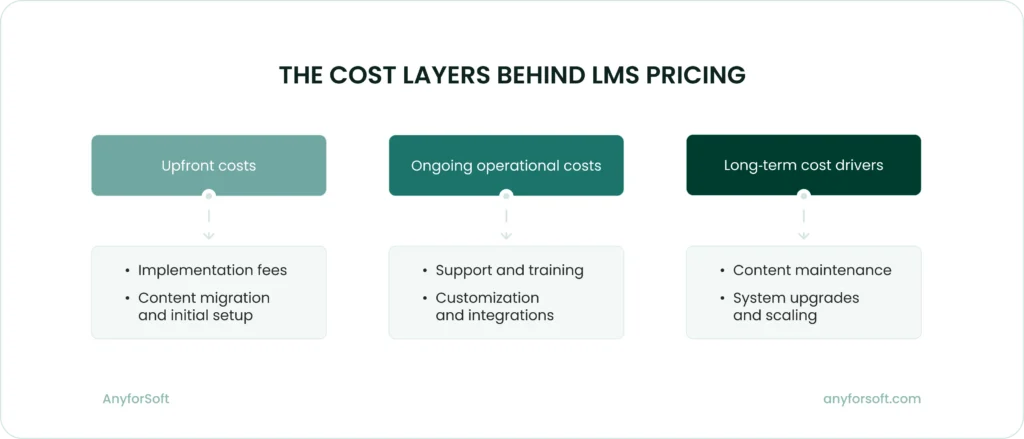
Implementation fees
Implementation costs appear before the first learner accesses the system. The reason is that configuration and early integrations require coordinated effort from both vendor and internal teams. That work is rarely covered by base pricing.
Even platforms positioned as quick to deploy involve data mapping, role setup, environment configuration, and access control definition. Each step introduces decisions that extend timelines and increase cost.
Although implementation fees are usually paid once, their effects persist. Inefficient setup choices can embed friction into workflows long after launch.
How to stay in control:
Define configuration boundaries early and document decisions before work begins. Limiting scope changes during setup helps control timelines and prevents rework.
Support and training
Most LMS subscriptions include basic support, while faster response times, dedicated account management, and uptime guarantees are typically excluded.
Premium support plans raise service‑level commitments and provide access to specialized teams. For organizations operating across regions or time zones, these upgrades can materially increase annual costs.
Training introduces additional demands that extend beyond vendor support. Administrator onboarding and internal documentation require sustained coordination.
When these areas are underfunded, internal teams absorb the workload. The cost does not appear on invoices, but it surfaces through slower response times and reduced productivity.
How to stay in control:
Assign internal ownership early and standardize support workflows. Clear escalation paths and shared documentation lower reliance on premium services.
Content migration and creation
Migrating existing courses into a new LMS rarely involves a direct transfer. File formats change, metadata breaks, interactive elements require rebuilding, and media assets need re‑encoding.
Legacy content frequently needs cleanup before migration, whether handled internally or outsourced. That effort consumes time and resources before new training can begin.
New platforms also create pressure to produce updated materials. Branding changes, revised compliance content, and new learning paths add ongoing production work.
Content responsibilities continue after launch. Over time, maintenance demands can approach or exceed licensing costs.
How to stay in control:
Reduce the factor impact by auditing content before migration and retiring low‑value materials. Prioritizing high‑use courses limits rework and shortens transition timelines.
Customization and integrations
Customization often begins with limited adjustments, such as a workflow change or a reporting modification.
As these changes accumulate, development effort increases and future maintenance becomes more complex. Each customization adds another dependency that must be managed.
Highly tailored systems are harder to upgrade without additional cost, particularly when platform updates affect custom components.
How to stay in control:
Favor configuration over custom development and document integration logic. Clear standards reduce maintenance effort during upgrades.
Reduced training time
A well‑configured LMS can shorten onboarding and recurring training cycles by improving content discovery and progress tracking.
Time savings compound across teams as fewer hours are spent navigating training systems. More time becomes available for operational work.
The impact is measurable, but it requires planning to capture and evaluate.
How to stay in control:
Maximize savings by aligning learning paths with job roles and tracking completion time. Consistent measurement makes efficiency gains visible.
Employee productivity gains
Learning platforms influence how quickly employees apply new skills in daily work. Clear learning paths reduce hesitation, while relevant content improves retention.
Productivity gains tend to emerge gradually as systems stabilize and content improves. Early friction fades as usage patterns settle.
Small improvements accumulate over time, particularly in large organizations. When measured across roles and departments, these gains often outweigh licensing costs.
How to stay in control:
Link learning outcomes to performance metrics and review content relevance regularly. Feedback loops help sustain gains.
Compliance improvements
Compliance training carries operational risk when deadlines are missed or records remain incomplete.
An LMS with strong tracking and reporting reduces that risk by centralizing data and automating follow‑ups. Audit preparation becomes faster, and reporting requires less manual effort.
Avoided penalties and reduced administrative workload contribute directly to return on investment.
How to stay in control:
Standardize compliance workflows and scheduling automated reviews. Consistency improves audit readiness.
Monetization of training programs
Some organizations use LMS platforms to generate revenue through external courses, certifications, or partner training.
Monetization requires additional setup. Payment processing, access controls, and reporting introduce technical and operational complexity.
When managed consistently, training programs can shift from a cost center to a revenue‑generating function.
How to stay in control:
Start with a narrow offering and reuse existing content. Gradual expansion keeps operational complexity manageable.
ROI factors to consider
Return on investment from an LMS rarely appears all at once. It builds gradually, shaped by how the platform fits into daily work, reduces friction, and supports long‑term operational goals.
Where LMS Value Is Realized
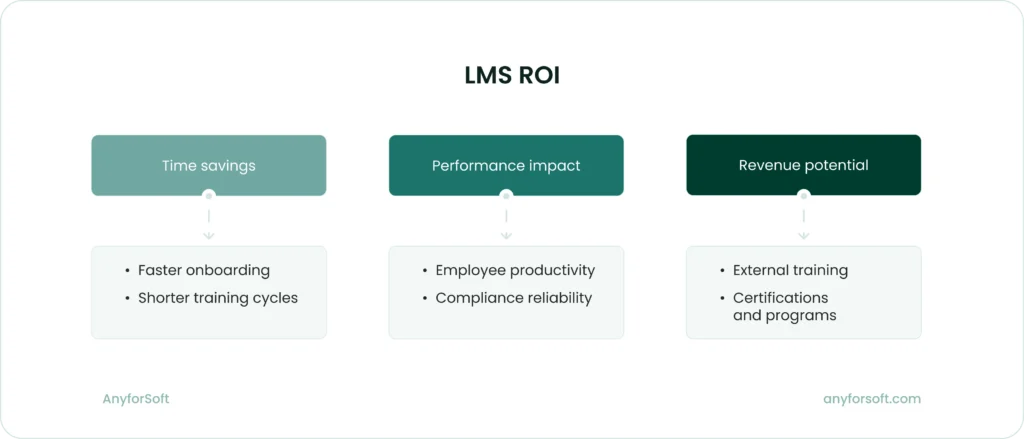
Reduced training time
A well‑configured LMS can shorten onboarding and recurring training cycles by making content easier to find and progress easier to track. Learners spend less time navigating the system and more time completing relevant modules.
Time savings usually come from a combination of design choices rather than a single feature. Clear structure, consistent content formats, and automated reminders all contribute to faster completion rates.
As training time decreases, working hours are freed across teams. That effect compounds as headcount grows and training programs expand.
The return shows up steadily, even if it is not immediately visible in budget reports.
Employee productivity gains
Learning platforms influence how quickly employees apply new skills in real work situations. Clear learning paths reduce hesitation, while relevant content improves retention and confidence.
Productivity gains tend to appear after the system stabilizes. Early friction fades. Usage patterns settle.
As teams become more comfortable with the platform, learning blends into daily routines instead of interrupting them. That shift matters.
Small improvements accumulate over time. They rarely stand out on their own.
When measured across departments and roles, these gains often outweigh licensing and support costs.
Compliance improvements
Compliance training carries operational risk, especially when deadlines are missed or records are incomplete. An LMS with strong tracking and reporting reduces that risk by centralizing data and automating follow‑ups.
Audit preparation becomes faster as records remain up to date. Reporting becomes more reliable, reducing manual checks and last‑minute corrections.
Lower administrative effort and avoided penalties both contribute directly to measurable return.
Monetization of training programs
Some organizations use LMS platforms to generate revenue through external courses, certifications, or partner training programs. These initiatives turn learning into a business function rather than a cost center.
Monetization requires additional setup. Payment processing, access controls, and reporting add complexity.
These systems demand ongoing management as offerings evolve and audiences grow.
When executed consistently and at scale, training programs can produce steady revenue that offsets platform and content costs.
How to Choose the Right LMS Pricing Model for Your Business
Choosing an LMS pricing model affects how training costs behave as the organization changes. The model determines whether spending tracks real usage or drifts upward as headcount and features expand.
For startups
Takeaway: Startups benefit from pricing models that limit financial exposure while allowing frequent plan changes.
Startups operate with constrained budgets and incomplete forecasts. Per‑user pricing or entry‑level subscriptions keep costs tied to active participation rather than projected growth.
Training usage is uneven in early teams. Product, sales, and support roles may train regularly, while other functions engage sporadically, which makes rigid licensing inefficient.
Feature scope should remain narrow. Reporting dashboards, AI recommendations, and custom workflows require time and internal ownership before they produce value.
Contract terms matter more than feature depth. Plans that allow upgrades or cancellations without penalties reduce risk during early experimentation.
For growing companies
Takeaway: Growing organizations need pricing that remains predictable as user volume and system complexity increase.
As teams expand, per‑user pricing becomes harder to forecast. Tiered or usage‑based models reduce volatility during hiring cycles.
Operational load increases alongside headcount. Pricing should account for automation in onboarding, role changes, and recurring training assignments.
System integration becomes a cost driver. HR platforms, CRM tools, and identity providers introduce setup and maintenance work that affects total spend.
Governance requirements also expand. Permission management, reporting access, and content ownership influence which pricing tiers remain viable.
A pricing model that absorbs these changes prevents unplanned budget adjustments.
For enterprises
Takeaway: Enterprise pricing reflects organizational complexity and long‑term operational commitments.
Enterprise LMS agreements are contract‑based and tailored. Pricing often bundles compliance tracking, audit reporting, and dedicated support.
Global operations add regulatory and localization requirements. These factors influence both licensing structure and service costs.
Longer contracts reduce per‑unit pricing but limit flexibility. Organizations trade adaptability for negotiated stability.
Questions to Answer Before Selecting an LMS Pricing Model
Use these questions to clarify how usage patterns, feature needs, integration scope, and operational constraints affect pricing decisions. These questions will also help you assess whether a pricing structure remains sustainable as operational constraints evolve over time.
How many users will actively train each month?
Active learner count determines licensing cost. Pricing tied to registered users often exceeds actual usage when training applies only to specific roles or limited periods.
Engagement varies by function. Sales, support, and compliance teams train regularly, while other departments access the system mainly during onboarding or audits.
Estimating monthly participation clarifies which pricing model fits best. It also reduces the risk of paying for inactive accounts.
Do we need AI, compliance, or analytics features?
Advanced features increase licensing cost and internal workload. AI recommendations and analytics dashboards require defined training goals and assigned ownership to produce results.
Compliance tools matter when audits, certifications, or regulatory reporting are mandatory. Without those requirements, higher pricing tiers may not improve outcomes.
Feature adoption depends on process maturity. Organizations without established workflows often underuse advanced tools.
Delaying these features preserves budget. They can be added later when operational readiness improves.
How critical are HR or CRM integrations?
Integrations affect setup time and ongoing maintenance. Native connectors reduce implementation effort, while custom connections require technical resources.
HR integrations control user provisioning and role updates. CRM integrations support sales training and performance tracking.
Each additional system increases dependency. Pricing should reflect both initial integration work and future platform changes.
What’s our tolerance for long-term contracts?
Contract length shapes financial flexibility. Multi-year agreements lower per-user cost but restrict exit options.
Shorter contracts allow adjustment during growth or restructuring. They also reduce risk when training strategy is still evolving.
The decision depends on organizational stability. Predictable environments benefit from longer terms.
Should we invest in custom development?
Custom development aligns the LMS with internal workflows. It also increases maintenance effort and vendor dependency.
Customized systems require additional testing during upgrades. This slows adoption of new platform features.
Configuration often meets most needs. Many requirements can be addressed without custom code.
Custom development should be reserved for constraints that configuration cannot resolve.
Conclusion
Choosing an LMS pricing model requires a clear view of how training functions inside the organization and how that function is likely to change. Pricing decisions influence adoption patterns, budget predictability, and the ability to adjust as training scope expands or contracts.
Effective pricing choices have a few things in common:
- Alignment with actual usage. Costs reflect how many people train regularly rather than how many accounts exist. This approach reduces spend on inactive users and keeps licensing proportional to demand.
- Feature scope matched to operational readiness. Pricing tiers correspond to capabilities the organization can actively manage. Advanced tools deliver value only when processes and ownership are already in place.
- Integration effort accounted for upfront. Pricing considers the work required to connect HR, CRM, or identity systems. This avoids underestimating implementation time and ongoing maintenance.
- Contract terms that allow adjustment. Agreements support changes in user volume, feature needs, or training strategy. Flexibility limits risk as priorities shift.
An LMS delivers consistent value when its pricing structure supports how training is actually used. Organizations that evaluate pricing through this lens retain control over costs while preserving room to adapt.
FAQs
What is the main objective when choosing an LMS pricing model, and where should organizations begin?
The objective is to keep LMS spending tied to actual training activity. Costs should rise when participation increases, not when unused accounts or dormant features accumulate.
Organizations should begin by examining how training is used today. This means identifying which roles train continuously, which teams train only during onboarding or audits, and how participation changes over time. These patterns determine whether a pricing model remains stable or becomes volatile as usage shifts.
Should the pricing model be evaluated before selecting an LMS platform?
Yes. The pricing model should be evaluated before committing to a platform because it defines how future changes affect cost.
An LMS can meet functional requirements and still create budget pressure if its pricing structure penalizes growth, feature activation, or integration depth. Reviewing pricing models early helps eliminate platforms that cannot support expected usage without forcing upgrades or contract changes.
Why does the choice of pricing model matter beyond initial cost?
The pricing model determines which actions trigger additional spending. In some models, adding users increases cost. In others, enabling reporting, automation, or compliance tools does.
When the pricing model does not match how training operates, routine decisions become budget events. Onboarding new teams or expanding compliance coverage can require renegotiation rather than simple configuration.
What factors should guide the selection of an LMS pricing model?
Several factors influence whether a pricing model remains workable over time:
- Monthly active learner volume
- Required feature depth
- Integration scope
- Contract flexibility
- Internal ownership capacity
These factors should be evaluated together. Focusing on a single variable, such as license price, often leads to underestimating how costs behave as training programs expand.
What cost ranges are associated with different LMS pricing models?
LMS costs vary based on pricing structure and deployment approach. Typical ranges include:
- Per‑user or tiered SaaS LMS platforms. A few hundred dollars per month for small teams, scaling to several thousand as usage and features expand.
- Enterprise LMS contracts. Approximately $50,000 to $250,000 per year, driven by integration scope, compliance requirements, and support levels.
- Hosted open‑source LMS solutions. Under $1,000 per year at entry level, increasing with hosting capacity, customization, and maintenance needs.
- Custom LMS development. Tens of thousands of dollars upfront, with costs rising based on system complexity and long‑term support.
These ranges help organizations assess which pricing models align with both current budgets and expected operational demands.