



Corporate L&D, Associations and CE
Strategy & Discovery
Innovative education platforms
Build & Launch
Online training solutions
Grow & Support
Creative content & apps
Platform & Technology Expertise

LMS Migration Services

Have every record verified before your learners log in

Learner history and certificates go first to a test copy of Moodle, Canvas, or Open edX. When the numbers match, you switch with no data loss and no downtime.

Book a meeting
Partners, not just projects

Behind each logo is a long-standing relationship, built on trust as much as delivery.

What people say about us

Reviewed on Clutch
stars 4.9/5 rating
Regina Wolf-Berleb

Internal stakeholders are pleased with the heightened level of security that the new site
offers. AnyforSoft leveraged a collaborative approach to deliver an excellent product.
Customers can expect industry-leading services from a team that is knowledgeable,
efficient, and supportive.

Regina Wolf-Berleb

When to migrate to a new LMS

If any of these sound familiar, an LMS replacement will cost you less than fixing the old platform.

Legacy LMS

Built on an outdated stack:

  • ✗ New features and tools won’t connect
  • ✔ Current architecture that takes updates and add-ons

Poor UX on Desktop and Mobile

Learners give up mid-course:

  • ✗ Lags, crashes, and phone screens that break
  • ✔ Fast pages on laptops and phones

Scalability Limitations

Enrollment peaks drag performance down:

  • ✗ Users and courses outgrow the current setup
  • ✔ Capacity sized for your busiest weeks

High Upkeep and Weak Vendor Support

Costs rise, answers come slowly:

  • ✗ Maintenance bills climb while support tickets wait
  • ✔ Upkeep you can plan and budget

Security Vulnerabilities

Learner data sits exposed:

  • ✗ Outdated architecture misses current security standards
  • ✔ Encryption and access rules built to today’s standards

Poor Reporting

Reports stop at completion counts:

  • ✗ No view of how each person actually performs
  • ✔ Per-learner results you can act on

Limited Integrations

Your training platform can’t integrate:

  • ✗ Admins copy HRIS and SIS records by hand
  • ✔ Accounts and enrollments that sync on their own

Our LMS migration services

Platform-to-Platform Migration

Moving to Moodle, Canvas, or Open edX carries over learner data, course content, users and roles, and course history. Canvas imports course structure through IMS Common Cartridge, and a Moodle migration keeps gradebooks attached to their courses. A review of your current setup picks the approach before any export begins.

On-Premises to Cloud Migration

Your on-premises e-learning software moves to the cloud through our cloud migration consulting services, cutting infrastructure costs on the way. AnyforSoft’s development team works hand-in-hand with the key stakeholders to address migration challenges, optimize performance, and maximize the benefits of your cloud environment while maintaining the integrity of LMS data.

Content and Data Migration

After LMS data migration, each file and record is checked in the new environment. Your SCORM packages keep their tracking, xAPI statements reach the new LRS, and AICC courses still launch. Tests also cover question banks and transcripts; the table that follows lists where each type breaks.

Integration Rebuild After Migration

SSO, HRIS, CRM, and SIS connections break the day the LMS changes. Each connection is rebuilt through LMS integration against the new platform’s REST API, then tested before cutover. Enrollments and completion records sync again from the first day.

Post-Migration Support

After an LMS migration, the work continues under our maintenance and support packages. We keep your system up and running by timely eliminating bugs, continuously fine-tuning and optimizing your LMS, and addressing urgent issues like performance slowdowns, software crashes, or unexpected downtime.

Migration to a Custom LMS

When grading logic or certification rules fit no off-the-shelf platform, the records can go somewhere built for them. Migration to a custom LMS puts the data straight into software designed around your workflows. No third-party vendor’s course model gets in the way.

Find out what has to move first
A short call maps your courses, records, and integrations, so the plan starts from what you actually run.

What We Migrate

Every kind of record behaves differently in LMS data migration. Each row shows what stays intact and where it usually breaks.

DataWhat’s preservedCommon pitfall we handle
Users, roles, and groupsAccounts, permissions, organizational structureDuplicate accounts; role models that differ between platforms
Courses and structureModules, sections, sequencing, prerequisitesDifferent course models, such as Moodle sections vs Canvas modules
SCORM, xAPI, and AICC packagesPackages and their trackingPackages that need re-publishing or a version upgrade
Assessments and question banksQuestions, settings, randomizationQuestion types the target platform doesn’t support
Grades, completions, and transcriptsFull learner historyRecords for courses that are no longer active
Certificates and CE creditsIssued certificates, expiry dates, credit hoursCertificate templates and validity rules
Media and filesVideo, documents, imagesLarge files, broken links, storage limits
IntegrationsSSO, HRIS, CRM, and SIS connectionsConnections rebuilt in the new environment through LMS integration

Platforms We Migrate From and To

Data moves from the platform you run today to the one you choose next.

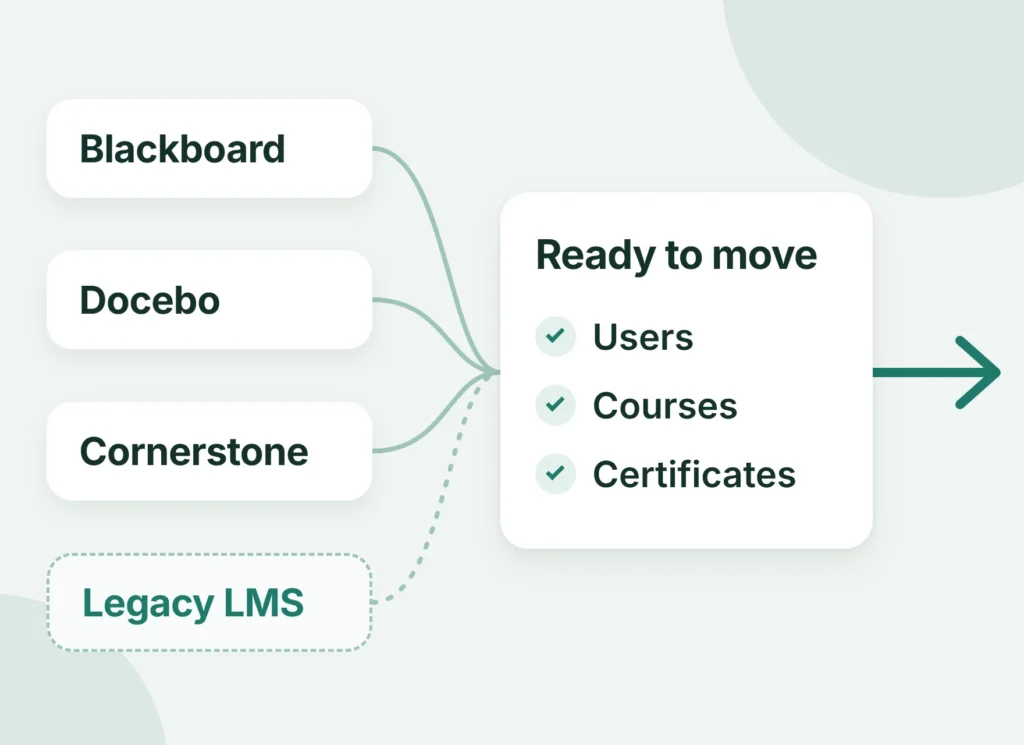
Diagram of Blackboard, Docebo, Cornerstone and a legacy LMS feeding users, courses and certificates into a migration

Migrate from

Records leave corporate and academic platforms, including legacy systems and any custom-built LMS. Switches between Moodle, Canvas, and Open edX work in either direction too.

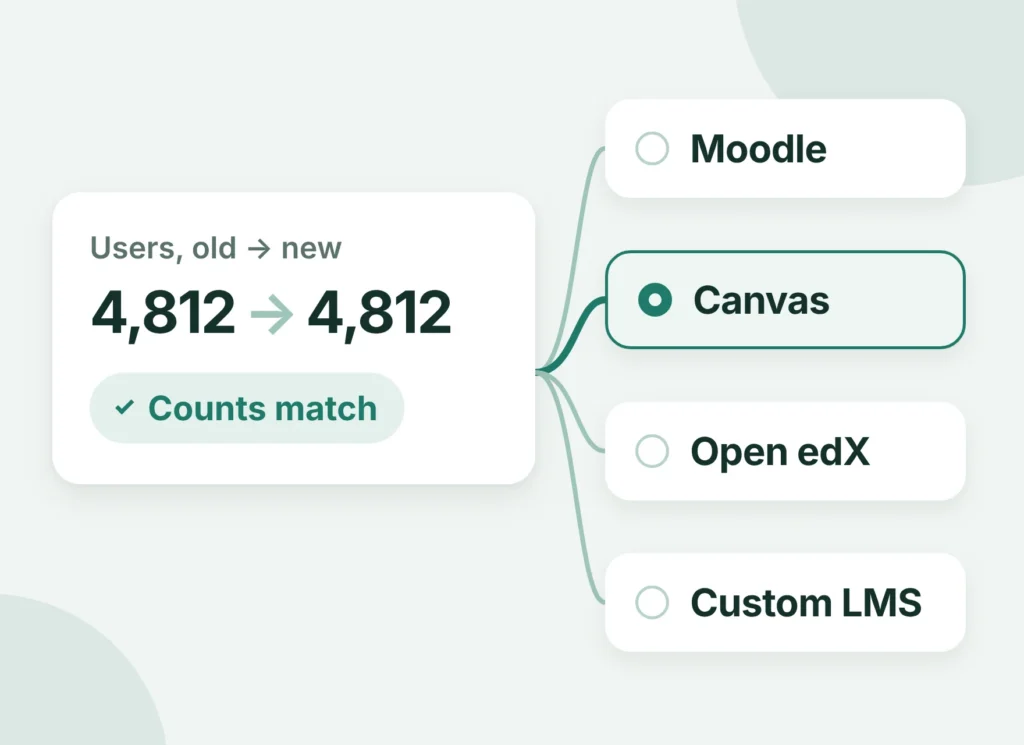
Migrate to

You choose the destination platform. If that choice is still open, LMS consulting comes first and compares the options against your requirements.

Diagram of migrated user counts matching between the old LMS and the chosen target: Moodle, Canvas, Open edX or a custom LMS

LMS Migration Approaches Compared

The right approach depends on catalog size, integrations, and how much an LMS transition can interrupt training. Phased and parallel routes keep minimal disruption within reach for large programs.

AnyforSoft reviews your catalog, connections, and academic or training calendar, then advises which approach fits.

Big bang

Shortest timeline, lowest cost

All content and history cross over in one cutover window. Learners face a short planned outage, and the risk is the highest of the three.

Best for: small catalogs with few integrations, where one planned weekend outage suits students and staff.

Phased migration

Longer timeline, moderate cost

Each department, course group, or region goes live in its own wave. Downtime stays minimal and limited to each phase, with moderate risk overall.

Best for: large organizations with many stakeholders, where each department can switch on its own schedule and sign off separately.

Parallel run

Longest timeline, highest cost

Old and new LMS run side by side for a set period. Learners see no downtime, and the risk is the lowest.

Best for: compliance-critical training and academic term constraints, where continuity of training outweighs paying for two platforms at once.

Initiate Your Transition Today. Tell Us About Your LMS Migration Project and Get 20% Off on the Discovery Phase!

LMS migration process

1

Pre-migration assessment

The work starts with a count of users, courses, SCORM packages, records, and integrations in your existing setup. Anything that won’t map cleanly to the target gets flagged early. You get a data and content inventory.
2

Choosing the target LMS

Before you migrate an LMS, each candidate is compared against that inventory, including off-the-shelf options extended through LMS development. Course model, reporting, integrations, and licensing decide the fit. Where none fits, custom LMS development builds the destination, and the step closes on a chosen platform.
3

Migration plan, data mapping, and backup

Each source field gets a target field, plus a rule for anything the destination lacks. Then the source instance is copied in full and test-restored, on Moodle through Moodle backup and restore. The output is a data mapping document and a verified backup.
4

Test migration

A few courses, a slice of users, and one integration go to a staging copy of the new LMS. Instructors and admins work through the test migration as they would on a normal day. Their findings become a fix list, closed before the full transfer.
5

Full migration

Your calendar picks the route: big bang, phased, or parallel run, from the three approaches compared above. Records travel through Python ETL scripts and platform APIs, checked batch by batch. At the end, the new environment holds the complete history.
6

Validation and UAT

Counts of users, courses, completions, and certificates are reconciled between source and destination. Spot checks of individual learner histories follow, and admins and instructors run UAT as part of validation. Your sign-off closes it.
7

Cutover and post-migration support

Go-live follows a rollback plan that restores the previous instance if any check fails. After the cutover, engineers fix issues and train your admins, which is where post-migration support begins. The old LMS retires only after the new one passes every test.

LMS Migration Timeline and Cost

User count, catalog size, SCORM content, and the number of integrations push a project from one tier to the next. Compliance requirements add review time on top.
A college moving one Moodle site sits in a different tier from a company with five connected systems. Every engagement gets a fixed estimate after assessment; the timelines here are typical ranges.

ScopeTypical profileTimeline
SmallUp to ~1,000 users, a small course catalog, no integrationsTypically 2–4 weeks
Mid-sizeSeveral thousand users, SCORM content, 1–3 integrationsTypically 1–3 months
EnterpriseLarge catalogs, full learner history, multiple integrations, compliance requirementsTypically 3–6+ months
Get a fixed estimate for your migration
The fixed estimate sets scope, approach, timeline, and cost in one document you can take to budget approval. An assessment call reviews your platform, data, and integrations, then returns a fixed estimate you can plan around.

Our technology stack

Back-end CMS Databases Front-end Mobile UI/UX tools
Next.JS Next.JS Node.JS Node.JS Symfony Symfony PHP PHP Django Django Python Python
Firebase Firebase Supabase Supabase
Angular Angular CSS CSS GATSBY GATSBY Graph QL Graph QL JQUERY JQUERY Jest Jest PWA PWA React React TypeScript TypeScript
Flutter Flutter PHP PHP
Acrobat Acrobat Adobe After Effects Adobe After Effects Adobe Illustrator Adobe Illustrator Adobe Photoshop Adobe Photoshop Avocode Avocode Figma Figma InVision InVision Sketch Sketch

Why choose AnyforSoft as your LMS migration partner

✔
Both sides of the move

Engineers build on Moodle, Canvas, Open edX, and custom LMS platforms, so neither end is new to them.

✔
One coordinated team

A project management office tracks every stage; a single team runs assessment, transfer, QA, and support.

✔
Estimates that hold

Scoping is done by engineers who have rebuilt learning systems, so the estimate reflects your actual records and connections.

✔
Education first

Term dates at universities, compliance deadlines in corporate L&D, and CE credit cycles at associations set the schedule.

Trusted edtech expertise, backed by numbers

15+
years in EdTech
80+
engineers
150+
projects with a focus on education

Success stories

A US tutoring company replaced paper SAT practice with its own Open edX platform

In business since the 1980s, the company relied on printed tests, hand grading, and handwritten reports for SAT practice. Open edX alone could not run the exam experience it needed. AnyforSoft kept Open edX as the core and built custom layers that mirror Bluebook, the official SAT practice app.

  • Most tasks once done by hand now run automatically
  • Data flows both ways between the testing site and Salesforce
  • Students, proctors, and administrators work in one platform
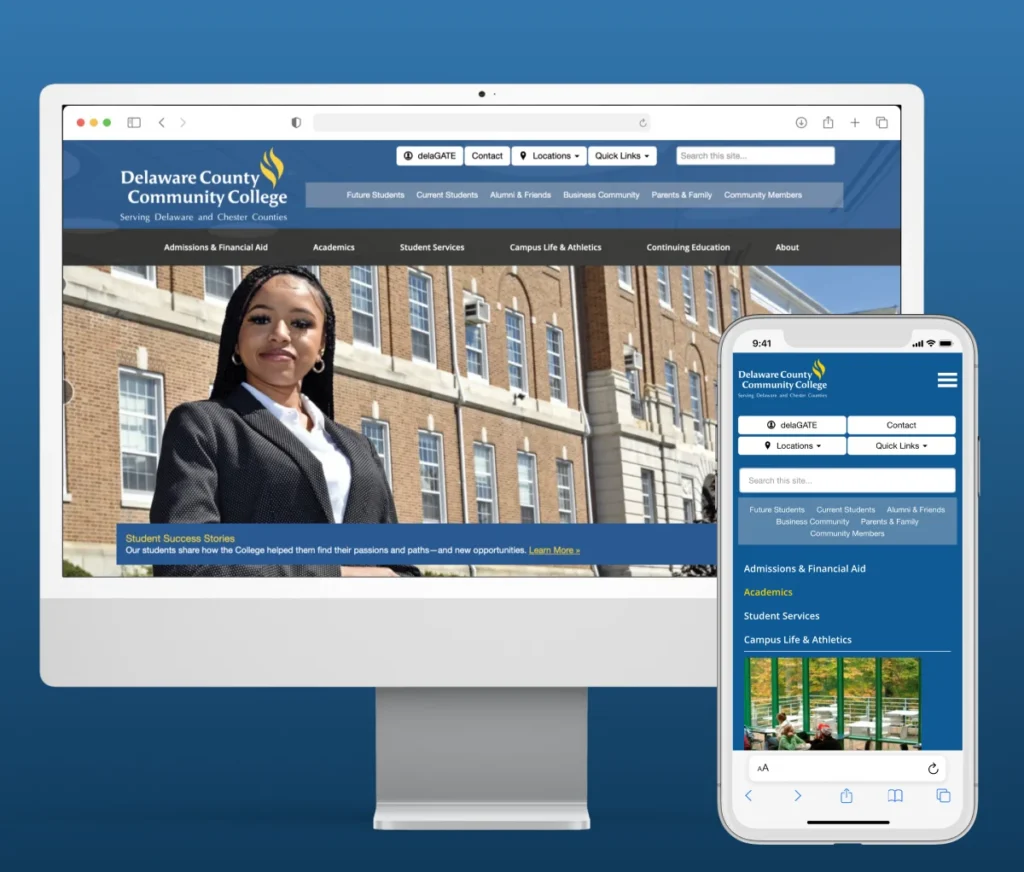
Delaware County Community College website by AnyforSoft

Delaware County Community College secured three sites and moved its main one

The college ran a main website and two restricted student sites. Security fixes and its own change requests had to be balanced across all three. AnyforSoft audited the sites, tightened access, and prepared them for migration to Drupal 10.

  • Security audit, authentication, and encryption across three sites
  • Sites prepared for migration from Drupal 7 to Drupal 10
  • Usability and accessibility improved across the sites
  • Ongoing support, updates, and patches from a dedicated team
Hire a Professional LMS Migration Team and Transition to Another System Headache-Free

FAQs

What is LMS migration?

Moving courses, users, and learner records from your current LMS into a new environment. Shifting an on-premises install to the cloud counts too. A full learning management system migration also covers the connections and reports that depend on the learner records.

How long does it take to migrate to a new LMS?

Typically from 2 weeks to several months, depending on scope. The main factors:

  • Size of the organization and the complexity of its data
  • Customization, infrastructure, and the number of integrations
  • Available resources and compliance requirements

Most small catalogs land at the short end of the typical timelines by project size.

How much does LMS migration cost?

Scope sets the price, and every project gets a fixed estimate after assessment. Cost grows with users, catalog size, SCORM content, integrations, and compliance requirements. The approach matters too: a parallel run means paying for two platforms at once. To migrate an LMS with a known budget, start with the assessment.

Will we lose course data or learner history during migration?

The plan is built so records survive the switch. A full backup comes first, then a test migration on a sample, reconciled counts, and a rollback plan. Each check is held to your requirement of no data loss, including every learner’s history. An LMS migration checklist and project plan sets the order of those checks before anything is exported.

Can you migrate SCORM and xAPI content?

Yes, with their tracking. SCORM 1.2 and 2004 packages keep their completion data, and xAPI statements go to the new LRS. Packages that need re-publishing are flagged during the assessment.

Can you migrate from Blackboard or Moodle to Canvas?

Both are common routes. Blackboard and Moodle structure courses differently from Canvas, so the mapping rebuilds sections as modules. The Canvas API then carries enrollments and grades into the new courses. Moving to Moodle instead is also an option.

How do you keep training running during the transition?

By matching the approach to your calendar. A parallel run keeps both environments live for teams that need no downtime for learners. A phased approach shifts one department or course group at a time. Big bang waits for a quiet window, such as a term break. Each LMS transition gets the route its schedule allows.

Do you rebuild integrations like SSO and HRIS after migration?

Yes, before the cutover. SSO, HRIS, CRM, and SIS connections are rebuilt against the destination through LMS integration and tested with real accounts. Learners log in and enrollments sync from the first day.

Can AI help clean and map data during an LMS migration?

It can, as an assistant to engineers. AI flags duplicate accounts, suggests field matches, and checks data quality across exports. Engineers review every mapping before anything is loaded, so the decisions stay with people.

Can we add AI features to our LMS as part of the migration?

Yes, and the move is the right time to plan them. AI features depend on clean, well-mapped data, and the migration produces exactly that. Once records are in the new LMS, an assistant can answer learners’ routine questions and quizzes can be graded automatically. Both can join the same project as part of our AI solutions for education.


Migrate your LMS with AnyforSoft

Move to a different learning environment without interruptions to your processes and workflows. Focus on growing your business while we handle the complex technicalities of LMS migration.

Let’s talk
Vlad
Vlad

Business Development Manager

Anatolii
Anatolii

CEO