









Vendor prices rarely tell the full story. Quoted association management software cost figures shift with organization size and feature depth. The deployment model changes the number again. Across cloud and on-premise setups, yearly spend diverges sharply.
Most buyers start their search under the broader label membership management software. From there, buyers narrow toward tools built specifically for professional bodies. Under SaaS pricing, monthly fees track usage and scale. This model replaces the flat one-time licenses that dominated the market a decade ago.
Between a five-hundred-member organization and a fifty-thousand-member trade body, pricing tiers seldom align across any single platform. Database complexity, integration count, support expectations, and implementation timeline pull price in different directions. Before a single line of code gets written, scoping already happens. Each variable shifts on its own timeline.
What Is Association Management Software?
AMS centralizes the daily operations of member-based organizations. Across one system, membership records, dues cycles, event logistics, and communications converge. Scattered spreadsheets and email threads disappear in the process. To track membership status and renewal timing, professional associations and nonprofit chapters rely on the platform.
The distinction from a generic CRM matters early. Structure separates the two. Where a CRM tracks individual sales relationships, an AMS tracks membership cycles and renewal cadence. Often labeled AMS vs CRM, the distinction shows up clearest in one case. Organizations already running a general CRM for donor relationships feel it most. Built into the platform, governance features cover voting and committee management.
Two sub-verticals extend the category to serve specific membership structures:
- Legal professional bodies use bar association software to track continuing education credits and licensing status.
- Community-based organizations, including homeowner and condominium groups, apply the same core software to assessment tracking and reserve fund management.
Each variant retains the core membership-tracking function, with additional fields matched to its sector.
Why Does Association Management Software Cost Vary So Much?
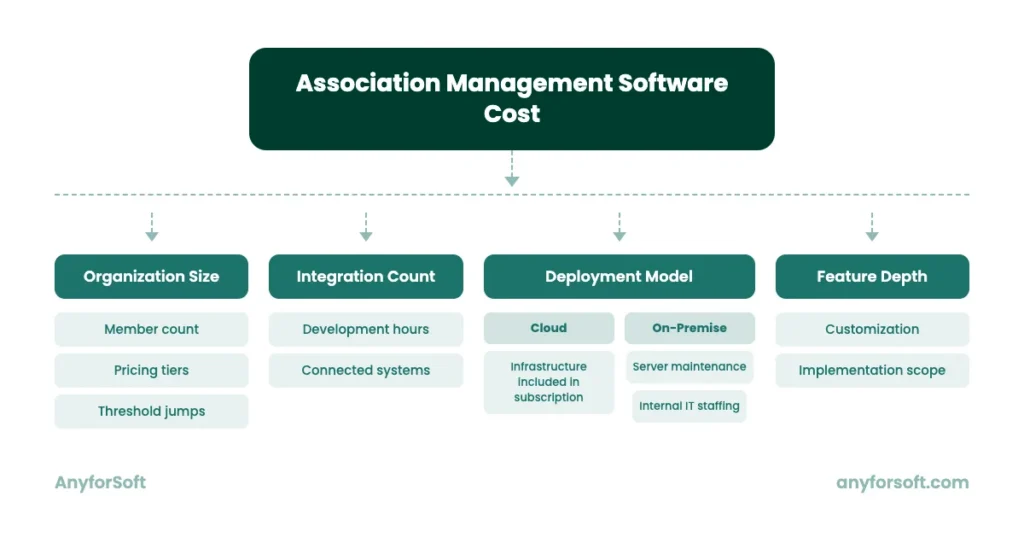
Two forces shape most quotes: how deeply the platform connects to existing systems, and organization size.
Every additional integration adds development hours. Landing directly in the vendor’s quote, those hours push integration count into the final price. Across most quotes, member count matters just as much. Providers often follow the PowerSchool-style vendor tiers, where price brackets step up at defined size thresholds. Sitting just above a threshold, an organization can trigger a full tier jump. Near this line, timing a plan review helps avoid the jump.
The deployment model adds a separate layer of cost on top of size and features. For cloud-hosted platforms, infrastructure pricing folds into the platform’s monthly fee. On-premise deployments shift server maintenance and IT staffing onto the buyer. For buyers without in-house IT staff, the gap tends to widen over time. Matching deployment models to existing technical capacity keeps this spread from compounding.
What Are Typical Association Management Software Pricing Ranges?
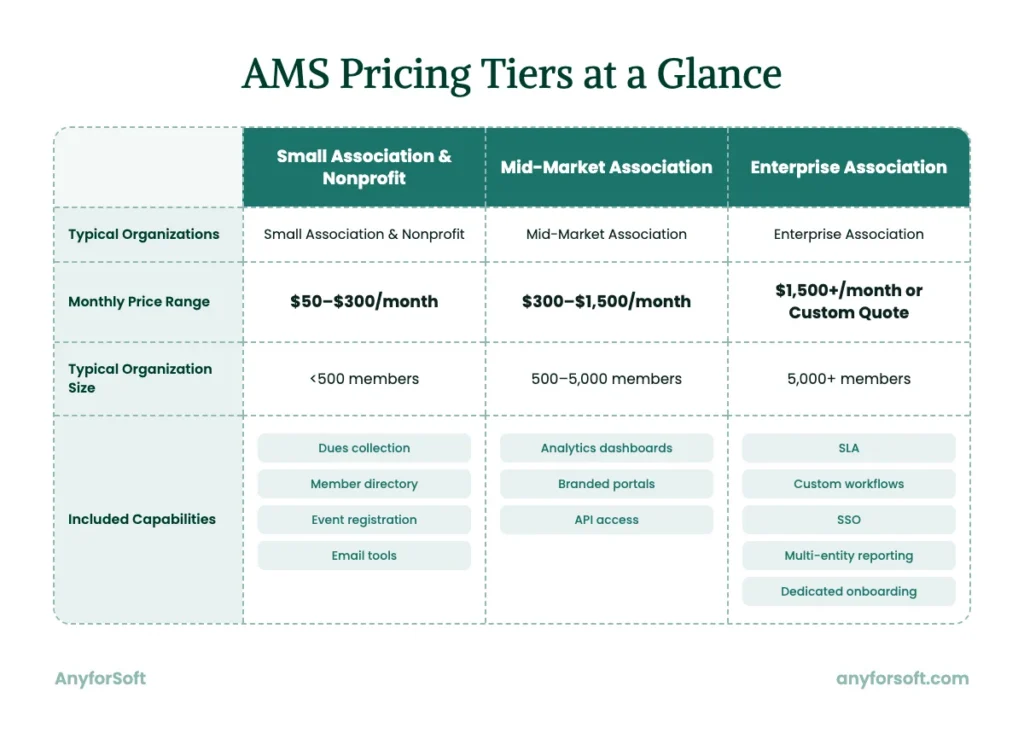
Shaped mainly by member count and feature depth, AMS pricing splits into two ranges, with enterprise deals negotiated separately. Across most quotes, the question of how much does association management software cost resolves into small-nonprofit and mid-market bands. From there, added functionality pushes either range higher.
Community-based groups often span both at once. In database complexity alone, a five-hundred-unit condo board can outgrow a five-thousand-member trade organization.
This gap is the main driver behind community association management software cost.
Small Association And Nonprofit Pricing ($50–$300/month)
Small nonprofits and volunteer-run chapters typically populate this band, most operating under 500 members. For rosters this size, nonprofit management software covers core needs. Single-community boards fit here too, running HOA management software built for small property counts.
- Dues collection and online payment processing
- Member directory with renewal tracking
- Event registration for meetings and fundraisers
- Standard email communication tools
Beyond a few hundred members, priorities shift. Once membership grows into the next tier, custom reporting and committee management tools become available.
Per-member pricing dominates at this level, so expense climbs steadily as rosters grow.
Mid-Market Association Pricing ($300–$1,500/month)
Regional organizations and mid-size trade bodies land here, generally between 500 and 5,000 members. Managing shared amenities across dozens of units, condo boards often reach this band as well. For reserve fund tracking, condo association software fits this profile closely.
- Advanced reporting and analytics dashboards
- Custom-branded member portals with committee management tools
- API access for third-party integrations
When governance spans layered committees across chapters, member bodies typically move toward enterprise-level tools. Feature bundling shapes price most at this level, and each added module raises the monthly rate incrementally.
Enterprise Association Pricing ($1,500+/month or Custom Quote)
National organizations and large trade federations occupy this tier, generally above 5,000 members. Spanning chapters nationwide, multi-entity structures also land here regardless of headcount.
- Dedicated account management and service-level agreements
- Custom workflow and compliance configuration
- Enterprise-grade security and single sign-on
- Multi-entity reporting across chapters
- Custom onboarding with a named implementation lead
At this scale, published ranges stop applying. After reviewing chapter count and integration scope together, vendors quote enterprise deals individually.
Negotiation leverage matters more than any published price band. Typically, multi-year contract terms and committed member volume shape the final figure.
One-Time vs. Recurring Costs
Payment structure splits AMS pricing into two distinct logics. Under perpetual licensing, ownership transfers through one upfront payment, scaled to user count and deployment size. Tied to active user count, subscription pricing follows monthly or annual payments.
After that upfront payment, ownership rests with the buyer, and support renewals become optional after the first year. This recurring model keeps support and updates bundled into the fee automatically. Budget cycles often decide which structure fits. Capital budgets favor the upfront license, while operating budgets favor the recurring fee.
What Factors Affect the Cost of Association Management Software?
Payment structure sets the model, but several forces shape the number inside it.
Membership Size and Database Complexity
Record count alone rarely drives price. Instead, complexity does the work. Beyond custom fields and historical data, cross-referenced household or company relationships add further weight to a database.
A five-hundred-member chapter with clean, flat records can run at a lower expense. Multi-tier memberships and legacy data can raise that price for smaller membership bodies too.
Once per-member fees start compounding, the math around the cost of association management software shifts. At this point, flat-rate pricing becomes the more economical structure. A fixed monthly fee stops scaling with each new record.
Pricing Model (Per-Member, Tiered, Flat-Rate)
A pricing model determines how a monthly bill grows over time, more than any other single choice. Three structures dominate the market, and each ties budgets to a different variable. Under per-member pricing, the bill scales directly with roster size, rising every time a new member joins. Tiered structures group organizations into membership bands. Once total membership crosses a threshold, the bill jumps and then holds steady until the next one.
Flat-rate structures detach the bill from roster size. As membership grows, a fixed monthly rate stays level. Choosing among these models shapes long-term platform budgets more than most feature lists.
Across each structure, roster size compounds differently, changing the total over years.
Implementation and Onboarding
Setup scope determines onboarding price more than any other early-stage variable. Data migration volume and staff training hours add most of the total before a platform goes live. Especially where custom workflows exist, configuration complexity layers on top of both.
Larger rosters typically raise implementation cost, since historical records require more mapping work. With few integrations, a lean setup can launch within days.
A full-scale rollout across five or six departments stretches into weeks. Across longer timelines, vendor hours accumulate and convert directly into billed time.
Integrations and Customization
Integration scope shapes price as directly as roster size does. To map data fields correctly between platforms, each connected system requires developer time. A single payment gateway connection adds modest integration cost.
For nonstandard fields, a legacy accounting system adds considerably more. Custom API bridges push the number highest, since older systems rarely have a pre-built connector available. Once core systems connect first, downstream integrations can build on a stable foundation, preventing costly rework later.
What Hidden Costs Should You Watch For in an AMS?
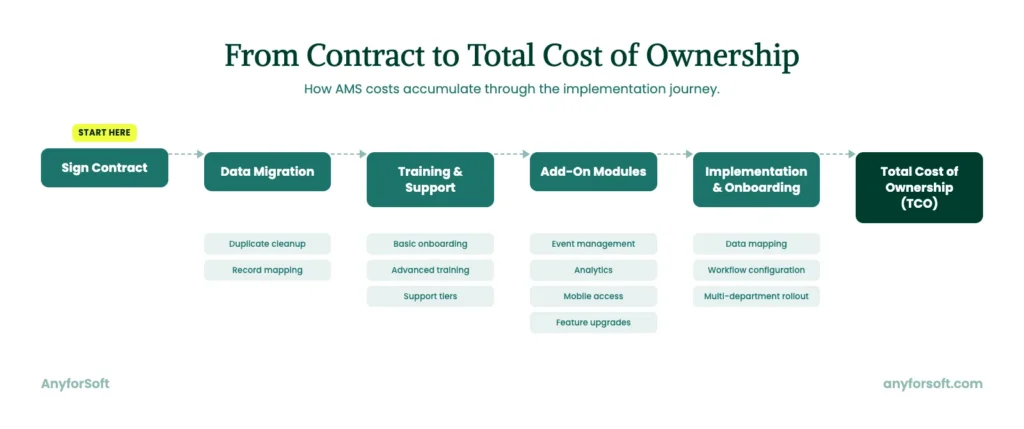
Beyond the sticker price, several prices surface only after signing. Together, they shape total cost of ownership (TCO), a fuller measure than any published pricing range. Data migration and training charges account for much of this gap. Add-on modules extend it well beyond the first year.
Data Migration Fees
A ten-year-old membership spreadsheet arrives with three different date formats and half its entries duplicated. Before a single record moves into the new system, this mismatch must be resolved by hand or by script. Every duplicate takes a few minutes to merge, and multiplied across thousands of rows, those minutes become billable hours fast.
Vendors typically quote data migration cost separately from the core subscription fee, so it rarely appears in headline pricing. When cleanup happens before migration starts, the separate fee often drops substantially.
Training and Support Costs
Staff training determines how quickly a team adopts a new platform, and slow adoption takes its own toll in lost productivity.
Covering login and basic navigation, a short onboarding session forms the baseline. Beyond this baseline, deeper training on reporting tools and automation features usually costs extra per session.
On top of training, support tiers add a second layer. With guaranteed response times, premium support commands a higher recurring fee than standard email-only support.
Separate from the subscription rate, annual renewals sometimes carry their own fee increase. Budgeting for the increase early avoids a surprise invoice at renewal time.
Add-On Modules and Feature Upgrades
At launch, the base subscription covers core membership tracking and little else. Six months in, most teams request event management or advanced analytics, and each arrives with its own per-module fee.
Mobile app access often joins the list around the same point, priced the same way as the modules before it. By the first renewal, feature upgrades released during the year start appearing on the invoice too. Each release cycle tends to bundle new capability behind an extra charge, adding incremental price year after year.
Implementation and Onboarding
Setup budgets catch many buyers off guard after the contract is signed. This difference traces to tasks invisible in the sales demo. Data mapping and staff training make up most of the weight. Larger rosters need more mapping work, since historical records hold more fields to translate. On top of this, purpose-built workflow configuration adds further complexity.
Timeline length sets the final number. A lean, few-integration setup can launch within days. Spanning four or five departments, a rollout stretches into weeks, with vendor time accumulating the longer it runs. Past record volume shapes implementation cost more than headcount or feature count alone.
How Can You Lower the Cost of Association Management Software?
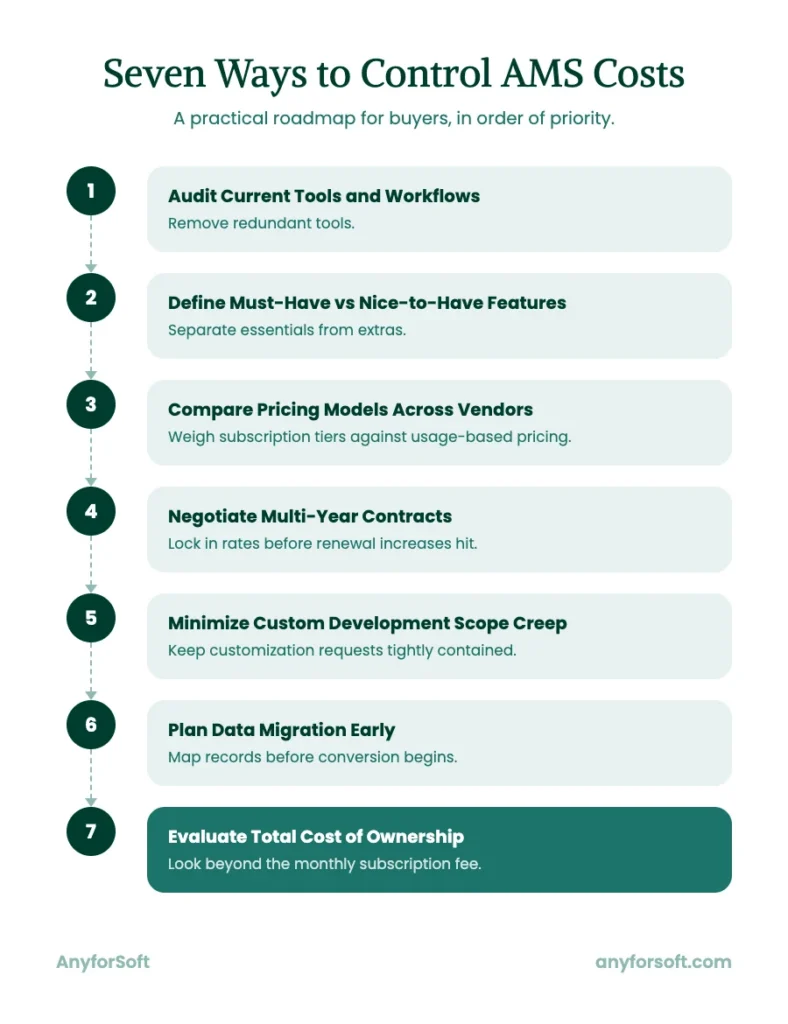
Seven concrete actions shift the number on a renewal invoice. Each targets one specific line item. Choosing low-cost association management software starts with understanding where a budget leaks, then addressing each one in turn. Done early, this process reduces administrative costs before the first bill arrives.
Step 1: Audit Your Current Tools and Workflows
Before comparing vendors, map the tools a team already uses. Spreadsheets and email platforms usually top the list, with the AMS itself included too. Note which tasks each one handles and how often staff switch between them.
This map becomes the audit checklist. Gaps surface where two entries duplicate the same task, often signaling a feature a new platform should consolidate. Naming those redundant steps keeps them from persisting into next year’s renewal.
Step 2: Define Must-Have vs. Nice-to-Have Features
Every request for a new capability falls into one of two categories. Core membership tracking, dues collection, and communication tools belong in the first. Everything else waits for evidence it earns its place.
Building the split works best as a short exercise. Staff list every capability they’ve asked for over the past year, then sort each into one of the two columns. An addition that solved a real problem last quarter belongs in this column; a request made only once stays in the second.
Nice-to-have items often carry a separate price tag. Reporting dashboards and branded portals frequently add customization cost on top of the base subscription, so isolating them early keeps that spend visible, separate from a bundled quote.
The finished feature priority list becomes the reference document for every vendor conversation that follows.
Step 3: Compare Pricing Models Across Vendors
The same feature set can carry three different price structures depending on the vendor. A side-by-side comparison sheet, built early, keeps the difference visible.
Provider rows run down one axis, pricing criteria across the other. Per-member fees, flat-rate options, and tiered pricing all belong on it, evaluated against identical row entries so no single quote hides behind unique terminology.
This sheet becomes the basis for a proper AMS comparison, built on matched criteria applied evenly across every provider’s numbers.
Step 4: Negotiate Multi-Year Contracts
Vendors price flexibility into every quote. A one-year commitment carries a premium; a three-year commitment often unlocks a materially lower rate.
Committed member volume strengthens this position further. A projected roster increase, shared upfront, gives a vendor reason to lock in a favorable number before growth pushes an organization into a higher tier.
Competing quotes carry weight in the same conversation. Two comparable proposals, placed side by side, give a buying team a concrete reference point for requesting a discount.
Price locks protect against a separate risk: the annual increase built into many renewal terms. Securing a fixed rate across the contract term removes this variable entirely.
A signed leverage checklist, built from these four points, turns a single negotiation into a repeatable process for every future renewal.
Step 5: Minimize Custom Development Scope Creep
Every purpose-built feature added mid-build adds hours beyond the original quote. Left unmanaged, the pattern compounds. A single extra workflow rule seems small in isolation. Ten such rules across a year change the total significantly. That discipline is exactly what keeps low-cost association management software affordable.
A scope-lock agreement addresses this directly. Every change request routes through a formal change order, priced and approved before development starts, keeping the starting budget as the reference point throughout the build.
Step 6: Plan Data Migration Early
Migration cost rises the longer a team waits to start planning it. Executing a decision in month one takes fewer resources than executing the same decision in month eleven. By then, a hard launch deadline is already close.
Field mapping benefits most from early attention. Matching legacy fields to new ones, while the original system is still fully accessible, avoids the scramble that comes with a tight timeline.
Deferred data migration costs compounds for a specific reason: cleanup work that could happen gradually over months gets pushed into a few final weeks, and rushed timelines carry premium pricing.
A migration timeline paired with a data-mapping document, started the day a contract is signed, keeps budgets on a predictable curve.
Step 7: Evaluate Total Cost of Ownership, Not Just Sticker Price
A monthly rate tells one part of the story. Support renewals, add-on modules, and migration fees fill in the rest across the life of a contract.
Two platforms quoted at the same monthly rate can diverge sharply by year three, once every recurring fee is added back into the total. This divergence is the figure worth comparing, more than the number on the sales page.
A comparison worksheet, built to sum every fee across a three-year projection, gives a buying committee the complete figure before a contract is signed.
How Is AI Changing Association Management Software Costs?
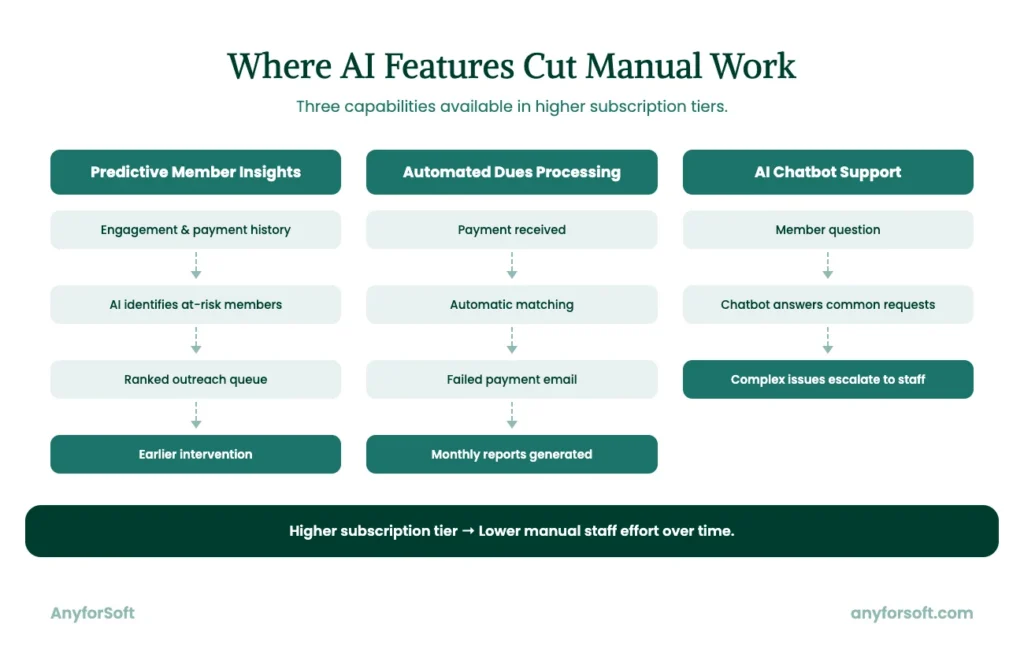
Increasingly, artificial intelligence reshapes pricing structure as much as it reshapes capability. Bundled into higher pricing tiers, predictive and automation features push adoption into a higher band as soon as a contract is signed. Total spend can still fall across a multi-year term, since the higher tier cuts staff hours a smaller platform would otherwise require.
AI-Powered Member Insights and Renewal Prediction
Long before a membership actually lapses, renewal behavior leaves a data trail. A model trained on engagement patterns and payment timing learns to flag accounts at risk, with event attendance feeding the same signal. Once a pattern crosses a threshold, the system surfaces this account to staff automatically, before the renewal date arrives.
Staff who see the flag early have more time to act.
Predictive renewal analytics turns the flagged list into a ranked outreach queue, so staff spend time on the accounts most likely to respond to a call. As a direct result, member retention improves, since intervention happens while a lapsing member is still reachable.
Automated Dues Processing and Reporting
Behind every dues cycle, repetitive tasks pile up. Payments need matching to records, failed transactions need flagging, and monthly totals need compiling for the board.
Intelligent automation now handles each task without a staff member touching a spreadsheet.
- Payment matching happens the moment a transaction clears.
- Failed payments trigger an automatic follow-up email.
- Monthly reports assemble themselves from data staff once tracked by hand.
For a five-thousand-member body, this shift means three fewer staff days each month spent reconciling payment records. Staff time savings compound most visibly here, as those reclaimed hours move toward member-facing work.
AI Chatbots for Member Support
A renewal or event-registration question rarely needs a human response. Trained on an association’s own membership data, a chatbot handles most of these exchanges on the first try. Escalations and judgment calls still route to support staff.
With the narrower scope, staffing math changes directly: a smaller team now covers only the cases a chatbot can’t resolve. Automation savings show up first in reduced after-hours coverage, since a chatbot answers a renewal question at 11 p.m. as reliably as at 11 a.m.
Should You Choose Off-the-Shelf or Custom Association Management Software?
This decision arrives at some point in every group’s growth. A ready-to-configure platform suits organizations happy with a proven workflow, launching within weeks. Built from scratch around a specific need, the other path moves slower and costs more upfront. Workflow fit matters more than budget alone in choosing between build vs buy. When a workflow already matches the market’s existing options, the choice gets simpler.
When Off-the-Shelf AMS Makes Sense
For most small and mid-market membership groups, a proven solution covers the core need.
Dues collection and member directory management rarely require new development. Most vendors have already built and tested these features across hundreds of organizations. Event registration fits the same pattern, already solved across the industry.
Speed favors this path too. Within days, a configured platform can go live, since no development cycle stands between signing and launch.
Among the best association management software options, several serve niche verticals without any bespoke development. A regional bar association and a national trade federation can both run on the same base system. Each one configures it differently at setup.
When Custom Association Management Software Pays Off
A workflow too specific for any off-the-shelf option changes the calculation entirely. Multi-entity governance structures and industry-specific compliance rules often exceed what a configured platform can handle. Legacy system integrations add a third pressure point of their own.
A national trade federation running a dozen regional chapters under one parent body illustrates the pattern well. Each chapter needs its own dues structure and its own event calendar. A distinct reporting line to the parent organization adds a third requirement. Built around a single-entity model, an off-the-shelf system forces constant workarounds; a purpose-built system handles the same setup natively.
At this point, a tailored option stops being a luxury. Workaround expenses accumulate over time. Within two to three years, they frequently exceed the upfront gap between the two paths.
The gap makes the tailored path the practical choice.
A few concrete checks help with this decision. When daily operation depends on a structure absent from every vendor’s catalog, it signals a strong case for a tailored platform. Compliance tied to a single jurisdiction’s rule set points to the same conclusion. A legacy system requiring live, two-way integration adds a third indicator on its own.
Total Cost of Ownership: Custom vs. Off-the-Shelf
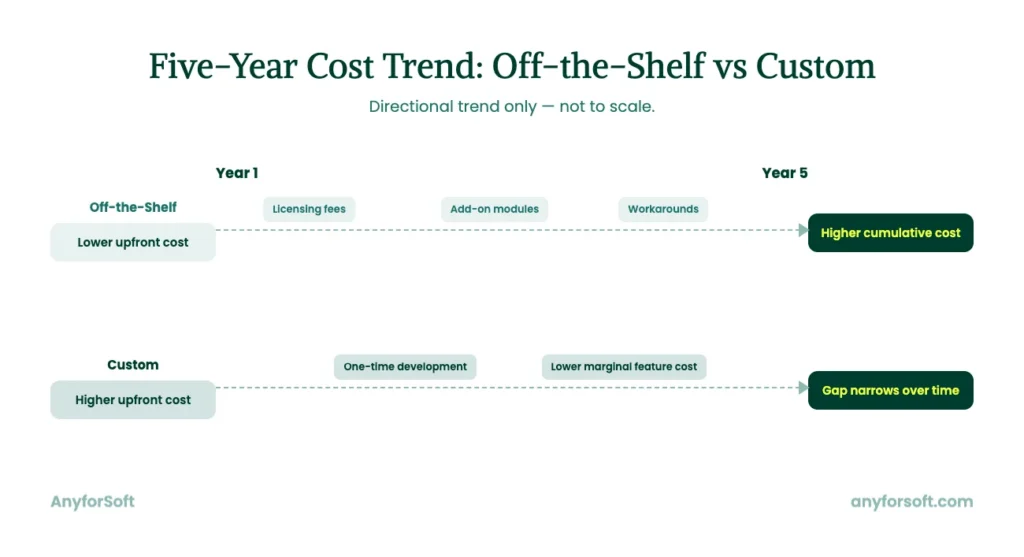
Sticker price favors off-the-shelf almost every time. A configured platform typically requires a lower initial payment, since no development cycle separates contract from launch.
Over a five-year horizon, the gap narrows.
Licensing fees and add-on modules accumulate steadily on the off-the-shelf side. A poor workflow fit adds its own compounding expense: ongoing workarounds.
Once built, a tailored system carries lower marginal cost per added feature. New capability extends existing code, without triggering another vendor fee.
A mid-market association evaluating both paths for a membership portal shows the pattern clearly. The off-the-shelf option carries a lower price in year one. Each new integration request afterward adds a separate line item to the invoice.
Building the tailored option demands a larger investment at the start.
A new integration adds development hours only once, without a new recurring fee attached. Every fee across the full contract term belongs in the comparison, beyond the number on the signing page.
How Has Anyforsoft Helped Organizations Cut Software Costs?
Engineering choices determine whether a platform budget stays under control, more than any published rate does. Two projects from Anyforsoft’s portfolio show the principle at work, each in a different industry. One right-sizes infrastructure. The other scopes AI adoption deliberately.
Case 1. 70% Faster Hosting at a Fraction of Enterprise Cost
A regional recruiting agency needed reliable hosting without paying enterprise rates built for far larger clients. Anyforsoft built the infrastructure on Hetzner, delivering automated backups and failover systems. Proactive monitoring rounded out the setup, all at a fraction of typical enterprise hosting budgets.
Website speed improved by 70%. Separately, the team resolved 54 security vulnerabilities. Both outcomes came without the premium price tag larger hosting providers typically attach to this level of service.
Case 2. 25% More Content Output Without a Full Custom AI Build
A news platform needed to scale content production, and most AI vendors quoted expensive, oversized proposals for the job. Anyforsoft took a different approach. AI went in step-by-step, applied only where it added real value, building capability gradually rather than committing to a full automation system on day one.
Such a scoped approach delivered a 25% increase in daily content output. The budget stayed aligned with the platform’s actual budget, not a vendor’s standard package price.
Why Choose Anyforsoft for Custom Association Management Software?
Vendor selection affects cost long after the contract is signed. Ramp-up time, engineering judgment, and pricing transparency all shape the total more than the initial quote does.
15+ Years in Software Development
Across fifteen-plus years, Anyforsoft’s engineering work has spanned education platforms, real estate technology, media publishing, e-commerce, and AI-driven verification systems. Drupal anchors much of this work, paired with Python, React, and cloud infrastructure across dozens of production builds.
The breadth changes the ramp-up math for a new client. A team already fluent in a given stack skips the learning curve a narrower specialist would need to climb first. Fewer billable hours go toward the team learning a system, and more go toward building the actual solution.
Transparent, Scoped Pricing With No Hidden Fees
How tightly a project stays in scope shapes the final number more than any published rate card.
Engagements are scoped against actual technical need, not a standard package, before a quote is issued. This scoping principle already runs through Anyforsoft’s project history, from right-sized hosting infrastructure to AI adoption paced by real value rather than a vendor’s default bundle.
Onboarding cost stays visible under this approach, itemized upfront rather than folded into a bundled monthly fee discovered later.
AI-First Engineering Approach
Earlier sections outlined how predictive analytics and automated dues processing can lower AMS operating expenses. Chatbot support adds a third lever. Whether those features deliver this saving, or just add another line to the invoice, depends on how they get built.
Anyforsoft’s own project history reflects this discipline.
For Wittenborg University of Applied Sciences (WUAS), the team built an AI-powered assistant that answers only from verified institutional content, avoiding the accuracy gaps a generic AI layer often introduces.
For a property-management client, the same engineering approach to AI-based solutions shaped a different system. The AI-based platform verifies HVAC filter replacement from tenant-submitted photos.
Both systems share the common engineering principle: AI earns its place in a workflow only where it removes a specific manual task, not because a pricing tier includes it by default.
Budget is where this distinction matters most.
An AI feature scoped to one task, like renewal prediction or dues reconciliation, adds a bounded, predictable expense. An AI feature bolted on for its own sake tends to add licensing cost without a matching reduction in staff hours, since nothing measurable actually changed in the workflow underneath it.
Flexible Engagement Models
Project needs shift over a platform’s lifetime, and staffing should shift with them. A dedicated development team can extend an in-house group during a heavy build phase, then scale back once a platform stabilizes. Long-term partnerships, spanning multiple years and several product phases, follow the same logic. Sustained collaboration matches how AMS needs evolve, more closely than a fixed one-time engagement can.
FAQs
How much does association management software cost per month?
Monthly rates start around $50 for a small nonprofit chapter. From there, pricing climbs past $1,500 for a large national federation. Between those two points, mid-market organizations, generally 500 to 5,000 members, land between $300 and $1,500. Driving most of this spread are member count and feature depth. With heavy customization, enterprise deals move to a custom quote, separate from a fixed monthly rate
What factors affect the cost of association management software?
Several forces shape the final number: database size, pricing structure, setup scope, and integration depth. Complex records raise the maintenance burden as a membership roster grows, more than roster size does on its own. Requiring configuration beyond a vendor’s standard package, setup and onboarding can add a separate layer of cost. Among these factors, integration count often has the largest single impact, since each connected system adds development time.
Is there a free association management software?
Genuinely free, full-featured platforms are rare in this category. Several AMS alternatives offer free tiers for very small organizations. Usually capped at a low member count, these tiers limit access to core features like a member directory. Once membership grows past this cap, a paid tier follows. Open-source options exist too, though self-hosting shifts the cost from a subscription fee to server maintenance and technical staff time.
What is included in AMS implementation costs?
Implementation covers two core tasks: data migration and system configuration. Beyond those two tasks, staff onboarding rounds out the total, often billed separately. Vendors quote all three as a one-time fee, separate from the recurring subscription. This figure often bundles in training cost, covering initial sessions on navigation and reporting features. Timeline length affects the total directly, since a rollout spanning several departments takes longer than a single-team launch.
How much does custom association management software cost compared to off-the-shelf?
Building custom association management software demands a larger investment upfront, often by a significant margin. Development timelines run longer too, since a purpose-built system begins from a blank architecture rather than a configured template. This gap narrows over time, however, particularly for organizations whose workflows exceed what an off-the-shelf platform accommodates without expensive workarounds. Over a multi-year horizon, each added feature tends to favor the custom-built option, since the per-feature math shifts in its direction
What is the true cost of association management software over time?
Beyond the monthly subscription rate, the true cost of association management software becomes visible. Migration fees and training budgets accumulate across the contract term. Add-on modules compound this total further, often pushing the real number thousands past the sales-page figure. Support tier upgrades and annual renewal fees layer on top over time. Evaluating the full multi-year total, alongside the sticker price, gives a more accurate budget picture.
How much does association management software cost for a small nonprofit?
For a small nonprofit chapter, this type of solution is priced between $50 and $300 per month. Most organizations at this size fall under 500 members. Core needs at this level include dues collection and a member directory, with event registration completing the set. At this tier, per-member pricing usually applies, so budgets climb steadily as the roster grows. Approaching a few hundred members, a nonprofit may want to plan ahead for the next pricing tier.
What hidden costs should I watch for when buying an AMS?
Beyond the published rate, expenses fall into two broad categories: data migration and training or support. Add-on modules round out a third source of expense, one buyers frequently overlook. Migration fees often surface only after a contract is signed. Messy or duplicate records take extra time to clean up, adding to the fee. Training charges can apply per session for anything beyond basic navigation. Advanced analytics and mobile access, when added, frequently carry their own separate monthly fee.
How does AI affect the cost of association management software?
AI features shift pricing upward at the tier level, since predictive and automation capabilities usually bundle into higher-cost plans. For example, AI-powered member insights flag at-risk memberships before renewal dates pass. This lets staff target outreach toward the members most likely to lapse, instead of contacting the full roster with the same message. In dues processing, automated dues processing removes manual payment matching and reporting from a team’s daily workload. Over a multi-year contract, the hours saved by both features can offset what the higher tier adds to the bill.
Can AI reduce the total cost of ownership for an AMS?
AI can lower total cost of ownership (TCO) when it targets a specific, high-labor task. A feature added without the specific target rarely produces the same saving. Renewal prediction and automated reporting both reduce staff hours spent on repetitive work. This lowers the ongoing side of the TCO equation. This saving has to outweigh what the AI feature adds in licensing fees to produce a net positive. Scoped AI adoption, tied to a measurable task, delivers the result more reliably than a broad, bundled AI package.