








Selecting an open source LMS involves more than comparing feature lists. The platform you choose determines how much development your team takes on, how well the system connects to existing tools, and how quickly employees actually use it. Research from Brandon Hall Group identifies insufficient integration support during implementation as one of the primary reasons organizations discontinue LMS use — a failure that directly reduces ROI on the platform.
This article covers:
- What differentiates the five leading open source LMS platforms across key business criteria
- A quantitative snapshot comparing each platform on measurable dimensions
- How each platform performs on customization, integrations, scalability, security, AI capabilities, and implementation complexity
- Which platform fits which business use case
- What open source LMS implementation actually costs
The comparison draws on current platform documentation and public data, so you can evaluate each option against your actual requirements.
Why Businesses Choose Open Source LMS
An open source learning management system publishes its source code under licenses that allow organizations to modify and deploy the software without licensing fees. That fundamentally separates them from proprietary platforms.
With proprietary systems, the vendor controls the codebase and charges per seat, so for businesses with growing workforces, licensing costs scale directly with headcount.
Free code does not mean free implementation. Hosting, developer time, security updates, and ongoing maintenance all require a budget, and for some organizations those expenses exceed what a comparable proprietary subscription would have cost.
The distinction is control. Organizations running on open source set their own investment timeline and decide what to build, without absorbing vendor-driven price increases or seat-count penalties. That predictability matters in multi-year budget planning, particularly for L&D teams justifying platform costs to finance leadership.
Customization is the primary reason most businesses choose open source.
Proprietary platforms deliver a fixed feature set, and the organization adapts its workflows to match the software. Open source inverts that relationship. Development teams work directly in the codebase, configuring the platform around specific workflows and integration requirements on a timeline the business controls.
Open source gives organizations:
- No licensing fees: costs scale with usage, not headcount
- Direct codebase access for deep customization
- Full ownership of data and infrastructure
- Independence from vendor pricing decisions
Data ownership adds a separate layer of practical consideration. Because user data on proprietary platforms sits on vendor infrastructure, switching providers can mean negotiating to retrieve records the organization itself generated. Open source eliminates that dependency entirely. The organization owns both the system and the data it produces. For businesses operating under GDPR or HIPAA, that ownership has direct compliance implications.
The tradeoff is technical responsibility. Without a vendor managing security patches and infrastructure maintenance, that work falls to internal teams or an external development partner. Organizations without dedicated technical resources often find proprietary platforms more practical, despite the higher licensing cost.
In return for what open source provides, it requires:
- Developer expertise to configure and maintain the platform
- Infrastructure investment for hosting and performance
- Responsibility for security patching and version upgrades
- Ongoing technical capacity, internal or contracted
The five platforms compared in this article differ significantly in how much each side of that equation weighs. That difference runs through every evaluation criterion that follows.
Platforms at a Glance
Before evaluating platforms on specific criteria, it helps to compare them on objective, publicly available measures. The table below covers six data points pulled from official repositories and
GitHub stars and forks are two publicly visible signals on every open source repository.
- Stars work like bookmarks: developers star a repository to mark it as useful or worth following, making the count a rough measure of community interest.
- Forks indicate how many developers have copied the codebase to build their own version or contribute changes back, which is a more direct signal of active development engagement.
Adoption context rounds out the picture, showing where each platform has actually been deployed and stress-tested at scale.
Open source LMS comparison: a high-level view
| Moodle | Open edX | Canvas LMS | Chamilo | Sakai | |
| GitHub Stars | 6.9k | 8,043 | 6.5k | 921 | N/A |
| GitHub Forks | 7.4k | 4,250 | 2.9k | 532 | N/A |
| License | GPLv3 | AGPL-3.0 | AGPLv3 | GPLv3 | ECL-2.0 |
| Plugin/Extension ecosystem | 2,390+ | XBlocks framework | LTI-based | Limited official plugins | Contrib tools |
| Deployment options | Cloud, on-premise, hybrid | Cloud, on-premise, hybrid | Cloud (Instructure), self-hosted | Cloud, on-premise | Cloud (via affiliates), on-premise |
| Primary adoption context | 152,000+ active sites, 236 countries | 100M+ learners, 2,283+ live sites | Higher education, K-12 | SMBs, NGOs, French-speaking markets | Higher education and research institutions |
Two platforms stand out on community scale.
With over 152,000 registered sites and a plugin directory of 2,390+ extensions, Moodle has the widest deployment footprint and the largest library of ready-built third-party functionality.
Open edX records the highest GitHub star count and the highest reported learner volume; both point to its strength in large-scale course delivery. Developer activity drops off considerably for the remaining three. Canvas occupies a middle position, though its self-hosted version carries fewer community-contributed extensions than Moodle.
Chamilo and Sakai show significantly lower GitHub numbers, which reflects smaller contributor bases and slower rates of third-party development.
The deployment options column also carries practical weight for business buyers. All five platforms support on-premise deployment, but the effort involved varies considerably. Canvas’s cloud option is managed by Instructure, which introduces a vendor dependency the others avoid. Sakai’s cloud hosting runs through commercial affiliates.
Those distinctions affect control and long-term cost in ways the following sections cover in detail.
Head-to-Head Comparison
Six criteria separate these platforms in ways that matter for business deployments: ease of customization, integration capabilities, scalability, security and compliance, AI capabilities, and implementation complexity. A platform that scores well on customization but poorly on integration often creates more work than it saves. These six criteria are the ones where platform choice produces measurable downstream consequences for L&D, IT, and finance teams.
Ease of Customization
Customization depth vs developer effort by platform
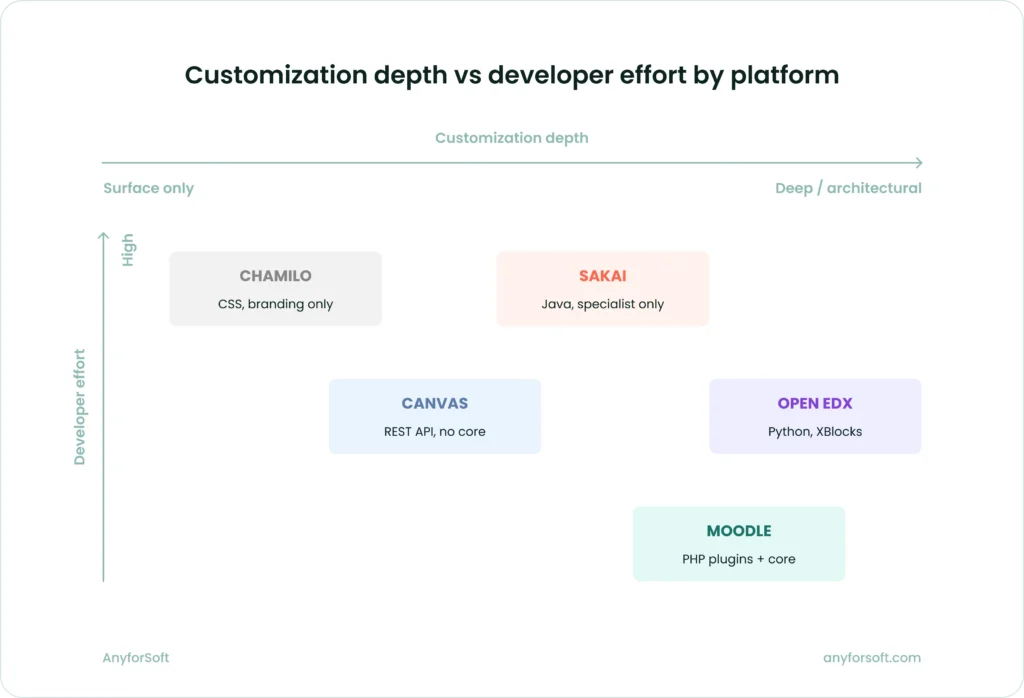
LMS customization depth varies more across these five platforms than any other criterion. The technical approach each platform takes determines how much developer time a change requires and whether modifications survive future version upgrades.
Moodle’s architecture separates core code from plugin code, which means modifications made through its plugin system remain intact through upgrades. Its plugin directory holds over 2,390 extensions covering everything from custom themes to workflow automation. Developers working in PHP can also modify core functionality directly, though this increases maintenance overhead on upgrades.
Open edX takes a different route. Its XBlock framework lets developers build entirely new course components from the ground up, which gives Python teams significant latitude over the learning experience. Getting meaningful results from the platform, however, requires a development team with Python expertise. Organizations that lack it typically need to hire or contract before any substantive customization work can begin.
Canvas exposes REST APIs that let developers build on top of the platform without touching core code, making it more accessible for teams without deep LMS expertise. Instructure controls the core development roadmap, which limits how far community-driven modifications can go. UI customization is achievable, though the ceiling is lower than on Moodle or Open edX.
Chamilo handles surface-level changes — color schemes, custom CSS, logo replacement — without requiring development work. Once a team moves past the surface, the platform’s PHP codebase presents a different challenge. Years of accumulated complexity make it time-consuming for developers who are new to it to navigate and modify confidently. Sakai, built on Java, supports significant architectural modification and has a long history in large-scale institutional deployments. Java-based LMS development is a specialized skill, though, and most corporate development teams do not have it in-house.
The answers to four questions determine which platform fits a given organization’s customization needs:
- Does the change need to survive version upgrades without manual rework?
- Is the development team working in PHP, Python, or Java?
- Does the organization need UI-level changes only, or workflow and data-layer modifications?
- Will customization be maintained internally or handed to an external partner?
For teams with PHP developers and an existing plugin budget, Moodle offers the most practical starting point. Open edX rewards organizations willing to invest in Python development with a fully tailored experience. Where API-level integration covers most requirements, Canvas is a workable fit. Chamilo and Sakai are better considered when the customization scope is narrow or when a specialist partner manages the platform long-term.
Integration Capabilities
Integration approach by platform
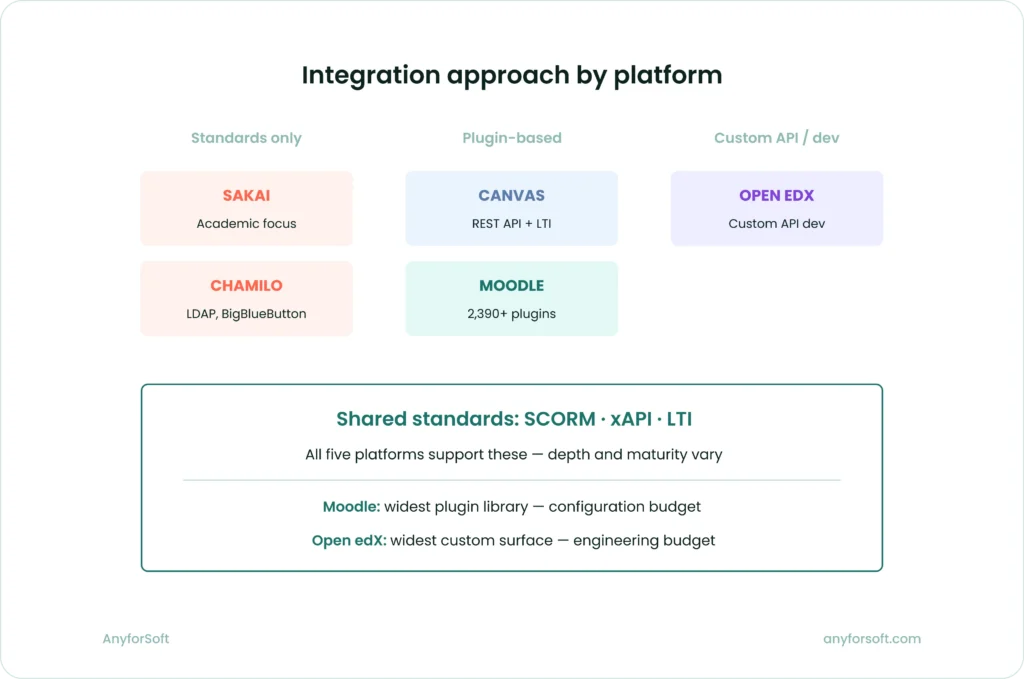
For business deployments, integration is where open source platforms earn or lose their value. An LMS that cannot connect to the HRIS managing employee records, or pass learning data to the BI tools leadership uses, creates manual overhead that offsets whatever was saved on licensing.
The relevant question is not whether a platform supports integration in principle, but how much custom development that integration requires in practice.
All five platforms support SCORM for packaged course content, xAPI for tracking learning activity across systems, and LTI for connecting external tools without separate authentication.
SCORM compatibility is consistent across the board. xAPI support varies more in depth than in presence: Moodle, Open edX, and Canvas handle xAPI statements reliably, while Chamilo and Sakai support the standard but with less mature implementations. Open edX Sumac achieved LTI Advantage Complete certification in 2025, which is a meaningful signal for organizations whose training operations depend heavily on third-party tool connections.
Beyond standards, the integration picture diverges.
Moodle’s plugin directory includes connectors for Salesforce, Workday, and Active Directory, though most require configuration work rather than plug-and-play setup.
Open edX handles enterprise integrations — HRIS synchronization and CRM data flows — primarily through custom API development, which gives it flexibility at the cost of upfront engineering time.
Canvas exposes a REST API that development teams can use to connect most enterprise systems, and its LTI support is strong. The self-hosted version, however, requires careful environment validation before analytics integrations can be confirmed as reliable.
Chamilo’s integration options are narrower. The platform connects to BigBlueButton for video conferencing and supports LDAP for authentication, but connections to enterprise systems like Workday or Salesforce require custom development with limited community-built tooling to draw on.
Sakai’s integration profile is similarly limited for corporate use cases — its API layer supports connections to external systems, but its developer community has historically focused on academic workflows, which means business-specific connectors are largely absent from the contributed tools library.
For teams evaluating integration requirements, the practical checkpoints are:
- HRIS and CRM connector availability: community-built plugins versus custom development required
- xAPI statement export to an external Learning Record Store in a portable format
- Analytics integration verified in the specific hosting environment
- Authentication standard compatibility with existing infrastructure
Moodle and Open edX give organizations the widest integration surface of the five, but through different means. Moodle relies on its plugin library; Open edX relies on custom API development. The right choice depends on whether the team’s budget is better spent on configuration or engineering.
Scalability
Scalability means different things depending on the organization. For a company running compliance training for 500 employees, it means reliable performance at a fixed load.
For a business scaling from 1,000 to 100,000 learners over two years, it means infrastructure that grows without requiring a platform rebuild. These two scenarios point toward different open source LMSs for business.
Open edX was built to handle large concurrent user volumes. Its microservices architecture lets teams scale individual components independently as demand shifts. The platform powers edX.org, which has served over 100 million registered learners, giving it a proven track record at scale that none of the other four platforms can match on that dimension.
Moodle scales well when infrastructure is configured correctly, but performance degrades under high concurrent load if the hosting environment is not optimized. Organizations running Moodle at enterprise scale typically add load balancing, caching layers, and database replication to maintain response times — infrastructure complexity that needs planning before deployment.
Canvas handles institutional-level scale reliably through the Instructure-hosted version. The self-hosted version transfers that responsibility to the organization’s own team, and performance at scale depends on how the environment is configured and maintained.
Chamilo has been tested with up to 5,000 simultaneous connected learners according to its own documentation, which covers many mid-market corporate training scenarios but not high-growth environments. Sakai supports large-scale deployment through its component architecture, though its Java-based infrastructure demands experienced system administrators to tune performance as user numbers grow.
Security and Compliance
Security responsibility across all five platforms falls primarily on the organization. Open source means no vendor patches arrive automatically — the team managing the installation applies updates, monitors vulnerabilities, and configures access controls. How well each platform supports that work varies.
Moodle’s compliance documentation is the most formally structured of the five. Its Privacy API requires all plugins to handle user data export and deletion requests through defined workflows. Moodle 4.5, released in October 2024, carries security fix support through October 2027, giving IT teams a concrete upgrade planning timeline — useful for organizations subject to audit requirements.
Open edX handles authentication through OAuth 2.0 and supports SAML-based SSO. Its GDPR posture is functional but less prescriptive than Moodle’s, with compliance implementation depending more on configuration than on built-in policy enforcement tools. Canvas supports role-based access control, SSO, and audit logging, with plugin compliance governed by defined privacy workflows for GDPR data requests. Chamilo includes two-factor authentication, HSTS, and an intrusion detection system in its documented feature set, with a security update cadence its primary developer BeezNest describes as faster than most comparable platforms. Sakai’s security model is mature given its long history in higher education, though its Java-based architecture requires experienced server administration to maintain securely over time.
For organizations with specific compliance requirements, these are the security gates to verify before selecting a platform:
- Does the platform support SAML 2.0 or OAuth 2.0 for SSO?
- Can user data be exported and deleted in response to GDPR subject access requests?
- Does the plugin audit trail support compliance reporting?
- Is there a published security maintenance window for the current release?
Moodle is the only platform in this group with a formally published security lifecycle tied to specific release dates, which makes compliance planning more predictable. For organizations where auditability is a hard requirement, that distinction carries real weight.
AI Capabilities
AI integration across these five platforms sits at different stages of development. Moodle and Canvas have the most structured implementations at this point. Open edX offers the most flexibility for organizations willing to build custom AI-powered features. Chamilo and Sakai are early in their AI development.
Moodle 4.5 introduced a new AI subsystem designed to integrate with various AI providers while prioritizing organizational control. Administrators can connect the platform to providers including OpenAI, Azure AI, and Ollama, enabling text generation and course content summarization directly within the interface.
Canvas delivers AI through its IgniteAI suite, which includes automated discussion summaries and AI-assisted translation via partnerships with OpenAI and Google Gemini.
Open edX’s AI capabilities are primarily delivered through custom XBlock development, giving technically resourced organizations significant latitude to build purpose-specific AI features like personalized learning paths and adaptive assessments, but requiring development investment to implement.
Chamilo has added AI-assisted quiz creation to its feature set, while Sakai’s AI integration remains limited to community-developed plugins with no centrally maintained AI framework.
One practical consideration across all five platforms: AI features in open source LMS environments require organizations to manage data flows to external AI providers. Sending learner data to third-party services introduces data governance questions that organizations operating under GDPR or HIPAA need to resolve before AI features go into production.
Implementation Complexity
No open source LMS installs itself and runs without configuration. The real question is how much technical work stands between a downloaded codebase and a production-ready platform. That gap varies considerably across these five.
Moodle has the most accessible installation process of the group. One-click installation options exist through several hosting providers, and its documentation covers the full setup process in detail. A team with basic server administration skills can get a standard instance running within days.
Open edX’s installation has historically been one of the most demanding in the open source LMS space. Tutor, the community-supported Docker-based deployment tool, automates configuration tasks and handles the integration of the platform’s different services, which has reduced that complexity significantly. Even with Tutor, the platform consists of a monolith plus independently deployable micro-frontends that all need to run together. The platform’s official documentation recommends using a service provider for most production deployments.
Canvas’s self-hosted setup requires Ruby on Rails expertise and careful environment configuration, while the Instructure-managed cloud option bypasses that at the cost of vendor dependency.
Chamilo’s low server requirements and straightforward documentation make it one of the fastest platforms to get running.
Sakai runs on Apache Tomcat and requires Java configuration expertise — the installation guide is detailed, but not forgiving for teams without Java server experience.
Here is how the five platforms compare on the dimensions that drive implementation timelines and cost:
- Technical expertise required: Moodle needs PHP and server administration skills. Open edX requires Python and DevOps capability. Canvas demands Ruby on Rails experience for self-hosted deployment. Chamilo works with basic PHP and server knowledge. Sakai requires Java server administration.
- Time to first working instance: Chamilo and Moodle can reach a functional state in days with the right hosting setup. Canvas self-hosted typically takes one to two weeks with a prepared team. Open edX with Tutor takes one to three weeks depending on the team’s familiarity with Docker. Sakai’s Java setup typically pushes deployment to three to four weeks.
- Ongoing maintenance load: Open edX’s microservices architecture creates the highest ongoing maintenance burden of the five. Moodle’s published maintenance schedule gives teams the clearest upgrade planning window. Canvas, Chamilo, and Sakai sit between these two in terms of operational overhead.
The implementation decision ultimately comes down to what the organization already has. A team with PHP developers and an existing hosting setup will reach production faster on Moodle than on any other platform here. A team without any of that should factor the cost of building those capabilities into the total project budget before committing to a platform.
Best Fit by Use Case
The head-to-head comparison shows where each platform is technically stronger. Use cases show where that strength translates into practical value — and where it doesn’t. The right platform for compliance training at a 10,000-person enterprise is rarely the right platform for onboarding a fast-growing mid-market team. This section maps each scenario to the platforms that handle it most effectively.
Corporate Training
Corporate training places demands that differ from education: compliance tracking, audit trails, integration with HR systems, and reporting that connects learning activity to business outcomes. The stakes are measurable. According to LinkedIn’s Workplace Learning Report, organizations that invest in learning culture see 57% higher retention, 23% higher internal mobility, and 7% more promotions to management compared to those that don’t. The platform choice determines whether those outcomes are achievable at the organization’s scale and budget.
Moodle handles corporate training well when infrastructure is properly configured. Its plugin directory includes compliance-specific tools, including certification management, automated re-enrollment, and completion tracking, that cover most standard requirements without custom builds.
Moodle Workplace, the commercial extension built on the open source core, adds multi-tenancy and dynamic rules designed specifically for corporate L&D teams managing multiple departments or entities.
Open edX suits large-scale corporate training programs where volume is the primary constraint. This platform is the scale-first option when modern extensibility and standards-based integration are non-negotiable.
Organizations running training for tens of thousands of employees benefit from its analytics depth, though the development investment required to configure it for corporate-specific workflows is substantial.
Canvas works for corporate training in environments where the Instructure-hosted version is acceptable, though the self-hosted version requires careful validation of analytics features before go-live, with a 2025 community report describing New Analytics as failing to appear in certain environments depending on configuration and version.
Chamilo covers standard corporate training scenarios at moderate scale with minimal setup.
Sakai’s corporate training fit is limited: its architecture and developer community are oriented toward academic collaboration workflows. It means compliance and reporting capabilities require more custom development than the other platforms.
| Moodle | Open edX | Canvas | Chamilo | Sakai | |
| Compliance tracking | Strong via plugins | Strong natively | Adequate | Adequate | Limited |
| HRIS integration | Via plugins | Custom API | Via REST API | Limited | Limited |
| Multi-tenancy | Via Moodle Workplace | Native | Via Instructure | Limited | Limited |
| Reporting depth | Strong | Strong | Adequate (verify first) | Basic | Basic |
| Overall fit | Strong | Strong | Adequate | Moderate | Weak |
Employee Onboarding
Onboarding has a specific rhythm: new employees arrive, need structured content delivered in a defined sequence, and must complete certain tasks before a set date. The LMS needs to handle automated enrollment, role-based learning paths, progress tracking, and manager visibility, ideally without manual administration for each new hire.
The retention numbers from the TalentLMS 2026 L&D Benchmark Report make the case directly. The report surveyed 101 US HR managers and 1,000 employees. Nearly all HR managers surveyed said better training improves retention, while 73% of employees said training would make them stay at their jobs longer.
Onboarding is where that relationship between learning investment and retention begins.
Moodle handles onboarding well through its course completion framework and conditional access rules. They allow L&D teams to build sequenced programs that advance learners based on defined criteria. Combined with HRIS integration via plugins, enrollment can be triggered automatically when a new employee record is created. The setup requires configuration, but the tooling exists without custom development.
Chamilo’s low technical barrier makes it a practical choice for smaller organizations that need a functional onboarding program running quickly. Its installation requires no configuration to start using the platform, and integration with an existing information system is straightforward, which suits HR teams without dedicated LMS administrators.
Open edX is a heavier investment for pure onboarding use cases; its strength is in delivering content at scale, not in the structured workflow automation that onboarding requires.
Canvas supports onboarding adequately, with clean course delivery and solid mobile access for employees completing programs on their own devices.
Sakai’s onboarding fit is limited by the same workflow orientation issues as corporate training — the tools exist but require more configuration effort than the other platforms.
| Moodle | Open edX | Canvas | Chamilo | Sakai | |
| Automated enrollment | Via plugins | Custom development | Adequate | Manual setup | Manual setup |
| Role-based learning paths | Strong | Adequate | Adequate | Basic | Limited |
| Manager visibility | Via plugins | Custom development | Adequate | Basic | Limited |
| Mobile access | Strong | Strong | Strong | Adequate | Limited |
| Overall fit | Strong | Moderate | Adequate | Moderate | Weak |
Partner and Customer Training
Training external audiences, such as channel partners, resellers, or customers, introduces requirements that internal training programs rarely face. They include separate branded portals for different organizations, external user authentication without corporate SSO, and enrollment management tied to commercial relationships.
External training gaps carry the same business consequences as internal ones.
The same TalentLMS research found that 35% of employees said a lack of training opportunities would prompt them to look for another job. That’s a signal that applies equally to partners and customers who disengage when structured learning is unavailable to them.
Open edX handles external training programs at scale better than any other platform in this group. Its origins in MOOC delivery mean it handles large external learner populations reliably, and the platform now serves over 100 million learners across 2,283 live sites.
Moodle can handle partner and customer training with the right plugins. IOMAD, which is an open source multi-tenancy extension built on top of Moodle, lets organizations run separate company environments, each with its own users, branding, and course catalog, from a single installation. This makes it possible to manage distinct partner portals without spinning up separate Moodle instances for each. The configuration is more involved than Open edX’s native multi-tenancy, but the outcome is comparable for mid-scale programs.
Canvas covers external training adequately when Instructure manages the hosting, though branding customization at the tenant level is more constrained than Moodle or Open edX.
Chamilo supports sessions management for re-using courses multiple times and adding structure to long-term course management, but lacks the multi-tenant depth for managing dozens of distinct partner organizations from a single instance.
Sakai is not a practical fit for partner or customer training given its academic-oriented architecture and limited external user management tooling.
| Moodle | Open edX | Canvas | Chamilo | Sakai | |
| Multi-tenant portals | Via IOMAD plugin | Native | Limited | Limited | Not available |
| External user authentication | Via plugins | Native | Adequate | Basic | Limited |
| Branded environments per partner | Via IOMAD | Native | Limited | Basic | Not available |
| Large external audience scale | Adequate | Strong | Adequate | Limited | Weak |
| Overall fit | Adequate | Strong | Adequate | Weak | Weak |
Global Teams
Training distributed teams across multiple countries introduces language, localization, and access requirements that quickly become the primary constraint.
Content needs to reach employees in their working language, interfaces need to function on varied devices and connection speeds, and administration needs to work across time zones without centralized oversight for every local market.
Digital learning has made this scale achievable. According to the World Economic Forum’s Future of Jobs Report 2025, survey respondents reported that 50% of their workforce completed training as part of learning and development initiatives — up from 41% in 2023, with the increase visible across nearly all industries.
For multinational businesses, whether the LMS supports that deployment reliably determines whether the numbers move at all.
According to Moodle’s registration database, there are currently 150,713 active registered sites across 236 countries. For organizations running training across Europe, Latin America, or Asia-Pacific, this breadth covers most requirements without custom translation work.
Open edX-powered platforms have registered learners in more than 190 countries with strong localization capabilities for course content through a mature translation infrastructure. Administrative interface localization is less complete than Moodle’s, but content delivery is reliable across regions.
Canvas delivers AI-assisted translation through its IgniteAI suite, though full interface localization is more limited than Moodle.
Chamilo has an established presence in French-speaking and Spanish-speaking markets, making it a practical choice for organizations with concentrated regional presence in those areas.
Sakai is available in 19 languages, which is sufficient for some global deployments but narrow compared to Moodle or Open edX for genuinely multinational programs.
| Moodle | Open edX | Canvas | Chamilo | Sakai | |
| Interface languages | 120+ | Partial (content-focused) | Limited | Strong in FR/ES markets | 19 |
| Content localization | Strong | Strong | Adequate (AI-assisted) | Adequate | Limited |
| Mobile access for distributed teams | Strong | Strong | Strong | Adequate | Limited |
| Low-bandwidth performance | Adequate | Adequate | Adequate | Strong | Limited |
| Overall fit | Strong | Strong | Adequate | Moderate (regional) | Weak |
Total Cost of Ownership
All five platforms are free to download. The actual cost depends on development work to configure and integrate the platform, infrastructure to host it, and ongoing maintenance. Each category behaves differently across the five platforms.
Development Costs
Moodle has the lowest entry point since its plugin library covers most business requirements through configuration rather than custom code.
Open edX carries the highest costs: its Python-based architecture requires specialized skills, and most business-specific features need custom API development.
Canvas development is minimal on the hosted version but adds Ruby on Rails overhead when self-hosted.
Chamilo’s PHP codebase is accessible to generalist developers.
Sakai’s Java architecture pushes most organizations toward a specialist LMS development company, making it the most expensive platform to staff.
| Moodle | Open edX | Canvas | Chamilo | Sakai | |
| Language expertise required | PHP | Python / DevOps | Ruby on Rails (self-hosted) | PHP | Java |
| Talent availability | High | Moderate | Moderate | High | Low |
| Plugin/extension coverage | Very high (2,390+) | Moderate (XBlocks) | Moderate (LTI-based) | Limited | Limited |
| Relative development cost | Low | High | Low to moderate | Low | High |
Infrastructure Costs
MoodleCloud offers managed hosting plans covering up to 750 users, billed annually. No other platform in this group publishes official pricing — infrastructure costs depend on hosting provider, server configuration, and user volume.
Chamilo has the lowest footprint: it runs on significantly less RAM and CPU than Moodle or Canvas.
Moodle’s standard stack performs well at moderate scale but becomes memory-intensive under heavy load.
Open edX has the highest infrastructure cost — its microservices architecture requires multiple services running simultaneously, and costs scale linearly with user volume.
Canvas self-hosted is resource-intensive even at moderate user counts.
Sakai’s Java server requirements are well-understood but carry higher base costs than PHP-based platforms.
| Moodle | Open edX | Canvas | Chamilo | Sakai | |
| Published SaaS pricing | Yes (MoodleCloud) | No | No | No | No |
| Minimum server requirements | Moderate | High | High (self-hosted) | Low | Moderate |
| Managed hosting available | Yes (certified partners) | Yes (marketplace) | Yes (Instructure) | Yes (official providers) | Yes (affiliates) |
| Relative infrastructure cost | Moderate | High | Moderate to high | Low | Moderate |
Maintenance Costs
Moodle publishes specific security fix windows for each release, giving IT teams a predictable upgrade planning timeline. Plugin compatibility adds overhead at each major version.
Open edX carries the highest maintenance burden. Its microservices architecture makes upgrades complex, and organizations have historically avoided them entirely, running deprecated versions rather than absorbing the effort.
Canvas hosted offloads maintenance to Instructure; self-hosted transfers that work entirely to the organization’s team.
Chamilo’s lighter architecture keeps maintenance low.
Sakai’s slower release cadence means security patches sometimes arrive later than on more actively maintained platforms.
| Moodle | Open edX | Canvas | Chamilo | Sakai | |
| Published maintenance lifecycle | Yes (per release) | No | No | No | No |
| Upgrade complexity | Moderate | High | Low (hosted) / High (self-hosted) | Low | Moderate |
| Security patching | Community + HQ | Community | Instructure (hosted) / Self (self-hosted) | Community | Community |
| Relative maintenance cost | Moderate | High | Low (hosted) / High (self-hosted) | Low | Moderate |
How to Choose the Right Open Source LMS
No platform in this comparison is universally the best choice. Each one is the right answer for a specific combination of organizational context, technical capability, and training objectives. The comparison criteria covered in this article — customization, integration, scalability, security, AI, and implementation complexity — carry different weight depending on the organization’s starting point.
For a structured approach to how to choose an LMS, the most reliable starting point is identifying the one or two criteria that would eliminate a platform entirely if it failed them.
- Start with technical capacity. The most common source of failed implementations. Confirm what the internal team can build and maintain before evaluating features. PHP skills point toward Moodle, Python and DevOps toward Open edX, limited resources toward Chamilo.
- Apply your primary use case as a filter. Partner and customer training at scale points to Open edX. Global multilingual deployment points to Moodle. Fast, low-overhead onboarding for a mid-sized team points to Chamilo.
- Verify the non-negotiables. Compliance requirements, data residency rules, and existing infrastructure often eliminate platforms before a full evaluation begins. An enterprise-ready open source LMS must prove standards, identity, analytics, governance, multi-tenancy, and an upgrade path before any platform is selected.
- Run a pilot. Test SSO, SCORM delivery, GDPR data export, and reporting in the actual hosting environment. The platform that passes those gates in your environment is the right platform, regardless of how it performed in a general comparison.
Use this checklist before committing to a platform.
- Confirm what technical expertise is available internally — PHP, Python, Java, or Ruby on Rails
- Identify the primary use case: corporate training, onboarding, partner training, or global deployment
- List any hard compliance requirements: GDPR, HIPAA, data residency, audit trail standards
- Verify whether the organization will self-host or use a managed hosting provider
- Estimate the number of concurrent users at launch and at 18-month projected growth
- Run a pilot that tests SSO, SCORM delivery, GDPR data export, and reporting in the actual environment
- Confirm that the development team or external partner has direct experience with the chosen platform
Four steps to your LMS shortlist
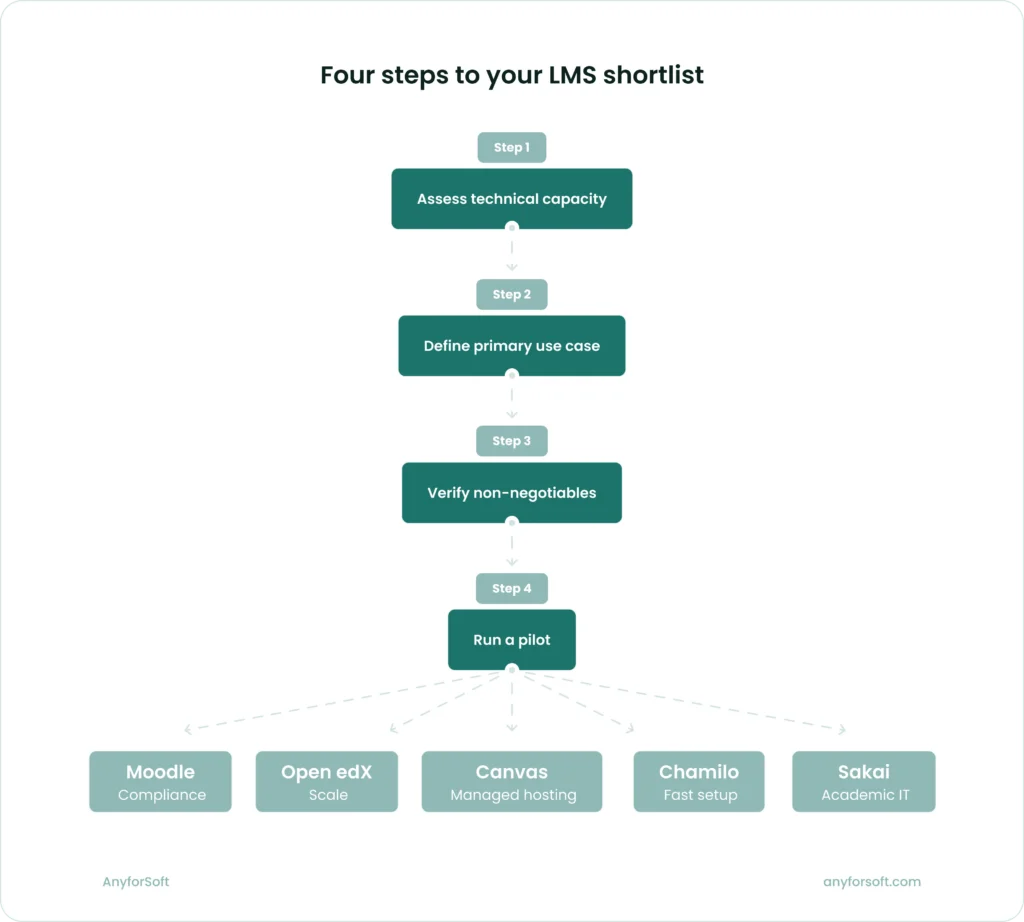
The table below maps organizational constraints to platform starting points. It is a starting point for a structured internal conversation, not a final recommendation.
Where to start your platform evaluation
| If your primary constraint is… | Start with | Avoid |
| Limited technical team | Chamilo, Moodle (hosted) | Open edX, Sakai |
| Large-scale external training | Open edX | Chamilo, Sakai |
| Strict compliance and audit requirements | Moodle | Chamilo, Sakai |
| Global multilingual deployment | Moodle, Open edX | Sakai |
| Fast time to launch | Chamilo, Moodle (hosted) | Open edX, Sakai |
| Deep custom development | Open edX, Moodle | Canvas (hosted) |
| Low infrastructure budget | Chamilo | Open edX |
| Vendor-managed hosting preferred | Canvas (Instructure) | Sakai |
Every organization’s context introduces variables this comparison cannot account for: existing vendor relationships, internal IT constraints, learner demographics, and budget cycles all shape what is practical.
The next step after identifying a shortlist is a structured pilot, with procurement following after the platform proves itself in the actual environment.
FAQs
Which open source LMS is best for business use?
No single platform leads across all scenarios. Moodle is the strongest general-purpose choice for compliance tracking and HRIS integration. Open edX fits large-scale programs with high learner volumes. Canvas works well where managed hosting is preferred. Chamilo suits smaller organizations needing fast, low-maintenance deployment. Sakai fits corporate use only when the IT team has Java expertise and requirements are narrow.
How much does an open source LMS cost to implement?
The software is free across all five platforms. Implementation costs split into three categories: development work, infrastructure, and ongoing maintenance. MoodleCloud offers managed hosting plans covering up to 750 users, billed annually. For all other platforms, hosting costs depend on provider and configuration. Organizations should budget for all three categories: for a broader LMS pricing comparison, the TCO section of this article covers development, infrastructure, and maintenance costs across all five platforms
Is open source LMS secure for companies?
Open source platforms can match proprietary security standards, but responsibility falls on the deploying organization. All five platforms support SSO via SAML 2.0 or OAuth 2.0, role-based access control, and audit logging. Moodle includes specific GDPR features covering user consent management, subject access requests, and data deletion workflows. Security depends on how promptly the organization applies patches and upgrades.
How scalable are open source LMS platforms?
Scalability varies significantly. Open edX serves over 100 million learners across 2,283 live sites and scales individual components independently through its microservices architecture. Moodle scales well with proper infrastructure configuration. Chamilo supports up to 5,000 simultaneous users. Canvas handles large deployments reliably through Instructure hosting. For any platform, the hosting environment determines whether the platform’s ceiling is achievable in practice.
Can open source LMS integrate with business systems?
All five platforms support SCORM, xAPI, and LTI. Beyond standards, depth varies. Moodle has the largest library of pre-built connectors for Salesforce, Workday, and Active Directory. Open edX handles enterprise integrations through custom API development — organizations without in-house Python teams typically rely on LMS integration services to implement these connections.
Canvas offers a well-documented REST API. Chamilo covers LDAP and BigBlueButton but has limited enterprise connectors. Sakai’s integration profile is oriented primarily toward academic systems.
How is AI used in open source LMS platforms?
Moodle 4.5 introduced an AI subsystem integrating with OpenAI, Azure AI, and Ollama, enabling text generation and content summarization. Canvas delivers AI through its IgniteAI suite with automated discussion summaries and translation. Open edX supports custom AI development through XBlocks. Chamilo has added AI-assisted quiz creation. Sakai’s AI integration remains limited to community plugins. Across all platforms, organizations should resolve data governance questions before enabling AI features in production.