


A company identifies a real training problem. Internal tools can’t handle the complexity, so the team evaluates custom LMS development and gets a quote somewhere between $150,000 and $300,000. The project stops there.
That scenario is common. Budget estimates for custom LMS development often land far above what organizations expect. As a result, a gap between the training need and the apparent cost leads many teams to drop the idea entirely, even when the underlying training problem is real and the business case is solid.
There are more accessible paths. Most organizations don’t need to build a learning platform from the ground up. They need a standard LMS platform adapted to their specific workflows, or a focused MVP to validate requirements before committing to a larger build.
Both approaches produce a functional, business-ready system at a fraction of full custom development cost.
This guide breaks down what each path costs and what the budget covers at each level. It addresses:
- Proof of concept builds for early-stage validation
- MVP development for first production deployments
- Platform-based LMS with moderate customization
- Platform-based LMS with advanced customization
- Full custom builds from scratch
With a clear picture of what each scope requires financially, you can match the investment to the actual business need and make a decision based on what your project requires.
What “Custom LMS” Means in This Article
“Custom LMS” covers three meaningfully different development paths, and the cost difference between them is substantial. Choosing the wrong one at the scoping stage either produces an overbuilt system the organization didn’t need or an underbuilt one it quickly outgrows.
An off-the-shelf LMS demands configuration work, not engineering. Out of the box, the platform handles course delivery, user management, basic reporting, and standard assessments. When standard platform logic already maps closely to how the organization runs its training, this path is the most cost-efficient starting point.
A platform-based custom LMS takes an established system and adapts it to specific operational needs. At AnyforSoft, this is the core of Moodle development services, Open edX development and consulting services, and Canvas LMS customization.
In each case, the work follows the same logic: design changes, workflow adjustments, integrations, and custom reporting bring the system in line with how the business operates.
For organizations that need a stronger fit than off-the-shelf tools provide, this path delivers it without the cost of a ground-up build. Most organizations that describe their need as “a custom LMS” end up here.
A fully custom build makes sense in specific circumstances:
- A business model where the LMS is itself the product being sold
- Regulatory or security requirements that existing platforms cannot meet
- Training logic so specific that platform adaptation costs more than building from scratch
Outside those cases, platform-based customization covers the full range of what most organizations need.
What Drives the Cost of LMS Development
Most LMS cost discussions focus on features. That framing misses the more important variable. Two projects with identical feature lists can carry budgets that differ by a factor of two to four, depending on how those features need to be built, integrated, tested, and maintained.
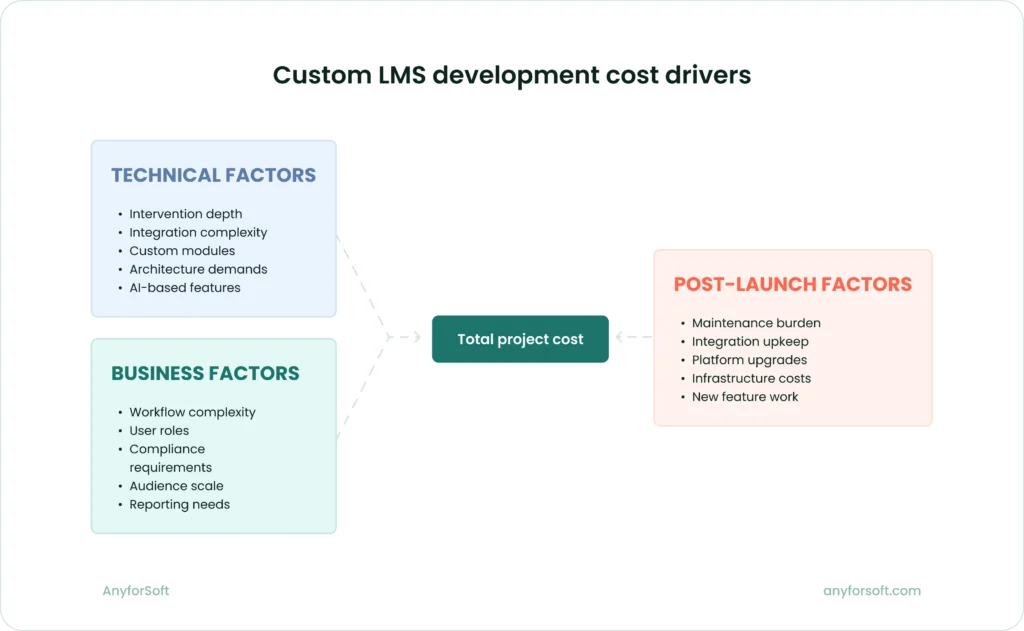
Cost is driven by intervention depth, not by feature labels
A certificate generation module is a useful example. Configured on most platforms, it takes a few days of work and costs relatively little. Rebuilt to support conditional certification paths, branch-specific approval chains, expiry and renewal logic, and regulatory reporting outputs, it becomes a multi-week engineering task.
The feature label stays the same. The actual scope does not.
Cost scales with distance from standard platform behavior. When the project requires the LMS to do something the platform was not designed to do natively, the development team writes custom code, builds workarounds, redesigns how core modules function, or extends the platform’s architecture.
Each of those steps adds time. The more exceptions, conditional workflows, and cross-system dependencies the project introduces, the further that distance grows and the higher the budget climbs.
Business requirements and workflow complexity
Standard training programs built around a fixed course sequence and a single learner group require little customization beyond configuration. The platform’s default logic handles most of what the business needs.
That changes quickly.
Additional user roles add permission logic and interface variations that require dedicated development and testing. Complex learning journeys with prerequisites and adaptive branching require conditional logic that most platforms don’t support natively. Manager approval steps and region-specific compliance requirements add layers of custom workflow on top of the platform’s standard structure.
Certification logic deserves particular attention. Basic certificates tied to course completion are straightforward. Certification programs with renewal cycles, external body requirements, evidence uploads, and multi-stage approvals take significantly more engineering to build correctly.
The further the business model departs from a simple assign-complete-report structure, the more the budget reflects that complexity.
Integrations and data flows
Connecting an LMS to other business systems is consistently the most underestimated item in early project budgets. Organizations often list integrations as line items without accounting for the actual technical work each one involves.
What determines the cost of an integration:
- Whether the external system has a stable, well-documented API
- Whether data moves in one direction or both
- Whether the integration follows a standard protocol or requires custom development
- How much transformation logic the connection requires before records can be exchanged reliably
Common integration targets on the HR and business side include HRIS and HCM platforms for user provisioning, CRM systems for customer or partner training, and payment gateways for commercial training programs. SSO providers, webinar tools, SIS platforms, and content libraries are frequent additions on the platform side.
The range of effort is wide. A straightforward SSO integration with a well-documented provider can be completed in hours; a bidirectional sync between the LMS and a legacy HRIS with limited API support can take weeks of development and testing.
That gap catches many organizations off guard when early budget estimates treat every integration as equivalent.
Design and user experience customization
Applying a company’s brand to an existing LMS theme is light work. It adds relatively little.
Costs increase when the project requires more than surface-level visual changes. Dashboard redesigns, role-specific interfaces, custom navigation structures, and learner journey mapping all require front-end development work beyond what the platform’s theming tools support.
Building distinct portal experiences for internal employees and external partners (each with separate interfaces and reporting views) is a meaningful engineering task.
The more the design departs from the platform’s default layout, the more development hours it demands.
Reporting and security requirements
Standard LMS reports cover course completion rates, assessment scores, learner activity, and time-on-task data. For many organizations, that is sufficient.
For organizations in regulated industries, or those with executive reporting needs, custom dashboards built outside the platform’s native reporting tools require a separate data layer and often a dedicated reporting infrastructure.
Audit trails and compliance records must be structured to meet specific regulatory formats, which vary by industry and jurisdiction. Role-based data access controls (ensuring that a regional manager sees only their team’s data, for instance) add permission logic that touches multiple parts of the system.
Data protection requirements add further complexity. Organizations handling sensitive employee records or subject to contractual data residency obligations need architecture decisions made at the start of the project. Earlier decisions cost less.
Scalability and long-term support
A single-tenant LMS for 300 internal employees and a platform supporting 40,000 learners across a franchise network are technically different products. Even in the case when the feature lists look similar. Underlying architecture and performance requirements diverge significantly at that scale.
User volume affects database design, caching strategy, load testing scope, and infrastructure costs.
Organizations that serve structurally separate audiences often need the LMS to maintain clear separation between those groups.
Each audience operates within its own configuration and content space, even though all of them run on the same platform. Multi-tenant architecture requires careful design and significantly more development effort than a single-audience deployment.
The same pattern applies post-launch.
For a lightly customized platform with standard integrations, ongoing support stays modest. Proprietary modules and complex data flows bring a different reality: continuous maintenance, regular upgrades, security patching, ongoing integration maintenance, and dedicated development capacity for new feature work.
From launch day onward, those costs run for the life of the system.
Not sure what your LMS needs to do?
How Costs Grow from Standard Setup to Advanced Customization
LMS development costs don’t jump arbitrarily between projects. They follow a logic tied to how much the system needs to move away from what the platform already does. Understanding that progression makes budget ranges easier to interpret and easier to apply to a specific situation.
Standard setup: the lowest-cost path
Configuration drives this path, not development. The platform already handles course delivery, user management, assessments, and basic reporting. The team adjusts settings, applies basic branding, defines user groups, and connects the system to one or two standard tools. Design work is minimal.
This approach works well when the platform’s standard logic already maps closely to how the organization runs its training. There is no need to build what already exists. The budget reflects that.
Moderate customization: the most common middle ground
Most real enterprise LMS projects land here. The organization starts with an established platform and adds a targeted layer of adaptation: adjusted enrollment workflows, a branded learner portal, custom reporting views, and integrations with two or three business-critical systems.
The result fits how the company operates. Learners interact with a system that reflects the organization’s processes and visual identity. Administrators work within workflows that match internal approval and compliance structures.
This path is substantially more cost-effective than starting from scratch. The development team builds on existing platform infrastructure rather than recreating it. That distinction keeps budgets manageable while still producing a system tailored to real operational needs.
Advanced customization: when costs rise sharply
Costs climb significantly when the project requires capabilities the platform cannot support through standard configuration or light extension. At this level, the development team is building on top of the platform in ways that require substantial engineering effort.
The triggers for advanced customization typically include:
- Custom reporting layers. When native platform reports are insufficient and the organization needs executive dashboards, cross-system data aggregation, or compliance-specific output formats, a separate reporting infrastructure must be built and maintained alongside the LMS.
- Complex certification logic. Multi-stage certification programs with conditional paths, renewal cycles, external body requirements, and evidence submission go well beyond what most platforms handle natively.
- Multi-audience architecture. Serving internal employees, external partners, and customer groups within a single platform — each with separate content, configuration, and reporting — requires a multi-tenant structure that adds significant design and development effort.
- AI-based functionality. Personalized learning recommendations, AI-assisted content search, or automated learner support features require model integration, data pipeline work, and ongoing refinement after launch.
- Proprietary integrations. When the organization’s core systems lack stable APIs or use non-standard data formats, each integration becomes a custom engineering project.
Each of these items adds development time, testing effort, and post-launch maintenance complexity. Projects that combine two or more of them move into a different budget range entirely.
Full custom build: the highest-cost scenario
Building from scratch means the development team is creating the platform itself. Every component — authentication, course delivery, content storage, reporting, user management — must be designed, built, and validated from the ground up. No existing infrastructure absorbs any part of that work.
The cost reflects the full scope of that effort, along with the long-term engineering commitment it creates. On a platform-based project, the vendor maintains the core product. On a fully custom build, the organization carries that responsibility entirely.
For most businesses, this path makes sense only when the learning platform is itself a product, or when operational and regulatory requirements genuinely rule out every available platform option.
The Cost of an LMS Proof of Concept
A proof of concept is the smallest meaningful investment in custom LMS development. It is also the most misunderstood. Organizations sometimes approach a POC expecting a compressed version of the final system. That expectation leads to scope creep at the earliest and most sensitive stage of the project.
What a proof of concept usually includes
A POC is a controlled validation exercise, not a prototype of the finished product. Its purpose is to answer one specific question before the organization commits to a larger build.
In practice, that means a narrow scope: one key use case, a limited set of user roles, and a basic interface sufficient to test the targeted functionality. The POC may include one integration or one workflow, chosen because it represents the most technically uncertain or strategically important requirement.
Everything else is deferred. Content library, advanced reporting, full branding, and secondary user roles are out of scope at this stage. Including them defeats the purpose. A POC that tries to represent the future system produces neither a valid test nor a useful build.
Typical cost range
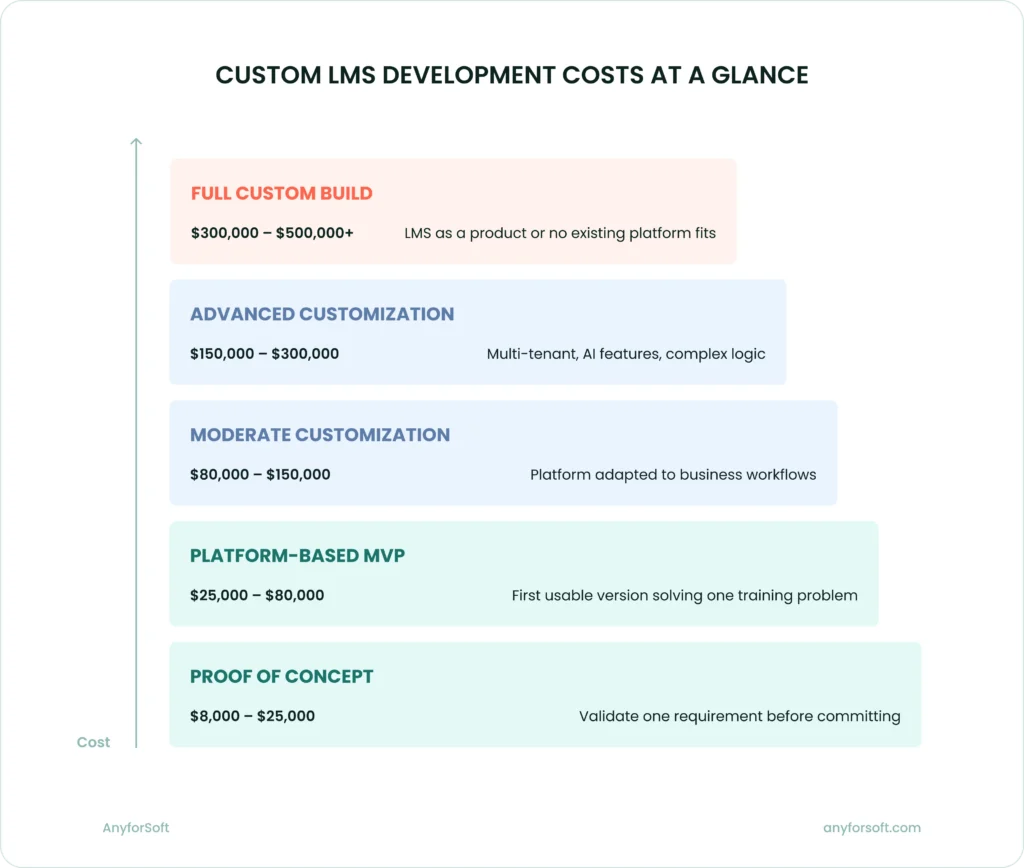
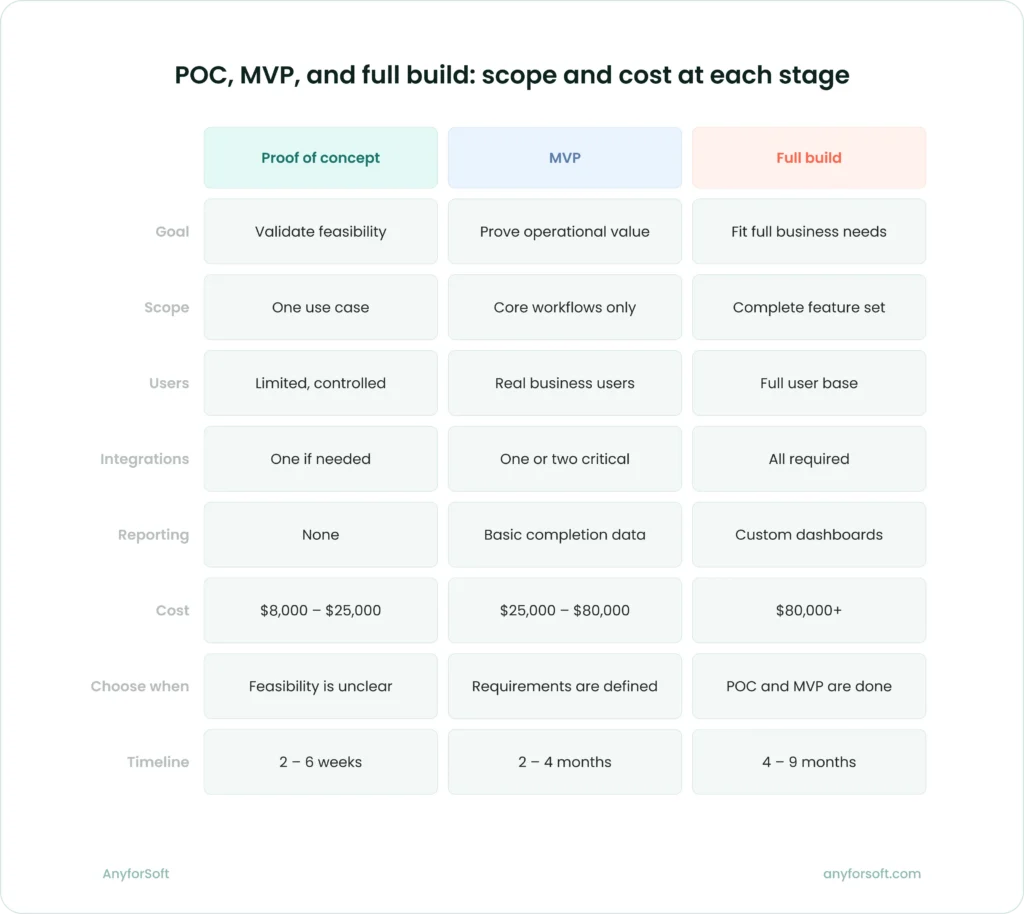
Platform-based LMS proofs of concept typically range from $8,000 to $25,000. That range reflects genuine variation in what organizations choose to validate.
Cost stays relatively limited at this stage because the scope is narrow by design. The development team works on one defined problem, with one set of constraints. There is no full system architecture to build, no complete UX to design, and no production-grade infrastructure to configure.
Several factors can push a POC toward the higher end of that range. A technically complex integration with a legacy system adds engineering effort even at proof-of-concept scale. Custom workflow logic that requires significant platform extension costs more than a simple configuration test. If the organization needs real users involved in the validation, additional interface work and environment setup add to the budget.
A POC is cheaper than an MVP, but it still requires real planning. A poorly scoped POC produces results that don’t transfer to the full project. The investment is only useful if the question being tested is precisely defined before development begins.
When a proof of concept is worth the money
A POC earns its budget when the organization faces genuine uncertainty about feasibility, adoption, or a specific technical requirement.
If the project depends on an integration with a system that has limited API documentation, a POC can determine whether that connection is viable before the full build is planned around it. If internal stakeholders disagree about whether employees will use a new learning system, a limited deployment with real users produces evidence that internal debate cannot. If the training model relies on a workflow the platform has never been configured to support, testing it at small scale costs far less than discovering the problem mid-project.
A POC is less appropriate when requirements are already well understood and the organization’s main need is a working system. In that case, moving directly to an MVP is the more efficient path.
The Cost of an LMS MVP
A proof of concept tests feasibility. An MVP delivers the first version of the system that real users can operate in a real business context. The step between them is significant, both in scope and in budget.
What an LMS MVP usually includes
An MVP should solve one defined training problem. It is not a scaled-down version of the future platform. It is the smallest build that produces genuine operational value.
A platform-based LMS MVP typically covers:
- Core course delivery
- Learner and admin roles with relevant permissions
- Enrollment logic aligned to the organization’s assignment process
- Assessments and, where required, certificates
- Basic reporting on completion and progress
- One or two integrations essential for the system to function at launch
- Light customization to fit the organization’s visual identity and workflows
Everything beyond that scope belongs to a later phase. An MVP that tries to represent the finished system produces a bloated build, a longer timeline, and a budget that reflects neither the MVP stage nor the full product.
Typical cost range
Platform-based LMS MVPs typically range from $25,000 to $80,000. That range is wide because “MVP” means different things to different organizations.
A disciplined MVP is at the lower end. The scope is tight, requirements are clear before development begins, and the team builds only what the business needs to start operating.
A bloated MVP’s position is at the higher end. It includes features added under pressure from internal stakeholders, integrations that could wait, and reporting functionality the organization isn’t ready to act on yet.
Which category does your project fall into? Answering that question honestly before development begins is the most effective cost control available at this stage.
The difference between a $30,000 MVP and a $75,000 one is rarely technical complexity. It is almost always scope discipline. Without scope discipline, that budget can double before the first version launches.
Common reasons MVP budgets expand too fast
Several patterns consistently push MVP costs beyond what the initial estimate anticipated:
- Unclear requirements at the start. When the organization hasn’t defined exactly what the MVP must do, the development team builds against shifting targets. Each change mid-development costs more than it would have cost to specify correctly upfront.
- Too many custom user roles. Each role requires its own permission logic, interface adjustments, and testing scenarios. Adding roles that aren’t strictly necessary at launch multiplies development effort across the entire system.
- Excessive integrations from day one. Does every planned integration need to be live at launch, or can some be added in the next phase once the core system is validated? Integrations are expensive to build and maintain, and their value at MVP stage depends on whether the system can function without them.
- Advanced reporting added too early. Custom dashboards and executive reporting layers require a separate data infrastructure. Building that before the organization knows what decisions the data needs to support produces reporting that often gets rebuilt in the next phase anyway.
- Heavy UX customization before product fit is proven. A fully bespoke interface requires significant design and front-end development time. At MVP stage, that investment is premature. The system needs to work well. It does not need to look final.
Scope creep starts early. The MVP stage is where budget discipline has the most leverage, because decisions made here compound through every phase that follows.
The Cost of a Full-Fledged LMS with Moderate Customization
An MVP confirms the system works. A full-fledged LMS makes it work at scale, across the organization’s actual user base, with the complete set of workflows the business runs daily. This section covers the most common serious investment level in platform-based LMS development.
What moderate customization means
Moderate customization produces an LMS that fits the organization well without requiring the platform’s core architecture to be rebuilt. The development team adapts what exists; they don’t replace it.
In practice, this means a branded learner interface built on the platform’s existing structure, dashboards adjusted to reflect the organization’s reporting priorities, and enrollment flows configured to match internal approval and assignment logic. Certifications follow standard formats, though they may be tailored to specific program requirements. Compliance reminders, structured user groups, and integrations with HRIS or SSO systems round out the typical scope.
The result is recognizable. Staff recognize the interface. Workflows match internal processes. Administrators manage the platform without constant developer involvement.
Moderate customization does not mean minimal effort. It means effort applied precisely to the parts of the system where a standard platform falls short, without extending into platform reconstruction.
Typical cost range
A business-ready LMS built on an existing platform with moderate custom work typically ranges from $80,000 to $150,000. The variation within that range comes down to one factor: the number of places where the business requires the platform to behave differently from its defaults.
Projects at the lower end have clear requirements, limited integration scope, and design work that stays close to the platform’s existing structure. Projects at the higher end involve more workflow customization, additional integrations, and reporting adjustments that require development work outside the platform’s native tools.
How precisely has the organization defined its requirements before engaging a development partner? That answer shapes the budget more than any individual feature decision.
Who usually chooses this path
Organizations that choose moderate customization have typically outgrown off-the-shelf tools but don’t need a proprietary platform. Their training operations are defined well enough to specify what the system must do. Standard platforms cover most of it; a targeted layer of custom work covers the rest.
This path suits companies with established L&D functions that need a system reflecting their specific workflows. It also suits organizations moving off a legacy LMS that no longer fits their operational scale. Ground-up development would produce a better-fitting system in theory, but the cost and timeline rarely justify the difference when a well-customized platform can meet the same requirements.
Most organizations describing their need as “a custom LMS” end up here. The build-from-scratch scenario is the exception, not the standard outcome.
The Cost of a Full-Fledged LMS with Advanced Customization
Moderate customization adapts to a platform. Advanced customization extends it in ways the platform was not originally designed to support. The engineering effort shifts from configuration and targeted development to building substantial new functionality on top of an existing foundation.
What pushes an LMS into advanced customization
The clearest signal is when business requirements consistently exceed what the platform can handle through standard development. Each requirement that falls outside the platform’s native logic adds a layer of custom engineering. When several of those requirements appear in the same project, the budget reflects their combined weight.
Advanced customization projects typically involve some combination of the following:
- Custom learning workflows with conditional logic the platform cannot support natively
- Branch-specific or region-specific content and rule sets operating within a single system
- Complex certification paths with multi-stage approvals, renewal logic, and external body requirements
- Executive analytics requiring a dedicated reporting layer built outside the platform
- Multi-tenant architecture serving distinct audience groups under one platform instance
- Proprietary integrations with systems that lack stable or well-documented APIs
AI-based functionality occupies a category of its own. Adding AI-assisted search, personalized learning recommendations, automated tutoring support, or content generation capabilities requires model integration, data pipeline work, and an ongoing refinement process after launch. These are not features the development team configures. They are systems the team builds, connects, and maintains.
Partner or customer training programs add structural complexity on top of any technical requirements. Serving external audiences alongside internal employees means separate content spaces, separate reporting, separate branding in some cases, and a permissions architecture that keeps those environments cleanly separated.
Typical cost range
A full-fledged LMS with advanced customization typically ranges from $150,000 to $300,000. Projects at the upper end involve multiple of the complexity factors listed above, particularly multi-tenant architecture, AI-based features, or proprietary integration work.
That range assumes a platform-based build. The same functional scope built from scratch would cost considerably more.
Why cost increases so much at this level
The jump from moderate to advanced customization budgets is not a pricing decision. It reflects a genuine expansion of engineering scope across every phase of the project.
- More custom development. Features that fall outside the platform’s standard behavior require original code. There is no configuration shortcut. Each custom module must be designed, built, and integrated with the platform’s existing architecture.
- More testing effort. Custom code introduces combinations of behavior that pre-built platform features don’t create. Testing must cover not only the new functionality but also how it interacts with the platform’s standard modules, with integrations, and with other custom components.
- Greater architecture demands. Multi-tenant deployments, high user volumes, and AI-based features require infrastructure decisions that affect the entire system. Getting those decisions right at the design stage takes time; getting them wrong costs significantly more to correct after development is underway.
- Higher integration risk. Proprietary integrations with limited API documentation introduce uncertainty that standard integrations don’t carry. That uncertainty adds development time, QA scope, and contingency budget.
- Sustained maintenance burden. Custom modules don’t benefit from platform vendor updates the way standard features do. Each new platform version must be tested against custom code. Each integration must be monitored and maintained independently. That ongoing engineering commitment begins at launch and doesn’t end.
Taken together, these factors explain why advanced customization budgets can run two to four times the cost of a moderate build. The visible feature list may not look dramatically different. The engineering required to deliver those features reliably, at scale, and with the integrations the business depends on, is a different project entirely.
When It Makes Sense to Build an LMS from Scratch
For most organizations, platform-based customization covers the full range of what a business-ready LMS needs to do. Ground-up development is the right answer in a specific set of circumstances. Understanding those circumstances prevents the option from being chosen by default when a more efficient path exists.
Situations where a fully custom LMS is justified
Rare is the organization whose requirements genuinely exceed what a well-customized platform can support. A from-scratch build earns its cost when those requirements are incompatible with what existing platforms can handle, even with significant customization. That incompatibility is rarer than vendors and internal stakeholders often assume.
The clearest case is when the learning platform is itself the product. EdTech companies building a commercial training product for external markets need a level of control over the user experience and underlying architecture that no third-party platform can provide. The LMS is not supporting the business. It is the business.
Proprietary training logic is another legitimate trigger. When the organization’s instructional approach, content structure, or learner progression model is sufficiently distinct that mapping it onto an existing platform would require more engineering than building from the ground up, a custom build becomes the more rational choice.
Product-level differentiation matters here too. Some organizations compete directly on the quality and distinctiveness of their learning experience. For them, a platform-based system carries an inherent ceiling on how far that experience can be shaped.
Exceptional regulatory or architectural requirements can also justify the investment. Certain defense, healthcare, and financial services contexts impose data residency, audit, or security constraints that existing platforms structurally cannot meet. In those cases, the decision is not about preference. Compliance decides.
Highly specialized workflows present a similar logic. When the organization’s training operations are structured in a way that no existing platform was designed to accommodate, the engineering cost of forcing that fit can approach or exceed the cost of building cleanly from scratch.
Typical cost range for from-scratch LMS development
From-scratch LMS development typically starts at $300,000 and frequently reaches $500,000 or beyond, depending on the complexity of the feature set, the scale of the intended user base, and the regulatory environment the system must operate within.
That range covers the initial build only.
Owning a proprietary codebase brings responsibilities that platform-based projects distribute between client and vendor. Post-launch, the organization carries the full cost of maintenance, upgrades, security patching, and new feature development, with no vendor absorbing any portion of that work. Over a three-to-five year horizon, total investment in a fully custom platform routinely exceeds the initial development budget. It is the ongoing engineering commitment, not the initial build cost, that most organizations underestimate at the planning stage.
Why this is usually not the best starting point
The from-scratch option appeals to organizations that want complete control. That appeal often reflects planning-stage optimism more than operational reality.
Ground-up development is chosen too often for the wrong reasons. Complete control means complete responsibility. Every bug, every upgrade, every integration failure, and every performance issue belongs entirely to the organization’s engineering team. There is no vendor support layer absorbing any of that load.
Most organizations considering a ground-up build have requirements that, examined carefully, fall within what a well-customized platform can support. The business case for starting from scratch typically weakens when a realistic comparison is made between a platform-based build with advanced customization and a fully proprietary system, not on day one, but across a two-to-three year operating period.
Starting with a platform-based approach allows the organization to reach a working system faster, at lower initial cost, and with a smaller ongoing engineering commitment. Faster means earlier value.
The platform removed from the equation, all maintenance, all future development, and all infrastructure decisions fall to the organization’s internal team from day one. If operational experience eventually reveals that platform constraints are genuinely limiting, migrating to a custom build at that point is a more informed and better-funded decision than building from scratch before those limits have been reached. Most organizations never reach that point.
Hidden Custom LMS Development Costs Companies Often Miss
Budget estimates for LMS development typically reflect the cost of building the system. Less often accounted for are the costs of preparing for it, transitioning to it, running it, and sustaining it over time. Those gaps, left unaddressed at the planning stage, produce overruns that feel unexpected but are largely predictable.
Discovery and requirement clarification
Skipped or compressed, discovery is the most expensive shortcut in LMS development. When requirements aren’t clearly defined before development begins, the team builds against moving targets. Changes mid-development cost significantly more than decisions made before a single line of code is written. Invested at the start of a project, a week of structured discovery work can prevent three or four weeks of rework later.
Poorly scoped projects don’t just run over budget. Producing a system that doesn’t fit the business well is the more costly outcome, requiring further investment to correct after launch.
Migration and content restructuring
Organizations moving from an existing LMS or a collection of legacy training materials often discover that the content itself requires substantial work before it can function in the new system.
Course files built for a previous platform may be in formats the new system doesn’t support natively. For video content recorded against older interfaces, re-editing is often unavoidable. Rarely do metadata structures and folder hierarchies built around the old system’s logic transfer cleanly. The content migration process, treated as a simple file transfer in many early estimates, frequently becomes a project in its own right.
Reformatted. Restructured. Sometimes rebuilt from scratch.
Admin onboarding and change management
A well-built LMS that administrators don’t know how to operate produces poor training outcomes regardless of its technical quality.
Adding to the post-launch budget are admin training, structured onboarding, and documentation for L&D teams. In larger organizations, change management extends further: department heads need to understand new reporting structures, managers need guidance on approvals and assignments, and learners need orientation before engagement rates reflect the system’s actual capabilities.
Underestimated consistently, change management costs surface after launch when adoption falls short of expectations.
Maintenance and platform evolution
Launched is not finished.
Bug fixes, security patches, platform version upgrades, and performance optimization are ongoing engineering commitments that begin on the day the system goes live. Maintenance the platform vendor doesn’t cover falls to the organization’s team for every custom module. As connected systems change their APIs or data structures, integrations require monitoring and periodic updates.
New feature work adds further cost. As the organization’s training operations grow and change, the LMS must grow with them. Each addition, whether a new user role, a new integration, adjusted reporting requirements, or a combination of all three, requires scoped development work, testing, and deployment. That cycle has no natural end date.
Infrastructure and third-party dependencies
Hosting, storage, and infrastructure costs vary significantly depending on the deployment model, the user base size, and the performance requirements the system must meet. Beyond infrastructure, third-party dependencies carry their own budget line:
- LMS platform licensing. Even open-source platforms like Moodle carry hosting and support costs. Commercial platforms add licensing fees that scale with user volume, sometimes substantially as the organization grows.
- Integration maintenance. Third-party APIs change. When a connected HRIS or CRM updates its data structure or authentication protocol, the integration requires developer attention to stay functional.
- External content libraries. Organizations licensing third-party course content pay recurring fees that grow with the catalog and the user base.
- SSO and identity management. Enterprise SSO providers charge based on active users or authentication volume, adding a cost that scales alongside the LMS.
- Storage and media delivery. Video-heavy training programs require content delivery infrastructure that adds to monthly operating costs, particularly at scale.
These dependencies carry a recurring price tag that most development estimates never mention. Growing alongside the platform, year after year, that figure compounds quietly until it becomes a significant operating cost.
How to Choose the Right LMS Development Scope Without Overspending
The previous sections describe what each development path costs and what drives those costs. This one addresses a prior question: which path fits the organization’s actual situation. The answer depends on three variables — workflow complexity, integration requirements, and how much the system needs to differ from standard platform behavior.
When off-the-shelf is enough
A standard LMS covers the full need when training workflows are straightforward, the learner population is relatively uniform, and the organization doesn’t require the system to reflect specific internal processes. If the platform’s default logic handles 90% of what the business needs without modification, the remaining 10% rarely justifies a custom build.
When moderate customization is the smartest investment
Moderate customization fits organizations whose training operations are specific enough that a standard platform falls short, but not so unusual that the platform’s core architecture needs to be rebuilt. The business has defined workflows, clear reporting needs, and two or three integrations the system must support from launch. The customization layer brings the platform in line with how the organization operates.
When advanced customization is justified
Advanced customization earns its budget when operational, strategic, or revenue-related requirements genuinely exceed what standard platform development can support. Multi-audience deployments, AI-based functionality, complex certification logic, and proprietary integrations each represent a real engineering expansion. The justification should be concrete — a specific workflow, a regulatory requirement, a revenue dependency — not a general preference for a more capable system.
Questions to ask before setting the budget
Before a scope is defined or a vendor is engaged, five questions help separate genuine requirements from premature ones:
- Which training workflows are truly unique? Most organizations assume their processes are more specific than they are. Mapping actual workflows against what a standard platform supports natively often reveals that a lighter customization scope covers more ground than expected.
- Which integrations are necessary from launch? Each integration added at launch that could function in a later phase adds cost and risk to the initial build. The question is whether the system can operate without it on day one.
- Which requirements are business-critical and which are nice to have? That distinction is rarely made explicitly at the planning stage. Making it before development begins is the most effective way to control scope.
- Are we solving today’s operational problem or designing a future platform too early? Building for a user base or feature set the organization doesn’t yet have produces a system that costs more upfront and may need redesigning once real usage patterns emerge.
- Do we need a product-like LMS or a well-fitted internal system? The answer shapes the entire architecture. Conflating the two at the scoping stage reliably produces an oversized budget and an undersized return.
These questions don’t require a development partner to answer. They require an honest internal conversation about what the organization needs the system to do on day one, what can wait, and what level of engineering investment that gap actually justifies. The scope that emerges from that conversation is almost always more manageable than the one that emerges from a feature wishlist.
Considering an off-the-shelf LMS before committing to custom development?
Conclusion
Getting the scope right matters more than getting the lowest quote. A system that doesn’t fit the organization’s workflows will need to be rebuilt. One that overshoots current needs drains budget on capabilities the business isn’t ready to use.
Both outcomes cost more than a well-scoped build would have from the start.
Before budgets are set or vendors are selected, discovery clarifies which requirements are genuinely unique and which integrations are critical from launch. Before budgets are set or vendors are selected, discovery clarifies which requirements are genuinely unique, which integrations are critical from launch, and whether those requirements justify the planned investment level.
If the scope remains unclear after internal discussions, a proof of concept is the lower-risk path. It answers the hardest technical question first, at the smallest possible investment, before the full project is planned around an assumption that may not hold.
Not sure which development path fits your organization?
FAQs
How much does custom LMS development cost?
For most organizations, platform-based LMS development with moderate customization falls between $80,000 and $150,000. Projects requiring advanced customization (multi-tenant architecture, AI-based features, proprietary integrations, or complex certification logic) typically run $150,000 to $300,000. Earlier development stages cost less: a proof of concept starts at $8,000, and a platform-based MVP ranges from $25,000 to $80,000.
For a full custom build from scratch, budgets typically start at $300,000 and can exceed $500,000. The final figure depends on the feature set, user scale, regulatory requirements, and post-launch engineering commitment.
Is it cheaper to customize Moodle or TalentLMS than build from scratch?
Yes. Platform-based customization starts with a working foundation, such as course delivery, user management, content rendering, and authentication that already exist. The development team builds only the layer of adaptation the business requires. A ground-up build starts with none of that. The same functional scope built on an existing platform typically costs 25–60% less than a from-scratch equivalent, with a shorter timeline and a smaller post-launch maintenance burden.
What is the difference between LMS customization and full custom LMS development?
LMS customization takes an existing platform and adapts it to specific business needs through design changes, workflow adjustments, integrations, and reporting modifications. The platform’s core architecture remains intact. Full custom development builds the platform itself from scratch — every component, from the data model to the course delivery engine, is designed and developed from the ground up. Projects in the article’s moderate customization range run $80,000–$150,000. A comparable from-scratch build starts at $200,000 and scales well beyond that. For most organizations, the operational case for a full custom build doesn’t hold up against a well-customized platform.
What affects LMS development cost the most?
The primary driver is intervention depth — how far the project moves away from standard platform behavior. A feature that exists natively on the platform costs little to configure. The same feature rebuilt with custom logic, conditional workflows, and cross-system dependencies becomes a substantial engineering task. Beyond that, integration complexity, reporting requirements, the number of distinct user audiences, and compliance or security obligations each add cost in proportion to how specifically they need to be addressed.
When should a company build an LMS from scratch?
A ground-up build makes sense in specific circumstances. The clearest case is when the LMS is itself a commercial product being sold to external customers. Regulatory or security requirements that existing platforms structurally cannot meet represent another legitimate trigger. A third is when the organization’s training logic is sufficiently proprietary that platform adaptation would cost more than building cleanly from scratch. Outside those cases, and when the goal is a well-fitted internal training system rather than a product, platform-based customization covers the full range of what most organizations need — at lower cost, faster, and with less ongoing engineering commitment.
