









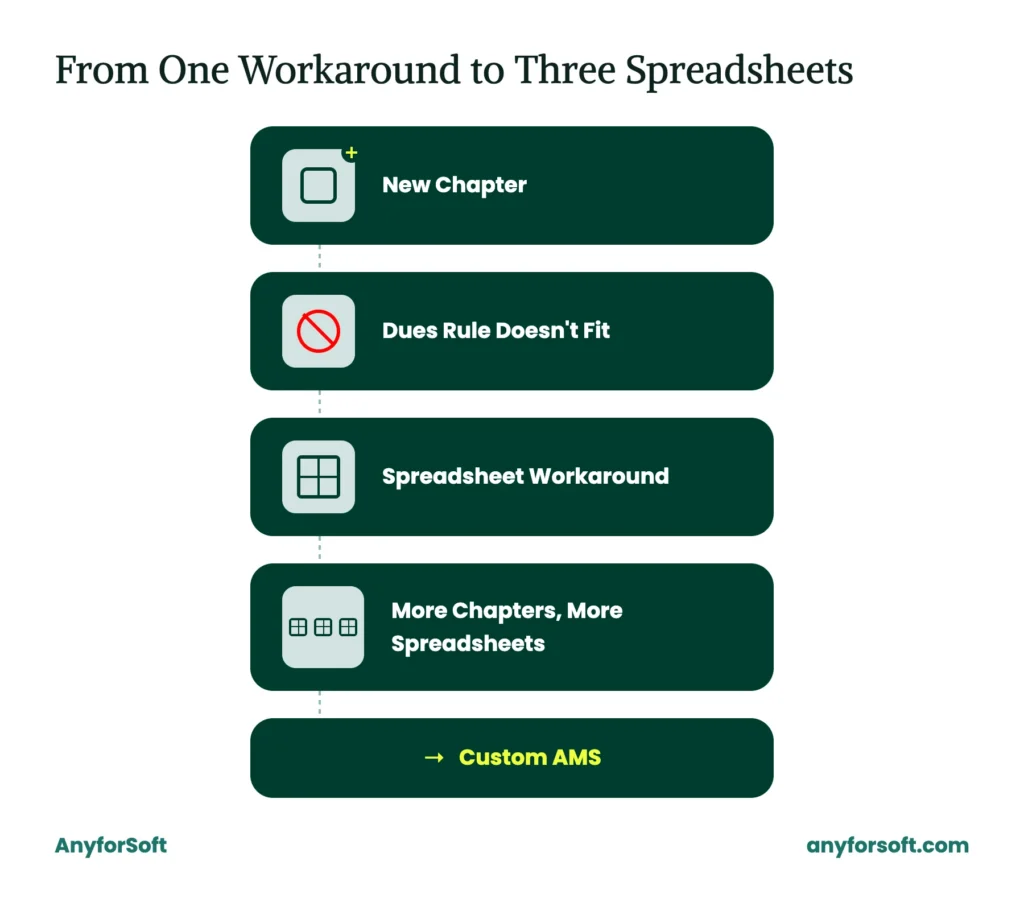
Picture a mid-size association adding a new regional chapter. Dues suddenly need to be split by chapter, not just membership tier, and the shared platform has no field for that. Someone creates a workaround in a spreadsheet. The next chapter launches, and another workaround follows.
A year later, three spreadsheets track what the tool was supposed to handle from the start. That’s when organizations start to build custom association management software, shaped around dues logic no template was built for. The result belongs to the broader practice of custom software development.
What Is Custom Association Management Software?
A tailored solution, built around one organization’s own membership rules and dues logic, is what “custom” means when comparing AMS options.
A configured product ships as a shared, multi-tenant SaaS platform, adjusted through settings to fit many organizations at once.
Organizations that go this route get a solution written for their own workflow from the start.
Dues logic too particular for a shared template often includes:
- Tiered membership levels
- Chapter-based billing
- Variable renewal cycles
- Multi-step approval workflows
A generic template rarely bends to accommodate tiered dues or chapter-based billing. A tailored approach treats them as core logic from the first release.
Behind most modern builds stands a cloud-native foundation, with dedicated infrastructure serving only the organization it was built for. This foundation matters for organizations planning years of growth, since infrastructure sized for today’s numbers can be costly to expand.
Organizations weighing this option are usually already comparing it against the cost and convenience of staying on an existing platform.
Custom vs. Off-the-Shelf AMS: Which One Does Your Association Need in 2026?
The build vs buy question comes down to a trade-off between fit and speed.
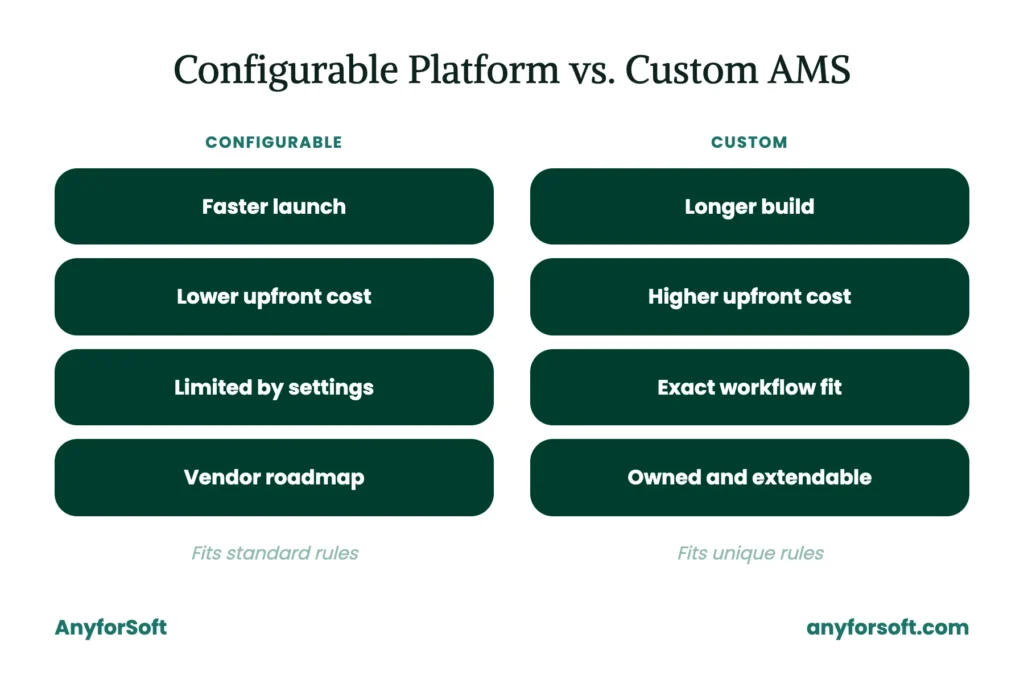
A configured tool launches faster, since the core structure already exists and configuration work is largely limited to settings and templates.
Configurable association management software works well for organizations whose dues rules, chapters, and workflows fit within what the solution’s settings allow.
This speed carries a cost over time. Licensing fees scale with membership size, and per-seat pricing that looks reasonable at launch often climbs as the organization grows.
A tool shaped around one organization’s own rules takes more time and budget upfront. Ownership brings a different kind of return after launch.
| Off-the-Shelf / Configurable | Custom Solution | |
| Launch speed | Faster — built on existing structure | Slower — built from requirements |
| Upfront cost | Lower | Higher |
| Fit for unique dues logic | Limited to settings | Built to match exactly |
| Licensing over 5+ years | Scales with membership size | One-time build, lower long-term fees |
| Long-term flexibility | Bound by vendor roadmap | Owned and extendable |
The ROI of custom AMS tends to show up in that longer window, once licensing savings and workflow fit are weighed against the build cost.
An organization with several years of runway and dues rules a template can’t hold may find the higher upfront investment pays off.
One still comparing options at a smaller scale may find a configured platform’s speed the better fit for now.
How Do You Know When It’s Time to Build Custom Association Management Software?
Certain patterns tend to repeat across organizations still working within a configured setup.
A dues structure that started simple grows more layered as membership tiers, chapter arrangements, or renewal cycles multiply.
Staff begin working around its limits. The workarounds quickly become the daily norm.
Several signals together often mean the time has come for a purpose-built tool:
- The settings no longer stretch to cover current membership-fee or chapter rules
- Per-seat licensing costs climb faster than membership revenue does
- Staff need deep integrations the connectors don’t support
- Manual workarounds start consuming hours better spent on member-facing work
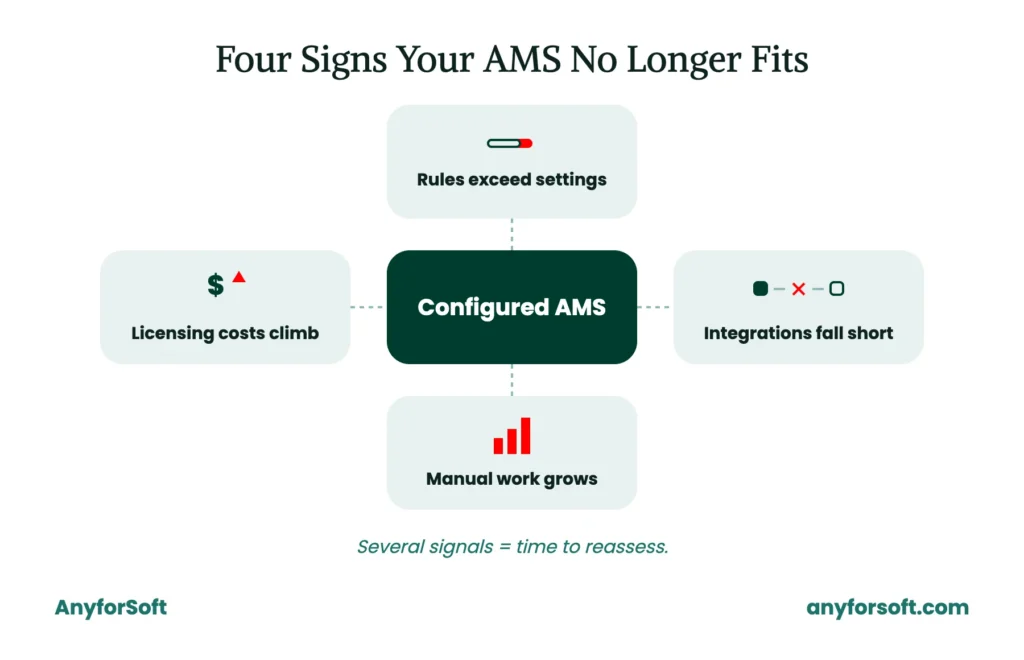
Two of these triggers carry particular weight for member retention and internal cost.
An architecture too rigid to support renewal reminders or personalized outreach makes it harder to keep members engaged past their first term.
Every hour staff spend forcing a shared tool to behave like a purpose-built one is an hour not spent on outreach. Such inefficiencies create the case for a solution shaped around actual workflow, one that helps reduce administrative costs directly.
What Features Should Custom Association Management Software Include?
Four areas matter most: membership, financial, engagement, and administrative work.
Custom association management software built around these areas gives every team member the tools their role actually requires, without forcing staff into manual patches along the way.
Communications tools tie engagement and administration together. Outreach, reminders, and internal updates all live inside one tool instead of scattered across separate ones.
Member Database and Profile Management
Every constituent record starts with a core profile: contact details, membership tier, join date, and renewal status. Tailored fields let organizations track details a generic platform wouldn’t anticipate:
- Committee roles
- Certification status
- Chapter affiliation
- Volunteer history
Profile history stays attached to the current record. Staff can see how a constituent’s involvement changed over time without digging through separate logs.
Dues, Billing, and Payment Processing
Membership fees rarely follow one flat rate. These fee types call for logic a custom membership management software solution handles as a single system:
- Tiered pricing, where dues scale with membership level or organization size
- Chapter-based billing, where fees route to local chapters before reaching the national body
- Prorated renewals, where a mid-cycle join date adjusts the amount owed
Each structure runs through the same billing logic, so no workaround gets bolted onto a shared template.
Invoicing follows the same fee structure automatically, generating the right amount for each tier without manual adjustment. Payment processing connects directly to the billing logic. A constituent’s full billing history lives in one shared record.
Event Registration and Committee Management
Registration workflows manage sign-ups and waitlists for events ranging from single-day conferences to multi-session programs. Attendance tracking runs alongside, capturing who actually attended against who registered.
Committee and board admin tools cover the same workflow.
Staff manage rosters and terms, along with voting records that would otherwise sit in a separate spreadsheet running alongside the platform.
Both draw on the same constituent data already stored in the system, so a person’s registration history and committee involvement connect automatically.
Member Portal and Self-Service Tools
Self-service access lets constituents update contact details and register for events without emailing staff. Renewal payments run through the same portal, cutting one more routine request from the staff queue.
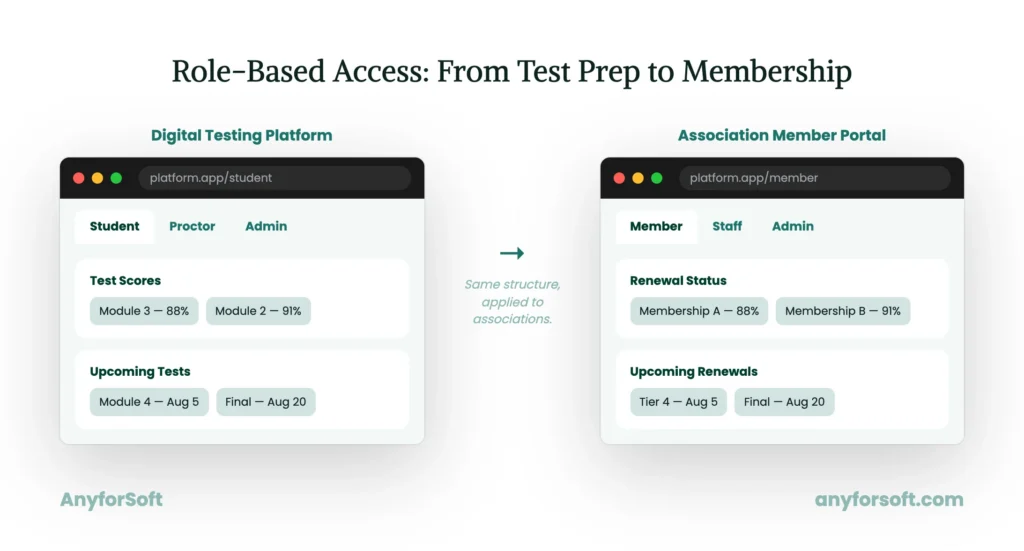
Role-based views control what each visitor sees. A board member’s portal differs from a general constituent’s, and a staff view differs from both.
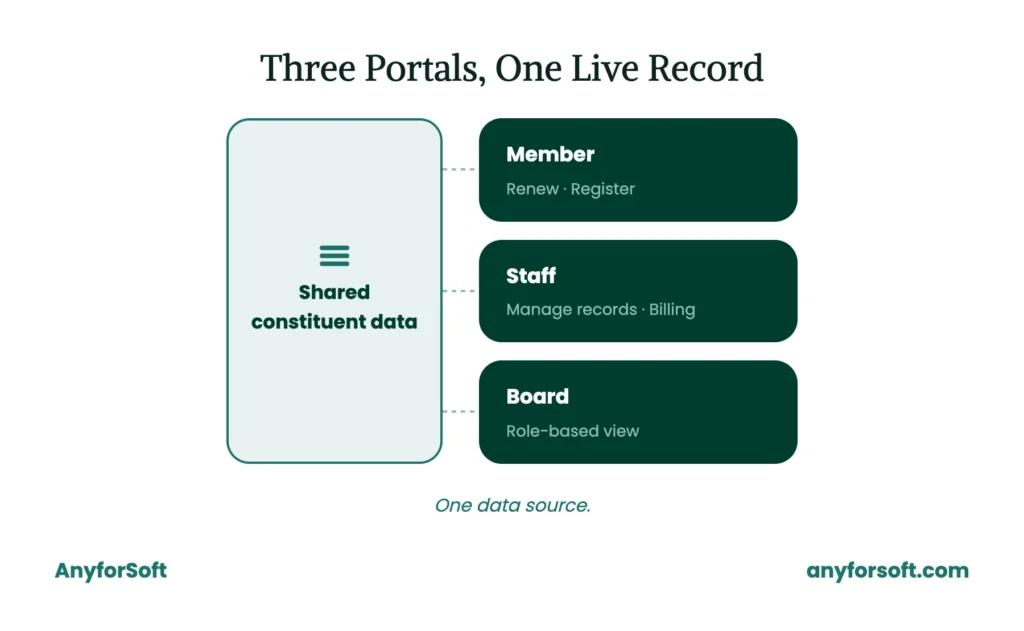
AnyforSoft built the digital testing platform for a tutoring company that needed separate portals for students and proctors, plus a third for administrators. Each portal synced in real time with Salesforce, so records moved between tools without manual re-entry.
The same logic applies to member and staff access in an AMS, plus board access as a third tier. Distinct portals serve distinct user types, backed by an architecture that keeps every record current across all of them.
How Do You Build Custom Association Management Software Step by Step?
Seven phased development stages make up a project, each ending in a concrete deliverable.
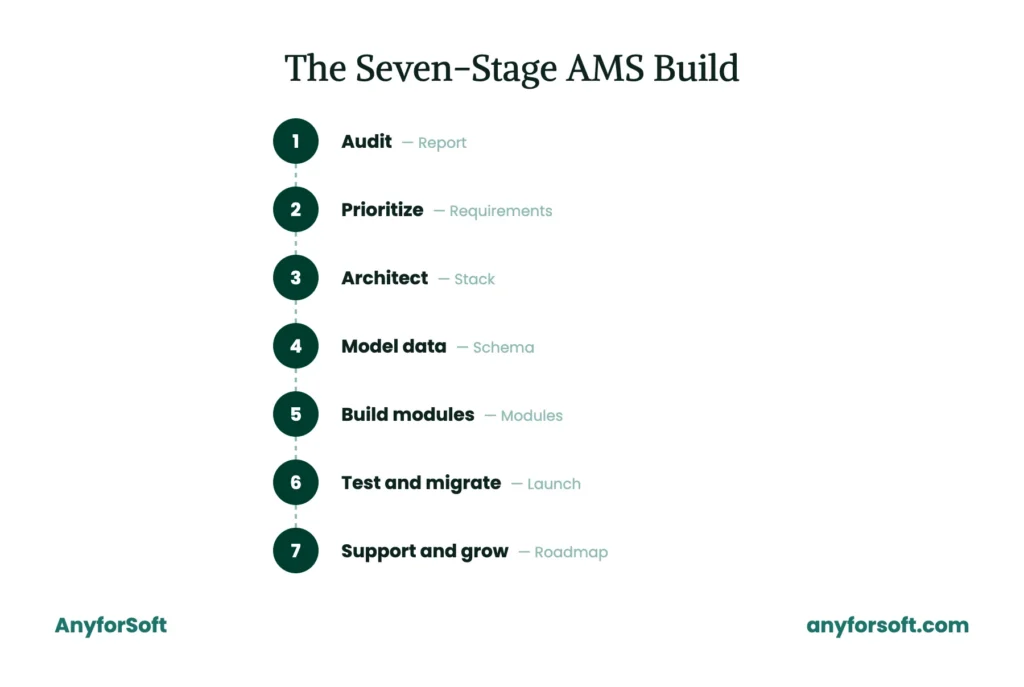
Step 1. Audit Your Current Membership and Association Workflows
Every solution starts with the discovery phase. A structured audit maps existing workflows, data structures, and the pain points staff run into daily. What comes out the other side is an audit report: what the current setup handles well, and where it breaks down.
Step 2. Define Success Metrics and Must-Have Features
With the audit complete, requirements gathering begins. Stakeholders name what success actually looks like. Faster renewals, fewer manual invoices, better board reporting: the specifics vary by organization, but the goal is a clear target everyone agrees on.
Must-have features then get scoped down into an MVP, a first release covering only what the organization needs on day one. The deliverable is a prioritized requirements document, features ranked by their impact on the organization’s goals.
Step 3. Choose the Right Technical Architecture and Stack
Architecture decisions shape everything downstream. Choosing an API-first architecture early means payment processors, CRMs, and other existing tools connect cleanly from day one.
A stack recommendation comes out of this step: the specific technologies, frameworks, and infrastructure the tool will run on.
Step 4. Design the Member Database and Core Data Model
Data structure underlies every feature that follows. Constituent records, dues history, event attendance, committee roles: the team defines a schema covering each one, along with how they relate to each other.
The schema becomes the data model the rest of the works from directly.
Step 5. Build and Integrate Payment, Dues, and Event Modules
Development moves into working modules once the data model is set. Dues and billing management logic comes first, connecting tiered pricing and invoicing directly to each constituent’s record.
Event registration functionality follows next.
Sign-ups, waitlists, and attendance tracking all draw on the same constituent data defined back in Step 4. Working payment, dues, and event modules, fully integrated into the core system, mark the end of this step.
Step 6. Test, Migrate Data, and Launch Incrementally
A QA and testing cycle runs before launch, checking that every module behaves correctly under real usage. Data migration happens alongside it, moving existing records out of the old platform and into the new structure.
Rollout happens in phases, catching problems while the stakes stay small.
By the end of the step, a completed test suite and a finished migration are both in place, delivered across several rollout phases.
Step 7. Plan for Ongoing Support and Feature Growth
Launch marks a starting point, with growth continuing well beyond it. A dedicated development team carries plans forward, already familiar with the system’s architecture and ready to extend it as needs change.
What this step produces is a post-launch plan. It’s a roadmap for support, fixes, and future feature growth.
How Is AI Changing Custom Association Management Software in 2026?
Most AMS platforms still bolt AI onto existing structures after the fact.
With a custom association management software tool, artificial intelligence is part of the system from the first release.
Intelligent reporting anchors this shift toward AI designed from the start. It surfaces membership patterns staff would otherwise search for by hand.
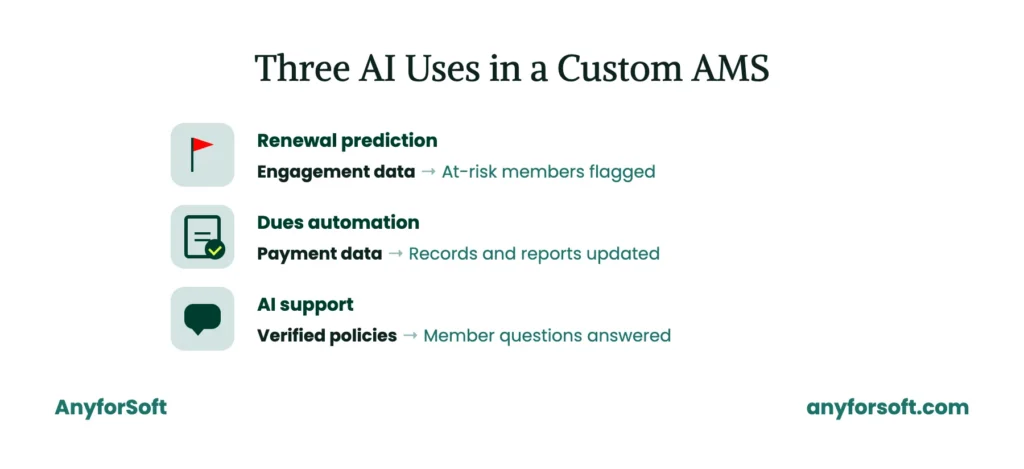
AI-Powered Member Insights and Renewal Prediction
Long before a membership actually lapses, renewal behavior follows patterns. Engagement drops. Event attendance thins out, and communications go unopened.
Trained on this kind of historical data, a predictive model flags accounts likely to lapse weeks ahead. It gives staff time to reach out before the renewal date passes.
Beyond renewal, the same modeling approach extends further. The same signals can flag constituents ready for a membership upgrade.
They can also point to chapters worth a closer look for engagement.
Automated Dues Processing and Reporting
Every renewal cycle, manual dues processing consumes hours: matching payments to accounts, updating records by hand.
Automation handles these steps directly instead, matching a payment to the right constituent record the moment it clears.
Board-ready summaries benefit the same way. Generated automatically from live billing data, these reports replace the spreadsheets staff once assembled ahead of every meeting.
AI Chatbots for Member Support
Member questions rarely arrive on a schedule. A chatbot trained on an organization’s own policies can answer them any hour. Staff don’t need to monitor every channel by hand.
A higher-education client needed round-the-clock answers for prospective and current students. Staff couldn’t be pulled away from other work to provide them. One example shows how that gap gets closed in practice. AnyforSoft built Wittenborg University of Applied Sciences a website-native AI assistant, tied directly to verified content for accurate answers.
The same approach carries over to member-facing support in an AMS. An assistant trained on institutional policy, tied to verified records, works the same way for members that it did for students.
What Integrations Does Custom Association Management Software Need?
A tool only earns its cost when it connects to the tools staff already rely on. For that reason, association management software customization starts with the integration layer. An isolated system creates as much friction as the platform it replaced.
Behind this layer runs REST API integration. It lets each tool exchange data directly with what’s already in place.
Payment and Accounting Tools (Stripe, QuickBooks)
Tied directly into billing logic, payment processing keeps every charge and refund linked to the same constituent record. From there, accounting sync matches transactions against the organization’s books without manual entry.
CRM and Marketing Platforms (Salesforce, Mailchimp)
Once a CRM connects, constituent data flows both directions.
Contact records and engagement history stay aligned across tools, along with communication preferences.
The same logic applies to marketing platforms, pulling segment data straight from membership records already stored in the system.
Single Sign-On and Member Portal Access
One login, tied to identity across every connected tool, replaces the separate credentials staff and constituents would otherwise juggle. Because access control follows that same identity layer, portal permissions update automatically the moment a role changes.
How Do You Choose the Right Development Partner for a Custom AMS Project?
Picking a vendor determines whether the solution actually solves the problem it was meant to solve. Association management software companies vary widely in depth, from generalist shops to teams with real domain experience in membership systems.
Evaluating a partner on the right criteria matters more than comparing price alone.
Software product development experience, applied specifically to dues logic and constituent data, separates a partner who can execute from one who is still learning on the organization’s budget.
Building a working relationship with a custom association management software provider takes more than a single project kickoff call.
Industry Experience and Technical Expertise
A vendor’s track record reveals more than a portfolio page ever will.
Ask what custom association management software projects they have actually shipped, not just proposed. Technical consulting experience matters here too, since a partner who understands architecture decisions upfront avoids costly rework later.
Flexible Engagement Models
Fixed-scope contracts work well when requirements are already locked. Dedicated teams suit organizations expecting ongoing feature growth well past launch.
Between the two models, agile delivery offers a middle path, adjusting scope in phases as priorities shift during development.
Post-Launch Support and Scalability
Support terms after launch matter as much as the tool itself. A vendor still available months after go-live catches issues before they affect constituents.
As membership grows, association management software customization continues well past the original launch, extending the solutions’ scope as the organization’s needs change.
Custom Software Built by AnyforSoft: Case Studies
AnyforSoft has built the processes and functionality that association management software depends on most.
A well-built customized association management software project draws on this same engineering discipline, and the three cases below show it in action.
Staff time savings show up across both.
FilterSync
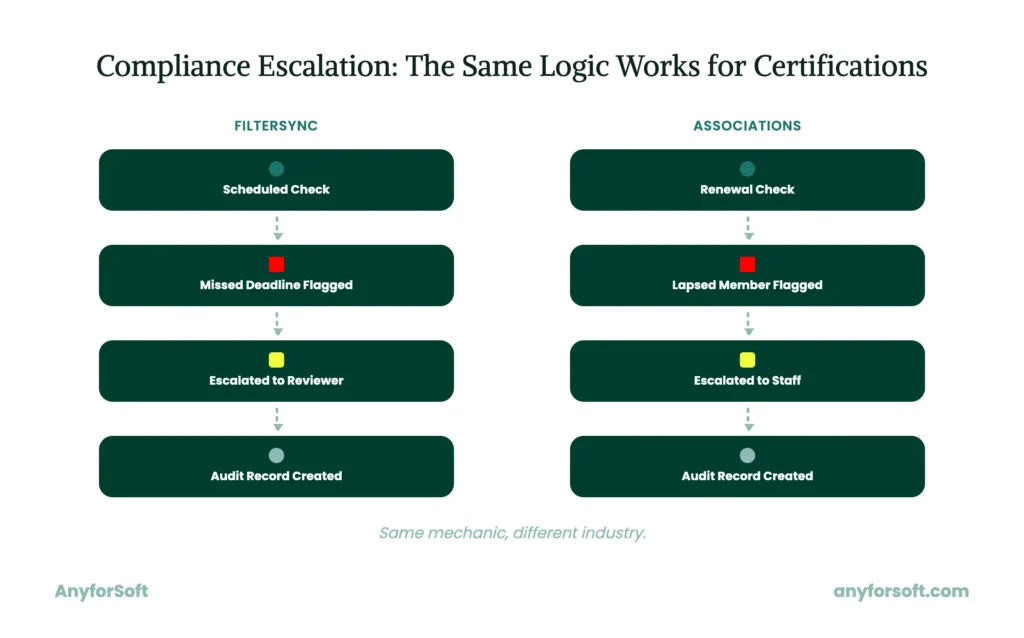
Certification renewals and membership lapses need what FilterSync already runs: scheduled checks and automatic escalation, backed by an audit trail. AnyforSoft built the platform from the ground up, for a property management company verifying tenant filter changes on schedule. Tenants upload photos of each change, and the solution flags anything missed before it becomes a bigger problem.
The same mechanic maps directly onto an AMS. Certification dates and renewal deadlines take the place of filter photos, and accounts get flagged as they approach a lapse.
Game Informer
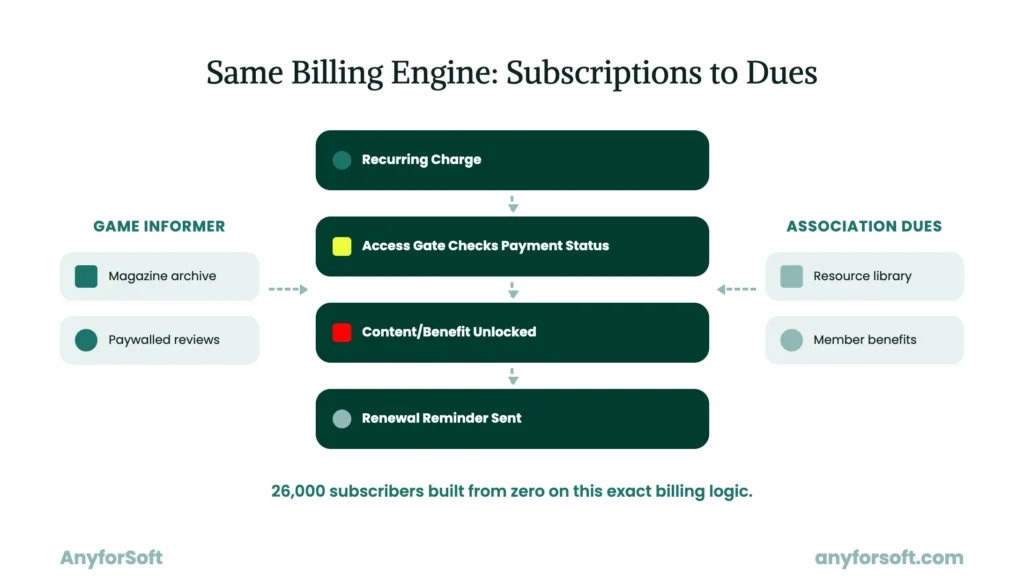
Game Informer’s paywall runs on the same recurring-charge and access-gate logic that gates member benefits behind paid dues. AnyforSoft rebuilt the gaming media outlet’s entire subscriber base from zero, migrating it onto new subscription billing and paywall-gated content.
The rebuilt infrastructure held under 5 million visitors at relaunch and now supports 26,000 subscribers on that same billing logic.
An AMS can run on this exact logic. Tiered membership dues take the place of subscription tiers, gating access the same way subscriptions once gated magazine content.
Digital Testing Platform
AnyforSoft built a testing platform for a private tutoring company preparing students for standardized tests. Each role got its own dashboard. Students tracked scores and upcoming tests. Proctors supervised active sessions and administrators managed enrollment, each through a dedicated view built for that role.
The same three-way split works for member, staff, and board access in an AMS. A member sees renewal status and event registration; staff sees the tools to manage them. Every level draws from the same live data underneath.
Why Associations Choose AnyforSoft to Build Custom Association Management Software
Fifteen years of engineering work stand behind every project the team delivers, association-focused or otherwise.
Operational efficiency drives every architecture decision from day one.
Scalability shapes those same decisions too, built into the foundation before growth ever demands it.
Client feedback collected on Clutch, the independent review platform, echoes each of these priorities across five separate engagements below.
Full-Cycle Discovery and Technical Audit
Every engagement starts with a structured look at what already exists. Doing that early spares later decisions from guessing at problems that were already visible. Current workflows and data structures come under review first.
The gaps between them get mapped too, shaping the architecture choices that follow.
A compliance officer at an ecological solutions company described a similar discovery-first approach in a Clutch review.
The company trains real estate and construction partners in sustainable practices, and needed a training platform built around specific sustainability goals.
Per the review, the project “started with a discovery phase” focused on those goals before any development began.
AI-First Engineering Approach
AI gets designed into the architecture from the first release, ahead of any launch date. Predictive models draw on the same underlying data structure, and automated reporting works the same way.
Conversational support follows the same pattern.
One Clutch reviewer, the founder and CEO of a JavaScript and TypeScript development company, hired the AnyforSoft team to build a learning management system with AI-driven personalization features.
His review pointed to a dedicated AI department as the reason the integration felt built in rather than bolted on.
Proven Custom Software Development Track Record
Fifteen years in business have produced dozens of custom solutions across education, fintech, and media. Each project adds to a body of architectural patterns applied to new engagements.
Before finding this team on Clutch, the CEO of a SaaS company had already tried outsourced developers in India, Costa Rica, Argentina, and Mexico.
According to his review, AnyforSoft’s developers were the first among those five countries who needed no training on basic coding standards.
Flexible, Scalable Architecture From Day One
Growth rarely follows a predictable line, and architecture built for today’s numbers alone tends to break under tomorrow’s. Solutions get designed with room to grow, whether that means more members or deeper integrations.
A dashboard built for an energy company’s solar and wind sites put that principle to the test, according to a former executive’s Clutch review.
New sites came online steadily after launch, and the review noted the platform absorbed that growth without any drop in performance.
Long-Term Partnership Beyond Launch
A launch is a starting point, and ongoing support and maintenance carries the relationship forward from there. Feature requests and scaling needs route through a team already familiar with the solutions’s architecture.
Integration updates follow the same path.
The Joint Communications Academy Director at an IT services company first hired the AnyforSoft team for one project. This project replaced an outdated learning management system unable to handle live sessions or track student progress well.
A separate website rebuild came up later. His Clutch review notes the company skipped a new vendor search and returned to the AnyforSoft developers.
FAQs
What does it mean to build custom association management software?
A tailored setup built around one organization’s specific dues logic and workflows is what this term describes. Development teams build around an organization’s own rules, distinct from what a shared product’s default settings allow. From the start, chapter structures and tiered dues logic get built in, along with reporting shaped around what the organization tracks. The result fits daily operations without the workarounds a generic template would require.
How do you know if your association needs custom AMS instead of an off-the-shelf platform?
Licensing costs that climb faster than membership grows are usually the clearest signal. Too specific for a shared template’s settings, dues rules point the same direction. Each week, staff spending hours on manual workarounds is a third sign worth tracking. When two or more of these patterns show up together, a tailored system tends to pay off faster than continued patchwork.
What features should custom association management software include?
A working system needs coverage across four areas: membership records, dues and billing, event registration, and self-service access. Tiered pricing and chapter-based billing need dedicated logic within a custom membership management software build, along with prorated renewals for mid-cycle joins. For members and staff, role-based portals provide separate dashboards, with a distinct view for board access. Tying the engagement and admin sides together, communications tools bring everything into one system.
How long does it take to build custom association management software?
Timelines vary based on feature scope and integration complexity. With core membership and dues functionality, a minimum viable release often ships in a few months. Deep integrations and AI features extend timelines further, along with multi-role portals. While later phases are still in development, phased delivery lets organizations use core features already.
How much does it cost to build custom association management software?
Cost depends heavily on feature scope and integration needs, along with team size. Over a five-year window, a tailored tool often costs less than continued licensing fees. A detailed association management software cost breakdown covers the specific factors that drive pricing up or down. Getting a scoped estimate early helps set realistic budget expectations before development begins.
What is the difference between building custom AMS and configuring a platform like Salesforce?
Configuring Salesforce means adjusting an existing product’s settings to approximate what an organization needs. Working with an association management software development company means building the actual logic from scratch. That logic gets shaped around dues rules and workflows a generic settings panel can’t replicate. Faster to launch, Salesforce configuration stays bound by what the platform allows. A purpose-built solution takes longer upfront, but removes these limits entirely.
How do you migrate data from a legacy AMS to a custom-built system?
Migration starts with mapping every field in the old tool to its equivalent in the new build. Member records and dues history move together, checked against the original source for accuracy, along with event data. Testing against real records catches mismatches before the old platform gets retired. Through a phased cutover, staff keep working while the transition happens, instead of pausing operations entirely.
What integrations should custom association management software support?
Payment and accounting tools, such as Stripe and QuickBooks, handle billing and financial sync. Including Salesforce and Mailchimp, CRM and marketing platforms keep contact and engagement data aligned. Across every connected tool, a single sign-on ties identity together. Together, these integrations turn a standalone system into one connected to the rest of an organization’s operations.
How can AI improve custom-built association management software?
Renewal risk surfaces before a membership lapses, through AI-powered member insights flagging accounts weeks ahead based on engagement patterns. Directly from live billing data, automated reporting pulls board-ready summaries instead of manually assembled spreadsheets. Trained on an organization’s own policies, chatbots answer member questions without staff involvement. Built in from the first release, these features work with data the platform already has.
What AI features are commonly added to custom AMS platforms?
Renewal prediction models rank among the most common additions, often paired with predictive renewal analytics to flag at-risk accounts early. Each billing cycle, automated dues processing and reporting cut hours of manual work. Conversational assistants handle routine member questions around the clock. Working only from data the system already collects, each feature needs nothing extra built to support it.