








A SaaS company closes 200 new accounts in Q2. The customer success team runs onboarding calls, answers setup questions, and walks users through core features one by one. By Q4, 40% of those accounts have not been renewed. Exit surveys point to the same reason: customers felt they never fully understood the product.
The product did not fail them. The training did. Customers churn when they cannot reach first value independently — and a learning management system built for external audiences is the infrastructure that gets them there at scale.
This guide covers the full scope of what an LMS for customer training makes possible:
- Core platform capabilities and how each one addresses a specific adoption gap
- On-demand and blended training formats by use case
- Integration with CRM, customer success, and help desk tools
- Custom development versus off-the-shelf solutions and total cost of ownership
- Metrics that connect training activity to business outcomes
We also prepared a feature checklist that pairs with every section in this guide. Use it to map capabilities directly to your customer training gaps and arrive at a build or buy decision with a clear requirements list in hand.
Core Ways LMS Helps in Customer Training
A customer training LMS is a learning platform configured for external audiences: paying customers and the partners who support them. Both groups need to understand your product before they can get value from it.
The solution delivers structured training to thousands of customers simultaneously, tracking who is progressing and who is at risk. From the business benefits perspective, it reduces the manual workload on customer success (CS) teams without reducing training quality.
Centralized, Always-On Learning Content
A customer training learning system consolidates all product education in one searchable location, including video tutorials, step-by-step walkthroughs, release notes, and role-specific guides. A customer in Singapore troubleshooting an integration at 11 PM local time finds the answer without waiting for a support response.
That accessibility depends on one condition: all training materials living in one place.
In practice, training materials often accumulate across email attachments, internal wikis, shared drives, and support articles. Different teams maintain them independently. The core of the challenge is that no single customer ever sees the complete picture, and no team is certain which version is current.
A centralized system resolves the issue by making one location authoritative.
When a product feature updates, a single content revision reaches every customer account automatically. Documentation that previously lived in five places, maintained inconsistently, gets consolidated into one source. The product team owns it and updates on each release cycle.
That source typically covers four content types:
- Product walkthroughs by role and use case
- Release notes with feature-specific training attached
- Troubleshooting guides indexed by error type
- Integration documentation
Customers who find accurate, current answers independently generate fewer support tickets and reach competency faster than those who rely on reactive customer success support.
Scalable Customer Onboarding
Onboarding 10 customers per month is manageable with a dedicated customer success team. At 200 per month, the same model creates a staffing problem. CS managers either hire to match volume, which is expensive, or accept that onboarding quality drops for lower-tier accounts.
A comprehensive platform removes that tradeoff by replacing manual, repetitive onboarding conversations with structured learning paths.
A well-configured customer training system assigns each new customer a learning path based on their role and product tier.
An administrator for an enterprise account follows a different path from a frontline user at a mid-market company. Each route covers the setup steps and configuration options relevant to that customer’s context.
Salesforce’s Trailhead is the most cited example of a product for learning at scale. Each user moves through a path matched to their experience level and job function while software records their progress without manual input.
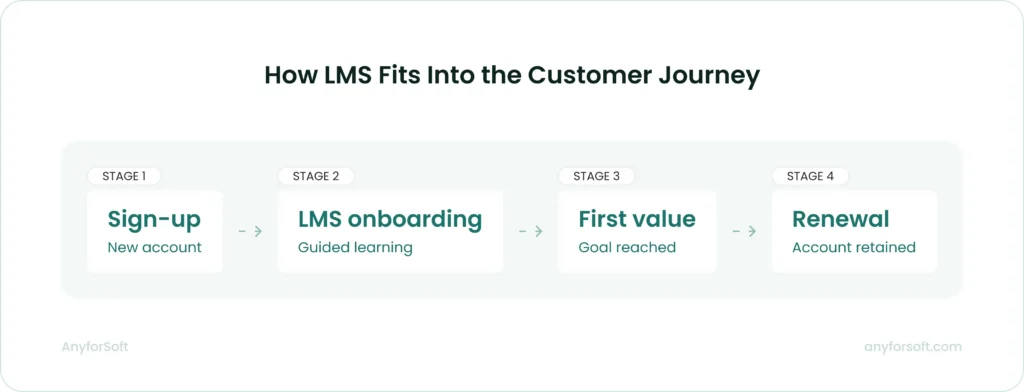
Speed matters here. The faster a new customer completes foundational onboarding, the sooner they reach first value.
Structured onboarding shortens that window by removing scheduling friction and availability constraints that slow down live-session models.
Progress Tracking and Completion Reporting
A customer training tool does not just deliver content. It records what happens after each learner opens a module: which sections they completed, how long they spent on each one, where they paused, and where they stopped entirely.
This behavioral data is what separates a training platform from a document repository. It feeds two distinct business functions: customer success and content development.
Customer success teams gain early warning signals. A key account that completes 30% of onboarding modules and stalls is a risk worth acting on immediately, before the pattern solidifies. An automated alert to the account’s Customer Success manager creates a window to re-engage while the customer is still in the onboarding period.
Content teams gain diagnostic data. If 65% of users exit the same module, the module has a problem. It might be too long, or covering a concept that requires prerequisite knowledge the tool assumed users already had.
Without completion data at the module level, that problem stays invisible until it shows up as churn.
The reporting layer covers four dimensions:
- Completion rate by module and learning path: shows where customers succeed and where they stop
- Time-on-task per section: identifies content that takes significantly longer than expected, which can signal confusion rather than engagement
- Assessment scores by question: pinpoints specific knowledge gaps rather than overall pass/fail outcomes
- Cohort comparison: tracks completion patterns by customer segment, product tier, or onboarding date to surface systemic issues
Used consistently, this data makes training a measurable business function with a direct line to revenue and retention.
Automated Certification
Certification turns product competency into a documented credential.
Once a user completes a defined learning path and passes an assessment, the platform issues a certificate automatically, with no human review at each step and no manual tracking of who passed what. The credential lives in the learner’s profile, retrievable at any point by the learner or by the company’s CS and partner teams.
For companies with partner or reseller networks, certification creates a quality standard that manual management cannot maintain at scale.
A partner who holds a current certification has demonstrated verified product knowledge against a defined benchmark. One who has not can be identified by querying the system and re-enrolled automatically when their certification lapses, without a manual audit cycle.
Certification creates the same incentive structure for direct customers, not just partners.
Certified users can receive faster support response times or access to dedicated support channels, giving customers a concrete reason to complete training. In healthcare technology and financial software, certification also serves a documentation purpose: it proves customers completed required training before accessing sensitive functionality.
Certification programs also change the economics of onboarding. When customers self-certify through an LMS, the CS team is released from verification tasks that consume time without requiring judgment.
That capacity moves toward accounts that need strategic attention.
Multilingual Support for Global Customers
Language is where customer training programs break down fastest at global scale. A company expanding from English-speaking markets into European or Asian markets faces a choice: maintain a single training library that non-native speakers navigate with difficulty, or build separate content programs per region.
Neither option scales cleanly without dedicated support.
Software with multilingual capabilities handles this through content localization.
Separate course tracks per language share the same course architecture and assessment logic; only the content itself is translated and adapted. A product update then triggers content revisions across all language versions through a single workflow.
The distinction between translation and localization matters in practice. Translation replaces words. Localization adapts examples, regulatory references, date formats, and contextual assumptions to the target market.
For B2B customers in regulated industries, localized training carries compliance weight: customers must demonstrate comprehension in the language in which they operate.
In particular, Docebo accommodates more than 50 languages, covering both full interface translation and distinct course tracks for each language.
TalentLMS provides multilingual interface delivery with user-level language preferences. Each learner can switch to their preferred language directly in their profile without an administrator changing the platform-wide setting.
For companies operating across more than two regional markets, this infrastructure is the difference between a training program that reaches all customers and one that only reaches those who read English fluently.
On-Demand vs. Instructor-Led Customer Training
The format of customer training affects how many customers complete it and what the program costs to run.
Self-paced modules and instructor-led sessions solve different problems, and choosing the wrong format for a given use case reduces the effectiveness of both.
The right format depends on four factors:
- How complex is the product workflow the customer needs to learn?
- Does the customer need to apply training immediately in a live environment?
- How many customers need this training, and how frequently?
- What is the consequence of a customer misapplying what they learned?
The answers determine format.
When Self-Paced Modules Work Best
Self-paced modules fit customers who need to learn product features at uneven intervals.
Software products with modular functionality work well in this format: a customer activating a CRM integration does not need the same session as one building advanced reporting dashboards.
Each customer moves through relevant content when they have the context to apply it immediately, and immediate application is what moves knowledge from the module into the workflow.
The operational case for self-paced training is straightforward. No scheduling coordination, no facilitator cost per session.
Customers who engage with asynchronous content on their own schedule complete training when it is contextually useful, not when a calendar slot was available two weeks ago.
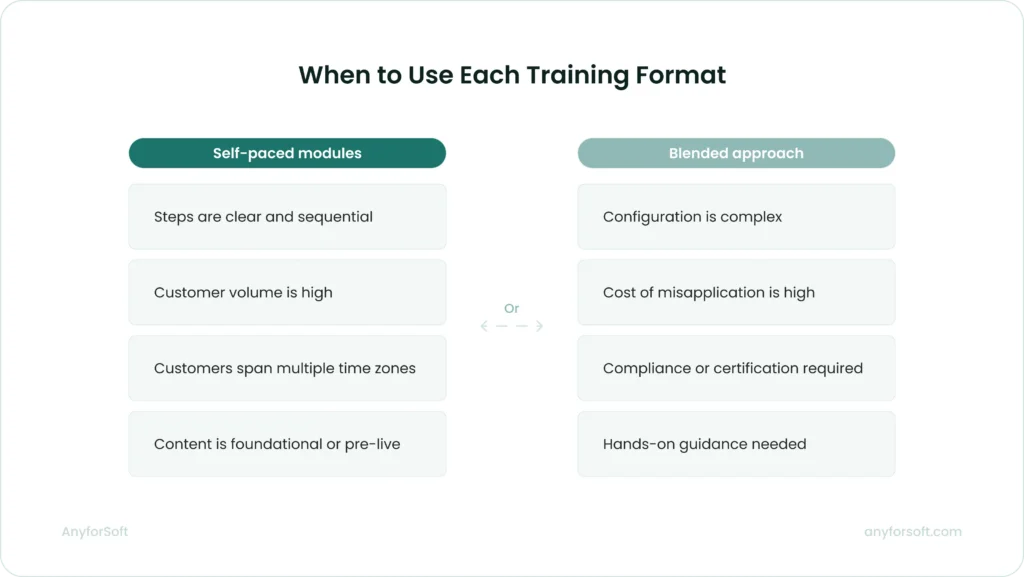
Self-paced format works best when:
- The learning objective is discrete and the steps are clearly defined
- Customers are distributed across time zones and scheduling coordination is a friction point
- The training covers foundational concepts a customer needs before a live session or advanced configuration
- Volume is high and consistent — hundreds of new customers per month completing the same onboarding path
The format has limits.
A customer who encounters an unexpected configuration issue mid-module has no immediate path to resolution. Self-paced training assumes the content anticipated the customer’s context correctly. When it does not, the customer either submits a support ticket or abandons the module.
Completion data identifies where this happens.
Modules with high drop-off rates at specific points signal a mismatch between the content’s assumptions and the customer’s actual situation. That data flags exactly where a content revision is needed, or where a live touchpoint belongs.
Blended Approaches for Complex Products
A blended program combines self-paced foundational modules with scheduled live sessions for specific, high-complexity scenarios. Asynchronous content covers product navigation and standard workflows that all customers need. Live sessions, in turn, are reserved for configuration workshops and certification preparation where hands-on guidance produces outcomes that recorded instruction cannot replicate.
Two enterprise software companies document this model in their official training programs.
Workday’s Education Services offer customers a choice between independent self-paced study and traditional classroom instruction. Each customer selects the delivery format that matches their required level of self-sufficiency and available budget.
SAP’s Blended Learning Academy pairs self-study modules with virtual instructor-led sessions. The self-paced phase covers foundational learning; live sessions are reserved for review and certification preparation.
In a blended program, live sessions work best at decision points, not at the start. Customers who complete foundational modules before a live workshop arrive with context, freeing session time for complex questions the self-paced content could not resolve.
This sequencing also changes the cost structure. When foundational content moves to self-paced modules, live session frequency drops. A company that previously ran weekly onboarding calls can consolidate to monthly sessions covering only the configuration component, because navigation content is handled asynchronously at a fraction of the cost.
Integrating LMS with Your Tech Stack
A solution that operates in isolation produces limited value. Training data that never reaches the teams managing renewal and customer success cannot drive the decisions those teams need to make. LMS integration with the right tools closes that gap.
CRM and Customer Success Platforms
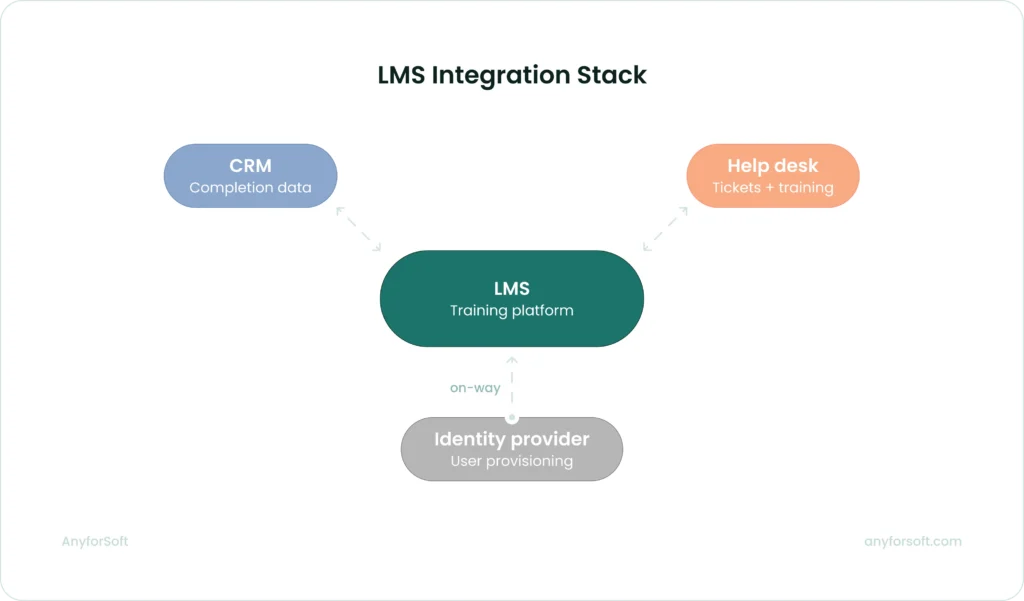
Connecting an LMS to your CRM gives every customer-facing team visibility into training progress alongside account health data.
Two solutions serve as examples here: Docebo and TalentLMS both have native Salesforce integrations that put training completion data into the CRM account view.
Both of them synchronize courses, learning plans, enrollments, and completion data between the two systems. It also embeds the solution data directly inside Salesforce, so account teams can assign training and view certification status without leaving their CRM.
Salesforce admins can build custom dashboards using completion data pulled from Docebo, connecting training activity to the account view they already work in. For teams not on Salesforce, Docebo connects to HubSpot through its native integration layer, keeping user records synchronized between both systems.
TalentLMS offers a two-way Salesforce data connector that syncs the CRM users and contacts to learners, then pushes completion data back to Salesforce every 30 minutes.
A customer success manager reviewing an account before a renewal conversation sees training completion status, product usage data, support ticket history, and contract details in a single Salesforce view.
The integration surfaces four data points directly in the CRM:
- Training completion status by user: shows which contacts have finished onboarding and which have not
- Course scores and certification records: surfaces product competency data alongside renewal dates and usage metrics
- Gamification badges and progress milestones: provides early engagement signals before formal completion is reached
- Custom dashboards per account: lets Customer Success managers filter training data by account, contact role, product tier, or enrollment date to prioritize outreach
Help Desk and Knowledge Base Tools
Connecting a learning management system to your help desk links training activity to the support workflow in both directions. Customer ticket data provides context for support agents; support volume data reveals where training content is failing.
TalentLMS integrates natively with Zendesk in two distinct modes:
- Zendesk Chat: live chat appears directly within the TalentLMS interface, so learners can ask questions without leaving their training session
- Zendesk ticket-to-training automation: ticket topics or statuses trigger course enrollments automatically, so support patterns initiate training actions for the users generating those tickets
The second mode changes the economics of content development directly.
Support ticket volume by topic is the clearest signal of where customers are failing to learn from existing training. When that data feeds into enrollment logic, the gap between identifying a content problem and acting on it closes significantly.
SSO and User Provisioning
External training adoption depends heavily on how easy it is for customers to access the platform.
When access requires a separate account and a new password, completion rates suffer: customers have no job requirement pushing them through the friction.
Docebo and TalentLMS, the two solutions referenced throughout this guide, both support SAML 2.0 single sign-on, connecting to identity providers like Okta and Microsoft Azure AD.
Customers authenticate through their existing provider and land directly in the training environment, with no separate login required. Docebo’s SSO configuration includes automatic user provisioning: when a customer authenticates for the first time without an existing platform account, Docebo creates that account on the fly.
TalentLMS supports SAML 2.0 and SCIM provisioning with Entra ID (Azure AD), enabling automated user management through the customer’s existing identity infrastructure.
For enterprise customers managing hundreds of seats, automated provisioning covers four administrative tasks without manual input on either side:
- New user creation: when a customer adds a team member in their identity provider, the account is created on first login with no admin action required
- Field synchronization: user details updated in the identity provider, such as name, role, department, and team assignment, delivered to the learning platform automatically
- Access revocation: when a user is removed from the identity provider, their LMS access is revoked through the same flow, eliminating orphaned accounts
- Group and enrollment assignment: provisioned users map to learner groups automatically, triggering course enrollment without per-user manual configuration
The business outcome across all these integrations is the same: training data stops being siloed and becomes part of the information that drives retention and account decisions.
Custom vs Off-the-Shelf LMS Development
Off-the-shelf LMS solutions for customer training ,including the platforms covered in our open source LMS comparison, cover the majority of use cases at lower upfront cost and faster deployment.
Custom development becomes the right path when standard tool capabilities create gaps that cannot be closed through configuration alone.
When a Custom-Built LMS Makes Sense
A custom option is worth building when the learning experience requires logic or data flows that no commercial platform supports without substantial third-party middleware.Moreover, the middleware would cost more than a purpose-built software.
Specific conditions that point toward custom development:
- The platform needs to embed training directly inside another product interface, with no redirect to an external URL
- Learning paths depend on real-time behavioral or product usage data that commercial platforms cannot ingest natively
- Certification logic ties to compliance rules specific to a regulated industry, requiring non-standard assessment and grading architectures
- The company intends to sell training access as a paid product, where full white-label control and revenue logic are structural requirements
A US-based tutoring company working with AnyforSoft reached this decision point directly. The company had been running SAT preparation programs since the 1980s using manual, paper-based methods.
When they decided to digitalize the process, the initial plan was to build on Open edX, a well-established open source learning platform. During discovery, Open edX proved insufficient for what the product required.
The final build kept Open edX as the core but added a Django backend and React frontend, plus a custom grading scheme that produces score ranges from complex formulas.
The solution also includes adaptive difficulty: when a student struggles in one module, the system adjusts question difficulty in subsequent modules automatically.
Additional scope included three distinct test modes, a proctor cabinet for session supervision, a student dashboard, and deep Salesforce integration.
None of these requirements could be met through Open edX configuration or standard platform customization. Custom LMS development was the only viable path.
Build vs. Buy: Total Cost of Ownership
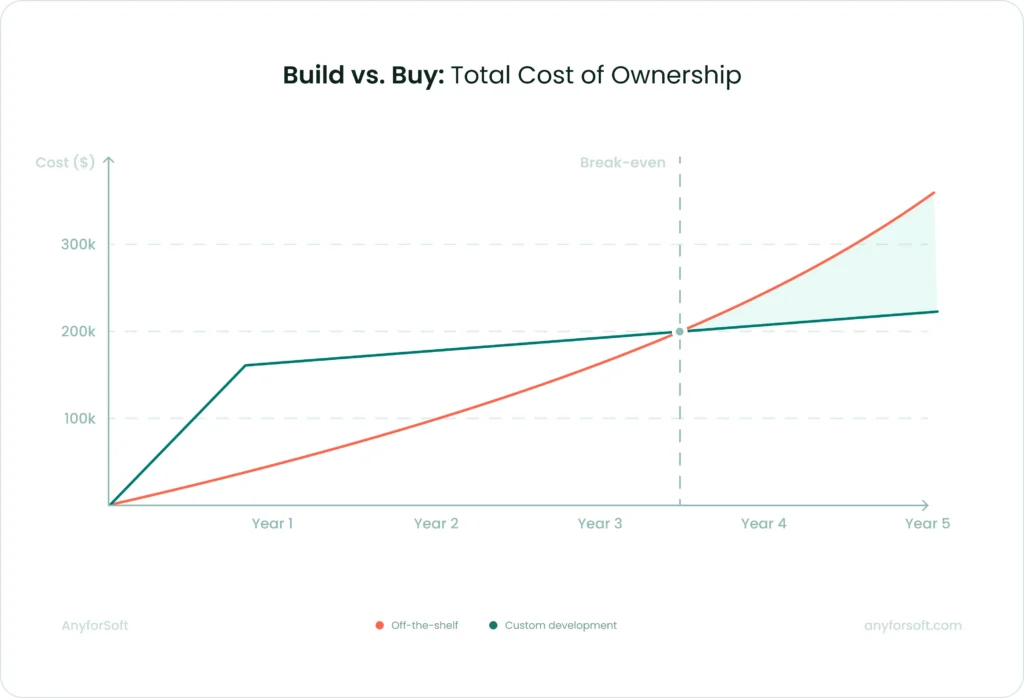
Procurement teams often compare annual license costs against upfront custom development costs and treat that as the full financial picture. Total cost of ownership includes more variables, and the balance shifts significantly at scale.
Off-the-shelf platform costs that accumulate beyond the headline license fee include:
- Per-seat pricing that scales with customer volume: software priced per active learner become expensive as the customer base grows, and pricing tiers often reset at contract renewal
- Integration development costs: connecting a commercial learning system to CRM, customer success platforms, and identity providers requires development work that sits outside the tool license
- Customization constraints that create manual processes: when a required workflow falls outside solution’s capabilities, teams build workarounds that consume ongoing staff time
- Vendor dependency at renewal: switching tools after content and user data are embedded in a proprietary system carries migration costs that are rarely factored into the initial purchase decision
Custom development carries higher upfront investment and a longer time to first deployment.
For companies with lower customer volumes and standard integration requirements, off-the-shelf tools typically produce lower total cost over a three-to-five year period — see our LMS pricing comparison for a breakdown by platform.
At higher volumes, particularly when per-seat licensing scales proportionally with customer growth, the cost curve for custom development often reaches break-even within two to three years.
The decision requires a projection built on realistic future customer volume estimates. Modeling platform costs at the volume the business expects to reach in year three produces a more accurate comparison than modeling at current headcount.
Flexibility, Branding, and Data Ownership
Commercial software allow logo replacement and color customization. Few support the structural interface changes needed to make training feel like a native part of a company’s own product.
For companies where the learning experience is part of the product, this is a functional limitation.
A custom-built tool can match the exact visual language and interaction design of the parent product.
Users do not experience a context switch when moving from the product into training. This distinction matters most in B2B contexts, where the training solution is a visible part of the customer relationship.
Commercial vendors store learner data on shared infrastructure and control the export format. Companies needing to run cohort analysis in their own BI environment or apply custom data retention policies to training records face constraints that vary by vendor and contract terms.
Custom-built software stores all learner data in the company’s own environment. The schema, retention policy, export format, and third-party access rules are fully under the company’s control.
In regulated industries where data residency requirements apply, this level of control is a compliance requirement.
Measuring the Impact of Customer Training
Training programs that cannot demonstrate business impact do not survive budget reviews. A system generates data automatically; the challenge is connecting that data to the metrics that matter to decision-makers outside the training team.
Key Metrics: Completion Rates, NPS, CSAT
Completion rate is the foundational training metric: what percentage of enrolled customers finish each module or required learning path.
It is a leading indicator: low completion appears in the data before its consequences show up in renewal rates or support volume, leaving time to act.
The question completion rate answers is not just “did customers finish?” It is where they stopped. A 45% completion rate on a required onboarding module means 55% of customers entered product use without the knowledge that module was designed to provide.
If the drop-off concentrates at a specific lesson, the lesson has a problem. If it is spread evenly across the path, the enrollment process or the perceived value of the training needs attention.
Both diagnoses require module-level data, not overall program completion figures.
Net Promoter Score (NPS) and Customer Satisfaction Score (CSAT) become meaningful for training measurement only when segmented by training status.
An aggregate NPS score for the full customer base does not tell you whether the training program is working. The signal appears when you compare NPS scores for customers who completed structured onboarding against those who received no formal training at the same product tier and account age.
The same segmentation applies to CSAT: a satisfaction score measured across the entire customer base obscures the difference between customers who reached product competency and those who did not.
Two additional metrics that belong in the core measurement set alongside completion rate and satisfaction scores:
- Time-to-first-value: how long it takes a new customer to complete the actions that produce their first meaningful product outcome; this window shortens when onboarding training covers the right sequence in the right order
- Support ticket volume per customer cohort: whether trained customers at the same product tier and account age generate fewer tickets than untrained ones, measured over a 6 to 12-month window after onboarding
Connecting Training Data to Business Outcomes
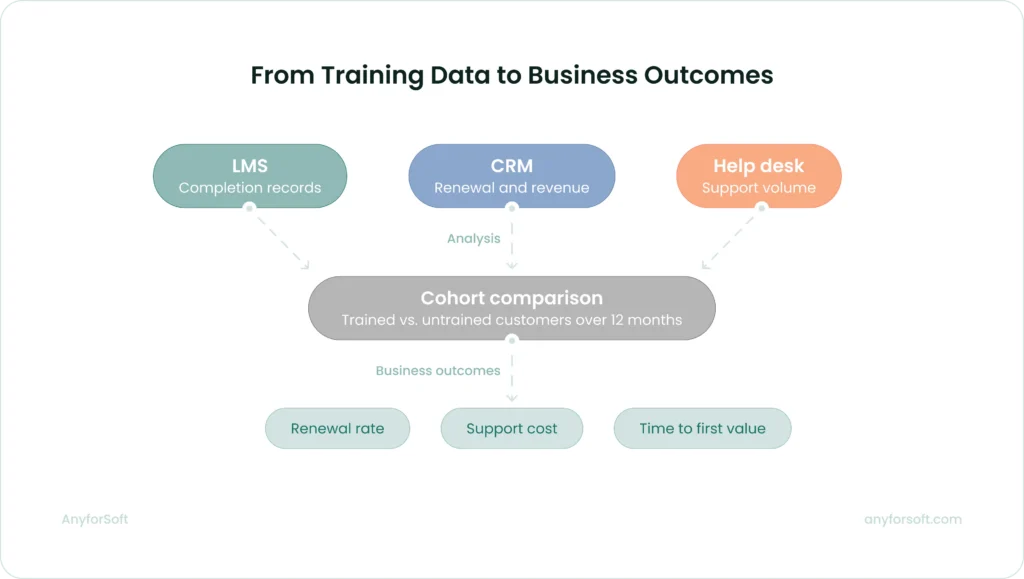
Renewal rate and support cost per customer are the metrics that move budget decisions. Neither lives on the platform. Making the connection requires defined integration between the learning management system and the business systems that track revenue and support, plus a clear attribution methodology.
The starting point is simpler than most teams expect. Segment customers by onboarding completion and compare the two groups over a 12-month window. No new data collection is required. The analysis connects records already sitting in three systems:
- LMS: completion status and learning path progress per customer
- CRM: renewal rates and expansion revenue per account
- Help desk: support ticket volume per customer cohort
The output answers whether trained customers behave differently from untrained ones on the metrics leadership already monitors.
The segmentation approach also identifies where a training program is underperforming.
If customers who complete 80% of the onboarding path renew at the same rate as those who complete 40%, the issue is unlikely to be training volume. The more probable explanation is content: the modules customers are finishing are not covering the functionality that drives retention.
Such diagnosis redirects content investment toward the modules with the highest demonstrated impact on adoption, not the ones easiest to produce.
For the analysis to be reliable, the cohort comparison needs consistent definitions across teams.
“Completion” must mean the same thing in the learning platform report and the CRM filter. “Renewal” must be measured at the same interval for all cohorts. “Support volume” must exclude ticket types unrelated to product knowledge.
Agreeing on these definitions before the first report runs prevents the most common failure mode: each team reading the same data differently.
Best Practices for LMS-Powered Customer Training
A customer training program that drives measurable adoption starts with deliberate design. The following practices hold across product types and customer volumes. The order in which you implement them matters.
Map Learning Paths to the Customer Journey
The structure of a product is not the same as the structure of how customers learn to use it.
Product teams organize features by function. Customers encounter them in the sequence that their specific use case demands.
A learning path built around the product feature list puts customers through training for capabilities they will not use for weeks, while skipping the context they need on day one.
Map the stages a new customer actually passes through: account setup, first meaningful action, integration with existing tools, and advanced configuration.
Each stage becomes a learning path milestone. Content assigned to each milestone covers only what the customer needs to complete that stage and move to the next one. Customers who receive training in this sequence apply what they learn immediately, because the training arrives when the context to use it is already present.
This approach also makes gaps visible.
If customers consistently stall at the same stage, the training covering it is either missing or misaligned with what that stage actually requires. Journey-mapped paths produce that diagnostic data while feature-list paths do not.
Training content that no one owns goes stale within a product release cycle. When a feature changes and the corresponding training module does not, customers learn the wrong workflow. The learning platform continues reporting completions while the completed content no longer reflects the product.
Assign each module to the team responsible for the feature it covers, and require content updates in the same sprint as the product update. This treats training as part of the product, not documentation that follows it at an undefined interval.
The training team owns the structure and editorial standards. Accuracy of feature descriptions belongs to the people building them.
Gate Advanced Content Behind Completion Milestones
Customers who activate complex features before completing foundational training generate disproportionate support load.
They encounter errors they cannot interpret and reach out to CS for guidance that onboarding training would have covered. Incorrect mental models form quickly and take time to correct.
A system can enforce prerequisite completion before a customer gains access to advanced feature documentation or configuration modules. The gate does not block the customer from using the product. It ensures they approach advanced capabilities with the foundational context to use them correctly.
The goal is sequenced learning: customers reach advanced capabilities only after building the foundation to use them correctly.
For enterprise accounts where multiple users are onboarding simultaneously, milestone gating also creates a consistent baseline across the account.
When a CS team engages with an enterprise customer for the first time after onboarding, they can see exactly what every user has completed and calibrate the conversation accordingly.
Design Access for External Users from the Start
Login friction suppresses adoption in external training programs more than in internal ones.
Unlike employees, customers have no obligation that pushes them through friction. A separate account and an unfamiliar URL outside their normal workflow are enough to suppress completion before a single module is opened.
SSO integration removes the login barrier.
Customers authenticate through their existing identity provider and land directly in the training platform. Mobile-responsive design reaches users outside office environments where desktop access is unavailable.
Progress persistence across sessions and devices ensures a customer who completes half a module on a laptop can resume on a phone without losing their place.
These features are the baseline conditions that determine whether customers use the tool at all. Treating them as enhancements to add later means launching a program with structural adoption problems built in.
Automate Re-Enrollment for Major Product Updates
When a core workflow changes significantly, existing customers need updated training.
A manual notification reaches some customers some of the time. Automated re-enrollment based on product version tags or feature flags reaches every affected customer without manual intervention per account.
Configure re-enrollment triggers at the feature level. When a feature a customer has previously trained on receives a significant update, the LMS re-enrolls that customer in the updated module automatically.
The customer receives a notification, completes the updated module, and continues with accurate knowledge of the current workflow. The CS team is not required to identify affected accounts and reach out individually.
For enterprise customers managing large user bases, this is a basic operational requirement. A product update affecting a core workflow can touch hundreds of users across a single account.
Automated re-enrollment ensures the update reaches every user without the account team tracking down each one.
Keep Learning Paths Role-Specific from Day One
Every customer segment benefits from a learning path built around their specific context.
An administrator configuring integrations needs different training from a frontline user running reports. A customer on an enterprise tier encounters different functionality from one on a starter plan.
Routing all of them through the same path wastes time on irrelevant content and delays first value.
Role-based paths assign each user to the sequence relevant to their actual context at enrollment.
The assignment can be automatic or driven by role data in the CRM. Alternatively, it can be self-selected during a short onboarding intake.
Either approach produces faster time-to-first-value because each user reaches the content they need without navigating past modules that do not apply to them.
Role-specific paths also generate cleaner data.
Completion rates measured within a role cohort reflect how well the training for that role is working.
Completion rates measured across a mixed-role population reflect the average of multiple different training experiences. It makes it harder to identify exactly where a specific path is underperforming.
Review Completion Data on a Defined Cadence
Looking at completion data only when a problem forces it means always responding to something that has already gone wrong. By the time a churn event or support spike prompts a review, the window to act has closed.
Reviewing completion data on a fixed monthly schedule replaces that pattern with an early warning system.
Set thresholds that trigger a defined response and enforce them consistently.
A module below 50% completion triggers a content review.
A key account below 40% path completion triggers a CS outreach.
A program that reviews data monthly and refines its thresholds over two quarters will reach meaningful accuracy faster than one that waits for the perfect metric framework before measuring anything.
The cadence also creates accountability across teams. Content owners who know their modules are reviewed monthly against completion benchmarks treat updates as a priority.
The review creates the organizational pressure that documentation-based content management cannot.
LMS Feature Checklist for Customer Training
LMS Feature Checklist for Customer Training
For each row, decide which description matches your needs. If the right column applies, add the points shown to your total. Read the decision key at the bottom.
Why weighted scoring: Not all custom requirements carry equal weight. Some can be approximated through middleware or advanced configuration. Others are architecturally incompatible with commercial platforms regardless of configuration or budget. Higher points indicate requirements that standard platforms cannot meet without workarounds that cost more than a purpose-built solution.
| Business need | Off-the-shelf LMS | Custom-built LMS | Points |
| Onboarding at scale | Structured learning paths with role-based assignment | Paths that adapt based on real-time product usage data | 3 |
| Content management | Centralized library with version control across enrolled users | Training embedded directly inside your product interface | 2 |
| Progress tracking | Module-level completion, drop-off data, time-on-task reporting | Completion data fed into proprietary scoring or risk models | 1 |
| Certification | Automated issuance, expiry, and re-enrollment on lapse | Certification logic tied to industry-specific compliance rules | 2 |
| CRM integration | Native Salesforce or HubSpot sync with bidirectional data flow | Custom data objects and triggers built around your CRM architecture | 1 |
| Access management | SAML 2.0 SSO with automated user provisioning via SCIM | Authentication embedded inside your product with no external redirect | 2 |
| Global delivery | Interface translation and separate course tracks per language | Localization logic tied to regional compliance or data residency rules | 1 |
| Branding | Logo replacement and color customization | Full visual and interaction design matching your product interface | 1 |
| Data ownership | Learner data stored on vendor infrastructure, exportable by format | All data in your own environment with full schema and retention control | 2 |
| Revenue model | Training included as part of product or support tier | Training sold as a standalone paid product with custom billing logic | 3 |
Maximum possible score: 18 points
Decision key
| Score | Recommendation |
| 0–3 | An off-the-shelf platform covers your needs. Focus on vendor selection and integration planning. |
| 4–8 | A hybrid approach may work: an off-the-shelf platform with custom integrations or a white-label layer. Scope the integration cost before committing to either path. |
| 9–18 | Your requirements point toward a custom build. The cost of working around platform limitations will exceed the cost of building correctly from the start. |
Use this checklist to identify which platform approach fits your requirements. For each row, decide which description matches your needs. If the right column applies, add the points shown to your total. Read the decision key at the bottom.
Why weighted scoring: Not all custom requirements carry equal weight. Some can be approximated through middleware or advanced configuration — they add complexity but do not rule out off-the-shelf platforms entirely. Others are architecturally incompatible with commercial platforms regardless of configuration or budget. The scoring reflects that difference: higher points indicate requirements that standard platforms cannot meet without workarounds that cost more than a purpose-built solution.
FAQs
What is the difference between a customer training LMS and a corporate LMS?
A corporate learning management system manages internal employee learning: compliance training and skill development, integrated with HR systems and built around mandatory completion. Performance tracking feeds into workforce records and regulatory reporting.
A customer training tool addresses external users who engage based on perceived value, not job requirement.
The integration priorities differ: customer software connects to CRM and customer success tools, not HRIS. The data they generate connects to retention and product adoption.
Access design also differs: customer solutions must accommodate users on personal devices without IT support, making SSO and mobile responsiveness structural requirements.
How does a customer training LMS help reduce churn?
Customers churn when they cannot reach first value independently — the moment the product delivers the outcome they purchased it for.
Customer training software addresses this directly by delivering structured onboarding that guides new users through the actions that produce first value before the cancellation window arrives.
It also identifies customers who abandon onboarding early, giving CS teams a window to intervene before disengagement becomes a cancellation.
The result is a shift from reactive support to proactive engagement: customers who finish structured onboarding understand the product well enough to use it confidently, which is the condition that drives renewal.
What features should I prioritize in an LMS for external users?
For external training programs, four features determine whether customers actually use the customer training LMS software:
- SSO integration: removes the login friction that suppresses adoption before a single module is opened
- Mobile-responsive design: reaches users outside office environments on personal devices
- Progress persistence: saves completion state across sessions and devices so customers can resume without losing their place
- Full-text content search: supports self-directed learning without forcing users through a structured catalog
Role-based learning paths and automated certification become priorities as customer volume scales, and choosing an LMS that supports both from the start saves significant rework later.
The feature checklist at the end of the Best Practices section covers the full evaluation framework.
How long does it take to implement a custom LMS for customer training?
Timeline depends primarily on integration scope. Content structure rarely determines delivery time.
A solution with standard integrations takes significantly less time than one requiring real-time data feeds or compliance-specific certification logic.
Any estimate made before requirements discovery is unreliable.
The integration layer determines delivery time while content architecture rarely does.
Before committing to a timeline, define which systems the solutuion connects to and whether any integrations require real-time synchronization.
What integrations are essential for a B2B customer training LMS?
The integrations that generate the most operational value connect training data to the teams that act on it:
- CRM: puts completion status and certification records into the account view Customer Success managers already work in
- SSO and identity provider: removes access friction and automates user provisioning at scale
- Help desk: links training activity to support workflows and uses ticket volume to direct content investment
- BI tools: enable cohort analysis once the program reaches the scale where data drives content decisions
We cover each integration in detail in the Integrating LMS with Your Tech Stack section of this guide.
How do I measure the ROI of a customer training program?
ROI calculation requires baseline data collected before the program launches: renewal rate, support ticket volume per customer, time-to-first-value, and expansion revenue per account.
After six to twelve months, segment customers by onboarding completion and compare those metrics across groups. The difference in behavior between trained and untrained cohorts, measured against the cost of building and running the program, is the ROI figure.
This analysis uses data from the learning management system and the CRM. Consistent metric definitions agreed on across CS and training teams before the first report runs are what make the output reliable.
How is AI changing the way LMS platforms personalize customer training?
AI-driven recommendation engines analyze individual learner behavior, including completion patterns and assessment scores. Then, they adjust the recommended content sequence accordingly.
A customer who finishes written modules but exits video content receives fewer video recommendations over time.
The personalization is algorithmic. Content still requires human authoring and approval.
AI adjusts what each learner sees next and at what pace. The training team defines what gets learned and verifies accuracy before publication.
Can AI-powered LMS tools automatically generate or update training content?
Several platforms now include AI features that generate first drafts of course outlines, module content, assessments, and flashcards from prompts or uploaded source documents. These capabillities accelerate content production.
They do not replace editorial review. AI-generated training content requires subject matter expert validation before publication, particularly for regulated industries where accuracy carries compliance implications. Hence, for any customer-facing content where an error reaches paying customers directly.
The appropriate division is consistent: AI drafts, humans verify and approve.