









Picking the wrong CMS for a complex project is expensive to fix. Rebuilding on a different platform mid-way costs time and budget. Drupal consistently comes up in evaluations for large-scale content operations, and the decision deserves more than a list of Drupal pros and cons.
This article covers:
- What Drupal’s real advantages are and which situations they benefit
- Where it creates friction and what that costs in practice
- How it compares to WordPress and Joomla for common project scenarios
- Which organizations get strong returns from Drupal
- Which projects are better served by a simpler platform
The assessments below draw on AnyforSoft’s 15+ years of Drupal project experience. On drupal.org, we actively maintain contributed modules and hold contributor roles dating back to 2021.
Our experience includes building a Drupal 10 multilingual platform for Verifone, a global FinTech corporation and the Drupal multisite implementation for Stage Entertainment, Europe’s largest theatre producer.
Drupal’s advantages are real, but so are its costs. Both sides follow.
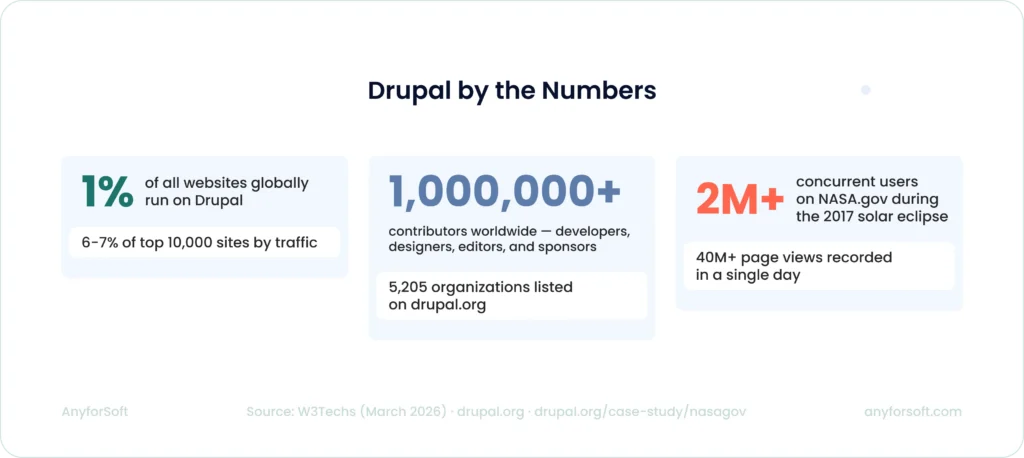
Drupal by the Numbers
Top Advantages of Drupal
Drupal’s advantages concentrate in specific areas: content architecture and security governance. They are most relevant to organizations managing complex editorial workflows, multiple sites, or strict compliance requirements.
Open-source Platform
Drupal carries no licensing fee. The core software is free to use, modify, and distribute, which redirects budget toward development and configuration rather than software access. That cost structure becomes more significant at scale, where proprietary CMS licensing costs compound with user seats and feature tiers.
Beyond the license, the codebase is fully accessible. Development teams can modify core behavior, build custom modules, and adapt the platform to project-specific requirements without hitting vendor-imposed limits.
The contributed module directory on drupal.org lists 55,251 modules, covering use cases from payment processing to content moderation workflows. Most projects draw heavily from this library before writing any custom code.
Huge User Community
Drupal’s contributor base maintains a steady pace of development, bug identification, and module upkeep. When issues surface, the community typically has an existing issue queue entry, a patch, or a workaround already available. This reduces the time development teams spend diagnosing platform-level problems.
A practical signal of community health is module standardization. Token, a foundational module for text substitution patterns, appears on approximately 79% of reporting Drupal sites. Pathauto, which automates URL alias generation, appears at roughly 71%.
That level of convergence means most Drupal developers arrive at a new project already familiar with the core toolset, which shortens onboarding and reduces implementation risk.
Strong Security
Drupal’s security model is built around process as much as code.
The security team follows a scheduled release cycle, issuing core and contributed module security updates on the third Wednesday of each month. For critical vulnerabilities, out-of-band releases are issued immediately. A public JSON feed distributes Public Security Announcements, which administrators can integrate into automated alerting workflows.
The security policy extends to contributed modules. Projects listed under the security advisory policy are subject to the same review and disclosure standards as Drupal core.
Role-based access control is built into Drupal’s permission system, allowing teams to assign granular administrative rights across editorial and configuration layers.
Regular Updates
Drupal follows a defined release schedule with published end-of-life dates. Drupal 10 reaches end of life on December 9, 2026. Drupal 11, the current recommended major version for new builds, already accounts for 12.7% of Drupal sites tracked by W3Techs as of March 2026.
Each major release expands the contributed module library and introduces performance improvements.
Updates carry migration effort, particularly across major versions. The trade-off is access to current security coverage and expanded module compatibility, both of which accumulate meaningful value over a platform’s lifespan.
Mobile-friendly
Drupal’s theming system supports responsive design out of the box. Images and layout elements scale across screen sizes without requiring separate mobile templates.
The platform can also function as a backend API layer for mobile applications, serving structured content to native clients through its JSON:API and REST modules. This makes it a practical choice for teams managing both web and mobile delivery from a single content repository.
Drupal Multisite
The pros and cons of Drupal multisite come down to one trade-off: a single codebase reduces duplication in maintenance and security patching, but it also means one misconfigured update can affect every site on the installation. Each site maintains its own database and content while drawing on the same Drupal core.
AnyforSoft applied this architecture for Stage Entertainment, Europe’s largest theatre producer, where five regional websites were consolidated under one Drupal platform. Security patches and updates applied once across all properties rather than five times independently.
Disadvantages of Drupal
The pros and cons of Drupal rarely exist independently. The same characteristics that make it capable at scale also create real friction. The disadvantages below are not dealbreakers for every project, but they carry weight in the decision.
Steep Learning Curve
Drupal was built for professional developers, and that shows in its structure. Content types, views, field configuration, and permission management all require familiarity before they behave predictably.
For non-technical teams, this creates a dependency on developers for tasks that simpler CMS platforms handle through visual interfaces.
The practical consequence is hiring difficulty. Drupal specialists are less available than WordPress developers, and the gap in hiring pool depth affects both project timelines and ongoing support costs.
Finding a team with genuine Drupal depth takes longer and typically costs more.
Excessive Memory Consumption
Drupal loads its module set on each request, which places consistent memory demand on the hosting environment. Drupal’s own documentation flags sites running 100–150 enabled modules as high complexity, noting that shared hosting often becomes inadequate at that level.
Dedicated hosting with appropriate RAM allocation addresses this, but adds to the total cost of ownership and rules out shared hosting for anything beyond a simple build.
Memory consumption scales with functionality. As module count grows, so does the hosting requirement.
Teams that budget for initial development but underestimate ongoing infrastructure costs often run into performance issues as the site matures.
New Versions Bring Drastic Changes
Major version upgrades in Drupal are not incremental.
The jump from Drupal 7 to Drupal 8 required a near-complete rebuild of custom code, and many sites delayed that migration for years. As of March 29, 2026, Drupal 7 still accounts for 31.4% of Drupal sites tracked by W3Techs, despite community security support ending on January 5, 2025.
Drupal 8 and Drupal 9, both unsupported, account for a further 9.1% and 11% respectively. That means over half of tracked Drupal sites currently run on end-of-life versions.
Sites running unsupported versions receive no security patches, which creates exposure that compounds over time.
Testing against the new version before committing to migration surfaces module incompatibilities early and allows realistic scoping of the upgrade effort.
Drupal Maintenance Issues
Drupal requires ongoing support and maintenance after launch. Security patches and module compatibility checks are not tasks a non-technical team can handle independently. Any CMS running complex custom functionality requires maintenance.
Drupal’s update cadence and the technical depth involved make that cost more structured and unavoidable than on simpler platforms.
The version distribution data above illustrates what happens when maintenance is deferred. Sites that skip major version upgrades eventually face a larger, more expensive migration.
Treating maintenance as a budget line from the start is less costly than treating it as optional.
Few Themes in Free Access
Drupal’s theme directory lists 3,292 themes.That is a smaller selection than WordPress offers, and a portion of the most polished options carry premium pricing.
For teams expecting to launch from a ready-made theme, the available range may feel limited.
In practice, production Drupal projects rarely rely on default themes.
Custom theming is standard for any build with specific design requirements, and most organizations commissioning a Drupal project already plan for it.
The theme library matters most for smaller projects where design customization is not a priority.
Drupal Is Written In PHP
PHP’s reputation has shifted considerably over the past decade. Drupal 10 and 11 require PHP 8.1 as a minimum, a version that introduced significant performance improvements and stricter type handling compared to the PHP 5.6 era where earlier criticism originated.
The object-oriented architecture introduced in Drupal 8 addressed the structural concerns that made older versions harder to maintain and extend.
Yes, the hiring pool for PHP is narrower than for JavaScript-based platforms. However, current PHP versions do not carry the performance limitations that older criticism was based on.
Drupal vs Other CMS
WordPress and Joomla share Drupal’s open-source PHP foundation, which makes the comparison easy to oversimplify. The meaningful differences appear at the level of project complexity and team capacity.
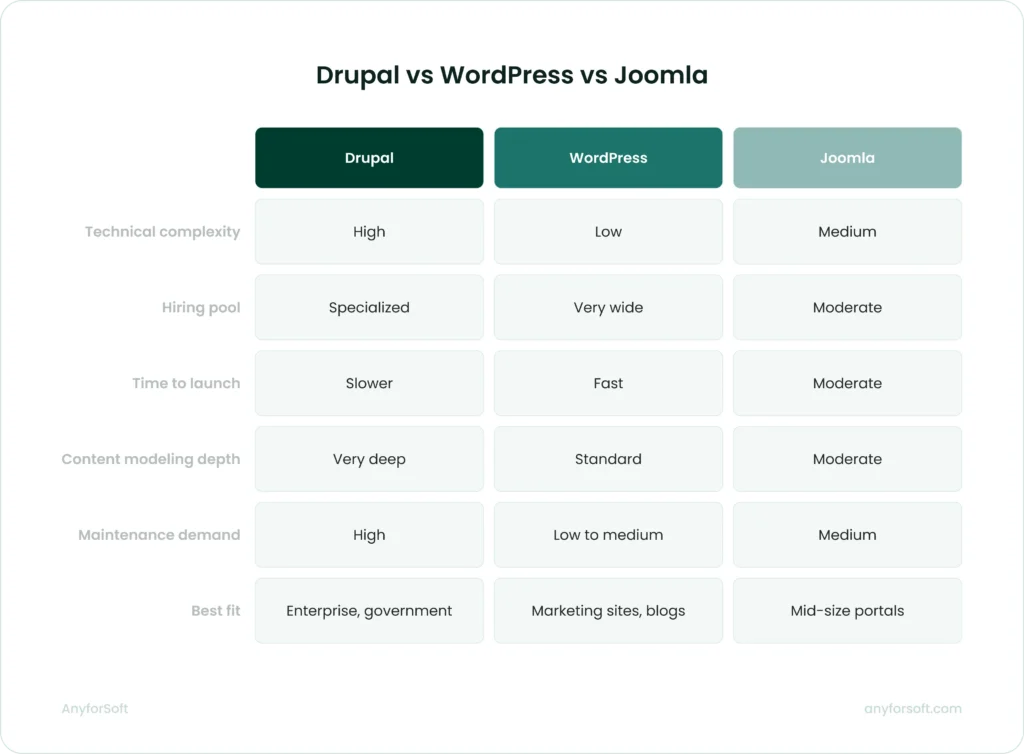
Drupal vs WordPress
WordPress powers 42.4% of all websites globally. It translates directly into such practical advantages as a larger hiring pool and faster time to launch. The official WordPress plugin directory lists 62,000+ free plugins and approximately 14,000 free themes. It gives teams a broad library to build from without custom development.
The gap between the platforms becomes visible at scale.
WordPress holds 42.4% of all websites and 59.7% of the CMS market. Drupal, by comparison, accounts for 0.7% of all websites and 1.0% of the CMS market. (W3Techs, March 29, 2026).
Both platforms appear in complex, high-traffic environments. How they get there differs.
- WordPress was built for publishing and extended through plugins.
- Drupal handles complex content modeling and multisite governance at the core architecture level. It reduces technical debt on demanding projects even if it increases upfront cost.
For teams without dedicated technical resources, WordPress fits the bill. When content architecture and compliance requirements drive the project brief, Drupal is the stronger choice.
Drupal vs Joomla
Joomla powers approximately 1.4% of all websites (W3Techs, March 29, 2026).
In technical complexity, Joomla lands between WordPress and Drupal. It serves teams that need more structure than WordPress offers but cannot sustain Drupal’s development requirements.
Where the platforms diverge most clearly is content architecture and API capability.
- Drupal handles content types with multiple variants by language or user role at the database level.
- Joomla addresses this through its extension system, which works for standard use cases but adds overhead as requirements grow.
For API-first and headless deployments, Drupal’s native JSON:API and GraphQL support give it a measurable edge. Joomla supports headless configurations, though the tooling and community practice around it are less mature.
Multilingual support tells a similar story. Drupal ships with four dedicated core modules covering over 100 languages, including right-to-left scripts. To reach equivalent functionality in Joomla, teams rely on extensions, which adds a dependency layer.
Organizations with moderate technical capacity that need structured site architecture without enterprise-grade content modeling will find Joomla a better fit.
For projects where content complexity and security requirements exceed what Joomla handles comfortably at scale, Drupal is the more appropriate platform.
Is Drupal the right fit for your project?
The decision comes down to project complexity and organizational capacity. Drupal performs well in specific conditions and creates unnecessary overhead in others.
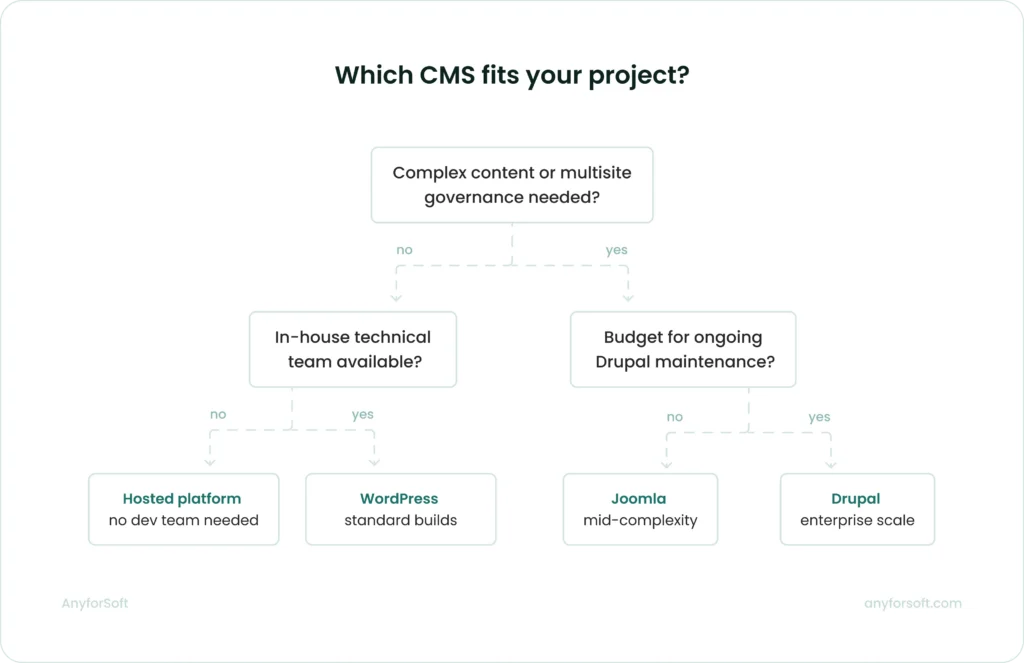
When Drupal is the right choice
Drupal earns its cost when a project requires structured content at scale or governance across multiple sites. Organizations that benefit most tend to share a few common characteristics:
- Content operations involve multiple editorial roles with different access levels
- The platform needs to serve content across web, mobile, and API consumers simultaneously
- Compliance or data protection requirements demand documented security practices
- The project scope includes multilingual delivery or multisite management from one codebase
Government agencies, universities, large media organizations, and enterprise companies with complex content workflows consistently return to Drupal because the platform’s architecture matches the problem.
Two AnyforSoft projects illustrate this well.
Verifone, a global FinTech corporation, chose Drupal 10 for a multilingual platform serving over 20 languages across multiple markets.
Stage Entertainment consolidated five regional websites under a single Drupal installation, applying security patches and updates once across all properties
When to consider alternatives
Drupal’s strengths become overhead when the project does not need them. If the content model is straightforward and the site does not require custom workflows or multisite governance, Drupal adds cost without adding capability.
Several project profiles consistently point toward other platforms:
- Simple marketing and brochure sites. WordPress handles this use case well. Its plugin library and theme directory cover most standard requirements without custom development. At this level of complexity, Drupal’s higher development cost is difficult to justify.
- Small teams without technical resources. Drupal requires a developer for module management and version migrations. Without that ongoing involvement, technical debt accumulates quickly. A managed WordPress environment or a hosted platform such as Squarespace or Webflow delivers content management without the operational overhead.
- Mid-complexity projects with moderate technical capacity. When a project needs more structure than WordPress offers but a full Drupal implementation is out of reach, Joomla is worth evaluating. It has a proven track record in education, government, and nonprofit sectors where structured content and user management matter. Compared to Drupal, the trade-off is a lower ceiling on content modeling depth and less mature API-first capability for multi-channel delivery.
- Early-stage products with undefined requirements. Drupal rewards projects with stable, well-defined content models. Building on Drupal before the product direction is clear creates rework risk, and restructuring a Drupal content model mid-project costs significantly more than on more flexible alternatives.
- E-commerce with standard requirements. Drupal Commerce handles complex B2B scenarios well. For standard retail needs — product catalog and payment processing — Shopify or WooCommerce are better suited, offering a wider range of plugins and lower ongoing maintenance.
- Projects with tight launch timelines. Drupal’s setup and module selection take more time than a comparable WordPress build. When time to launch is the primary constraint and content complexity is low, that slower ramp-up carries a real cost.
The pattern across all these cases is the same: when the project does not generate enough complexity to use what Drupal provides, a simpler platform delivers faster and at lower cost.
Bottom Line
Drupal is worth it in 2026 — for the right project. That qualification matters. The platform’s strengths are real: structured content modeling, granular access control, multilingual capability built into core, and a security process that regulated industries consistently trust. These are not marketing claims. They are the reasons government agencies, universities, and global enterprises keep building on Drupal when simpler options are available.
The cost is equally real. Drupal demands a qualified development team, a realistic timeline, and ongoing maintenance investment. Organizations that cannot sustain those requirements will find the platform increasingly difficult to manage over time. The version distribution data makes this visible: a significant share of Drupal sites still run on end-of-life versions, which reflects what deferred investment actually looks like in practice.
Drupal is likely the right fit when:
- The project is complex enough that a simpler platform would require significant customization to match the same requirements
- The organization has a development team or partner who can manage upgrades, modules, and security cadence consistently
- The content operations will grow in scope, adding languages, sites, or editorial roles, and the platform needs to scale with them
- Long-term total cost of ownership matters more than lower upfront cost
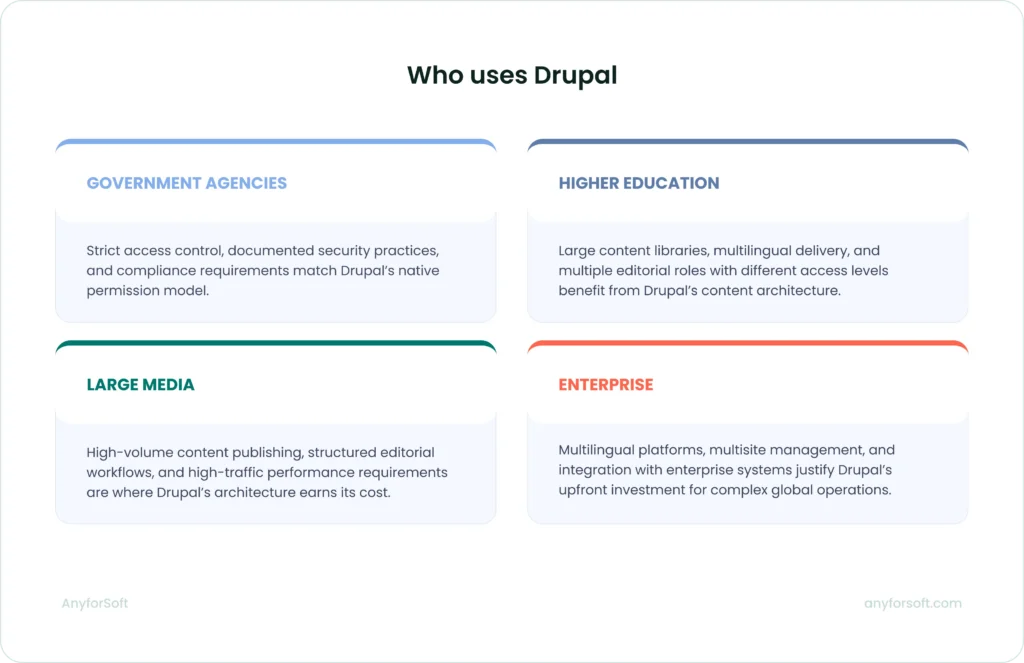
If Drupal isn’t the best fit, the right alternative depends on how much complexity the project actually needs. WordPress handles most standard content sites at lower cost and with a wider hiring pool. Joomla works for mid-complexity projects that need more structure than WordPress but don’t require a full Drupal build. Squarespace and Webflow suit teams with scarce technical resources
For organizations where the conditions above are met, the next question is finding a partner who offers Drupal consulting services with genuine platform depth. Drupal’s capabilities only translate into business value when the team implementing them understands the architecture well enough to make the right decisions early — on content modeling, module selection, and version planning.
FAQs
Is Drupal the right CMS for my business website?
Weighing the Drupal CMS pros and cons starts with one question: what does your website actually need to do? It depends on what your website needs to do.
Drupal is a strong fit for organizations managing large content volumes, multiple editorial roles, strict compliance requirements, or deep integration with enterprise systems. If your site needs multilingual delivery or multisite management, Drupal’s architecture handles these at the core level without relying on third-party plugins.
For smaller businesses with straightforward content needs, a simpler platform will deliver faster and at lower cost. Whether your project generates enough complexity to justify Drupal’s development and maintenance requirements is the right starting question.
Should I choose Drupal over WordPress for scalability?
For high-traffic, content-heavy platforms, Drupal has a strong track record. NASA.gov runs on Drupal and recorded over 2 million concurrent users during the 2017 solar eclipse, with peak days exceeding 40 million page views.
WordPress scales well for most publishing needs. When scalability involves complex content modeling or multisite governance, Drupal handles those requirements at the core architecture level. Layering plugins to achieve the same outcome on WordPress tends to accumulate technical debt over time.
Is Drupal a good choice for secure government portals?
Yes. Drupal’s security team follows a scheduled release cycle with out-of-band releases for critical vulnerabilities, and role-based access control is built into core. For portals handling sensitive data or operating under regulatory requirements, that combination of process discipline and native access control is a practical advantage. Platforms that rely on plugins for equivalent functionality introduce additional dependency and governance overhead.
When does it make sense to migrate to Drupal?
Migration to Drupal makes sense when an existing platform can no longer support the project’s content requirements. Common triggers include outgrowing WordPress’s content modeling capabilities, or managing multiple sites on separate codebases that need unified governance and compliance requirements that demand more structured access control.
Timing matters. The strongest migrations happen when the content model is stable, the editorial workflows are documented, and the organization has budgeted for both the migration and the ongoing maintenance that follows.
Is Drupal worth the higher development and maintenance costs?
For the right project, yes. Where Drupal’s cost is harder to justify is on projects that do not need its depth. A marketing site or an early-stage product will rarely generate enough complexity to offset the higher build and maintenance costs. Budgeting for maintenance from the start is part of the total cost of ownership, not an optional line item.