


Ask a class of teenagers who’s used a chatbot for homework, and most hands will probably go up. Pew Research Center surveyed 1,458 U.S. teens and their parents for a report published in February 2026, and 54% of the teens, aged 13 to 17, said they’d done exactly that.
So the help is there, at any hour. Whether anyone learns from it depends on what the software does next, because a general chatbot hands over the finished solution and the student copies it down. A well-built AI tutor waits. It asks what the student already tried, and only then does a hint come.
Hints like this turn a chat window into personalized learning, because the tool adjusts to what one learner knows and where they slipped.
For an exam prep company or a university, the teaching approach behind them also decides what you’d have to build and what you’d want to own.
What Is an AI Tutor?
In plain terms, an AI tutor is software that uses artificial intelligence to guide one learner at a time through a subject. It explains a concept, asks questions, checks the learner’s work and adjusts the next step to the level that learner has reached.
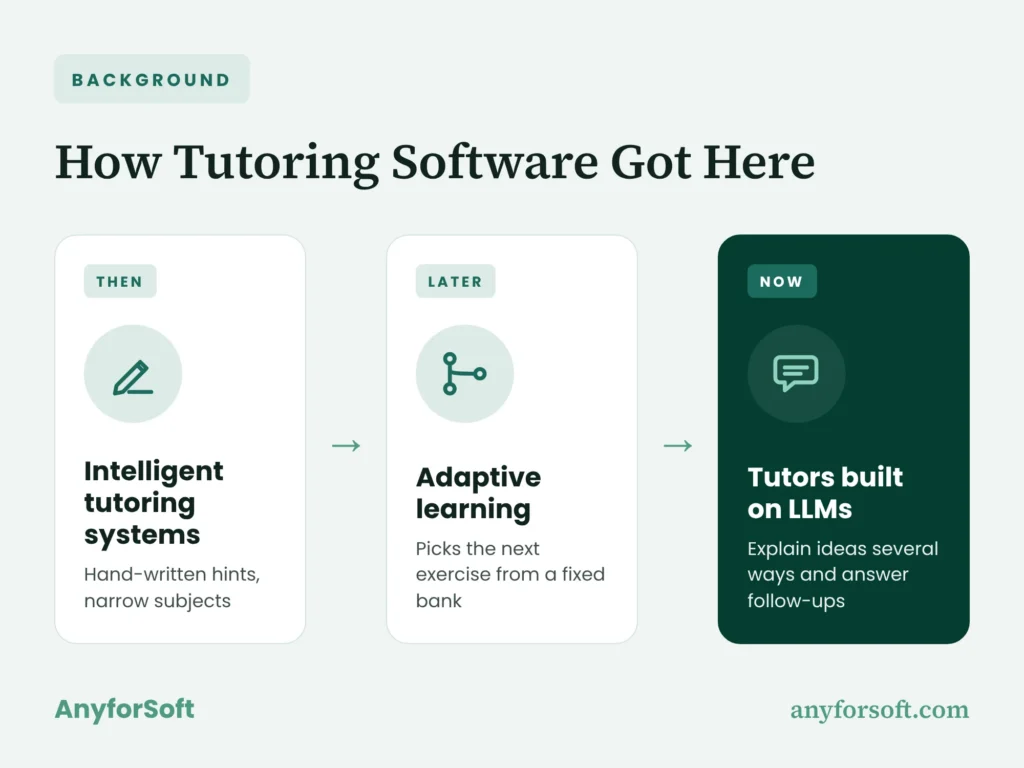
The idea is older than chatbots. Researchers have been building intelligent tutoring systems for decades, programs that map a subject step by step so someone stuck on an algebra problem gets feedback on each line of the work as they write it.
Early versions worked in narrow subjects. Somebody had to write every hint and every wrong-answer path by hand. Later adaptive learning products took a lighter route and picked the next exercise from a fixed bank based on scores.
With large language models (LLMs), software can explain one idea three different ways, or pick up a follow-up typed in a learner’s own words.
Modern AI tutoring puts that flexible language on top of the old discipline, meaning a record of skills plus rules about when to hint.
There’s a catch. Software that can say anything can also say something wrong, or hand over the whole solution when nobody asked it to. Keeping it in teaching mode is the line between a tutor and an ordinary chatbot.
How It Differs from a Chatbot or an Answer App
All three take a request typed in everyday language and use natural language processing to figure out what you want. After that, they split.
A general chatbot tries to be helpful right now, so you get the full reply. A homework solver goes further and hands back a worked solution, often from a photo of the page. Course support bots are their own category again, and AI chatbots in e-learning mostly deal with deadlines, enrollment and where the readings are. A tutor gets judged by what the student can do tomorrow without it.
That’s why it often replies with a question of its own.
Tutor vs. Chatbot vs. Homework Solver: How They Differ
| Tutor | General chatbot | Homework solver | |
| Goal | the learner can solve the next problem alone | a fast, helpful reply | the correct final result |
| How it responds | hints and prompts first, the full solution last | a complete reply straight away | a step-by-step solution to copy |
| What data it uses | approved course material plus the learner’s history | general training data, sometimes the open web | its own solution library or the photo you upload |
| What teachers can see | progress, errors and full conversations | nothing, unless the school sets it up | nothing |
For a school or prep company, what teachers can see matters most. If instructors can’t look inside a tool, it can’t become part of how they teach the course.
How Does AI Tutoring Work?
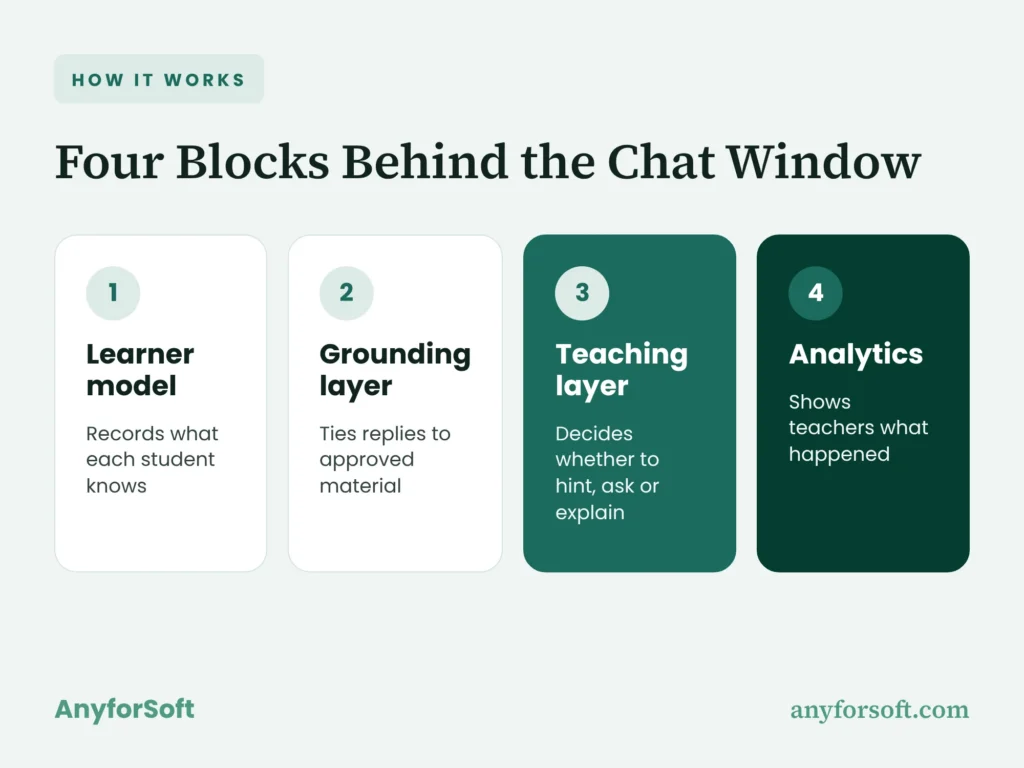
Most tutors run on four building blocks that work behind the chat window, where learners don’t notice them.
They hand information back and forth after every reply a learner sends:
- a learner model that records what each student knows
- a grounding layer that ties replies to approved material
- a teaching layer that decides whether to hint, ask or explain
- analytics that show teachers what happened
Each one’s simple on its own. How well the four work together is what decides the quality of the tutor.
The Learner Model: Tracking What Each Student Knows
Every answer a learner gives updates a running profile of their skills. Engineers call the method knowledge tracing. It works one skill at a time: the system estimates how likely that learner is to get the next related item right, then revises the guess after each attempt.
Get a fractions item right and the estimate goes up.
Some systems also weigh hesitation, so a wrong answer after a long pause counts for more than a quick slip.
After a week or so, you can see which skills are solid and which still wobble. That profile is what makes mastery learning possible, with the learner staying on one skill until the estimate crosses a threshold.
The threshold is a teaching call, and it’s yours.
A school might set it higher for a licensure exam than for weekly homework. Without the profile, the tutor would treat a learner it’s taught all term like someone who signed up this morning.
Content Grounding: Answers Based on Approved Material
Say a physics tutor explains momentum one way and the professor’s lecture notes explain it another. Both can be right, and students still won’t know which to trust. So the system draws on material the school or company has approved, meaning course notes, worked solutions, practice items and policy documents.
The usual technique is retrieval-augmented generation (RAG). Before it replies, the system searches that approved library for passages matching the message and passes them to the language model with one instruction, to stay inside them.
When nothing relevant turns up, a well-configured tutor says so and sends the learner to a person.
You end up with explanations someone on your staff can trace back to a page, check against the syllabus and fix at the source if the page itself is wrong.
The Teaching Layer: Hints, Questions, and Guardrails
Between a student’s message and the reply, there’s a set of rules about how to respond. The main one is simple. Hint first. A stuck student gets the smallest nudge that might get them moving, with more help only if that nudge fails.
Working out the next step themselves is what makes a skill stick. Hand them the solution and they skip that part.
Asking before telling comes from the Socratic method, where a teacher’s questions walk the learner toward the answer. The rules also set scope.
A chemistry tutor won’t write your history essay. They decide when a human should take over, too, say after three nudges in a row haven’t helped, or when someone mentions they’re upset. Getting all of it right takes testing with real classes.
A hint that’s too big gives the solution away; one that’s too small just frustrates people.
Analytics: Feedback for Teachers and Admins
Instructors need to know what happened in each class’s sessions. The fourth block turns those sessions into learning analytics you can scan in a few minutes: which skills a group is stuck on, which items trip up the largest share of learners, how long sessions ran, which hint requests went nowhere.
Admins get those figures rolled up for the whole program. Some tutors also flag a learner who needs a person, like someone who’s failed one skill three sessions running. Teachers can usually read full conversations too.
This matters for trust. Nobody has to take the software’s word for what happened. And when an instructor edits the course, the tutor’s material updates along with it.
What Are the Benefits of an AI Tutor for Students?
Built on those four blocks, from the learner model to analytics, a tutor pays off on two sides at once. Students get help that starts where they are. The school or prep business behind it gets something it rarely has: a record of how learning happens between classes.
Learning at the Right Pace and Level
A class moves at one speed. On any given day, some people are waiting and others are scrambling to keep up. A tutor can follow each learner instead, slowing down on the skill someone keeps missing and skipping whatever they’ve already shown they know.
For the student, personalized learning means less time on the easy parts and more on the gaps that actually cost points. For the school or prep business, it’s one less reason for someone to drop out. A course that’s neither boring nor overwhelming is simply easier to finish.
Level matters as much as pace. You can explain photosynthesis to a seventh grader through a backyard garden, or to a nursing student through cell biology, and the software can switch between the two in a single afternoon.
Pacing can’t rescue material that’s wrong for the course, though. A tutor helps most when the content underneath is solid.
Instant Feedback, Day or Night
Most homework happens when no teacher is around. Flip a sign in line two and you’ll carry that error through the next ten problems, unless something catches it. The assistant does, right away.
Teachers call this formative feedback, comments that arrive during learning while there’s still time to adjust. Most of its value is timing.
A misconception fixed within minutes doesn’t get the chance to settle in. Think of the week before a test date, when SAT/ACT prep runs late into the evening and the tutoring center closed hours ago.
For the business, an evening explanation costs nothing extra. Nobody has to staff a late shift.
One-on-One Support at Scale
In 1984, educational psychologist Benjamin Bloom described what became known as Bloom’s 2 sigma problem. Learners in his studies who got one-on-one tutoring scored about two standard deviations higher than those in a conventional class.
A standard deviation measures how spread out scores are.
Two of them put the typical tutored child near the top of the regular class. The catch was cost, and it still is: no district budget stretches to a personal tutor for every child.
A 2025 Harvard University study in Scientific Reports tested how much of that gap AI can close. In an introductory physics course, each of 194 students learned one topic in an active-learning class and another with a tutor the instructors had built, and with the tutor their median learning gains came out more than double. They got there faster, too, in a median 49 minutes against roughly 60 in class. The researchers put the effect at 0.73 to 1.3 standard deviations. In education research, it counts as large.
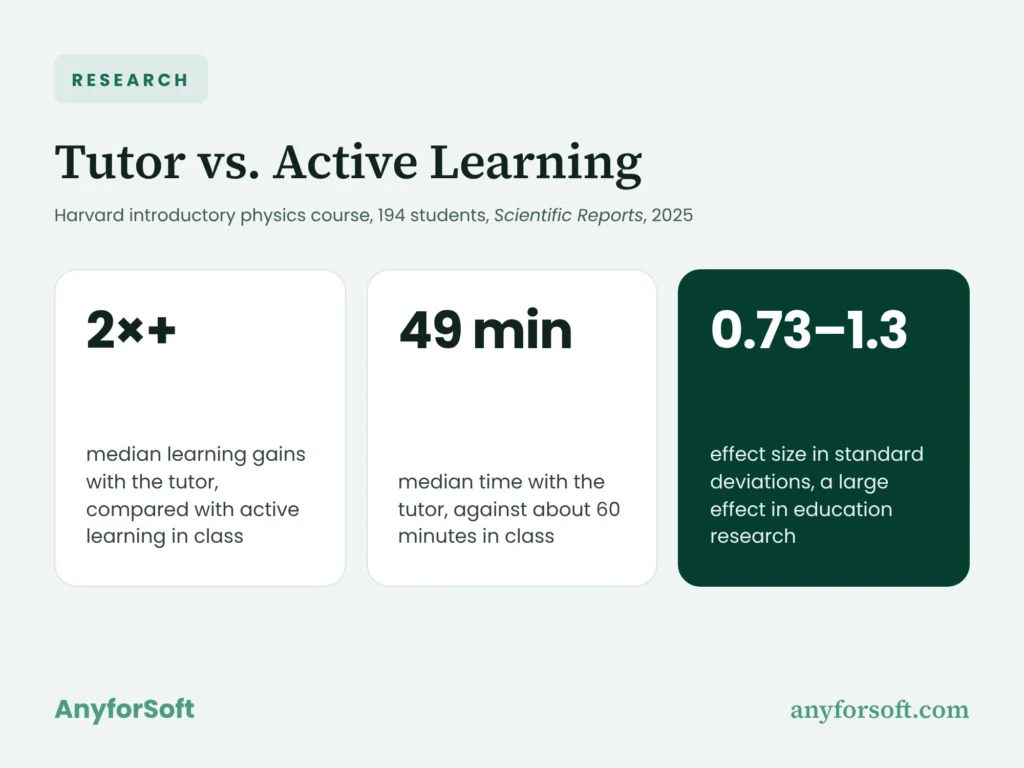
It’s one course at one university, with a tutor designed around good teaching practice. What it shows is how far careful design can go in a strong setting, and the gains belong to software built around a clear teaching plan.
Clear Data on Where Students Struggle
Every session leaves a trail. Across a whole cohort, those trails add up to a map of where a course loses people, and a prep company can use it to decide where revision time goes:
- rewriting the three practice items most learners get wrong for one shared reason
- moving a weak module earlier, so candidates meet it before the first mock exam
- sending human tutors to the learners the data flags first
- finding a confusing instruction in the course itself, when one query keeps coming up
Each change improves the course for the next cohort, and it didn’t take a survey to find them. Learners notice too. Whoever’s stuck reaches a human sooner, and the item that confused last term’s group has already been rewritten when they get to it.
Top Use Cases in 2026: From Homework Help to Exam Prep
The four building blocks (learner model, grounding layer, teaching layer and analytics) turn up everywhere from a fourth-grade worksheet to a bar review course. Schools and employers alike now use AI tutors in five main settings.
What changes is the mix. A homework helper leans on its teaching rules; an exam prep tool lives or dies by the attempt history.
K–12 Homework Help and Practice
At home, a stuck child usually has two options. Ask a parent who may not remember long division, or copy a solution from somewhere. A tutor adds a third. Its hint-first rules matter more with children than anywhere else, because at eleven the pull toward just getting the answer is at its strongest.
In math tutoring, the tool asks the child to show the first step, then points at the line where the working went wrong. Practice adapts too. A child breezing through multiplication gets harder problems; one who’s struggling gets another worked example first.
Schools usually want teachers to see these sessions from day one, with parental controls and limits on topics outside the curriculum. Age changes the rules as well. Privacy law treats a nine-year-old’s data more strictly than a college student’s, and the system’s storage has to follow suit.
University Courses and Student Support
A first-year statistics course with 600 people enrolled and four teaching assistants can’t offer office hours to every learner who needs them. That’s the kind of course universities comparing AI tutor platforms for students tend to start with: big, with predictable sticking points and a syllabus the tutor can be grounded in.
A course-grounded tutor answers questions about this week’s lecture in the professor’s notation and points to the right slide. It’ll give writing feedback on a lab report draft as well, commenting on structure and evidence while the writing stays the author’s own. Outside class, that kind of assistant helps with student support, like explaining a degree requirement to someone in their first week.
Integrity policies still apply. Most universities set the assistant up to comment on drafts and turn down requests to write them.
Test Prep and Licensure Exams
On high-stakes tests, a mistake a candidate keeps making without noticing does the most damage. Inside a prep platform, a tutor is well placed to notice, because it sees every attempt. When a learner misses an item, it explains why the right option is right and why the chosen one looked tempting. Give it a few sessions and it starts reading how that person works:
- pacing, such as rushing the last 20 minutes of a section
- answer changes, when second thoughts turn right answers into wrong ones
- guessing, visible as fast responses on hard items
Those patterns decide what comes next, maybe a timed block for a slow reader, maybe a review of one weak topic. The logic carries across NCLEX and bar exam prep, the U.S. nursing and law licensing tests, where formats differ and a weak area can mean a failed attempt.
For a prep business, AI test prep earns its keep by turning thousands of practice attempts into a study plan for each candidate preparing for the SAT, the ACT or a professional license. The tutor works best inside a custom test prep LMS that already stores the item pool, the timing data and each candidate’s attempt history. Without that history, it can explain a wrong answer. It can’t see the habit behind it.
Language Learning
Speaking is the hardest skill to practice alone. It’s also where a tutor adds the most. With speech recognition, the tool listens to a spoken reply, flags the sounds that need work and asks for another try.
Conversation practice scales that up. You order a coffee or argue about a delayed train, the tutor answers in character, and corrections wait until the end so the exchange keeps moving.
Vocabulary runs on spaced repetition, bringing a word back just before it’s likely to slip from memory, at intervals that grow each time.
The learner model tracks which words and grammar points someone actually gets right when speaking. Pronunciation scoring still struggles with strong accents and noisy rooms. Most language programs pair the app with live classes for that reason.
Corporate Training and Upskilling
Someone learning a new CRM, the system that holds customer records, usually has exactly one question about the screen in front of them. The trainer’s booked for weeks. A tutor grounded in the company’s own manuals and process documents can handle that question, then check understanding with a short scenario.
Onboarding’s a common place to start. New hires work through product knowledge and policies at their own speed, with short quizzes on situations they’ll face in their first month. Compliance fits too: an employee applies a rule to a realistic case before the module counts as complete. Sales and support teams use role-play, with the AI playing a difficult customer.
For the L&D team, the payoff is knowing which procedures each department struggles with, months before an audit would surface it.
What Today’s Best-Known Tutors Have in Common
The names most people recognize show the building blocks working at scale.
Students using Khanmigo (Khan Academy) are guided to work problems out themselves, from elementary school through college, and it all runs on Khan Academy’s own content platform.
Younger children meet a similar idea in Synthesis Tutor, an elementary math program for ages 5 to 11 that breaks a problem into steps after a mistake.
For languages, Duolingo Max adds conversation practice to Duolingo’s courses through role-play scenes and video calls with an animated character called Lily.
The tutor behind one of the best-known published results went the other way. In the 2025 Harvard physics study in Scientific Reports, the course’s own instructors built it on GPT-4 and loaded its prompts with their pre-written, step-by-step solution to each problem. Accuracy didn’t hinge on the model working things out alone.
All three teach their maker’s material, and that focus is part of their strength. Khanmigo follows Khan Academy’s curriculum and Synthesis its own math program. Duolingo’s tutor lives inside Duolingo’s courses. For a prep company with its own NCLEX item bank, the takeaway is to build on that bank the way these apps build on theirs.
What Are the Risks of Using AI for Tutoring?
Bring up AI in a classroom and three worries surface almost at once: wrong answers, learners leaning on the tool too hard, and the privacy of student records.
Each has a practical fix. They’re part of the wider debate about the pros and cons of AI in education, and all three fixes rest on a human-in-the-loop design, with the tutor supporting teachers and a person reviewing what matters.
Wrong or Made-Up Answers (Hallucinations)
Language models sometimes produce a fluent, confident reply that’s simply false. In a casual chat, that’s annoying. In a tutoring session it’s worse, since the student trusts the tool and may have memorized the error by the next class.
The main fix is content grounding. The tutor answers from course material your staff signed off on and shows which page or item it drew on, so anyone reading can check. Some universities already run assistants on official sources only.
One we built for Wittenborg University of Applied Sciences answers only from the university’s official information. For a tutor, that setup means a stuck student gets the explanation from your own course notes, not a confident guess pieced together from the open web.
Grounding narrows the room for bias as well, because the examples and explanations come from material people on your team have already reviewed. Replies still need testing across student groups before launch.
Over-Reliance and Academic Integrity
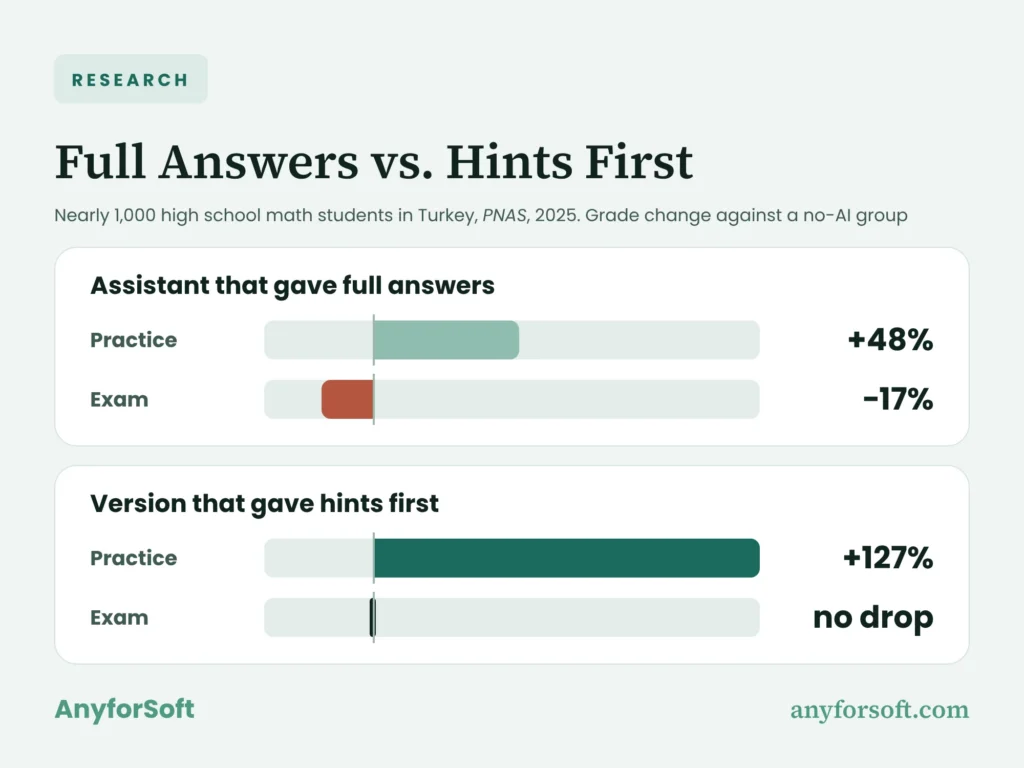
A tutor that hands out solutions too freely can leave learners worse off than having none. Researchers measured how much free answers cost on the final exam in a 2025 PNAS study with nearly 1,000 high school math students in Turkey. With a standard GPT-4 assistant, the group scored 48% higher on practice problems than a control group without AI. Then the AI was taken away, and on the exam they scored 17% lower.
A second version, built to give hints and hold back full solutions, lifted practice scores by 127% and left exam results level with the control group. (Each percentage compares grades with that no-AI group.)
If you’re building a tutor, it’s hard to find a clearer case for coaching mode. The version that coached did better in the drills and cost nothing on the test.
Copying is the other half of the problem. Here the practical fix is teacher visibility: instructors read sessions, spot the student who kept pushing for a solution, and set assignments where the tutor only coaches.
Student Data Privacy: FERPA, COPPA, and GDPR
Grades are a small part of what a tutor collects. Every question, wrong answer and late-night session ends up in a log, and three laws govern that log:
- U.S. schools that receive federal funding follow FERPA, which protects student education records
- online services aimed at children under 13 need parental consent under COPPA before collecting personal data
- learners in the EU, adults included, are covered by GDPR, the EU’s data protection law
Between them, the three laws reach nearly every learner a tutor is likely to serve, from a fourth grader in Ohio to an adult student in Berlin. The fixes start with data minimization, storing only what’s needed to teach. Then role-based access, so a teaching assistant sees their own section and nothing else. Hosting matters too, since contracts often require records to stay in one region. And a school needs it in writing from the model provider that student conversations won’t be used to train someone else’s model.
How to Build an AI Tutor: Step-by-Step
Building a tutor puts all four blocks in place, from the learner model through to analytics. You start with who it’s for and finish with real learners using it. Whether you run an edtech company, a school or a learning business, each stage leaves behind a document or system the next one relies on.
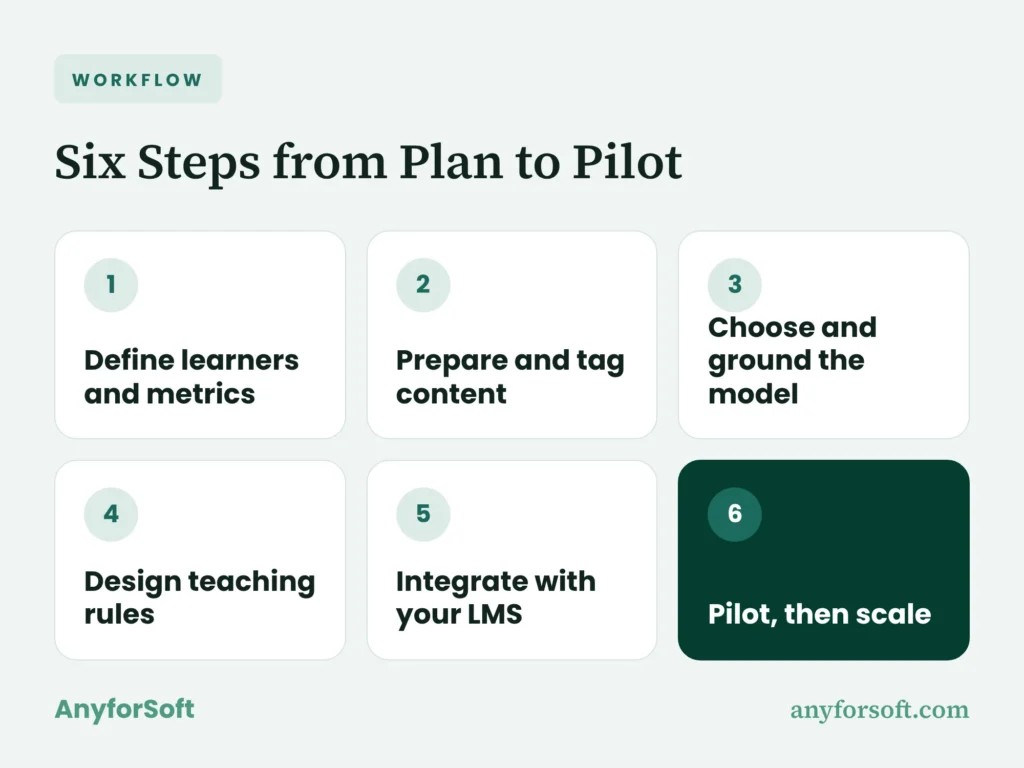
Step 1 — Define Learners, Subjects, and Success Metrics
The first step pins down who the tutor serves: which learners, which subjects, what level, the devices they study on. Nursing candidates preparing for the NCLEX need different rules from seventh graders doing algebra, even when the technology underneath doesn’t change.
This step also sets success metrics, in plain numbers. Maybe the first-attempt pass rate against last year’s cohort. Maybe the average score change between two mock exams taken six weeks apart. Usage figures belong on the list too. On their own, though, they don’t prove anyone learned anything.
Instructors should help write this part. They know where people actually get stuck. The output is a learning goals brief, a short document the whole project can check later decisions against.
Step 2 — Prepare and Tag Your Content
Next comes the material the tutor will teach from. Most teams already have plenty, from lecture notes and worked solutions to practice items and past exams, scattered across folders and formats.
The work is collecting it, clearing out old versions and tagging each piece by skill and difficulty. Tags let the learner model connect a wrong answer to a specific skill and pick what comes next. In exam prep, you end up with a question bank where each item carries its topic, difficulty level, correct option and an explanation of the common wrong choices.
Content prep is slower than teams expect, and it’s worth the time. It also shapes the quality of every reply more than any other step, and once every item’s tagged, grounding has something to work from.
Step 3 — Choose the Model and Ground It in Your Material
With the library ready, the team picks a language model and hooks it up to that material. Four criteria usually decide it:
- accuracy on your subject, tested with your own items
- cost per conversation at the volume you expect
- privacy terms, including whether the provider trains on your data
- hosting options, if contracts require data to stay in one region
Those criteria rarely leave more than one or two candidates, and that’s fine. A short test with real learner questions settles the rest. Grounding’s set up at the same time.
In plain terms, your library is cut into short passages the system can search, and RAG pulls the right ones whenever a learner asks something.
What comes out of this step is a model and grounding setup, plus a written note on why that model won.
Step 4 — Design the Teaching Logic and Guardrails
This step turns teaching principles into instructions the system follows. Through prompt design, the team writes the tutor’s core rules: give the smallest useful hint first, ask the student to explain their reasoning, hold back the full solution until they’ve had a go.
Limits come next. Off-limits topics, what the system says when someone asks for an essay, the moment a person takes over the conversation.
Each rule gets tested on awkward cases, like the student who insists they only need the result or one who’s clearly upset. The rules then go into a prompt and guardrail spec an instructor can read and recognize as their own way of teaching.
For licensure candidates, the spec might also require a course citation before the assistant confirms any clinical answer.
Step 5 — Integrate with Your LMS and Data Stack
Make learners log in to a separate tutor and fewer of them will bother. Most teams connect it to the LMS learners already use, with single sign-on so one login covers both, plus a CRM link where enrollment or sales data matters. Information flows back as well, so a teacher sees session activity next to grades in the gradebook they already use.
Then there’s placement, inside a lesson or right next to a practice test. Standard connectors cover the basics, and LMS integration services handle the data they don’t reach, such as custom reports or a two-way CRM sync.
The integration plan from this step lists each system, the data moving between them and who owns each part. With that agreed, the pilot runs on tools learners already know.
Step 6 — Pilot with Real Students, Then Scale
The last step puts the tutor in front of real learners, in a group small enough to watch closely: typically one course or one cohort, for six to eight weeks. That’s long enough to see whether scores move and short enough to change course.
The team compares results with the Step 1 metrics and reads a sample of conversations for accuracy and tone. Teachers’ feedback counts as much as the numbers. Expect a few problems. Wrong replies go back to Step 2 or Step 4, because most of them trace to missing material or a loose rule.
Scaling happens course by course. Each new subject repeats Step 2, since the system only knows what it’s grounded in. The step ends with a pilot report covering results, fixes made and a recommendation on whether to expand.
Off-the-Shelf Tool or Custom Build: Which Fits?
Buying an AI tutoring platform gets you going fastest. You’ll pay per seat each year. The content is generic, the vendor’s own or limited to what its upload tools accept, and your view of learner data stops at the vendor’s reports. That suits a school testing whether learners use a tutor at all, or a subject where a general syllabus is good enough. For a first trial, it’s often plenty.
Building your own costs more up front. In return, you own your content, your learner data and your brand, and no license bill grows with enrollment. Integrations and the amount of material to prepare account for most of a custom LMS development cost, and this kind of build follows that pattern too. A team that does tutor app development builds the assistant around your platform and connects it through standard protocols:
- launches inside LMS courses through LTI, the standard most learning platforms support
- records learning activity in a shared format through xAPI
- gives learners one login for both systems through SSO
Together, they make the assistant feel like part of the course. If your item bank is the product you sell, custom tutoring software development is worth pricing once enrollment grows past the point where seat fees would cost more than a build.
Smart Tutoring and Assessment in Practice: AnyforSoft Case Studies
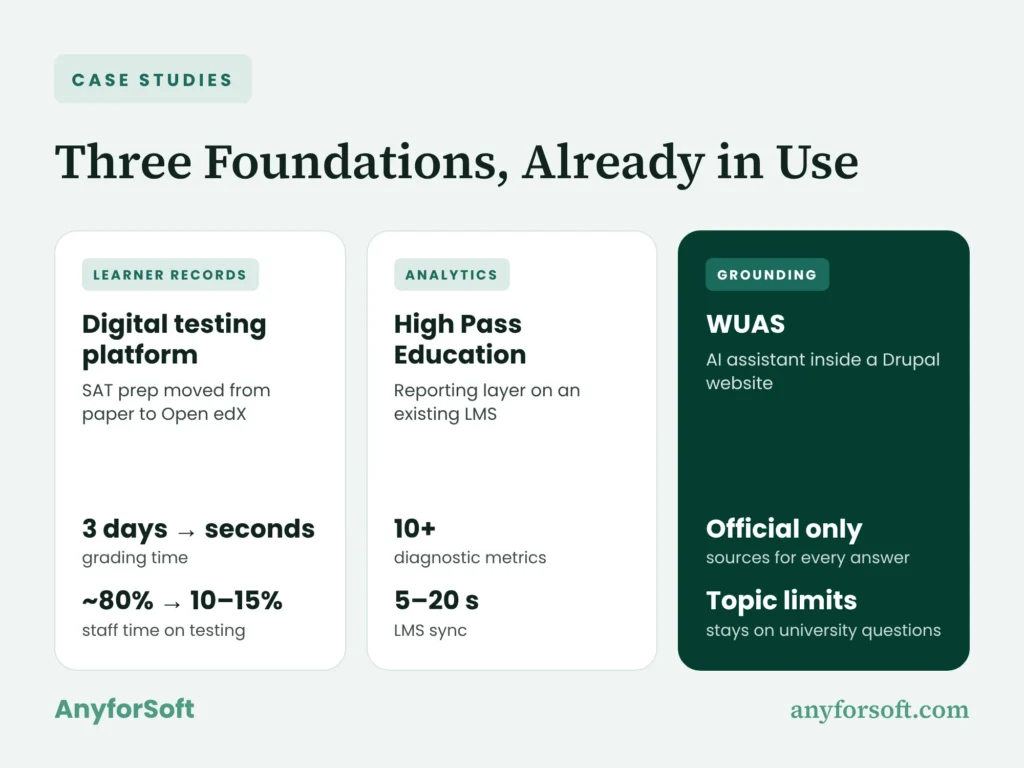
A tutor can only teach as well as the data and content behind it allow. Each of the three AnyforSoft projects below built one piece of that foundation for a real client:
- a digital testing platform that records every answer and every second, the history a learner model learns from
- an analytics layer for High Pass Education that separates knowledge gaps from time-management problems
- an AI assistant for WUAS that answers only from official university content, the grounding a tutor depends on
Put together, they’re the groundwork a tutoring assistant plugs into, and all three are already in use.
Digital Testing Platform for the U.S. Tutoring Center
Taking its SAT prep off paper was the next goal for a U.S. tutoring center that has prepared students for standardized tests since the 1980s. AnyforSoft built a digital testing platform on Open edX, with a custom Python and React layer that looks and behaves like Bluebook, the College Board’s SAT practice app:
- three test modes, from fully timed to self-paced
- Bluebook-style tools such as a built-in calculator and answer cross-out
- adaptive module difficulty and automatic scoring
- PDF score reports and two-way sync with Salesforce
Grading that used to take three days now takes seconds. Supervising and grading together dropped from about 80% of a staff member’s working time to 10–15%.
Before a center can offer AI SAT prep, it needs digital tests that capture every answer and every second. That’s exactly what the platform’s exam simulation records.
High Pass Education: Licensure Prep Analytics
High Pass Education prepares mental health professionals for the credential they need before opening a private practice or supervising others. Its team wanted sharper, more personal licensure exam prep but didn’t want to leave the LMS its courses ran on, so AnyforSoft built a custom testing and reporting layer to run alongside it:
- test rules set per learner, including a timed “speedrun” mode
- 10+ diagnostic metrics that separate knowledge gaps from time-management issues
- personalized guidance between attempts, with WCAG 2.1 accessibility
- user updates synced between the LMS and connected learning tools in 5–20 seconds
Routine questions that used to take a one-to-one session now get handled through the combined reports and AI-assisted support.
By the client’s account, the program can also grow without adding instructors. For a prep provider, the project shows the analytics block, plus guidance between attempts, built as a layer with no move to a new LMS.
WUAS: A Website-Native AI Assistant
At Wittenborg University of Applied Sciences in the Netherlands, the aim was for applicants and current students to get accurate answers about admissions and programs whenever they ask. AnyforSoft built an AI assistant as a module inside the university’s Drupal 10 website, answering from a knowledge base drawn from official pages and documents:
- fresh answers as soon as a page is edited
- topic limits that keep the assistant on university questions
- a pointer to the relevant form or office when a question needs a person
- settings that let admins choose the assistant’s voice and its sources
Applicants and students now get help from first visit to enrollment, and there’s no separate AI platform for anyone to run.
For a school planning a tutor, WUAS shows grounded answers already working in production, on the website applicants use every day.
Why EdTech Teams Choose AnyforSoft for AI Learning Products
AnyforSoft is an EdTech software development partner that builds learning platforms and AI tools for education organizations. When teams bring us an AI project for education, their reasons usually come down to four things.
15+ Years Building Education Software
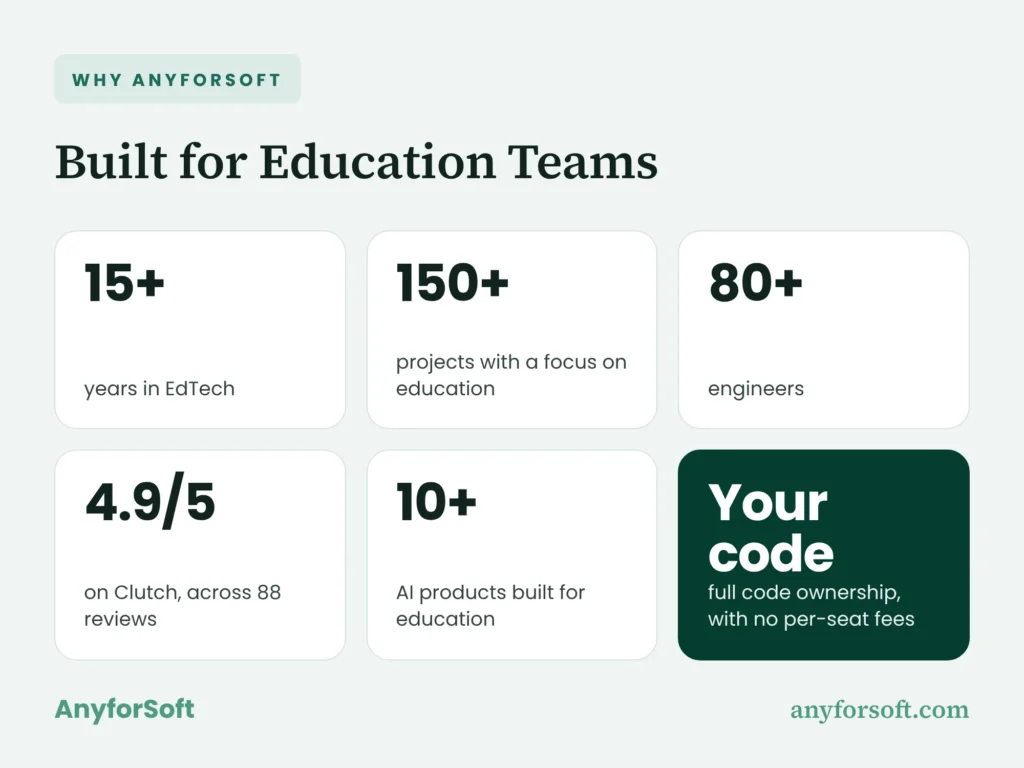
Over 15+ years in EdTech, AnyforSoft has delivered 150+ projects with a focus on education, and its team has 80+ engineers. Clients rate that work 4.9 out of 5 on Clutch, across 88 reviews. That experience goes into early scoping in edtech product development, where the team agrees which features the first release leaves out.
AI Trained on Your Content, Not Generic Answers
AnyforSoft has built 10+ AI products for education. In a tutor, we ground the model in your course material and item bank, so its explanations match your curriculum and your terminology. Instructors find personalized learning easier to trust that way. The assistant adapts to each learner but stays inside material they’ve approved.
Your Code, Your Data, No Per-Seat Fees
You get full code ownership of the tutor we build, along with the data it collects. Licensing doesn’t grow with enrollment, so your next thousand learners don’t come with a fee attached. Owning that learner data also opens the next step, such as predictive analytics for education that flags at-risk learners early, while there’s still time to step in.
Works with Open edX, Moodle, Canvas, or From Scratch
We build tutors into the LMS you already run, or build a new learning product around one. Our LMS work covers development, migration and integration for those three platforms, as well as custom systems built from scratch. After launch, a dedicated development team stays with the project, so the product keeps pace as your courses change.
Frequently Asked Questions
What is an AI tutor, and how is it different from a chatbot?
It’s software that guides one learner through a subject by explaining, asking questions, checking their work and adjusting to their level. A chatbot responds to whatever you ask, as fully as it can. A tutor holds the solution back and gives hints first. It also draws on the course’s own material, and teachers can see what happened in each session.
Does AI tutoring actually improve learning outcomes?
When it’s designed well, the early evidence is encouraging. In the 2025 Harvard physics study published in Scientific Reports, learners improved more, and in less time, with a purpose-built tutor than in an active-learning class. The 2025 PNAS study of high school math students in Turkey adds a condition. Hand out answers freely and exam scores can drop once the AI’s gone; the hint-first version showed no such drop.
Can AI replace a human tutor?
For most programs, no. Software covers the routine side, and an AI tutor for students handles practice, instant feedback and explanations at any hour, while a person still notices exam anxiety or reworks a plan after a bad week.
How much does it cost to build a custom AI tutor?
It depends on scope, and there’s no honest single number. Three things drive most of the budget:
- integrations, especially with an existing LMS and CRM
- content work, meaning preparing and tagging your material
- the teaching logic and the testing it needs before launch
Model usage adds a running cost per conversation on top. A short discovery phase is the dependable way to get a figure you can plan around.
Is it safe to use AI with student data?
It can be, if the system’s designed for it from the start:
- collecting only what the tutor needs
- limiting who sees which records
- choosing where data is hosted
- contracts that stop model providers from training on student conversations
Together, they keep student records in fewer hands and in known places. Schools also have to meet the privacy laws that apply to them, and they’re stricter for children under 13 and for learners in the EU.
How can AI help students prepare for the SAT, ACT, or licensure exams?
Inside a practice platform, the tutor explains every wrong answer, tracks habits like rushing or second-guessing, and builds the next practice set from the weak areas it finds. Over a few weeks, a pile of mock-exam scores becomes a study plan. For licensure test prep, including the NCLEX, that tracking helps candidates tell knowledge gaps apart from time-management problems.
Can you add AI-powered learning support to Moodle, Canvas, or Open edX?
Yes. Each of them supports the standard that lets outside tools launch inside a course, so a tutor can open there and pass the results back to the gradebook. Deeper features, such as reading a learner’s full attempt history or syncing with a CRM, take custom integration work, and how deep you go depends on what the assistant needs to know about each learner. If your LMS isn’t one of the three, its documentation will say whether it supports that launch standard.
What is an intelligent tutoring system?
Before chatbots, the idea took the form of programs that map a subject step by step and comment on each step of a learner’s work, mostly in math and science. Their hints were written by hand, which made them accurate but slow to extend to new material. Today’s tutors keep that structure and add language models for open conversation.
How do large language models and RAG keep answers accurate and on-topic?
RAG makes the system look things up first. It searches your approved material for passages that match the question, then passes them to the language model with an instruction to use nothing else. Topic rules keep it on subject, and citations let a teacher check any reply against its source. Neither removes every error, so a pilot should include reading real conversations.
Can you train an AI model on your own course content and question bank?
You can, though a tutor rarely needs it. Training changes the model itself, which is costly and has to be redone whenever your material changes. Grounding leaves the trained system untouched and lets it search your course content and items at the moment it replies, so an updated chapter is live the same day. Training helps in narrow cases, such as matching a house style for written feedback, and it works best on top of grounding.