





Every Lost Point Explained: A Concept Case for Online Test Prep Like Prep Expert
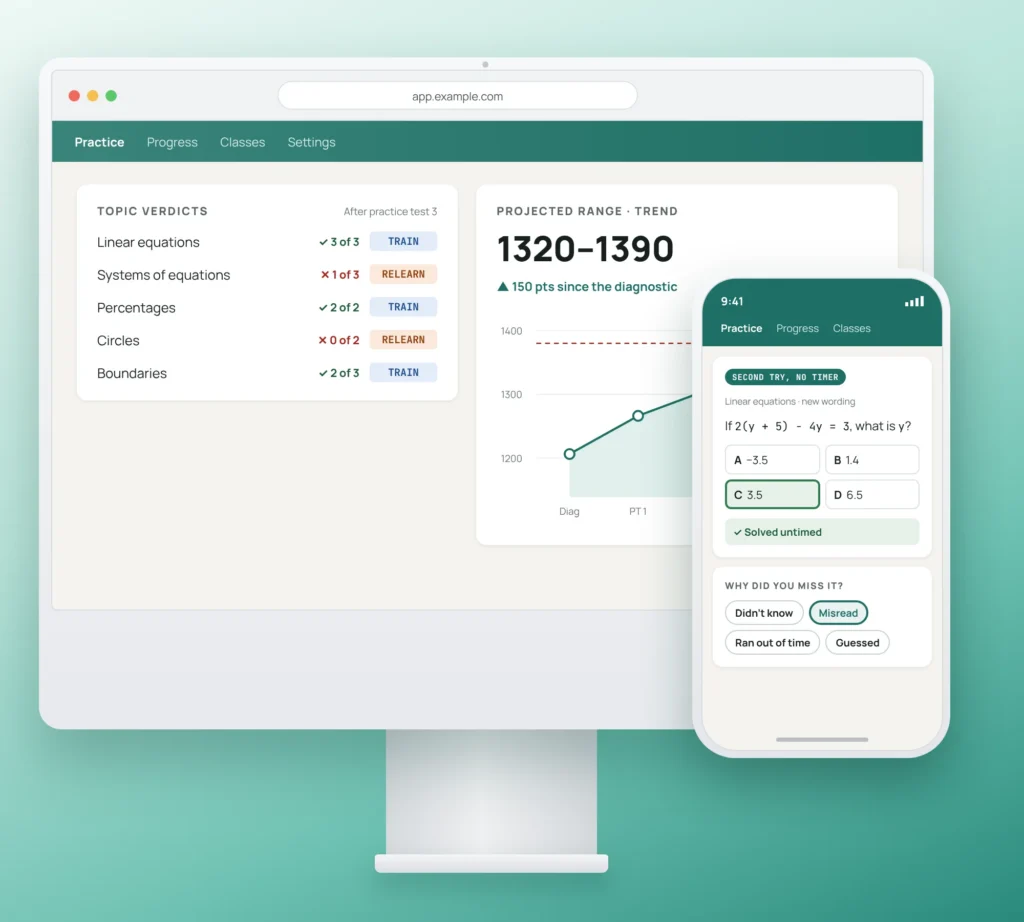
Prep Expert is a trademark of Patel Educational Services, Inc. Used here for identification purposes only. AnyforSoft is not affiliated with, endorsed by, or sponsored by Patel Educational Services, Inc. SAT, PSAT and AP are registered trademarks of the College Board, and ACT is a registered trademark of ACT Education Corp. Neither organization is affiliated with or endorses this concept.
A company that guarantees score gains benefits from seeing early why points are lost and who is off pace. In this concept case study, AnyforSoft imagines such a platform, built around each student’s target score. Instructors stay in charge of teaching.
CHALLENGEPractice scores that don’t show the way to the target
On a model like Prep Expert’s, a live online SAT course runs three to eight weeks, with two 3-hour classes a week. Most practice, including full practice tests, happens at home between those classes.
The guarantee raises the stakes. On its main SAT courses, a student who completes the course without gaining 200 points on the official SAT, or 100 on the shortest courses, can get the money back. For any company with such a guarantee, each student who falls behind is a financial risk as well as an educational one.
That risk is easier to manage when every practice score shows the path to the target. Across test prep, four things tend to stand in the way:
- Reports stop at right or wrong. A plain right-or-wrong report gives students almost nothing to work on before the next class, and instructors get little more to act on.
- Weak topics wait for someone to assign the next set. Working out each student’s weak topics often happens in spreadsheets before instructors know what to assign.
- Rented testing tools are rigid and fragile. Off-the-shelf products leave little room to fit a company’s own course, and some struggle when a large group takes a mock exam at once.
- Results live in a separate tool. Scores get copied out of the testing tool by hand, and parents struggle to read the spreadsheets they receive.
SOLUTIONPractice measured against each student’s target
AnyforSoft’s concept is a score path platform that works out why a student lost points on each topic. It separates two reasons: the material isn’t understood yet, or it’s understood but not yet performed under test conditions. Each reason leads to a different next step.
The concept starts from a test player that follows the digital exam and builds the diagnosis on top of it. Progress is measured against each student’s target: the baseline score plus the promised gain, by the official test date.
The platform hasn’t been built; this case describes a vision. Results stay in one place, with a view for each role: students, instructors, academic directors and parents, who get a read-only summary.
1. Practice
Each student starts with a diagnostic test. Its result places the learner on a path to the target, with a weekly plan up to the exam date.
Between live classes, students take full tests or shorter sets on one section or topic. The player follows the logic of the digital exam: a timer, flagging for review, answer elimination, highlighting and a calculator. With familiar controls at hand, the official sitting should hold fewer surprises.
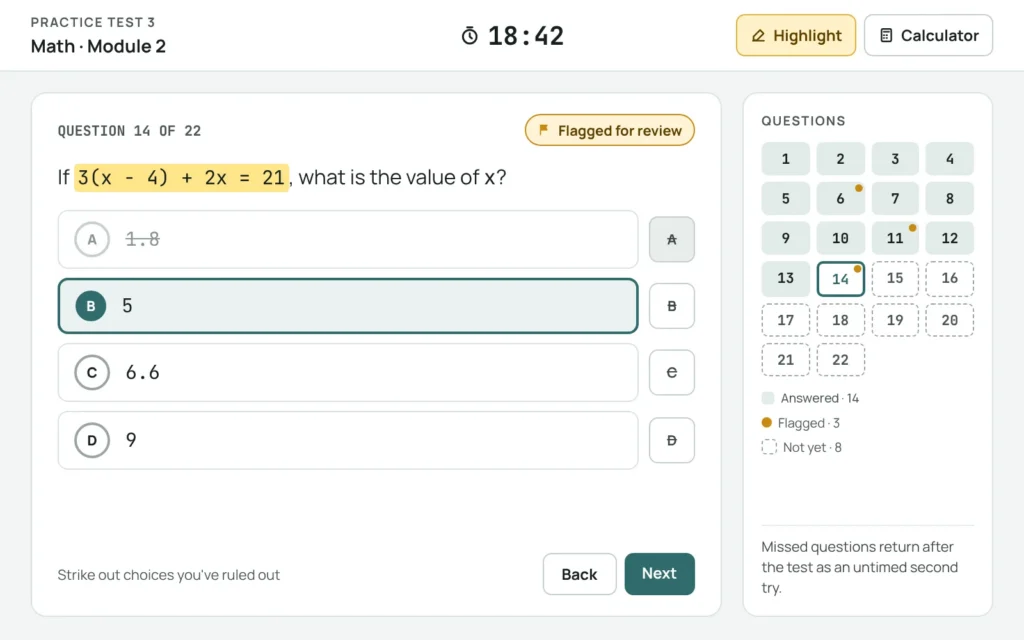
Concept screen. The test player follows the familiar logic of a digital exam in an original design.
2. Second try
After each attempt, every missed question gets a twin. A twin covers the same concept in new wording and comes with no timer.
Picture a student who misses an algebra question on the clock. If they solve its twin untimed, they likely know the material but can’t yet perform under test conditions. Missing the twin again suggests a gap in understanding.
On the same screen, the student taps one reason for the original miss: “didn’t know”, “misread”, “ran out of time” or “guessed”. The tap takes a moment and feeds the next step.
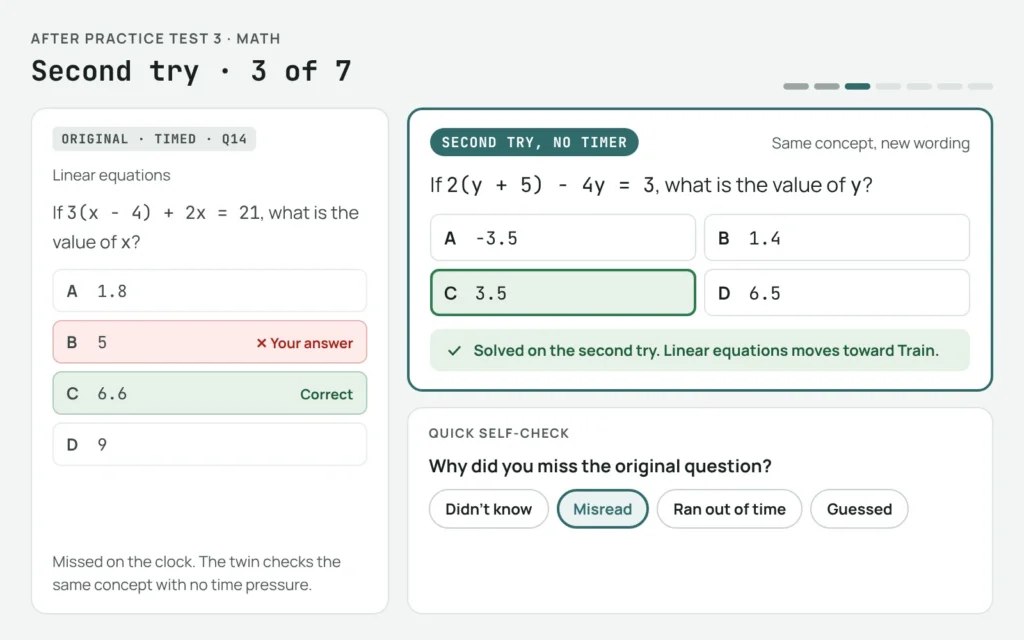
Concept screen. The twin question appears untimed next to the missed original, with a one-tap self-check below.
3. Diagnose
For each topic, the platform gives one verdict.
- Relearn means the material isn’t understood yet.
- Train says the student understands it but can’t yet perform under test conditions.
Four signals feed the verdict:
- The twin result, the main one.
- Same concept, different format. Solving a concept in one question format and missing it in another points to test skill.
- Stability across attempts. A topic that’s wrong on each attempt suggests a knowledge gap; one that’s sometimes right points to performance.
- The self-check. The student’s own reason for the miss adds context to the numbers.
Next to the verdicts, the score appears as a range, with a progress line toward the target and the test date. This way, one practice result is less likely to read as a promise.
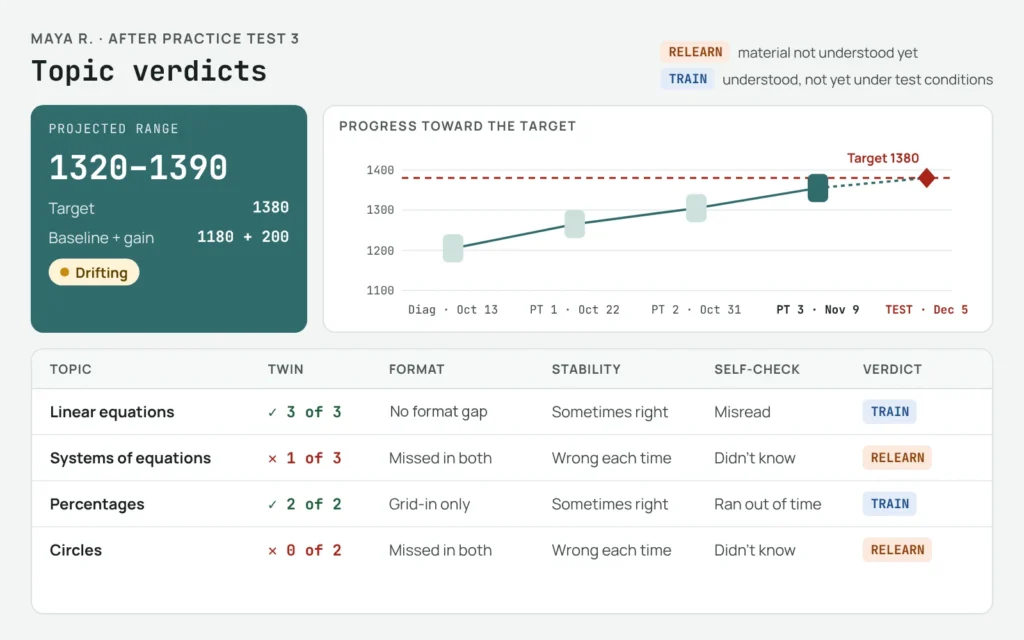
Concept screen. Each topic carries one verdict, with the four signals behind it and the score shown as a range against the target.
4. Steer
Each verdict leads to its own path.
- A Relearn topic opens the related lesson from the course, followed by untimed practice.
- For a Train topic, the plan moves to timed drills in mixed formats, then full test conditions.
Before each live class, the instructor sees the cohort, meaning the students in one course run, with its topics grouped by verdict.
The Relearn topics shared by the most students go into the next class, and Train topics go into homework.
A status shows how each learner is tracking against the target: on pace, drifting or off pace.
When a student’s projected range falls short of the target, or practice stops, the platform raises an early alert.
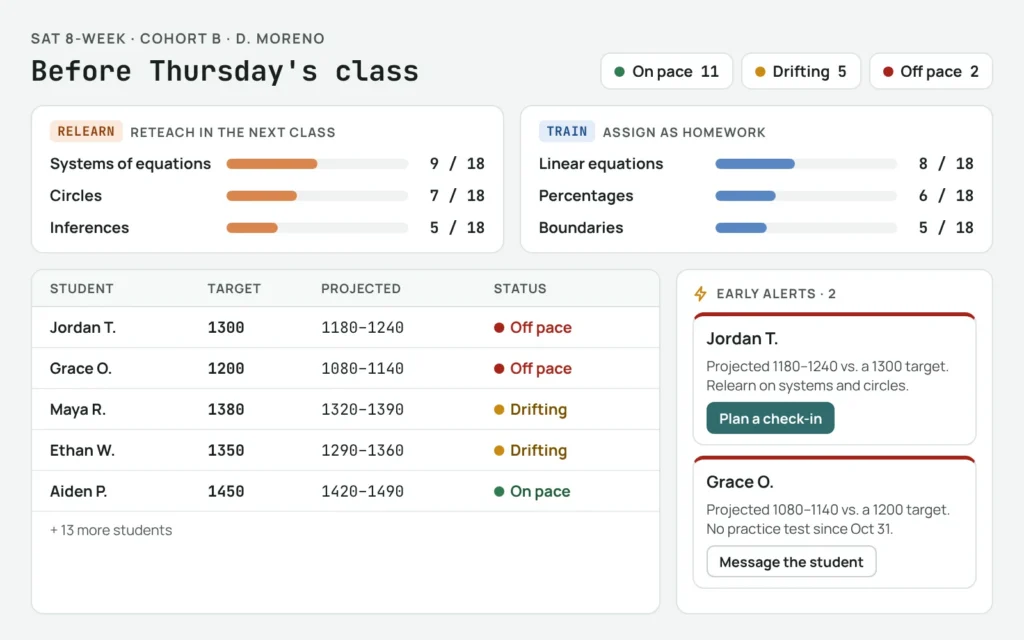
Concept screen. The class view groups the cohort’s topics by verdict, so the instructor knows what to reteach and what to assign.
Academic directors see the same picture across all courses. Their dashboard lists each cohort by instructor, the share on pace, the most common Relearn topics and open alerts.
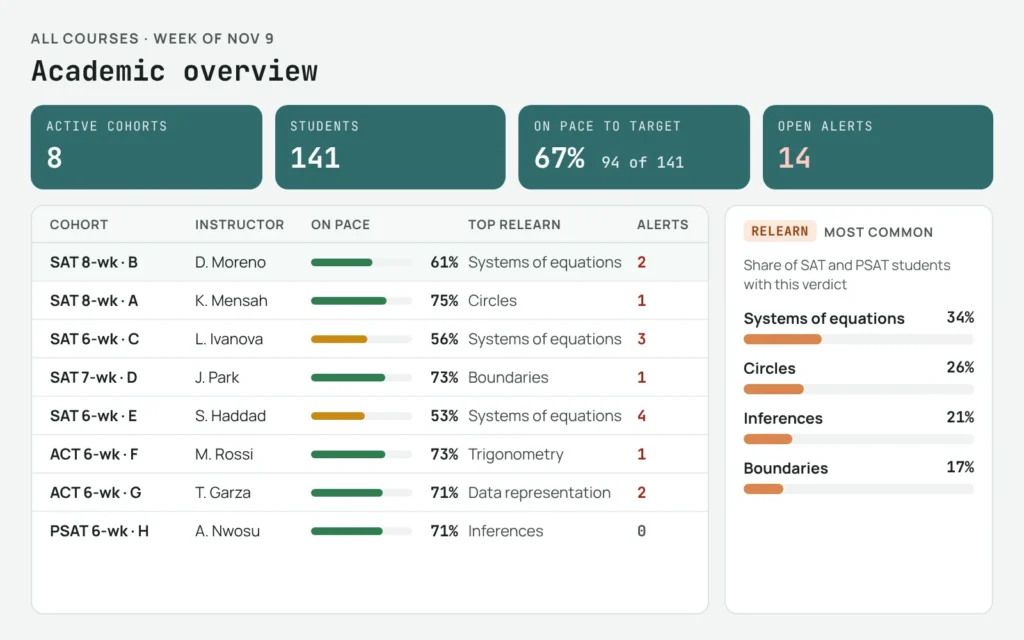
Concept screen. The academic dashboard compares cohorts across courses and brings up the Relearn topics that recur most often.
INTENDED OUTCOMESWhat the concept is meant to deliver
The concept hasn’t been built or tested, so none of the points below comes from measured results. They are the business outcomes it is designed to support:
- Early alerts and targeted practice aim to bring more students to the promised gain, which could mean fewer refunds under the guarantee.
- The platform sets out to cut the manual work of assigning practice, so the same instructors might run more cohorts.
- Built for a whole cohort testing at once, the platform is meant to hold up on the busiest mock exam days.
- A plain-language parent summary has the potential to build the trust behind repeat enrollments and referrals.
- Shaped around the company’s own courses, the platform is designed to change as those courses do.
FEATURESKey capabilities of the concept
The four steps rest on these supporting features:
- Twin question drafting. AI drafts twin versions of each question from the question bank, and subject experts approve them before students see them.
- One engine for SAT, ACT, PSAT and AP. Each exam keeps its own format, so no exam is forced into another’s template.
- Content import with versioning. A company’s existing mock exams move over from documents without retyping.
- Cohort-scale testing. The platform is built for a whole cohort taking a test at the same time.
- Topic-tagged question bank. Topic tags on each question feed the practice sets and the twins.
- Parent summary. A read-only page in plain language: the projected range against the target and test date, plus the topics the student will work on next.
- One login and integrations. The platform connects with the tools a company already uses.
WHAT’S NEXTCloser to the classroom and home
Later versions could add:
- an AI study coach, with answers checked by subject experts
- a fuller parent view
- analysis of live class recordings
As with twin questions, subject experts would review the coach’s answers before students see them. For that reason, a specialist check would stay part of any coach design.
This is an independent product concept created by AnyforSoft for illustrative purposes.