


You decide to install an LMS and find out that the quote doesn’t match the price you expected. The onboarding process is already moving, your team is involved, and switching platforms would disrupt work. This situation is possible because pricing details were unclear at the start. Careful study of LMS pricing before implementation helps teams avoid this trap.
This article helps readers:
- understand how vendors structure LMS pricing
- see how user limits, feature tiers, and add‑on services affect total cost
- compare common pricing models across leading platforms
- identify factors that influence long‑term spend
Let’s take a look at how LMS pricing models work and how to interpret the elements that shape each vendor’s approach.
This context will help you understand what published prices actually represent and how to read them with more precision.
How to Interpret LMS Pricing Models
LMS vendors present pricing in different ways, and those differences make direct comparisons challenging.
Some platforms base cost on the number of people who can access the system, while others charge for the number of people who actually use it.
Feature access, support levels, and optional services add more variation. Understanding these elements helps teams read pricing tables with more accuracy.
User Limits and Active Usage
The typical approach is to set prices based on the number of users included in a plan. These limits define how many people can have accounts in the system at the same time. Plans with higher limits cost more, and vendors often encourage upgrades when organizations approach those thresholds.
Some platforms use active‑user pricing instead. In this model, cost depends on how many people log in during a billing period. This approach can work well for organizations with fluctuating participation, but it requires careful tracking. A spike in activity during a training cycle can increase monthly charges.
Vendors apply these models in several ways:
- fixed user limits with tiered pricing
- active‑user billing based on monthly logins
- hybrid models that combine account limits with activity thresholds
- usage bands that adjust cost when participation rises
A clear example is iSpring Learn, which charges based on active users per month. A plan may include 100 active users. The system counts only those who log in during the billing period. This structure helps teams with seasonal training cycles but requires attention to participation spikes.
User definitions also vary across vendors. Some count anyone with an account, while others count only learners who complete activities or access specific modules. These differences influence how predictable the final cost will be. Clear definitions help teams estimate usage more accurately and understand how each pricing model responds to changes in participation.
Feature Availability by Plan
LMS pricing tables often divide features across several tiers:
- Entry‑level plans usually include core tools for course delivery and user management.
- Higher tiers add reporting, automation, integrations, advanced assessment options, and AI tools.
Feature placement within tiers varies widely. A capability considered standard on one platform may appear only in a premium plan on another. This creates gaps that are not obvious from the headline price. Teams often discover these gaps when they begin configuring the system and realize that essential tools require an upgrade.
A practical example is TalentLMS. The platform places custom reports and advanced integrations in higher‑tier plans. For organizations, it provides an opportunity to start with a basic plan and upgrade later, once they need deeper analytics or workflow tools.
Feature tiers also influence scalability. Organizations may start with a lower plan but outgrow it as they add programs or expand training.
Understanding which features lie behind higher tiers helps teams anticipate when upgrades may become necessary. This reduces the risk of unexpected cost increases later.
Add‑Ons and Optional Services
You can notice that many LMS vendors offer optional services that extend the platform. The examples of such add-ons include:
- implementation support
- custom integrations
- content libraries
- dedicated account management
Each additional feature has its own price. Importantly, these costs tend to accumulate quickly.
Some extra tools are optional in theory but functionally required in practice. For example, a platform may need a paid integration to connect with an HR system. Without it, user provisioning becomes manual and time‑consuming. These dependencies influence the real cost of adopting the LMS.
A clear example is LearnWorlds, which places API access, SSO, HubSpot integration, premium onboarding, and priority support in higher‑tier plans or separate service categories. These capabilities expand the platform but increase the total cost when organizations need them.
Other vendors follow similar patterns, and their service structures create additional layers of cost that depend on the level of support an organization requires.
If you want to avoid unplanned expenses, review these details early in order to understand the scope of each paid service.
Enterprise LMS Pricing Comparison 2026 by Vendor
LMS vendors present pricing in different ways, and the structure of each model affects how organizations interpret long‑term cost. Public pricing pages show plan tiers and feature lists, but they rarely explain how those tiers behave in real use. Reviewing several vendors with transparent pricing helps highlight the patterns that influence budgeting and platform selection.
LearnWorlds Pricing Model
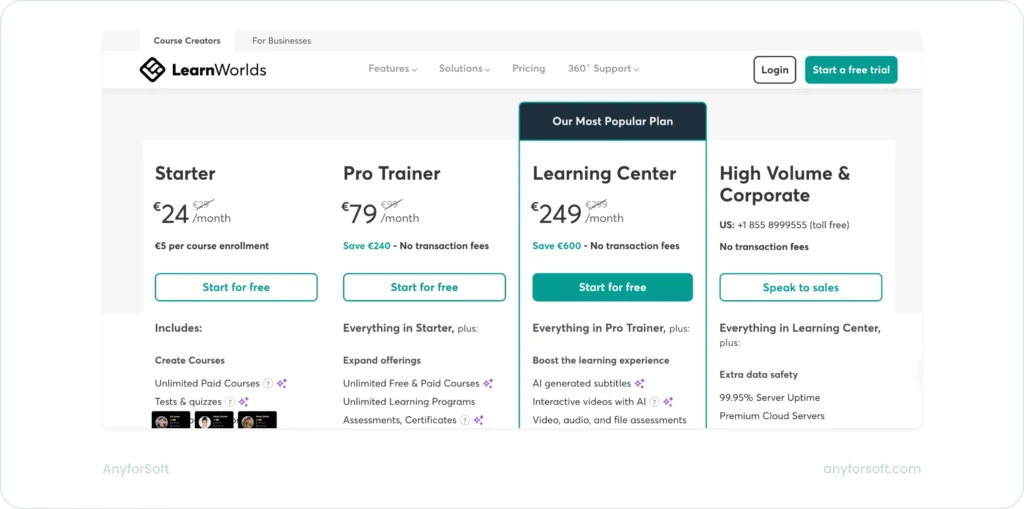
LearnWorlds uses a tiered pricing structure that expands as organizations need more tools for course creation, delivery, and administration. The lower tiers focus on essential capabilities, while the higher tiers introduce advanced video features, automation, broader customization options, and expanded site controls.
LearnWorlds Plan Structure and Key Figures
| Plan Tier | Starting Price (Monthly) | Key Limits | Notable Capabilities |
| Starter | ~€24 | Basic site, limited pages | Paid courses, quizzes |
| Pro Trainer | ~€79 | More site pages, no transaction fees | Learning programs, assessments |
| Learning Center | ~€249 | Unlimited SCORM, advanced tools | Interactive video, AI subtitles |
| High‑Volume | Custom | Custom admins, custom servers | Premium cloud, SLAs |
Capabilities that are available behind higher tiers or separate service categories include API access, SSO, HubSpot integration, advanced automation, and premium onboarding.
LearnWorlds also separates support levels.
Basic email support appears in lower tiers, while priority support and dedicated success management require upgraded plans. These distinctions matter because support needs often increase during rollout, and the pricing page does not always make the operational impact obvious.
In practice, LearnWorlds works well for teams that start with core features and expand as their training programs grow. Costs rise when organizations need integrations or enterprise‑level support. Thus, the platform’s tiered structure encourages early planning around which capabilities are essential and which can wait.
TalentLMS pricing model
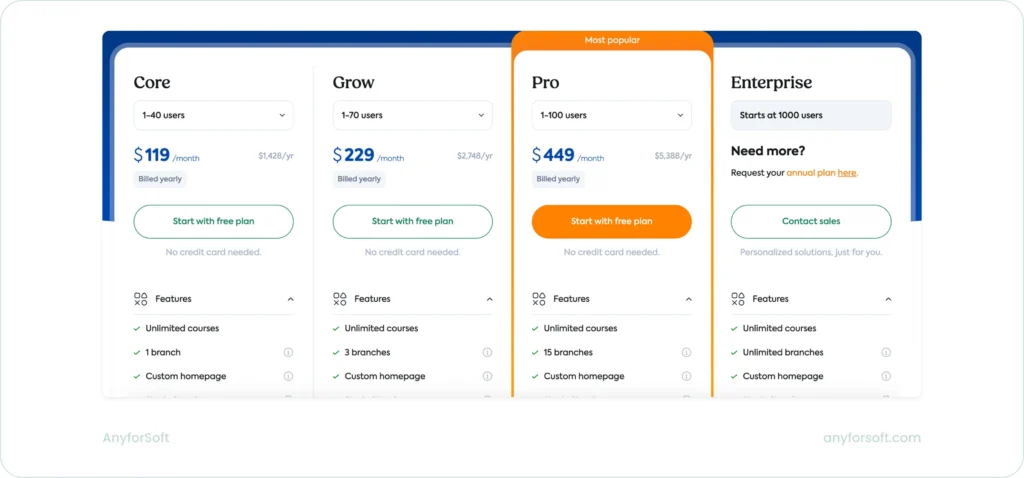
TalentLMS uses user bands and feature tiers, but the most interesting details are in how it concentrates capabilities at specific thresholds. The Core, Grow, and Pro plans all cover relatively small teams, while Enterprise jumps directly to 1,000 users and moves into a sales‑led model.
This creates a sharp divide between small deployments and large‑scale rollouts.
TalentLMS plan structure and key figures
| Plan Tier | Users | Price per Month (Yearly) | Notable Focus |
| Core | 1–40 | ~$119 | Starter features, basic AI set |
| Grow | 1–70 | ~$229 | More users, limited AI expansion |
| Pro | 1–100 | ~$449 | Full AI suite, richer support |
| Enterprise | 1000+ | Custom | Large scale, account management |
What stands out in TalentLMS is how it ties advanced AI features and support levels to specific tiers. Pro is the first plan that unlocks the full AI set, including test creation, course translation, AI Coach, and skills tools. Enterprise then extends this with “unlimited” AI usage and adds phone support and a dedicated account manager, but only once an organization crosses the 1,000‑user threshold.
Support is another clear differentiator. Core and Grow include onboarding and unlimited email support, but priority email, live chat, and higher‑touch onboarding appear only at Pro and above. Enterprise adds phone support and an account manager, turning support into a meaningful part of the pricing structure rather than a minor detail.
Compared with LearnWorlds, TalentLMS compresses its smaller plans into narrow user bands and reserves its most powerful AI and support capabilities for a relatively high price point and user count.
This makes it attractive for small teams that want a polished core feature set, but it also means that organizations planning to rely heavily on AI tools or premium support need to think carefully about when they will cross the Pro or Enterprise thresholds.
iSpring Learn Pricing Model
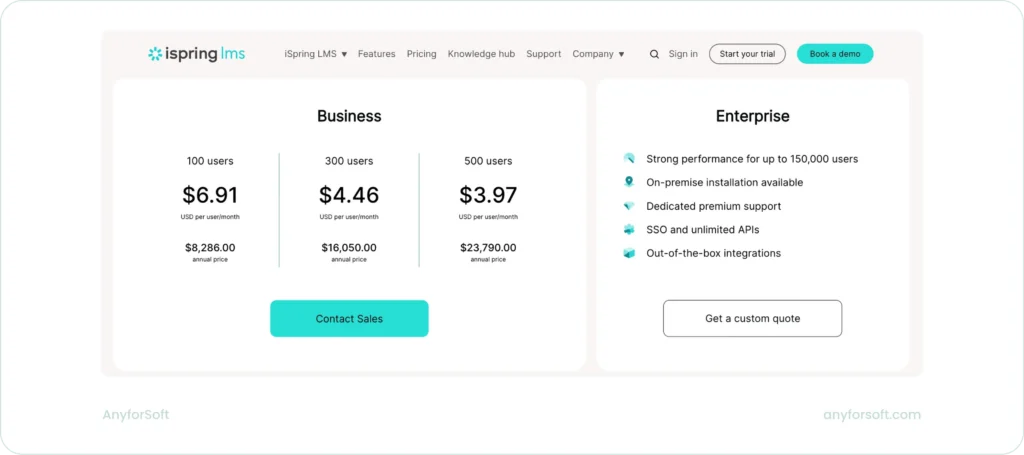
iSpring Learn uses an active‑user model that ties cost directly to the number of people who log in during a billing period. This structure works well for organizations with predictable training cycles, but it also means that participation spikes have a direct financial impact. The platform positions this model as transparent and budget‑friendly, yet the real behavior depends on how consistently teams engage with training.
iSpring Learn plan structure and key figures
| User Band | Price per Active User (Monthly) | Annual Cost | Notes |
| 100 users | ~$6.91 | ~$8,286 | Entry point for small teams |
| 300 users | ~$4.46 | ~$16,050 | Lower per‑user rate at higher volume |
| 500 users | ~$3.97 | ~$23,790 | Most cost‑efficient published tier |
| Enterprise | Custom | Custom | Up to 150,000 users, on‑premise option |
The most distinctive element in iSpring Learn’s pricing is the way it rewards volume. The per‑user rate drops sharply as organizations move into higher bands, which makes the platform appealing for teams with steady participation across large groups.
Unlike user‑limit models, iSpring Learn ties pricing to active users, defined as anyone who logs in at least once during the month. This shifts the cost structure toward real participation patterns rather than the total number of registered accounts, which makes usage spikes more financially significant than they appear on the pricing page.
Another notable aspect is the ecosystem around iSpring Suite, the platform’s authoring tool. While the LMS pricing focuses on active users, many organizations pair it with iSpring Suite for course creation. This introduces a second cost layer that does not appear on the LMS pricing page but becomes part of the real budget once teams begin producing interactive content, quizzes, and simulations.
The Enterprise tier adds capabilities that shift the platform into a more controlled environment: on‑premise installation, unlimited APIs, SSO, and dedicated premium support. These features matter for organizations with strict security or integration requirements, and they move pricing into a custom‑quote model that behaves differently from the published tiers.
Compared with LearnWorlds and TalentLMS, iSpring Learn stands out for how directly its pricing reflects learner activity. It favors organizations with consistent engagement and predictable cycles, while teams with irregular or seasonal participation need to monitor login patterns closely to avoid unexpected increases. This makes the model transparent on paper but sensitive to real‑world usage in ways that other LMSs are not.
LearnDash Pricing Model
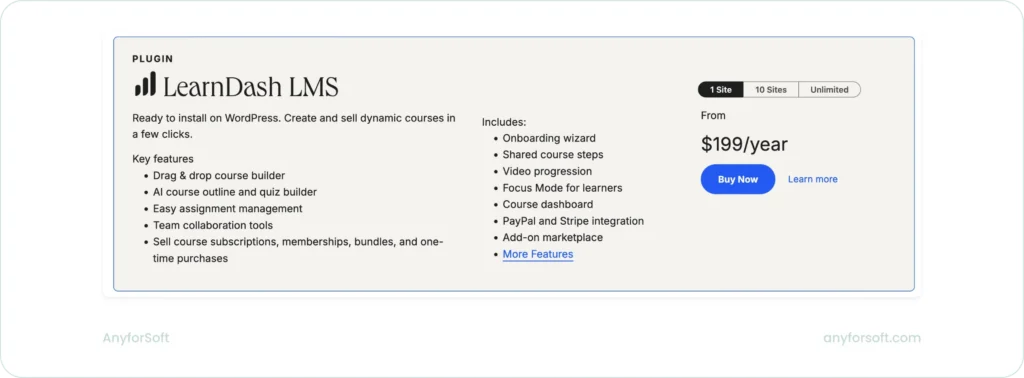
This model often appears in LMS hosting pricing tiers comparison discussions because the total cost depends on hosting choices and the number of add‑ons required.
The core LMS is sold as a WordPress plugin with annual pricing tied to the number of sites, and the real cost depends on how many add‑ons or bundles an organization needs.
This creates a modular structure where teams assemble their own LMS stack rather than purchasing a single, all‑inclusive plan.
LearnDash plan structure and key figures
| Component | Price (Annual) | Notes |
| LearnDash LMS (Plugin) | From ~$199 | 1‑site license; higher tiers for 10 sites and unlimited |
| StellarSites Learning (Hosted) | From ~$29/month | Includes hosting, domains, backups, AI writing tools |
| LearnDash App | From ~$1,199 | Mobile app with optional done‑for‑you setup |
| Add‑ons | ~$49–$99 each | Sold individually; priced per site tier |
| Bundles | ~$249–$499 | Combine LMS + multiple add‑ons at a discount |
LearnDash’s pricing becomes more complex once add‑ons enter the picture. Features such as group management, instructor roles, gradebooks, advanced analytics, notes, and ratings are sold separately, each with its own annual price. Bundles simplify this by grouping several add‑ons together, but they still require teams to understand which components they need for their learning environment.
The hosted version, StellarSites Learning, introduces a parallel pricing path. Instead of managing WordPress hosting independently, organizations can purchase a bundled environment that includes hosting, domains, backups, security, AI writing tools, and support. This option behaves more like a traditional SaaS plan, but it sits alongside — not instead of — the plugin model.
The LearnDash App adds another layer. It provides mobile access with offline learning, cross‑device progress, certificates, and drip content support. The optional done‑for‑you setup includes branding, app store submission, compliance checks, and handling of rejections, which turns it into a premium service rather than a simple add‑on.
Compared with the previous platforms, LearnDash stands out for how much of its pricing depends on assembling the right combination of components. The base plugin is only one part of the total cost, and organizations must account for add‑ons, bundles, hosting, and optional mobile capabilities. This modular structure offers flexibility but requires more planning than the all‑inclusive tiers of hosted LMSs.
MoodleCloud Pricing Model
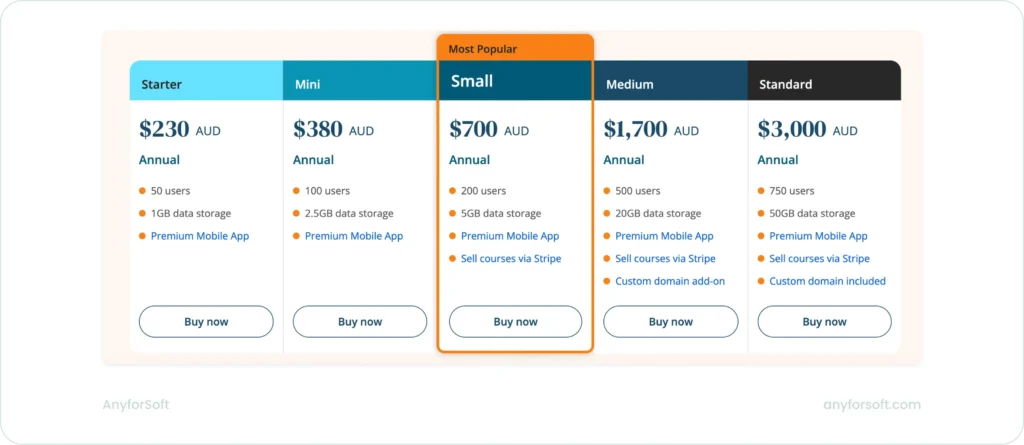
MoodleCloud uses a straightforward tiered structure based on user limits, storage capacity, and a small set of included capabilities.
The plans scale from 50 to 750 users, and each tier increases storage and unlocks additional options such as selling courses or adding a custom domain. This creates a predictable progression, but the real story lies in how MoodleCloud positions each tier for different types of deployments.
MoodleCloud plan structure and key figures
| Plan Tier | Annual Price (AUD) | User Limit | Storage | Notable Capabilities |
| Starter | ~$230 | 50 users | 1 GB | Premium mobile app |
| Mini | ~$380 | 100 users | 2.5 GB | Premium mobile app |
| Small (Most Popular) | ~$700 | 200 users | 5 GB | Premium mobile app, sell courses via Stripe |
| Medium | ~$1,700 | 500 users | 20 GB | Premium mobile app, sell courses, custom domain add‑on |
| Standard | ~$3,000 | 750 users | 50 GB | Premium mobile app, sell courses, custom domain included |
What stands out in MoodleCloud’s pricing is how tightly the plans are tied to storage and user caps. The platform doesn’t expand through feature tiers as much as through capacity. As a result, it makes the cost structure easy to understand but also rigid. Organizations with large media libraries or fast‑growing user bases may find themselves moving up tiers sooner than expected simply because of storage constraints.
The ability to sell courses appears only from the Small plan upward, and custom domains follow a similar pattern: available as an add‑on in Medium and included only at the Standard level. These capabilities are not framed as premium features but as structural elements. The latter ones determine when a team is ready to operate MoodleCloud as a branded, revenue‑generating environment.
MoodleCloud is the most capacity‑driven model, when we compare it with the previous platforms. It doesn’t rely on add‑ons or active‑user billing.
Instead, it offers a fixed set of features across all tiers and uses user limits and storage as the primary levers.
This makes budgeting predictable. Yet, it also means that organizations with fluctuating usage or large files need to track their user count and storage closely because the platform sets firm limits on both.
Teachable Pricing Model
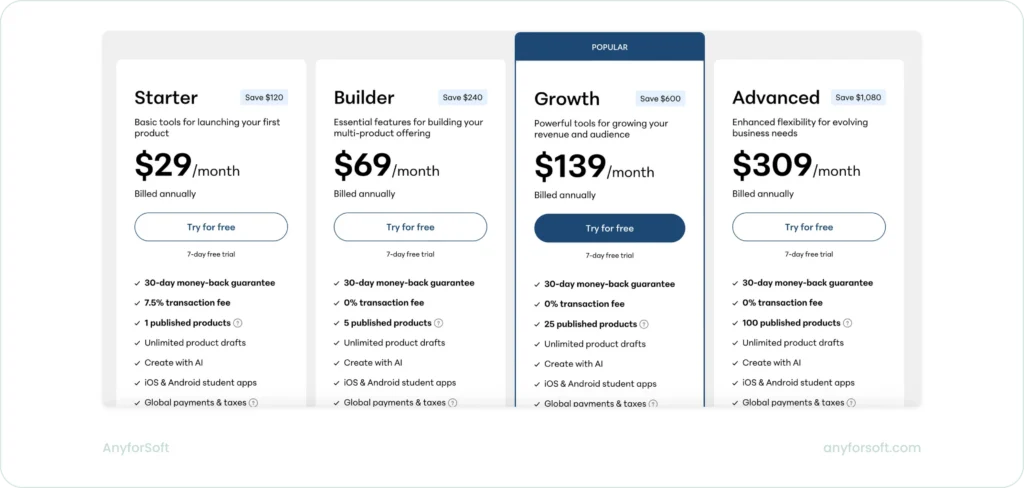
Teachable structures its plans around transaction fees and the limits placed on published products.
The structure is built to guide creators from a single‑product launch toward a larger catalog, and the cost increases as the number of published products grows.
The platform also uses transaction fees on the entry plan. It affects how creators evaluate the real cost of selling through the platform.
Teachable plan structure and key figures
| Plan | Monthly Price (Annual Billing) | Published Products | Students | Notable Capabilities |
| Starter | ~$29 | 1 | 100 | AI creation, mobile apps, global payments, upsells |
| Builder | ~$69 | 5 | 1000 | Certificates, affiliate program, real time support |
| Growth | ~$139 | 25 | Up to 5000 | White label site, custom admin permissions, subtitles |
| Advanced | ~$309 | 100 | Up to 5000 | Unlimited integrations, expanded admin controls |
| Enterprise | Contact sales | Flexible | Flexible | SSO, bulk sales tools, sandbox school, priority support |
The Starter plan introduces the core publishing tools but limits creators to one published product and applies a 7.5% transaction fee. This fee shapes the economics of the plan because it affects every sale.
The Builder plan removes the fee and increases the number of published products, which changes how creators can structure their catalog.
The Growth and Advanced plans increase the limits on published products and introduce features that support branding and team management.
The Enterprise tier shifts the model toward organizational use. It includes SSO, bulk sales tools, flexible seats, a sandbox school, priority support, onboarding, and migration assistance. These additions indicate that the plan is designed for teams that need more control over access, testing, and support.
Teachable also sets clear ceilings for students and storage. The Starter plan supports up to 100 students, and the Builder plan increases this to 1000. The Growth and Advanced plans support up to 5000 students. Storage increases only at the Advanced level, which provides up to 2 TB. These limits influence how creators plan their catalog and how they manage video content.
The platform applies auto‑renewal for all plans. Cancellations take effect at the end of the billing cycle, and charges may change over time. Processing fees and payout rules apply across plans. This adds another factor for creators to consider when evaluating the total cost of using the platform.
Kajabi Pricing Model
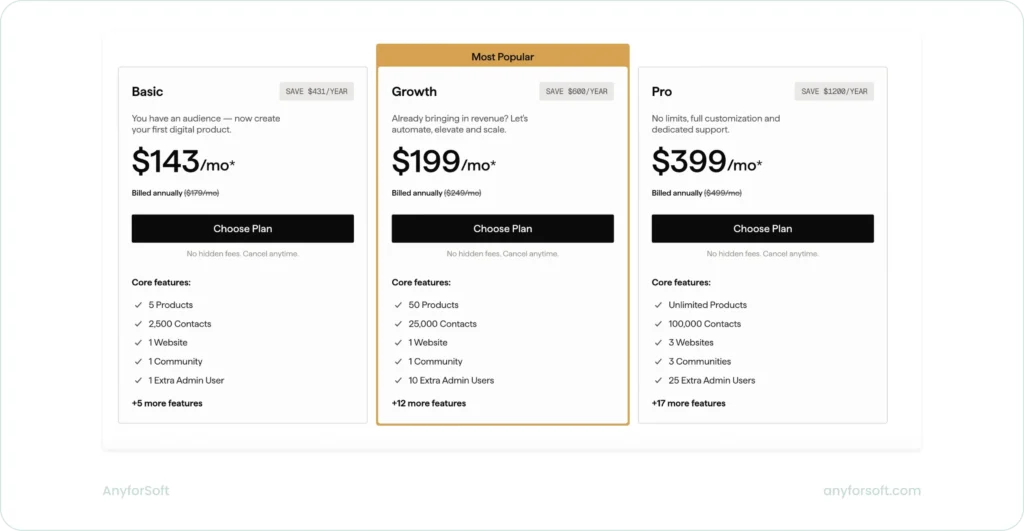
Kajabi’s pricing hinges on three limits that determine when a creator must upgrade: product count, contact count, and the number of sites and communities. These thresholds drive cost more than the feature list itself.
Kajabi plan structure and key figures
| Plan | Monthly Price | Products | Contacts | Websites | Notable Capabilities |
| Basic | ~$143 | 5 | 2,500 | 1 | Unlimited funnels, landing pages, emails, creator studio, customer app |
| Growth | ~$199 | 50 | 25,000 | 1 | Cohort courses, certificates, affiliate programs, advanced automations, webhooks, universal inbox |
| Pro | ~$399 | Unlimited | 100,000 | 3 | Branded mobile app, API access, custom code editor, comment to DM |
The jump from five products to fifty creates an early upgrade point for anyone building a broader catalog. Contact limits create the second pressure point because Kajabi ties its marketing tools to stored contacts rather than enrolled students. A growing list triggers a plan change even when the product catalog stays small.
Operational scale forms the third constraint. One site and one community on the lower tiers restrict multi‑brand setups. The higher tier supports teams that need more administrative access and more places to publish.
Automation, integrations, and extensibility appear only in the upper tiers, which affects whether Kajabi can function as part of a larger system. Payment processing fees also shift across plans, which matters for high‑volume creators because the effective cost changes with sales volume.
Kajabi differs from the other platforms in this chapter because its pricing grows with catalog size, audience size, and team size. The others rely on feature tiers, user bands, active‑user billing, plugin licensing, storage caps, or transaction fees. Kajabi follows a scale‑based model rather than a learner‑based one.
When Pricing Comparisons Fall Short
Public pricing pages present fixed numbers, but they rarely show the conditions that determine the real cost of an LMS. The total cost of ownership depends on how each platform measures growth and when those measurements trigger an upgrade. These mechanics shape cost far more than the listed monthly price.
The first issue is that platforms track usage in different ways. Some count active users, some count stored contacts, some count enrolled learners, and some count products or sites. Two plans with similar prices can diverge quickly once a team starts publishing more content or serving a larger audience.
The second issue is that upgrade triggers are rarely visible. A plan may look generous, but the real constraint might be the number of products, the size of the contact list, the number of administrators, or the number of sites. These thresholds force upgrades long before a team reaches the limits shown in the feature list.
The third issue is that operational needs change the economics. Multi‑brand setups, larger teams, deeper automation, and integrations often require higher tiers even when learner numbers stay low.
The fourth issue is that variable fees can outweigh the subscription price. Payment processing percentages, overage charges, and third‑party provider fees scale with revenue or usage, not with the plan level.
These hidden factors often matter more than the listed price:
- how the platform defines a “user” or “contact”
- which internal limits trigger an upgrade
- how quickly operational needs exceed the lower tiers
- how payment processing fees scale with revenue
- whether automation or integrations require a higher plan
Negotiation also affects cost for enterprise plans. Some platforms adjust pricing based on usage expectations, support requirements, or contract length. Public pricing does not reflect these adjustments, which makes list‑price comparisons unreliable for larger teams.
The listed price shows the entry point. The real cost emerges only when a team maps its content volume, audience size, operational structure, and automation needs to the way each platform measures growth.
How to Use Top LMS Pricing Comparison Effectively
Pricing pages help establish a baseline, but they are not enough to guide a final decision. The useful comparison is not between listed prices but between the way each platform measures growth and the way your organization actually operates.
A platform that looks inexpensive at the entry point can become the highest‑cost option once its internal limits are reached.
The most reliable approach is to map your real usage patterns to the constraints that drive upgrades.
This shifts the evaluation from headline prices to the mechanics that determine long‑term cost. It also prevents teams from selecting a platform that fits the first six months but becomes restrictive once the catalog, audience, or operations expand.
Key practices that make pricing comparisons meaningful:
- Anchor the evaluation to your growth pattern. Identify whether your organization grows through more learners, more contacts, more products, or more brands. Platforms charge differently for each of these patterns, and the wrong match creates early, expensive upgrades.
- Identify the limits that will break first. Every platform has a constraint that becomes the bottleneck before anything else. It may be active users, stored contacts, products, administrators, or sites. The first limit you hit is the one that determines your real cost.
- Model the next 12–24 months, not the first quarter. A plan that fits today may not fit once the catalog expands or the audience grows. Mapping expected growth to platform limits reveals which plans will hold and which will force a tier change.
- Evaluate operational needs separately from learner needs. Multi‑brand setups, automation, integrations, and administrative access often push teams into higher tiers even when learner numbers stay low. These needs should be evaluated as cost drivers, not as optional conveniences.
- Account for variable fees, not just subscription fees. Payment processing percentages, overage charges, and third‑party provider fees can exceed the subscription cost at scale. These fees should be included in any cost projection.
- Treat list prices as reference points, not final numbers. Enterprise plans often adjust based on usage expectations, contract length, and support requirements. Public pricing does not reflect these adjustments, so comparisons should focus on structure rather than sticker price.
Effective pricing evaluation comes from aligning internal needs with the way each platform measures growth. The lowest headline price rarely produces the lowest total cost. The platform that matches your operational pattern is the one that remains cost‑stable over time.
Summary Table: How Each Platform Measures Growth
| Platform | Primary Cost Driver | Cost Metric | What This Means in Practice |
| LearnWorlds | Feature tiers | Highest tier: ~$249/mo | Cost increases when teams need capabilities locked behind upper tiers. |
| TalentLMS | User bands | 100 users: ~$449/mo | Cost scales with the size of the learner base, even if content stays small. |
| iSpring Learn | Active users | 100 active users: ~$691/mo | Cost depends on monthly logins, not total enrollment. |
| LearnDash | Licensing + add‑ons | Core license: ~$199/yr | Cost grows with required extensions, hosting, and maintenance. |
| MoodleCloud | User caps + storage | 50 users: ~$230 AUD/yr | Cost increases when the audience grows or content volume expands. |
| Teachable | Transaction fees + product limits | Starter plan fee: 7.5% | Cost rises with revenue and catalog size on lower tiers. |
| Kajabi | Products + contacts + sites | 5 products + 2,500 contacts on entry plan | Cost scales with catalog size, audience size, and operational complexity. |
Conclusion
The platforms in this extended enterprise LMS pricing comparison are all credible choices; the difference lies in which growth pattern each one is built for. Before committing to a pricing tier, it helps to identify which variable will grow fastest in your organization over the next 12–24 months:
- More learners? TalentLMS and iSpring Learn scale most predictably here: one through user bands, the other through active-user billing.
- More products or audience size? Teachable and Kajabi are built around catalog and contact growth, but their costs rise directly with both.
- More content volume and storage needs? MoodleCloud’s capacity-driven model is straightforward to budget, but its firm user and storage caps can force upgrades sooner than expected.
- More feature depth over time? LearnWorlds and TalentLMS both use feature tiers, meaning costs increase when advanced tools — integrations, AI, automation — become necessary rather than optional.
- More control over infrastructure? LearnDash offers that flexibility through its modular plugin model, but it requires more assembly and ongoing maintenance than a hosted platform.
The honest starting point is not “which platform is cheapest” but “what will we have more of in two years — learners, products, content, or operational complexity?” That answer narrows the field faster than any pricing table.
FAQs
Why do LMS prices vary so much between vendors in the 2026 LMS pricing comparison tables?
Each platform measures growth in its own way. Some charge for total users, others for active users, and some for products, storage, or contacts. These structural differences create the biggest cost gaps.
How can I estimate the real cost of an LMS before buying?
Map your expected growth to the limits in each pricing tier. The first limit you reach determines your real cost, not the entry price shown on the website.
What is the most common reason organizations outgrow their LMS plan?
Hidden upgrade triggers. These include product limits, contact caps, admin restrictions, storage ceilings, or advanced features that appear only in higher tiers.
Are active user pricing models cheaper than fixed user limits?
They can be, but only when participation is predictable. If your training cycles create spikes in logins, active user billing can become more expensive than fixed user bands.
Do transaction fees or overage fees matter as much as subscription cost?
Yes. Variable fees can exceed the subscription price when usage or revenue grows. They should be included in any cost projection.
When should I consider an enterprise or custom quote plan?
When you need SSO, advanced integrations, multi‑site setups, large contact lists, or dedicated support. These requirements often appear earlier than expected in organizations with multiple brands or complex workflows.
