


Every month, Bank of America’s AI assistant Erica handles more than 58 million client interactions. More than 98% of users find what they need without reaching a specialist, which frees the bank’s financial advisors to focus on conversations that actually require human judgment.
Erica is just one example; similar tools are built across industries.
AI assistants for business are implemented for specific operational jobs, such as handling customer queries, processing orders, coaching employees, documenting clinical encounters, and managing recurring financial tasks.
This article explains how those assistants work and how to build one.
This article covers:
- types of business AI assistants and what each has delivered in practice
- why a business AI assistant works differently from general-purpose tools like ChatGPT
- a six-step build process
- the off-the-shelf versus custom development decision
- and the risks to plan for before deployment.
By getting clear on your WHYs and HOWs before you build, you reduce the risk of strategic missteps and costly rebuilds.
What Is an AI Virtual Assistant for Business?
Think of a knowledgeable colleague versus a set of sticky notes spread across your desk. Each sticky note captures something useful. But they don’t talk to each other, and none of them knows what the others say.
Personal AI assistants, such as Siri, Google Assistant, and similar tools, work well for individual goals. They set reminders, schedule appointments, and send a quick message. They serve the person using them, not the business the person works in.
AI-powered tools like Notion AI or AI in Google Sheets take that further into work tasks. But they still operate in isolation.
A business AI assistant is embedded into the platforms a company already runs on, including CRM, ERP, EHR, or communication tools. It draws on company data, follows defined processes, and connects functions into a single flow.
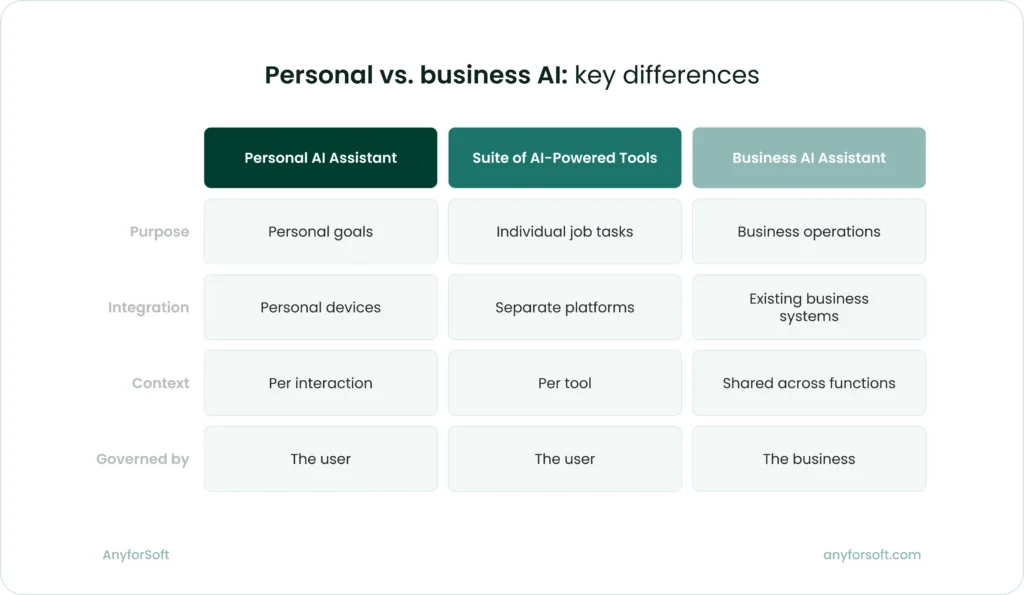
AI assistant works as a unified system:
- draws on company data, documentation, and process knowledge
- connects to existing business platforms and acts within them
- carries context across functions so each step informs the next
- operates under rules the business defines and controls
That system quality is what makes a business AI assistant useful at operational scale. It doesn’t work alongside your business; it runs inside it.
Why a Best AI assistant for Business Is Not the Same as ChatGPT
Many businesses start their AI journey with ChatGPT or a comparable general-purpose tool. For individual tasks like drafting emails, summarizing documents, or answering one-off questions, these tools work well. The limitations appear when a business tries to use them as operational infrastructure.
General-purpose AI models are trained on broad public data. They have no knowledge of your product catalog, your internal processes, your customer history, or your compliance requirements. Every conversation starts from zero.
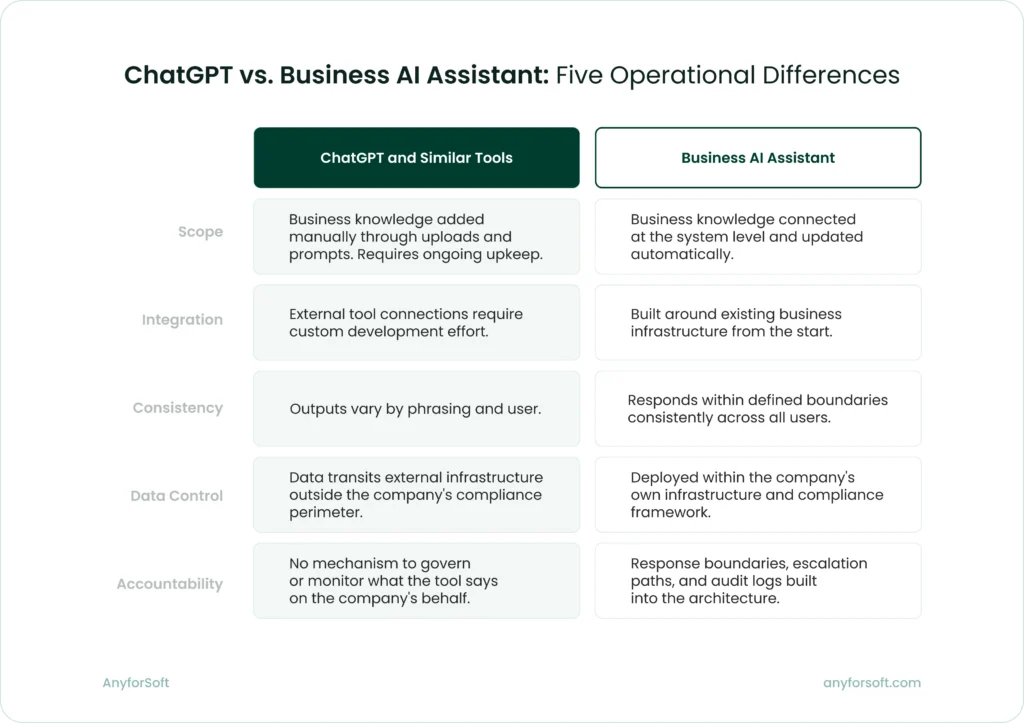
A business AI assistant is different in five concrete ways.
Scope
ChatGPT can work with your business knowledge. You can configure a persistent system prompt with your tone-of-voice guidelines, upload product documentation, and add process instructions that stay active across sessions.
For a team handling occasional, varied tasks, that setup is workable.
The limitation shows up when that knowledge changes. A revised pricing structure, an updated compliance policy, a new product line: each update requires an action. Someone has to locate the relevant file, revise it, and upload it again.
Multiply that across the documents, guidelines, and data sources a business relies on, and the maintenance becomes a job in itself.
A purpose-built assistant treats business knowledge as a managed resource.
Documentation, policies, and data sources are connected directly to the system and updated at the source. When a pricing policy changes, it changes once, and every interaction reflects that immediately.
Integration
ChatGPT can connect to external systems. Through its API and custom GPT configurations, businesses integrate it with CRMs, knowledge bases, and internal databases.
The issue is what that integration requires.
Connecting ChatGPT reliably to your business systems means custom development: defining data flows, managing access permissions, handling authentication, and maintaining those connections as your systems change.
That is not a plugin setup. It is an engineering project. Data still transits external infrastructure, which creates compliance and security concerns.
At that point, the marginal cost of building a fully custom system is lower than you think, and you gain:
- Full data control, especially critical for regulated industries
- Vendor independence if pricing or terms change
- Architecture designed for your needs, not adapted to fit a general tool
Consistency
General-purpose models produce variable outputs. The same question phrased two different ways can return two meaningfully different answers. For individual use, that variability is rarely a problem.
In a business context, it is. When dozens of employees interact with customers, process orders, or generate reports using the same tool, inconsistent outputs create inconsistent operations.
A purpose-built virtual assistant for business is configured to behave predictably within defined parameters. Teams across the business work from the same governed responses:
- a customer service agent and a sales manager asking about the same return policy get the same answer
- a compliance query returns the same response regardless of who submits it or how it is phrased
- audit trails reflect consistent, predictable behavior that managers can review and verify
That consistency is what makes an AI assistant usable as operational infrastructure. Teams can rely on it.
Data control
Most enterprise-grade AI tools offer meaningful data protections. ChatGPT Enterprise, for instance, does not use conversation data for model training.
In addition, the paid version of the tool applies stricter retention policies than the consumer version. For many use cases, that is sufficient.
Regulated industries operate under a different set of requirements. Healthcare, finance, and legal sectors, in particular, work with data that is subject to HIPAA, GDPR, SOC2, and similar data privacy regulations.
These sets of rules often require demonstrable control over where data lives, who can access it, and how it moves between systems. An external AI tool, however well protected, is outside that perimeter.
A purpose-built assistant can be deployed within the company’s own infrastructure, making it subject to the same controls as every other internal system:
- sensitive data never leaves the company’s environment
- access permissions follow the same policies applied across other internal tools
- every interaction is logged within systems the business owns and audits
- compliance reporting draws on data that stays under the company’s direct control
For businesses in regulated industries, keeping data within their own infrastructure is a compliance requirement, full stop.
Accountability
When employees use a general-purpose tool for work tasks, the business is accountable for how they act on its outputs. What it lacks is the ability to govern those outputs in the first place.
There is no mechanism to define what the tool can say on the company’s behalf, monitor how it behaves across users, or enforce boundaries when it produces something it shouldn’t.
A purpose-built assistant shifts that. Accountability is built into the architecture from the start. The business defines the rules the assistant operates under and retains full visibility into how it behaves:
- response boundaries are set by the business and enforced consistently across all users
- every interaction is logged, making behavior auditable at any point
- escalation paths are defined in advance for queries the assistant is not authorized to handle
- updates to policies or guidelines apply immediately across all interactions
That governance structure is what makes a business assistant deployable at scale. When something goes wrong, the business knows exactly what the assistant said, why it said it, and where the process needs to change.
Five Types of AI Assistants for Business
AI assistants take different forms depending on the job they are built for.
The table below summarizes what each type has delivered in real-world cases. Each case is explored in detail in the sections that follow.
What artificial intelligence virtual assistants deliver — real results by type
| Type | What changed | Source |
| Conversational assistant | Handled 2.3M customer service conversations in one month — two-thirds of all chats | Klarna |
| Document processing assistant | Order processing time cut from 10 min to 2 min; throughput increased 5x | Medical diagnostics company (anonymized) |
| AI tutor | Combined student and teacher users grew from 68,000 to 700,000 across 380+ school districts in one year | Khan Academy / Khanmigo |
| Voice assistant | Physicians save 5+ min per patient encounter; see an average of 11 more patients per day | Microsoft Nuance DAX Copilot |
| Workflow automation | Businesses paid 5 days faster; save up to 12 hours/month across workflows | Intuit QuickBooks |
Conversational assistants
Conversational assistants are text-based AI systems that handle queries, route requests, and resolve issues within a defined scope.
The most common deployments include:
- customer service
- customer onboarding,
- and internal helpdesks
- sales support
At scale, conversational AI chatbots handle repetitive, high-volume work that would otherwise require significant headcount.
Klarna, the Swedish buy-now-pay-later platform, put that to the test in early 2024. The company deployed an AI customer service assistant built on OpenAI to handle standard customer queries and service requests.
The outcomes were among the most cited in the industry that year:
- 2.3 million conversations handled in the first month, covering two-thirds of all customer chats
- revenue up 108% since 2022, with operating costs remaining flat
Those figures attracted widespread attention, and not only within the fintech sector. Call-center operators saw their share prices drop as investors drew their own conclusions about what AI at that scale meant for the industry.
The second chapter of the Klarna story was less headline-friendly but more informative.
In May 2025, CEO Sebastian Siemiatkowski announced a recruitment drive to bring human agents back. He acknowledged that cost had been too dominant a factor in how the company organized its customer service, and that the result was lower quality.
The company’s AI-first approach had delivered efficiency. It had not delivered the service quality Klarna needed to sustain customer trust.
Document and data processing assistants
AI assistants for small businesses convert unstructured inputs into structured, actionable data. They handle documents that arrive in inconsistent formats: invoices, orders, contracts, and medical records. In operations where specialist interpretation slows every step, they reduce manual data entry and accelerate processing pipelines.
AnyforSoft worked with a medical diagnostics company facing exactly that challenge. The company received customer orders as spreadsheets, scanned sheets, text documents, and phone photos. Each required an operator to interpret inconsistent terminology and manually calculate dependent materials using vendor spreadsheets.
AnyforSoft built an assistant that reads inputs across all formats, standardizes terminology against the company’s catalog, and assembles a structured draft including all dependent materials.
Operators review and confirm before the order is finalized. As the client noted, a mistake in one letter can cost clients real money, which is why human review stays in place.
The outcomes of an AI data assistant for business implementation:
- processing time cut from 10 minutes to 2 minutes
- throughput increased fivefold
- error rates significantly lower
- projected annual savings in the five-figure range
In high-stakes operations where a single error carries real cost, the combination of AI-prepared drafts and human validation is what makes the approach reliable.
AI tutors
AI tutors and coaching assistants deliver personalized learning experiences, adapt to knowledge gaps, and provide structured feedback between instructor-led sessions.
They are used in professional training, certification prep, and employee onboarding. At scale, they make individualized support available where one-on-one instruction is not feasible.
Khan Academy’s Khanmigo is among the most documented examples. Developed with GPT-4 and designed as a Socratic tutor, it leads students toward answers rather than providing them directly.
Khanmigo extends practice opportunities and provides feedback between sessions. It does not replace the teacher’s role in guiding students to use it well.
Across US school districts, the results were:
- combined student and teacher users grew from 68,000 in 2023-24 to more than 700,000 in 2024-25
- district partnerships expanded from 45 to more than 380 in a single academic year
The same principle applies in professional learning contexts.
For a US-based platform preparing mental health professionals for licensing exams, AnyforSoft built an AI avatar that conducts on-demand coaching sessions of 20 to 30 minutes. The avatar adapts its questioning to each learner’s knowledge gaps and generates quizzes between exam attempts.
Learners who used it reported a tangible difference in how prepared they felt. As the client put it: “People specifically mention the guidance they get from our testing platform as something that gave them an advantage.”
Voice assistants
Voice assistants process spoken language in real time and generate documentation from spoken conversations. They are used most widely in healthcare. In this domain, administrative documentation consumes a significant share of clinical time. With a voice assistant, this time and effort could go to patient care.
Microsoft’s Nuance DAX Copilot is an ambient voice AI for clinical documentation. It listens to patient-physician conversations and generates draft clinical notes directly in the Electronic Health Record (EHR). It’s the digital system where patient histories, diagnoses, and treatment records are stored.
Physicians review and approve each note before it enters the patient record.
Reported outcomes include:
- physicians spend an average of 24% less time drafting notes
- physicians see an average of 11.3 more patients per day
Stanford Health Care, a leading academic medical center in Palo Alto, California, began piloting DAX Copilot within its Epic EHR in 2023.
A Stanford physician survey found that:
- 96% of physicians said the system was easy to use
- 78% said it expedited clinical note-taking
DAX Copilot is currently used by more than 400 healthcare organizations. Across all of them, the working model is the same: the AI handles the documentation, and the physician stays in charge of what goes into the record.
AI assistant for business process automation
Smart AI assistants for business operations execute multi-step business processes without requiring manual triggering at each step. Invoice tracking, bookkeeping, and lead management run automatically, which reduces operational overhead and frees time for work that requires human judgment.
Intuit’s QuickBooks platform deployed a suite of AI agents in July 2025 to automate workflows across payments, accounting, finance, and customer relationship management.
The architecture works like a team where each agent handles a specific function.
- The Payments Agent manages cash flow and invoice collection.
- The Accounting Agent handles transaction categorization and reconciliation.
- The Finance Agent covers reporting and forecasting.
Customers decide which agents to activate and when to step in.
For the Payments Agent, the workflow operates on a clear principle: AI prepares, the customer approves. The agent predicts late payments, automates invoice tracking, and drafts reminders, which customers review before they send.
Reported outcomes include:
- businesses paid an average of 5 days faster
- businesses save up to 12 hours per month across workflows
- 78% of customers say Intuit’s AI makes it easier to run their business
- 68% say it allows them to spend more time growing their business
The agents work alongside human experts who provide additional support when needed. Routine processes run automatically, and people step in for decisions that require judgment or context the AI does not have.
Six Steps of AI-Powered Virtual Assistant Development
The six steps below focus on the decisions leadership needs to make at each stage and the deliverables that mark completion before moving forward.
Step 1: Problem and success definition. Identify what the assistant will do
Start with a single, well-defined use case. Specify the operational problem, the measurable outcome, and the systems the assistant needs to access. When the definition is precise enough, success criteria become obvious.
Leadership makes four foundational decisions at this stage.
The first decision is defining the operational problem with enough specificity that a solution becomes clear.
- “Improve customer service” is too broad to build against.
- “Handle routine account queries without routing to specialists” gives the team something concrete.
Second, name the actual users. Customer service agents interact with an assistant differently from physicians, order processors, learners, sales teams, HR staff, or compliance officers. The assistant’s interface and workflow depend entirely on who sits on the other side of it.
Third, list every system the assistant needs to reach: CRM, EHR, LMS, accounting software, or HRIS. Knowing this in advance shapes the technical architecture.
Fourth, define success with a number. Response time, resolution rates, processing speed, error reduction, cost savings, user satisfaction scores, throughput increases. Which metrics mean the most for you? If the outcome cannot be measured, it cannot be verified. It means the project has no way to prove it worked.
Those decisions look different depending on which assistant type the business is building:
- Conversational AI-powered assistant: Resolve 70% of first-contact support queries without escalation, reduce average handling time from 8 minutes to 3 minutes, maintain customer satisfaction above 85%
- Document processing: Process 500 invoices per day with 98% accuracy, reduce manual data entry time by 60%, eliminate duplicate payments
- AI tutor: Deliver personalized coaching at scale, reduce instructor workload by 40%, improve certification pass rates by 15 percentage points
- Voice assistant: Cut clinical documentation time by 25%, eliminate after-hours charting for 80% of encounters, improve note completeness scores
- Workflow automation: Accelerate payment collection by 5-7 days, reduce accounts receivable aging, save finance teams 10-15 hours per week on reconciliation
Step 1 deliverables
| Conversational Assistants | Document and Data Processing Assistants | AI Tutors and Coaches | Voice assistant | Workflow and Process Automation Tools |
| Scope document: defines the specific task, user groups, system access requirements, and measurable success criteria across all assistant types | ||||
Step 2: Data inventory and quality assessment. Audit your data
An AI assistant performs only as well as the data it draws on. Map what data exists, where it lives, what format it takes, and how complete it is. Poor data quality is the most common reason AI projects underdeliver.
Four questions need answers before development begins.
First, identify every data source the assistant will need. The examples are customer history, patient records, order details, learner progress, financial transactions. Map them all.
Then, assess quality and completeness. Inconsistent terminology, missing fields, duplicate records, and outdated information all degrade performance. A document processing assistant trained on clean invoices fails when real invoices arrive with handwritten notes and missing line items.
After that, define boundaries. Not all data should be accessible. Establish which data the assistant will use and which it will not touch.
Finally, apply governance. HIPAA, GDPR, SOC2 — define which frameworks apply to each data category the assistant will access.
Data requirements differ by assistant type:
- Conversational assistant: Customer interaction history from CRM, knowledge base articles, product catalogs, support ticket outcomes, escalation patterns
- Document processing: Sample documents in all formats received (PDFs, scans, photos, spreadsheets), product or service catalogs, vendor specifications, historical order data
- AI tutor: Learner progress records, assessment results across multiple attempts, course materials, performance benchmarks, instructor feedback patterns
- Voice assistant: EHR patient data, clinical terminology standards, previous encounter notes, lab results, medication histories, diagnostic codes
- Workflow automation: Invoice and payment history, customer payment behavior data, transaction records, accounts receivable aging reports, vendor terms
Step 2 deliverables
| Conversational Assistants | Document and Data Processing Assistants | AI Tutors and Coaches | Voice assistant | Workflow and Process Automation Tools |
| Data inventory and quality assessment: documents what data exists, where it is stored, its format and completeness, quality issues identified, access restrictions, and applicable governance requirements | ||||
Step 3: Integration requirements. Define system connections
Two decisions shape how the assistant operates:
- Which systems it connects to
- Whether an off-the-shelf platform or custom development delivers what the business needs
This stage centers on four foundational choices.
First, identify which systems the assistant must connect to:
- CRM for customer history
- EHR for patient records
- order management for inventory
- LMS for learner progress
- Accounting software for financial data
List every system the assistant needs to read from or write to. That list determines integration complexity.
Second, define the level of integration required. Does the assistant only need to read data, or does it need to update records? Does it pull information on demand, or does it need real-time synchronization?
A conversational assistant that reads customer history needs different architecture from a workflow automation assistant that updates invoice status after each action.
Third, establish security and compliance requirements. Data encryption standards, access controls, audit logging, and regulatory frameworks like HIPAA, GDPR, or SOC2 all constrain how the assistant can operate. These requirements are non-negotiable in regulated industries and determine what the technical team can and cannot do.
Fourth, decide between off-the-shelf platforms and custom development.
- Platforms work when the use case fits their standard functionality and the integration requirements stay within their capabilities.
- Custom development is required when data is proprietary, workflows are non-standard, or quality thresholds exceed what platforms offer.
Newser, a US-based digital news aggregation platform, made that decision after trying both approaches.
The company needed to scale daily content output without reducing editorial quality. Their first attempt used an off-the-shelf approach: AI-generated summaries of AP articles. The output did not meet editorial standards and was abandoned.
The custom solution AnyforSoft built operates differently. AI generates first drafts by pulling from multiple source articles. Editors then revise, fact-check, and publish each piece. Human judgment stays at the quality gate.
Daily content output increased by 25%. The architecture can scale to five times that volume when needed.
Integration requirements differ by assistant type:
- Conversational assistant: Read access to CRM and knowledge base, write access for logging interactions, escalation routing to human agents when queries exceed the assistant’s scope
- Document processing: Read access to documents in multiple formats, integration with product catalog for terminology mapping, write access to order management system for draft orders, workflow triggers for operator review
- AI tutor: Read access to LMS for learner history, write access for progress tracking, integration with assessment tools for quiz generation, analytics dashboard for performance visibility
- Voice assistant: Real-time read/write access to EHR, integration with clinical terminology standards, draft note generation with physician review before committing to patient record
- Workflow automation: Read access to payment and invoice history, write access for status updates, integration with CRM for customer communication, automated triggering with human approval checkpoints for high-stakes actions
Step 3 deliverables
| Conversational Assistants | Document and Data Processing Assistants | AI Tutors and Coaches | Voice assistant | Workflow and Process Automation Tools |
| CRM and knowledge base connections, escalation routing, build approach | Document intake, catalog integration, order system connections, build approach | LMS integration, assessment tools, analytics dashboard, build approach | EHR integration, clinical standards, physician review workflow, build approach | Payment systems, CRM, accounting software connections, build approach |
Step 4: Development and human oversight design. Build and integrate
Platform-based solutions involve configuration and integration setup. Custom solutions require development from the ground up.
In both cases, leadership makes decisions that determine whether the assistant operates safely at scale.
hree decisions determine whether the assistant operates safely at scale.
For a start, define where human review applies. Any output that carries operational or reputational risk should route through human approval before it reaches a customer, updates a record, or triggers a financial action. Decide which actions the assistant executes autonomously and which require a human checkpoint.
After that, establish testing requirements. The assistant should be tested with real data from actual systems before it reaches users. Clean test data produces results that do not hold in production. Define what “real conditions” means: actual customer queries with their ambiguity, documents in all formats received, learner data with its inconsistencies.
Finally, approve timeline and resource allocation. Custom development takes longer than platform configuration. Integration complexity scales with the number of systems involved. Budget and schedule accordingly.
Human oversight requirements differ by assistant type:
- Conversational assistant: Agent reviews and approves AI-drafted responses before sending; automatic escalation to human agents for queries outside the assistant’s scope
- Document processing: Operator reviews AI-assembled draft orders before submission; flagging for items that may require attention based on confidence scores
- AI tutor: Instructors available for escalations the avatar cannot handle; periodic review of AI-generated quiz content for accuracy and appropriateness
- Voice assistant: Physician reviews and approves AI-generated clinical notes before they enter the patient record; edit capability before committing
- Workflow automation: User reviews AI-drafted payment reminders before they send; approval required for any action above a defined financial threshold
Step 4 deliverables
| Conversational Assistants | Document and Data Processing Assistants | AI Tutors and Coaches | Voice assistant | Workflow and Process Automation Tools |
| Working assistant with agent review workflow, escalation paths defined | Working assistant with operator review workflow, confidence flagging system | Working assistant with instructor escalation paths, content review process | Working assistant with physician review workflow, note editing capability | Working assistant with user approval checkpoints, threshold-based controls |
Step 5: Real-world testing and success validation. Test with real conditions
Testing in a controlled environment with clean data consistently produces results that do not hold in production. Before launch, the assistant needs to handle the full range of inputs it will actually receive: ambiguous requests, incomplete data, edge cases, and inputs that push it outside its defined scope.
Two decisions shape how testing validates the assistant’s readiness.
To begin with, define what “real conditions” means for your deployment. Real customer queries include typos, unclear phrasing, and requests the assistant was not designed to handle. Real documents arrive in every format, with missing fields and inconsistent terminology. Real learner data contains gaps and contradictions. Test against actual complexity, not idealized versions of it.
In addition, measure against the success criteria defined in Step 1. If the assistant was built to reduce processing time by 50%, measure processing time. If it was built to resolve 70% of first-contact queries without escalation, measure escalation rates. Testing without reference to the original success criteria produces confident but uninformative results.
Testing requirements differ by assistant type:
- Conversational assistant: Test with actual customer queries including ambiguous phrasing, requests outside scope, and multi-turn conversations; measure resolution rates and escalation frequency
- Document processing: Test with documents in all formats received (clear scans, blurry photos, handwritten notes, partial data); measure processing time, accuracy, and operator correction rates
- AI tutor: Test with learners across different knowledge levels and learning patterns; measure engagement, completion rates, and performance improvement between attempts
- Voice assistant: Test in actual clinical environments with background noise, multiple speakers, and varied terminology; measure documentation time, note completeness, and physician edit rates
- Workflow automation: Test with edge cases in payment timing, customer communication preferences, and threshold scenarios; measure process completion rates and approval checkpoint frequency
Step 5 deliverables
| Conversational Assistants | Document and Data Processing Assistants | AI Tutors and Coaches | Voice assistant | Workflow and Process Automation Tools |
| Test results against Step 1 success criteria, edge case documentation, escalation rate analysis | Test results against Step 1 success criteria, accuracy rates by document format, operator intervention frequency | Test results against Step 1 success criteria, engagement patterns, learner outcome data | Test results against Step 1 success criteria, documentation time savings, physician edit frequency | Test results against Step 1 success criteria, process completion rates, approval checkpoint analysis |
Step 6: Post-launch operations. Deploy, monitor, adjust
AI assistants require ongoing monitoring across output quality, user adoption, edge case accumulation, and model drift over time.
Establish how often you’ll review the assistant’s performance before launch. Plan for two types of work after that: maintenance and expansion.
Three areas require ongoing attention after launch.
The first decision is defining the monitoring framework. Track output quality, user adoption rates, and edge cases that the assistant cannot handle. Set thresholds for when human review is required and when the assistant needs adjustment.
The second one is establishing the maintenance process. As business data and systems change, the assistant needs updates to stay aligned. New product lines, policy changes, system upgrades, and terminology shifts all require corresponding adjustments. Define who owns maintenance and how often reviews occur.
The third decision is planning for expansion. Once the initial use case is stable, the assistant’s scope can grow. However, expanding scope before the foundation is stable is where most AI projects accumulate technical debt. Define what “stable” means before planning expansion.
Monitoring and maintenance requirements differ by assistant type:
- Conversational assistant: Track resolution rates, escalation patterns, and response accuracy; update knowledge base as policies change; expand to additional query types once core resolution rates stabilize
- Document processing: Monitor processing accuracy by document format, operator correction frequency, and throughput; update terminology mappings as catalog changes; expand to additional document types once accuracy thresholds hold
- AI tutor: Track engagement rates, completion patterns, and learning outcomes; update content as course materials evolve; expand to additional subjects once learner satisfaction and performance gains stabilize
- Voice assistant: Monitor documentation time savings, note completeness, and physician edit rates; update clinical terminology as standards evolve; expand to additional specialties once physician adoption and satisfaction stabilize
- Workflow automation: Track process completion rates, approval checkpoint frequency, and exception handling; update business rules as payment terms change; expand to additional workflows once current processes run reliably
Step 6 deliverables
| Conversational Assistants | Document and Data Processing Assistants | AI Tutors and Coaches | Voice assistant | Workflow and Process Automation Tools |
| Monitoring dashboard, maintenance schedule, performance against Step 1 success criteria, expansion roadmap. | ||||
AI Assistant Implementation Risks and How to Address Them
Five risks appear consistently across AI assistant deployments. Addressing them before launch is substantially less costly than addressing them after.
Hallucination
AI generates plausible but incorrect information. The response sounds confident and well-formed. The content is wrong. This risk is highest when the assistant operates outside its defined knowledge boundary or when source data contains inconsistencies.
Where hallucination appears across assistant types
| Conversational Assistants | Document and Data Processing Assistants | AI Tutors and Coaches | Voice Assistant | Workflow and Process Automation Tools |
| Invents product features or policies that do not exist when answering customer queries | Misidentifies product codes or creates catalog entries that do not match real inventory | Generates quiz questions with incorrect answers or teaches concepts inaccurately | Fabricates patient history details or medication information not present in the EHR | Creates invoices for incorrect amounts or sends reminders to wrong customers |
How to address hallucination:
- Constrain the assistant to verified data sources only
- Require human review for high-stakes outputs before they reach customers or update records
- Implement output validation layers that flag responses with low confidence scores
- Test regularly with inputs designed to push the assistant outside its scope
Data privacy and security
Business data used to train or query AI may be exposed depending on the vendor’s terms and infrastructure. For regulated industries, that exposure creates compliance risk regardless of how well the vendor protects it.
Data privacy and security risks in practice
| Conversational Assistants | Document and Data Processing Assistants | AI Tutors and Coaches | Voice Assistant | Workflow and Process Automation Tools |
| Customer interaction history and personal details leave the company’s environment | Proprietary order data and vendor specifications transit external infrastructure | Learner performance data and assessment results stored outside institutional control | Patient health information processed on external servers without HIPAA compliance | Financial transaction data and payment behavior accessible to third-party providers |
How to address data privacy risks:
- Use models with data isolation guarantees that prevent training on your data
- Define clear data handling policies before deployment, including what data the assistant can and cannot access
- Audit vendor contracts for retention policies, data storage locations, and compliance certifications; deploy within your own infrastructure when regulatory requirements demand it
Integration failure
The assistant does not connect reliably to existing systems. Data sync fails. Records do not update. Users lose trust quickly when the assistant cannot access the information it needs to function.
Common integration failure by assistant type
| Conversational Assistants | Document and Data Processing Assistants | AI Tutors and Coaches | Voice Assistant | Workflow and Process Automation Tools |
| Cannot access customer history from CRM, provides responses without account context | Cannot read incoming documents or write to order management system, processing stops | Cannot sync with LMS, learner progress invisible to instructors | Cannot write to EHR, draft notes lost or duplicated | Cannot update payment status, invoices sent to customers who already paid |
How to address integration failure risks:
- Map integration requirements in Step 3 before selecting a platform or starting development
- Test in a staging environment with real data before production rollout
- Monitor integration health after launch and set alerts for connection failures
- Establish fallback procedures for when integrations go down
Over-reliance
Staff stop applying judgment because the AI responds quickly. The assistant becomes the default even when human judgment would produce a better outcome. This risk grows as the assistant proves reliable in routine cases.
What over-reliance looks like in each assistant context
| Conversational Assistants | Document and Data Processing Assistants | AI Tutors and Coaches | Voice Assistant | Workflow and Process Automation Tools |
| Agents approve AI-drafted responses without reading them, miss context the AI did not catch | Operators approve orders without verifying product matches, errors reach customers | Learners rely on AI explanations without consulting instructors, misconceptions go uncorrected | Physicians approve clinical notes without review, miss inaccuracies in patient history | Users approve payment reminders automatically, send communications to customers in dispute |
How to address the over-reliance risk:
- Design workflows that keep humans in the loop at decision points where judgment matters
- Set clear escalation paths for edge cases the assistant was not designed to handle
- Monitor for patterns where users approve AI outputs without review and provide training on when to trust the assistant versus when to override it
Scope creep
The assistant gets extended to tasks it was not designed for. Performance degrades. Users encounter errors in contexts where the assistant was never tested. This happens when early success creates pressure to expand quickly.
How scope creep manifests by assistant type
| Conversational Assistants | Document and Data Processing Assistants | AI Tutors and Coaches | Voice Assistant | Workflow and Process Automation Tools |
| Expands from billing queries to technical support without retraining, provides incorrect troubleshooting advice | Extended to process contracts and legal documents without document type training, misses critical clauses | Applied to advanced subjects without subject-specific content, teaches incorrect methods | Used in specialties it was not trained for, generates notes with inappropriate clinical terminology | Expanded to manage vendor payments without payment term logic, creates compliance issues |
How to address the scope creep risk:
- Define the assistant’s scope in writing before deployment and establish a formal change process for expanding capabilities
- Test any scope expansion as rigorously as the initial deployment and track performance separately for each capability
Conclusion
Businesses that plan before building gain concrete advantages that show up in every stage of deployment. The practical value of disciplined scoping and decision-making is measurable:
- Well-scoped projects deliver outcomes that justify the investment
- Clear success criteria make it possible to prove the assistant works
- Defined integration requirements prevent costly rebuilds when systems do not connect
- Human oversight designed into the workflow from the start keeps errors from reaching customers
- Risk mitigation planned before launch costs substantially less than fixing problems after deployment
Businesses that apply discipline to the scoping and planning stages build assistants that operate reliably at scale. Those that treat AI as a technology experiment rather than an engineering project end up with tools that do many things poorly, degrade over time, and require rebuilds.
The technology is capable. The results depend on the decisions made before the technology is deployed.
